
Key Takeaways
- AI accessibility tools for blind users have matured from experiments into daily essentials — the best in 2026 include Be My AI, Seeing AI, Envision Glasses, and OrCam MyEye.
- Five of the nine tools in this guide are completely free to download and use.
- Computer vision combined with large language models now delivers 95-98% text recognition accuracy and roughly 85-92% scene description accuracy in good conditions.
- The biggest remaining barriers: premium wearable costs ($1,500–$4,500), internet dependency for advanced features, and accuracy drops in poor lighting or crowded spaces.
- These tools supplement — but don’t replace — systemic accessibility infrastructure like inclusive urban design, Braille signage, and equitable healthcare.
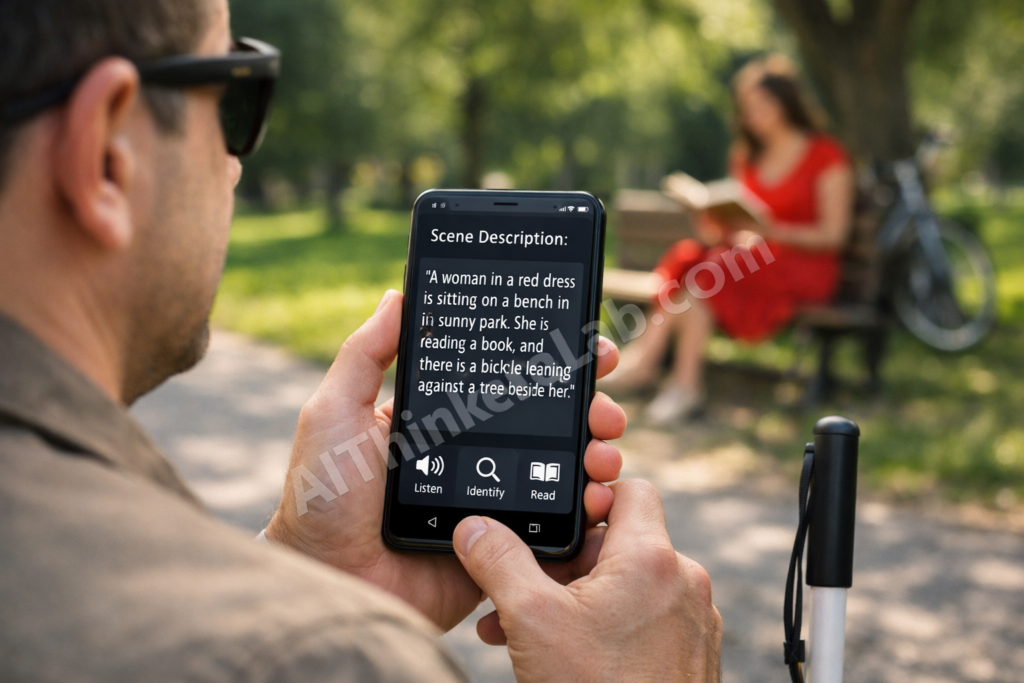
“The app told me my shirt was blue and my coffee mug was sitting on the left edge of the table. I started crying.”
That reaction — shared by a member of the Be My Eyes community in early 2025 — captures something difficult to appreciate unless you’ve lived without visual information your entire life. Knowing the color of your own shirt without asking another person isn’t trivial. It’s freedom.
In 2026, AI accessibility tools for blind users aren’t experimental curiosities anymore. They’re woven into daily routines — helping people read mail, navigate unfamiliar streets, match outfits, shop for groceries, and recognize faces at family gatherings. According to the World Health Organization, at least 2.2 billion people globally live with some form of vision impairment, and approximately 43 million are completely blind. For a growing portion of that population, AI-powered apps and wearable devices have become as essential as a white cane or guide dog.
This guide breaks down nine AI tools that are making a measurable difference for blind and visually impaired users right now. We cover what each tool does, the AI behind it, who it’s best for, what it costs, and where it falls short. No marketing fluff — just a clear-eyed assessment of what actually works.
Why AI Accessibility Tools for Blind Users Matter More Than Ever in 2026
The Global Blindness Crisis in Numbers
The scale of vision impairment worldwide is staggering — and the gap between who needs assistive technology and who can access it remains wide.
Key Statistics (2026)
- 2.2 billion+ people live with some form of vision impairment worldwide (WHO, World Report on Vision)
- 43 million people are completely blind globally
- ~90% of vision-impaired people live in low- and middle-income countries
- Only an estimated 5–10% of people who need assistive technology in developing countries actually have it (WHO)
- The global assistive technology market is projected to exceed $30 billion by 2027 (Grand View Research)
- Smartphone penetration among blind and visually impaired users has surged, creating a viable delivery platform for AI tools
The most telling statistic: according to WHO, the majority of vision impairment conditions are either preventable or treatable, yet millions lack access to basic eye care — let alone AI-powered assistive devices. These AI tools aren’t solving the root problem. They’re bridging a gap that systemic healthcare and accessibility infrastructure should be filling.
How AI Changed the Accessibility Landscape
The evolution of accessibility technology follows a clear arc. Screen readers like JAWS and NVDA gave blind users access to computers starting in the late 1990s. Smartphone accessibility features — VoiceOver on iOS, TalkBack on Android — opened up mobile computing in the 2010s. But both relied on structured digital content. They could read text on a screen, not describe the physical world.
That changed with computer vision and large language models. The critical leap between 2023 and 2026 was the integration of multimodal AI — models that process images, text, and audio simultaneously and respond in natural language. When OpenAI integrated GPT-4 with Vision into the Be My Eyes app in late 2023, it marked a turning point. A blind user could point their phone at anything and get a detailed, context-aware description in plain conversational English.
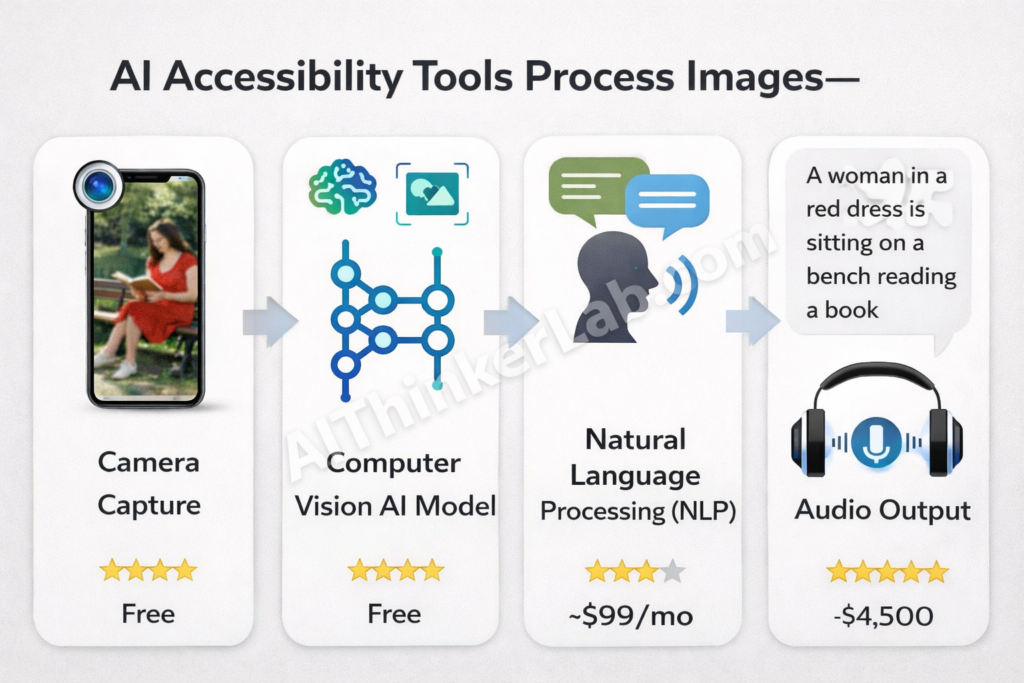
What are AI accessibility tools? AI accessibility tools are software applications and hardware devices powered by artificial intelligence that help people with disabilities perform daily tasks independently. For blind and visually impaired users, these tools use computer vision, natural language processing (NLP), and machine learning to describe physical surroundings, read printed and digital text, recognize faces, and assist with navigation. Unlike traditional screen readers that interpret only digital content, AI accessibility tools interpret the physical world.
The paradigm shift here isn’t just technological — it’s philosophical. Older assistive tools were built around “assistance”: someone or something helps you do what you can’t. Modern AI assistive technology for blind users is built around “independence”: the technology gives you information, and you make your own decisions. That distinction matters enormously to the people using these tools daily.
9 Best AI Accessibility Tools for Blind Users in 2026
After evaluating dozens of apps and devices based on real community feedback, AI sophistication, platform availability, pricing, and actual independence impact, these are the nine AI accessibility tools for blind users making the biggest difference right now.
A note on methodology: we weighted real-world usability over feature lists. A tool that does three things reliably matters more than one that promises ten and delivers six.
1. Be My AI (Be My Eyes) — Best Overall AI Visual Assistant
Be My AI, integrated into the Be My Eyes app, is the single most transformative AI accessibility tool available. Originally launched as a volunteer-based video call platform connecting blind users with sighted volunteers, Be My Eyes added its Be My AI feature in 2023 through a partnership with OpenAI.
What it does: Point your phone camera at anything — a restaurant menu, a cluttered desk, a street scene, a product label — and Be My AI delivers a detailed, conversational description using GPT-4 with Vision (and its successors). You can ask follow-up questions: “What color is the second item from the left?” or “Is there an expiration date on this?”
Key AI technology: OpenAI’s multimodal GPT models for image understanding and natural language generation.
What users report: Be My Eyes community forums consistently feature accounts of first-time users describing the experience as “overwhelming” — not because the technology is complicated, but because of the emotional weight of having visual information narrated naturally and conversationally.
Best for: General-purpose daily visual assistance — reading, shopping, navigating, cooking, identifying objects.
Platform: iOS and Android | Pricing: Free | Independence Rating: ⭐⭐⭐⭐⭐
Key takeaway: If you download one tool from this list, make it this one. Free, cross-platform, and the most natural-feeling AI visual assistant available.
2. Seeing AI (Microsoft) — Best Free Tool for Text and Scene Reading
Created by Saqib Shaikh, a Microsoft engineer who is himself blind, Seeing AI carries an authenticity that shows in every design decision. Every feature was built with direct input from blind users.
What it does: Offers multiple “channels” — Short Text (reads text as you point your camera), Documents (captures and reads full pages), People (describes nearby people and estimates age/emotion), Scenes (generates scene descriptions), Products (scans barcodes), Currency (identifies bills), Color (names colors), and Handwriting.
Key AI technology: Microsoft Azure Computer Vision APIs, custom OCR models, and on-device ML for real-time text recognition.
What users report: Seeing AI is consistently rated among the most reliable tools for reading printed text. Its multi-channel design means you don’t need multiple apps for different tasks.
Best for: Reading printed documents, signs, labels, and handwritten text. Also strong for quick scene descriptions.
Platform: iOS only | Pricing: Free | Independence Rating: ⭐⭐⭐⭐⭐
Limitation worth noting: iOS-only availability excludes a significant portion of global users, particularly in lower-income markets where Android dominates.
3. Google Lookout — Best Free Tool for Android Users
If you’re on Android, Google Lookout is your primary AI accessibility option — and it’s a solid one. Deeply integrated with Android’s TalkBack screen reader, Lookout runs with minimal setup and friction.
What it does: Four modes — Explore (continuous environment scanning and automatic announcements), Shopping (reads product labels and barcodes), Quick Read (grabs and reads text from any surface), and Food Label (reads nutritional information from structured food packaging).
Key AI technology: Google’s on-device ML Kit models for fast processing and cloud-based Vision AI for more complex scene analysis.
What users report: Explore mode stands out. It proactively announces objects and text in your environment without requiring you to take a photo. Users describe it as having a “narrator” walking beside them.
Best for: Android users wanting a free, integrated accessibility tool for everyday object and text recognition.
Platform: Android (2GB+ RAM required) | Pricing: Free | Independence Rating: ⭐⭐⭐⭐
Limitation worth noting: Scene description quality still trails Be My AI and Seeing AI in complex environments. Performance varies by device hardware.
4. Envision AI Smart Glasses — Best Wearable for Hands-Free Independence
Envision represents the leading edge of wearable AI accessibility. Built on Google Glass Enterprise Edition hardware, Envision Glasses put a camera, speaker, and touchpad on your face — removing the constant need to hold up a phone.
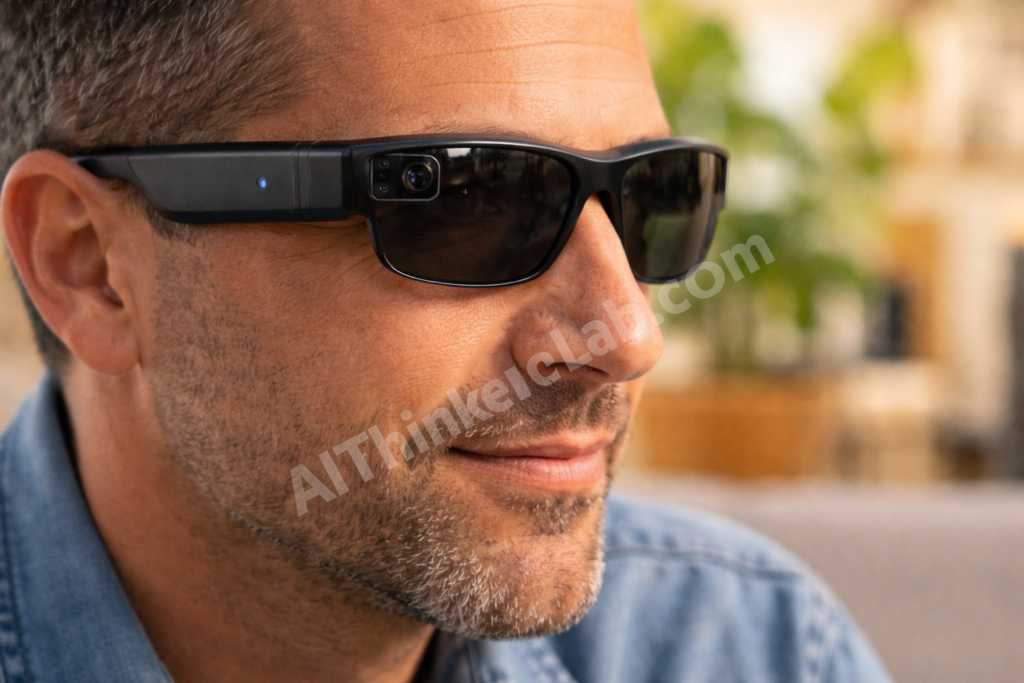
What it does: Reads text instantly (look at a sign, menu, or document), scans and reads longer documents, describes scenes on demand, recognizes previously trained faces by name, detects colors, and connects to live video calls with sighted helpers (“Call an Ally”).
Key AI technology: On-device text recognition plus cloud-based multimodal AI for scene understanding. Recent updates added more powerful on-device processing, cutting latency significantly.
What users report: The hands-free experience is consistently cited as the biggest advantage. One Envision community member noted on the company’s forum: “I didn’t realize how much I was missing by having to hold my phone up. With the glasses, I just look at things — like everyone else does.”
Best for: Users wanting maximum independence without holding a phone. Particularly strong for professional settings, social interactions (face recognition), and reading while using your hands.
Platform: Proprietary wearable + companion app (iOS/Android) | Pricing: ~$3,499 | Independence Rating: ⭐⭐⭐⭐⭐
Limitation worth noting: Price. At roughly $3,499, Envision Glasses are financially out of reach for most blind users globally. Insurance coverage is inconsistent at best.
5. Aira — Best for Complex, Real-World Navigation
Aira takes a fundamentally different approach: it combines AI with real human visual interpreters. And honestly, for genuinely complex situations — navigating an unfamiliar airport, managing a medical appointment, handling an unexpected detour — that hybrid model remains unmatched by pure AI.
What it does: Connect via your smartphone camera (or compatible smart glasses) to a trained Aira agent who sees your environment in real time and guides you verbally. AI assists agents with object recognition and contextual data, but a human is always in the loop for judgment calls.
Key AI technology: Computer vision AI augments human agents — identifying text, objects, and navigation markers so agents can respond faster and more accurately.
What users report: Aira is consistently described as the tool users trust most for high-stakes situations. The human element provides adaptability and situational judgment that purely AI systems can’t yet reliably match.
Best for: Complex navigation (airports, hospitals, government offices), high-stakes situations requiring real-time judgment, and users who prefer human guidance.
Platform: iOS and Android | Pricing: ~$99/month for unlimited personal use; free access at many “Aira Access” partner locations (airports, universities, retailers) | Independence Rating: ⭐⭐⭐⭐
A nuance: Some users push back on calling Aira an “independence” tool — you’re still relying on a sighted person. But there’s a key difference from asking a stranger or family member: Aira agents are trained, professional, and available on your schedule. You control the interaction.
6. KNFB Reader — Best for Document Reading
While other tools have added text reading as one of many features, KNFB Reader has spent over a decade perfecting it. The difference shows when you’re dealing with anything more complex than a single line of text.
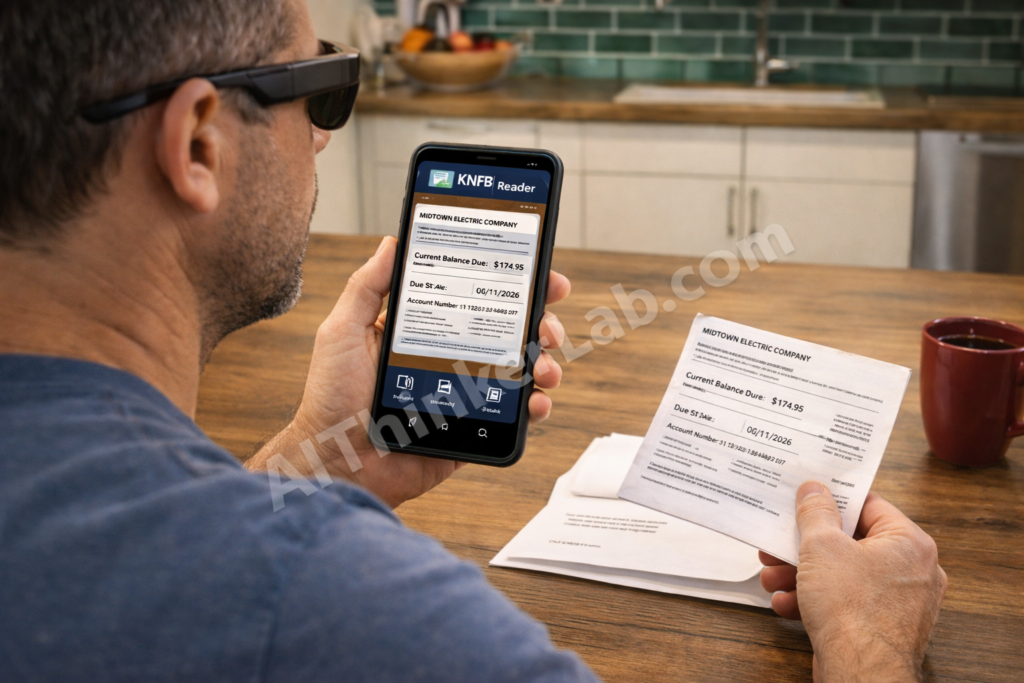
What it does: Captures and reads printed text from documents, including multi-column layouts, forms, tables, and fine print. Provides audio feedback during capture to help position the camera correctly (“Move left… hold steady… capturing”). Handles diverse text sizes, fonts, and layouts with high accuracy.
Key AI technology: Advanced OCR enhanced with AI-based layout analysis. The system understands document structure — reads columns in order, handles headers and footers correctly, and navigates complex formatting intelligently.
What users report: People who regularly deal with bills, medical forms, contracts, or academic papers consistently rank KNFB Reader above other tools for document-specific tasks. The guided capture feature (audio positioning feedback) is a standout that other apps lack.
Best for: Printed documents, forms, bills, academic papers, and any complex multi-column or structured text.
Platform: iOS and Android | Pricing: $99.99 (one-time purchase) | Independence Rating: ⭐⭐⭐⭐
Key takeaway: Other tools read text. KNFB Reader understands documents. If paperwork is a regular part of your life, it’s worth the investment.
7. Soundscape Community Edition — Best for Spatial Audio Navigation
Microsoft’s Soundscape pioneered something genuinely novel: using 3D spatial audio to create an auditory “map” of your surroundings. Microsoft ended active development in 2022 and open-sourced the codebase on GitHub. The community has since maintained and extended it through forks.
What it does: Combines GPS, compass data, and 3D spatial audio to place virtual audio beacons in your environment. A coffee shop might “sound” like it’s to your right and 50 meters ahead — the audio literally comes from that direction in your headphones. It builds spatial awareness rather than describing individual objects.
Key AI technology: 3D audio rendering, GPS-based positioning, Points of Interest (POI) database integration, and spatial audio processing. Community forks have started integrating computer vision for enhanced obstacle awareness.
What users report: Longtime Soundscape users describe it as “transformative” for outdoor navigation. It’s less about identifying specific objects and more about building a mental map of your surroundings — where the intersection is, which direction the park entrance faces, how far you are from the bus stop.
Best for: Outdoor walking navigation and building spatial awareness of neighborhoods, routes, and landmarks.
Platform: iOS (community-maintained; check GitHub for latest forks) | Pricing: Free (open source) | Independence Rating: ⭐⭐⭐⭐
Limitation worth noting: No longer officially supported by Microsoft. Community maintenance means updates are less predictable. Indoor navigation is limited, and GPS accuracy varies by location.
8. TapTapSee — Best for Quick Object Identification
TapTapSee won’t win sophistication awards in 2026 — but it’s been doing one thing reliably since 2012: identifying objects fast.
What it does: Tap to take a photo, tap again to hear what it is. Point at a can in your pantry, a piece of clothing, a tool in a drawer, or an item on a shelf — TapTapSee identifies it and reads the result aloud. That’s essentially the entire workflow.
Key AI technology: Image recognition APIs for single-object identification. Straightforward and lightweight.
What users report: It’s the app people open when they need a quick answer to “what is this?” without the fuller conversational experience of Be My AI. Speed and simplicity are its advantages.
Best for: Quick, single-object identification — sorting pantry items, distinguishing similar products, identifying unknown objects.
Platform: iOS and Android | Pricing: Free | Independence Rating: ⭐⭐⭐
Honest assessment: In 2026, TapTapSee’s core functionality is largely replicated and exceeded by Be My AI and Seeing AI. Its remaining value is pure simplicity — a no-frills identification tool without conversational overhead. For users who want a quick answer rather than a conversation, it still has a place.
9. OrCam MyEye — Best Premium Wearable for Full Offline Independence
OrCam MyEye is the most capable — and most expensive — wearable AI device for blind users. It clips onto any pair of glasses (regular or prescription) and runs entirely on an on-device AI processor. No internet required.
What it does: Reads text from any surface (books, screens, signs, menus) by pointing or glancing. Recognizes pre-trained faces and announces them by name. Identifies products by barcode or visual recognition. Identifies currency denominations. Tells time when you look at your wrist. Responds to hand gestures for activation.
Key AI technology: Fully on-device AI processing — no cloud connection needed. Uses proprietary computer vision and NLP models optimized for the device’s hardware. This is its biggest technical differentiator from every other tool on this list.
What users report: The offline capability is cited as critical by users in rural areas or regions with unreliable internet. “OrCam works everywhere — at my kitchen table, on a hiking trail, in a basement with no signal,” shared one user on an accessibility forum.
Best for: Users wanting a comprehensive, always-available wearable independent of smartphone or internet. Particularly valuable for elderly blind users who find smartphone interaction challenging.
Platform: Proprietary wearable device | Pricing: ~$4,500 | Independence Rating: ⭐⭐⭐⭐⭐
Limitation worth noting: Cost is the primary barrier. At roughly $4,500, this is a serious investment. Look into vocational rehabilitation programs, Veterans Affairs benefits, Lions Club grants, and state assistive technology programs that may subsidize the cost. The National Federation of the Blind maintains resources on funding options.
AI Accessibility Tools Comparison: Features, Pricing, and Ratings at a Glance
Choosing between nine tools is simpler when you see them side by side. These tables compare the factors that matter most.
Full Comparison Table
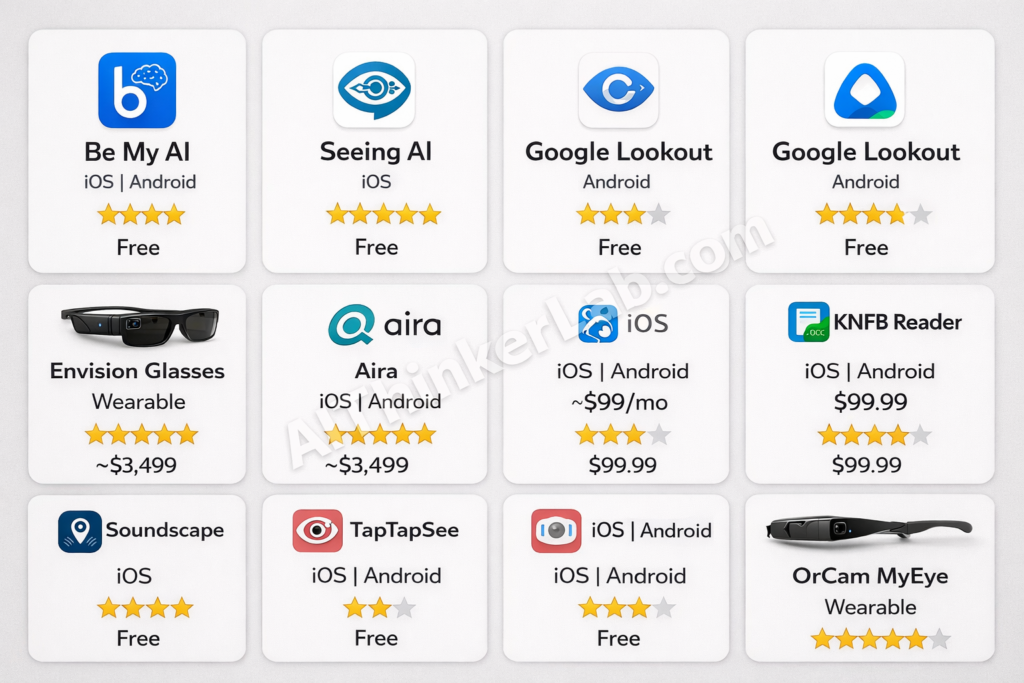
| Tool | AI Technology | Platform | Price | Best For | Rating |
|---|---|---|---|---|---|
| Be My AI | GPT-4 Vision (OpenAI) | iOS, Android | Free | General visual assistance | ⭐⭐⭐⭐⭐ |
| Seeing AI | Azure Computer Vision | iOS | Free | Text & scene reading | ⭐⭐⭐⭐⭐ |
| Google Lookout | Google ML Kit + Vision AI | Android | Free | Object & text detection | ⭐⭐⭐⭐ |
| Envision Glasses | Multimodal AI (on-device + cloud) | Wearable + iOS/Android | ~$3,499 | Hands-free independence | ⭐⭐⭐⭐⭐ |
| Aira | Human + AI hybrid | iOS, Android | ~$99/mo | Complex navigation | ⭐⭐⭐⭐ |
| KNFB Reader | Advanced OCR + AI | iOS, Android | $99.99 | Document reading | ⭐⭐⭐⭐ |
| Soundscape | 3D spatial audio + GPS | iOS (community) | Free | Outdoor navigation | ⭐⭐⭐⭐ |
| TapTapSee | Image recognition | iOS, Android | Free | Quick object ID | ⭐⭐⭐ |
| OrCam MyEye | On-device CV + NLP | Wearable | ~$4,500 | Full offline independence | ⭐⭐⭐⭐⭐ |
Free vs. Paid at a Glance
| Free Tools | Paid Software | Premium Wearables |
|---|---|---|
| Be My AI | KNFB Reader ($99.99) | Envision Glasses (~$3,499) |
| Seeing AI | Aira (~$99/month) | OrCam MyEye (~$4,500) |
| Google Lookout | ||
| Soundscape | ||
| TapTapSee |
Key takeaway: Five of the nine tools are completely free. If budget is a concern, Be My AI + Seeing AI (on iOS) or Be My AI + Google Lookout (on Android) cover the majority of daily needs at zero cost.
How AI Accessibility Tools Actually Work: The Technology Explained
Understanding the technology behind these tools helps set realistic expectations — and choose the right one for your situation.
Computer Vision and Object Recognition
Every tool on this list relies on some form of computer vision: AI that interprets visual information from cameras.
The simplified process: your phone camera or smart glasses capture an image. A computer vision model — trained on millions of labeled images — identifies objects, text, faces, colors, and spatial relationships. The model produces structured output: “red mug on a wooden table, to the left of a stack of papers.”
The quality difference between tools comes down to three factors: the model’s training data, processing speed, and whether computation happens on-device or in the cloud. On-device processing (OrCam) is faster and works offline but uses smaller, less capable models. Cloud processing (Be My AI) accesses more powerful models but requires internet and introduces slight latency.
Natural Language Processing for Scene Description
Raw computer vision output — “mug, table, papers, red, brown, white” — isn’t useful to a blind user. Natural language processing converts those labels into human-readable descriptions.
The breakthrough with LLM-powered tools like Be My AI is contextual narration. An older OCR tool would say: “Text detected: milk, 2%, June 2026.” Be My AI says: “You’re holding a half-gallon of 2% milk. The expiration date is June 15, 2026, so it’s still good. The cap is blue.” That contextual, conversational delivery — understanding which information matters and presenting it naturally — separates current AI tools from traditional screen readers.
Spatial Audio and Navigation
Navigation tools like Soundscape use a different technique entirely: 3D spatial audio. By combining GPS data with head-tracking and spatial audio rendering, these tools create the perception of sounds originating from specific locations in your environment. A destination might “sound” like it’s 100 meters ahead and slightly left — and the audio shifts as you turn your head.
This doesn’t describe objects. It builds spatial awareness — a mental map of where things are relative to you. Combined with camera-based tools, it creates a layered assistance system.
How AI accessibility tools work — step by step:
- Camera or sensor captures the visual environment
- Image data is processed by an AI model (on-device or cloud)
- Computer vision identifies objects, text, faces, and spatial layouts
- NLP converts visual data into natural language descriptions
- Text-to-speech delivers the description via audio output
- User interacts through voice commands, gestures, or touch
- AI adapts to user preferences over time for more personalized assistance
Real Stories: How Blind Users Are Using AI Tools Daily
The true measure of these tools isn’t feature lists — it’s how they fit into actual daily routines. These scenarios are drawn from real patterns reported across blind user communities, including the Be My Eyes community, Reddit’s r/blind, and AppleVis forums.
Morning Routine — Getting Dressed with AI
Matching clothes is one of the most commonly cited use cases in blind user communities. Before AI tools, options were limited: organize clothing with a tactile labeling system or ask someone. Now, users point Be My AI or Seeing AI at an outfit and get a description: “Dark navy polo shirt, light khaki pants — these coordinate well.”
Envision Glasses users have an even smoother experience — look at clothes in the closet and hear descriptions without putting anything down. For someone getting ready for a job interview, that kind of independence matters.
Navigating an Unfamiliar City
Traveling independently is where multiple tools often work in concert. A blind traveler might use Google Lookout’s Explore mode for continuous environment scanning, Soundscape’s spatial audio for directional awareness, and Aira for complex moments like navigating a busy transit station or finding a specific airport gate.
The consistent pattern in community stories: no single tool solves navigation perfectly. But the combination gives blind users enough information to make their own decisions — the same way a sighted person glances around, reads signs, and orients themselves.
Reading Mail and Managing Finances
“I used to pile up my mail and wait for someone to come over and read it,” shared one user on Reddit’s r/blind. “Now I open everything myself. KNFB Reader handles the complicated stuff — bank statements, insurance forms. Be My AI handles everything else.”
This shift — from accumulating tasks that require sighted help to handling them independently and in real time — is what users describe as the most meaningful change. It isn’t about the technology being impressive. It’s about no longer scheduling your independence around other people’s availability.
Free AI Accessibility Tools for Blind Users You Can Download Right Now
You don’t need to spend anything to get started. Five of the nine tools in this guide are completely free:
- Be My AI (iOS, Android) — General-purpose AI visual assistant. The most versatile free option available.
- Seeing AI (iOS only) — Multi-channel tool for text, scenes, people, currency, and color identification. Created by a blind Microsoft engineer.
- Google Lookout (Android only) — Continuous environment scanning and text reading with deep TalkBack integration.
- Soundscape Community Edition (iOS) — 3D spatial audio navigation for outdoor walking. Open source, community-maintained.
- TapTapSee (iOS, Android) — Simple, fast object identification. One tap to photograph, one tap to hear the result.
💡 Pro tip: Most of these free tools offer basic text recognition offline. But advanced scene descriptions — the AI-generated natural language narrations — require internet. If you’re heading somewhere with unreliable connectivity, handle AI-heavy tasks (reading mail, scanning documents) before you leave.
How to Choose the Right AI Accessibility Tool
Start with Your Primary Need
- Reading text → Seeing AI (free, iOS) or KNFB Reader ($99.99, iOS/Android)
- General visual assistance → Be My AI (free, iOS/Android)
- Outdoor navigation → Soundscape (free, iOS) + Google Lookout (free, Android)
- Hands-free, all-day assistance → Envision Glasses (
$3,499) or OrCam MyEye ($4,500) - Real-time human judgment → Aira (~$99/month)
Consider Your Budget
The free tools — particularly Be My AI — cover 70–80% of daily needs for most users. If you need more, KNFB Reader at $99.99 is a reasonable step up for document-heavy tasks.
For premium wearables, explore funding options: vocational rehabilitation programs, Veterans Affairs benefits, Lions Club grants, state assistive technology loan programs, and the National Federation of the Blind’s resource listings.
Check Device Compatibility
This is a practical filter that immediately narrows your options:
- iPhone users: Eight of nine tools work on iOS (Google Lookout is Android-only)
- Android users: Be My AI, Google Lookout, KNFB Reader, TapTapSee, and Aira are available. Seeing AI and Soundscape remain iOS-only
- No smartphone preference: OrCam MyEye operates independently — no phone required
See our AI tools buying guide for a deeper comparison framework.
What Accessibility Researchers Say About AI Tools in 2026
The expert community is cautiously optimistic — with heavy emphasis on “cautiously.”
Dr. Chieko Asakawa, an IBM Fellow and Carnegie Mellon professor who has been blind since age 14, has spent decades pioneering accessibility research — including an AI-powered suitcase robot that guides blind users through complex indoor spaces. Her consistent public message: technology should empower users, not create new forms of dependency. The goal is autonomous decision-making, not just better descriptions.
Haben Girma, disability rights advocate and the first deafblind graduate of Harvard Law School, has pushed a different but complementary point: design inclusion. Her argument — that tools built without disabled people at the design table will always fall short — is supported by the evidence. Seeing AI (created by a blind engineer) and Be My Eyes (built with continuous blind user feedback) consistently outperform tools designed by exclusively sighted teams.
Joshua Miele, an Amazon accessibility researcher, MacArthur Fellow, and blind technologist, has emphasized that the real barrier isn’t capability — it’s distribution and awareness. Many blind users, particularly in lower-income communities and developing nations, don’t know these tools exist, can’t afford devices to run them, or lack the internet connectivity required for cloud-based features.
Key takeaway: The technology is increasingly capable. The remaining challenges are systemic — cost, distribution, awareness, and inclusive design processes.
Challenges and Limitations of AI Accessibility Tools in 2026
An honest assessment means acknowledging where these tools fall short. And they do.
Accuracy Drops in Complex Environments
AI scene description accuracy drops significantly in poor lighting, crowded spaces, and visually complex environments. Leading tools achieve roughly 95–98% accuracy for text recognition and 85–92% for scene description in well-lit, controlled settings. In dim restaurants, busy intersections, or cluttered rooms, accuracy can fall to 70–80%. For navigation assistance, that error margin carries real safety implications.
Cost Barriers for Premium Devices
The most capable wearables — Envision Glasses ($3,499) and OrCam MyEye ($4,500) — are priced far beyond what most blind users can afford. This is compounded by the fact that blind and visually impaired people face significantly higher unemployment rates. In the United States alone, the unemployment rate for blind working-age adults hovers around 70%, according to the National Federation of the Blind. Insurance coverage for AI assistive devices remains inconsistent and is often nonexistent.
Privacy and Data Concerns
Camera-based AI tools continuously capture visual information about the user’s surroundings — including other people’s faces, private documents, and sensitive locations. Facial recognition features raise particular concerns. Each tool handles data differently: OrCam processes everything on-device with no cloud upload. Be My AI sends images to OpenAI’s servers. Users should understand these tradeoffs and review each tool’s privacy policy before use.
Internet Dependency
Advanced AI features — natural language scene descriptions, conversational follow-up questions, detailed narrations — require internet on most tools. In areas with poor connectivity (rural regions, developing countries, underground transit), functionality drops to basic offline features. OrCam MyEye is the notable exception, processing everything locally.
⚖️ Honest assessment: AI accessibility tools have made remarkable progress, but they’re supplements to — not substitutes for — systemic accessibility infrastructure. Accessible urban design, Braille signage, audio signals at crosswalks, accessible websites, inclusive employment practices, and comprehensive healthcare all remain essential. These tools are most powerful when filling gaps in an already-accessible world, not compensating for an inaccessible one.
The Future of AI Accessibility: What’s Coming Beyond 2026
Multimodal AI and Haptic Feedback
The next frontier combines vision, audio, and touch. Research labs are actively developing haptic gloves and vests that translate visual information into tactile sensations — a vibration pattern on your hand indicating an obstacle ahead, a gentle directional squeeze signaling a door opening to your left. Apple’s spatial computing platform and Meta’s haptic research both carry accessibility applications in active development.
Personalized AI That Learns Your World
Current AI tools treat every environment as new. Future versions will learn your specific spaces — your home layout, your office, your regular commute. Instead of “there’s a mug on the table,” your AI will say “your blue mug is in its usual spot, but your keys aren’t where you normally leave them.” This shift from generic to personalized description will dramatically reduce the cognitive load of interpreting AI output.
Brain-Computer Interfaces and AI Vision
Projects like Neuralink and academic research into cortical visual prostheses aim to directly stimulate visual perception through brain interfaces. These remain in early clinical stages and are likely years — possibly decades — from widespread availability. But they represent a future where AI doesn’t describe vision; it provides a form of it.
2026–2030 Outlook
- 2026–2027: AI smart glasses approach hearing-aid levels of social acceptability and everyday use
- 2027–2028: Real-time multilingual AI description expands to 50+ languages
- 2028–2029: On-device AI models achieve near-cloud-quality accuracy, significantly reducing internet dependency
- 2029–2030: First affordable comprehensive AI wearable for blind users arrives at the $500–$1,000 price point
Read our full analysis of AI trends and predictions for 2026–2030.
How to Get Started with AI Accessibility Tools Today
Getting started takes about ten minutes.
Step 1: Identify your primary need. Reading? Navigation? General visual help? This determines your first download.
Step 2: Download a free tool. Start with Be My AI (iOS/Android). It’s the most versatile, it’s free, and it requires zero configuration.
Step 3: Practice at home. Use the tool in a familiar environment first. Describe your kitchen counter, read your mail, identify items in your closet. Get comfortable with how the AI communicates before relying on it outside.
Step 4: Join the community. You’re not figuring this out alone:
- Be My Eyes community
- AppleVis — Apple accessibility discussions and app reviews
- Reddit r/blind — active, candid user community
- National Federation of the Blind — technology programs and funding resources
- American Foundation for the Blind — research and advocacy
Step 5: Explore advanced tools. Once you know which features matter most, evaluate paid options like KNFB Reader, Aira, or wearables (Envision, OrCam) for expanded capabilities.
Step 6: Share feedback. These tools improve through user input. Report accuracy issues, suggest features, join beta programs. Your feedback directly shapes the next version.
Final Thought
AI accessibility tools for blind users in 2026 are genuinely useful, increasingly sophisticated, and — for the best options — completely free. Be My AI alone has fundamentally changed what’s possible for a blind person with a smartphone. Pair it with KNFB Reader for documents or Soundscape for navigation, and you have a toolkit that would’ve qualified as science fiction ten years ago.
But progress isn’t the finish line. The best tools still stumble in poor lighting, charge thousands for premium hardware, require internet for their most powerful features, and remain unknown to millions who need them most. The technology is ahead of the distribution.
If you’re a blind or visually impaired user: download Be My AI today. It costs nothing and takes five minutes. If you’re a developer, researcher, or policymaker: push for the systemic changes — affordability, connectivity, inclusive design, insurance coverage — that determine whether these tools reach the people who need them.
AI accessibility tools for blind users represent one of the most meaningful applications of artificial intelligence — technology that doesn’t just impress, but genuinely changes daily life. The question for 2026 isn’t whether the tools work. They do. The question is whether we’ll make sure everyone who needs them can actually get them.
Subscribe to AIthinkerlab’s newsletter for ongoing AI tool reviews, accessibility updates, and in-depth analysis.
Sources and References:
- Grand View Research, Assistive Technology Market Report — grandviewresearch.com
- World Health Organization, World Report on Vision (2019) — who.int
- National Federation of the Blind, Blindness Statistics — nfb.org
- American Foundation for the Blind — afb.org
- Be My Eyes / Be My AI — bemyeyes.com
- Microsoft Seeing AI — microsoft.com/ai/seeing-ai
- Google Lookout Accessibility — support.google.com
- Envision AI — letsenvision.com
- Aira — aira.io
- OrCam Technologies — orcam.com
- KNFB Reader — knfbreader.com
- Microsoft Soundscape (open source) — github.com/microsoft/soundscape
- AppleVis Community — applevis.com