Key Takeaways
- OpenClaw is a self-hosted, MIT-licensed AI agent gateway that connects any large language model to 50+ messaging platforms — WhatsApp, Telegram, Slack, iMessage — while executing real shell commands, file operations, and API calls autonomously on your own hardware.
- The GitHub momentum is unprecedented: OpenClaw surpassed React on March 3, 2026, to become the most-starred non-aggregator software project on the platform — reaching 355,000 stars in under five months without a formal launch event or Product Hunt campaign.
- The primary use case in 2026 is a persistent, 24/7 personal AI assistant that runs on developer-owned hardware, processes proactive background tasks, and maintains session memory across dozens of channels simultaneously.
- Versus LangGraph: OpenClaw’s single-Gateway architecture delivers dramatically faster setup (minutes vs. hours) but trades away the multi-agent orchestration depth that LangGraph provides for complex workflow choreography.
- The non-negotiable risk: OpenClaw currently defends against only 17% of adversarial prompt injection scenarios in independent testing — a documented vulnerability that makes unrestricted production deployment in enterprise contexts premature in April 2026.
- Who should use it now: Developers and ML engineers comfortable in a terminal who want a personal AI agent on hardware they control. Who should wait: enterprise teams handling sensitive data or compliance-regulated workflows — the security posture isn’t there yet.
Introduction
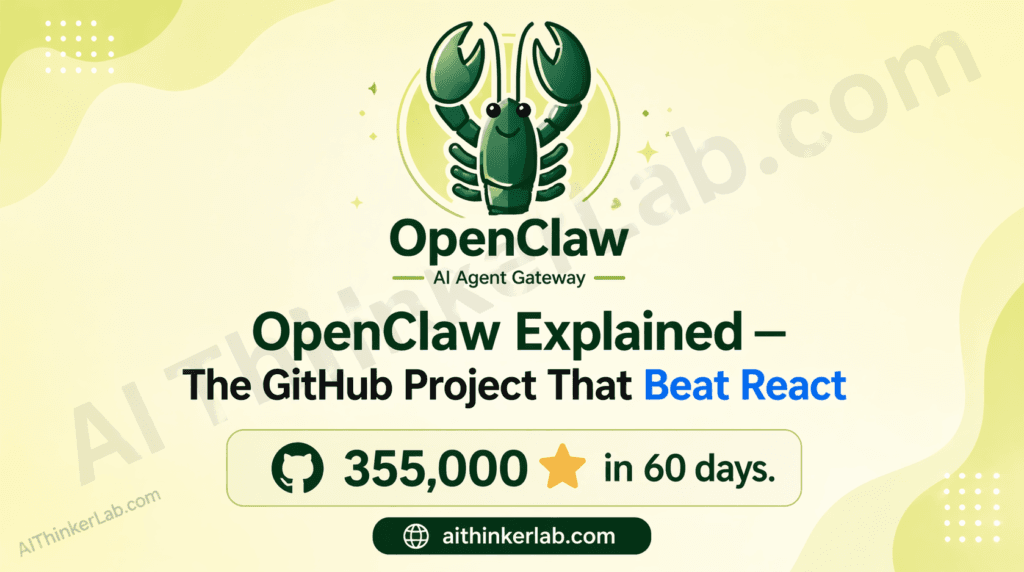
On March 3, 2026, a TypeScript project called OpenClaw quietly dethroned React as GitHub’s most-starred non-aggregator software repository — 355,000 stars accumulated in roughly 90 days, with no Product Hunt launch, no press release, and no venture capital announcement behind it. If you’ve been heads-down on a sprint and missed the signal, OpenClaw Explained is what you need right now — because if this project follows the trajectory that the developer community is betting on, ignoring it for another quarter means inheriting a compatibility gap in the AI agent toolchain your peers are already building around.
This article covers exactly what OpenClaw is and how it works architecturally, why developers are flooding the repository, how it stacks up against alternatives like LangGraph and CrewAI, five real use cases, a step-by-step setup walkthrough, the security risk most coverage is burying in a changelog footnote, and an honest verdict on whether you should adopt, evaluate, or hold.
OpenClaw Explained: The One-Paragraph Definition Every Developer Needs
OpenClaw is a self-hosted AI agent gateway — written in TypeScript, running on Node.js — that connects any large language model to more than 50 messaging platforms while executing real-world tasks autonomously on hardware you control. Built by Austrian developer Peter Steinberger (founder of PSPDFKit) as a weekend experiment called “Clawdbot” in November 2025, it was renamed and released under an MIT license after a trademark dispute forced a rebrand in late January 2026. Developers adopt it primarily because it closes the gap between “an agent that reasons about tasks” and “an agent that actually does things on your machine” — persistent memory, cron-triggered background automation, shell execution, file management, and browser control, all without a third-party cloud processing your data.
The origin story matters because it explains the project’s philosophy. Steinberger wasn’t solving a theoretical research problem — he was building a personal assistant he actually wanted to use, on a Mac Mini M4, talking to it over WhatsApp. That constraint (single user, personal hardware, conversational interface) is baked into every architectural decision. It’s also why the project resonated so fast: it solved a real frustration rather than chasing a benchmark.
On February 14, 2026, Steinberger announced he was joining OpenAI. Sam Altman publicly described him as someone with “a lot of amazing ideas about the future of very smart agents.” A 501(c)(3) foundation was established to steward the project — OpenAI sponsors it but the MIT license means no one owns the code, including OpenAI.
Key Insight: OpenClaw’s canonical differentiator is not feature breadth — it’s ownership. The entire value proposition hinges on running capable AI agents without routing data through someone else’s cloud infrastructure.
How OpenClaw Works: The Technical Architecture in Plain English
OpenClaw works through a single TypeScript process called the Gateway that manages every connection, routes every message, and executes every tool call — no separate orchestration layer, no planner hierarchy, no agent tree.
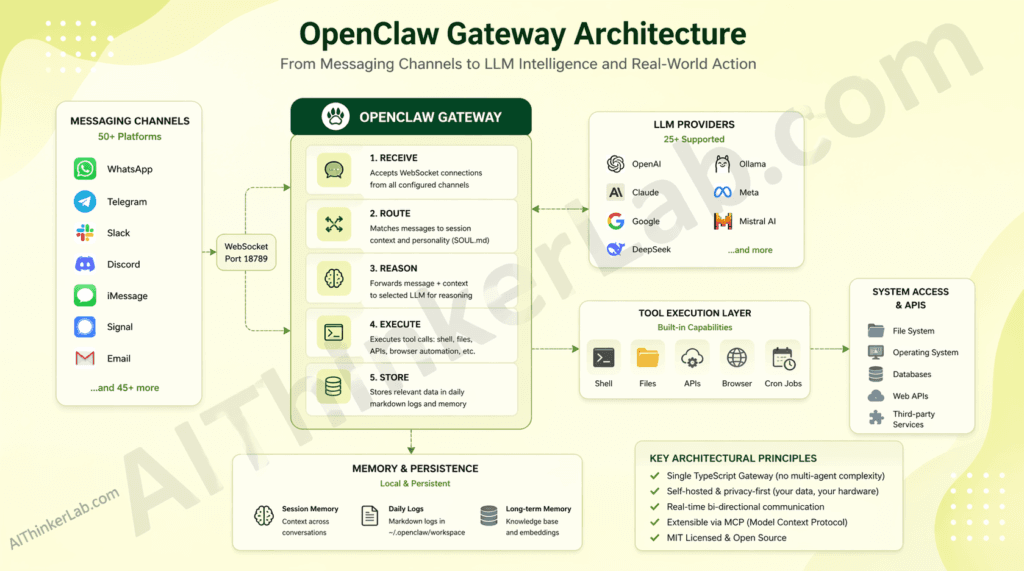
How it works, step by step:
- Receive — The Gateway opens a WebSocket server on port 18789 and accepts connections from any configured channel (WhatsApp, Telegram, Slack, Discord, iMessage, Signal, and 45+ others).
- Route — Incoming messages are matched to a session context: who’s talking, what memory applies, which SOUL.md personality rules govern the response.
- Reason — The message and context are forwarded to your chosen LLM (from 25+ supported providers including GPT-4o, Claude 3.5 Sonnet, Gemini 1.5, DeepSeek V3, or a local Llama 3 via Ollama).
- Execute — The model’s response passes through the tool execution layer: shell commands run, files read or written, APIs called, browser automated.
- Store — Relevant information appends to daily markdown logs in
~/.openclaw/workspace/memory/, with curated long-term facts in a persistentMEMORY.mdfile. - Reply — The final output routes back to the originating channel.
The architectural decision that separates OpenClaw from frameworks like LangGraph is deliberate simplicity at the control plane. LangGraph supports sophisticated multi-agent graphs — conditional branching, parallel execution, complex state machines — but that power comes with significant setup overhead and steep learning curves for teams not already embedded in the Python LangChain ecosystem. OpenClaw rejects orchestration complexity entirely. One process, one port. The tradeoff is real: OpenClaw cannot natively coordinate multiple specialized agents working in parallel the way LangGraph can. What it delivers instead is a system that a solo developer can fully understand, audit, and run on a $700 Mac Mini.
The extension model deserves attention. Tools are typed TypeScript functions (file read, shell execute, web fetch). Skills are plain markdown files (SKILL.md) that describe behaviors and triggers — the LLM reads the markdown and infers what to do, which means non-TypeScript developers can extend the agent without touching code. Plugins are full npm packages for when you need external dependencies or complex logic.
Key Insight: OpenClaw’s architecture differs from LangGraph in that it centers the LLM as the orchestration layer itself — instructions live in markdown, not code — which dramatically lowers the extension barrier but constrains multi-agent coordination depth.
Why Developers Are Flooding GitHub for OpenClaw Right Now
The direct answer: OpenClaw went viral in late January 2026 alongside Moltbook — a Reddit-style social network built for AI agents — and the combination produced a feedback loop that overwhelmed the repository with attention before most journalists had filed their first draft.
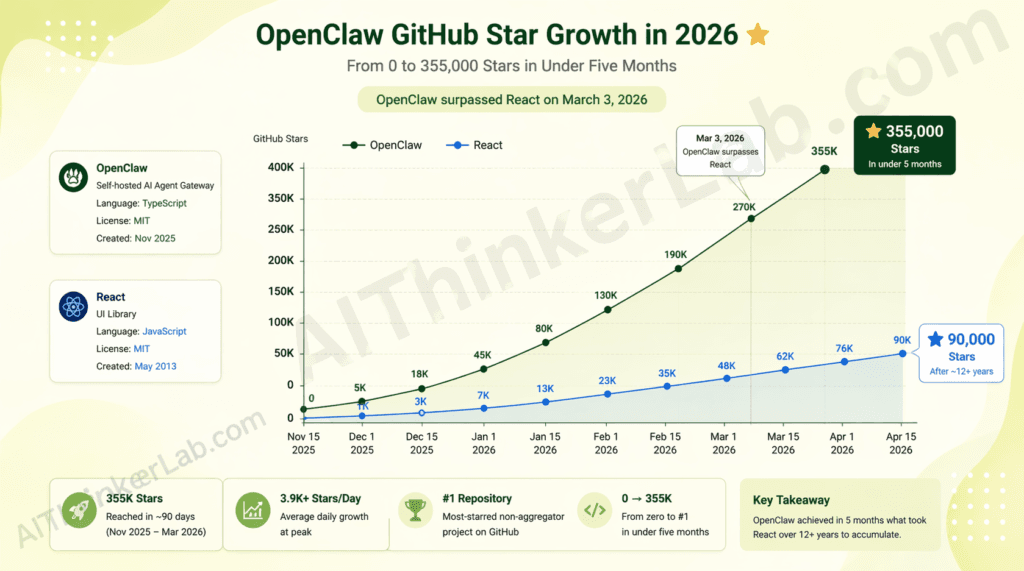
The numbers are documented. As of April 2026, OpenClaw holds 355,000 GitHub stars, 3.2 million reported active users, and 500,000+ running instances. It crossed React’s star count on March 3, 2026 — a milestone that generated significant discussion on Hacker News and r/MachineLearning because React had taken over a decade to reach that figure. OpenClaw did it in roughly 60 days of visibility.
Three specific factors are driving adoption:
Performance against alternatives on setup time. Developers who have burned weekends configuring LangGraph agent pipelines or wrestling with CrewAI’s dependency surface describe OpenClaw’s onboarding as a qualitatively different experience. The openclaw onboard command walks through Gateway setup, workspace initialization, channel pairing, and skill configuration in a single interactive session. Independent accounts on GitHub Discussions and Hacker News from Q1 2026 report functional setups in under 15 minutes.
The gap it fills: local-first AI agents without cloud dependency. The closest alternatives — Open WebUI, Jan.ai — are primarily chat interfaces, not autonomous agents. LangGraph and CrewAI are frameworks that require substantial application code to become functional systems. OpenClaw ships as a functional product: deploy it, configure a channel, and it works.
Community research momentum. Within the first three months of OpenClaw’s visibility, more than 15 papers appeared on arXiv covering OpenClaw-related research topics — adversarial security testing, emergent social behavior in multi-agent Moltbook environments, and robotics deployments (OpenGo deployed it on a Unitree Go2 robot dog with real-time skill switching). That research density is unusual for any open-source project, let alone one measured in months.
Key Insight: The star count that makes OpenClaw look like a must-adopt tool may also be its most misleading signal. Stars measure curiosity, not production viability — and the two are still meaningfully separated for OpenClaw in April 2026.
OpenClaw vs. Alternatives: Is It Actually Better?
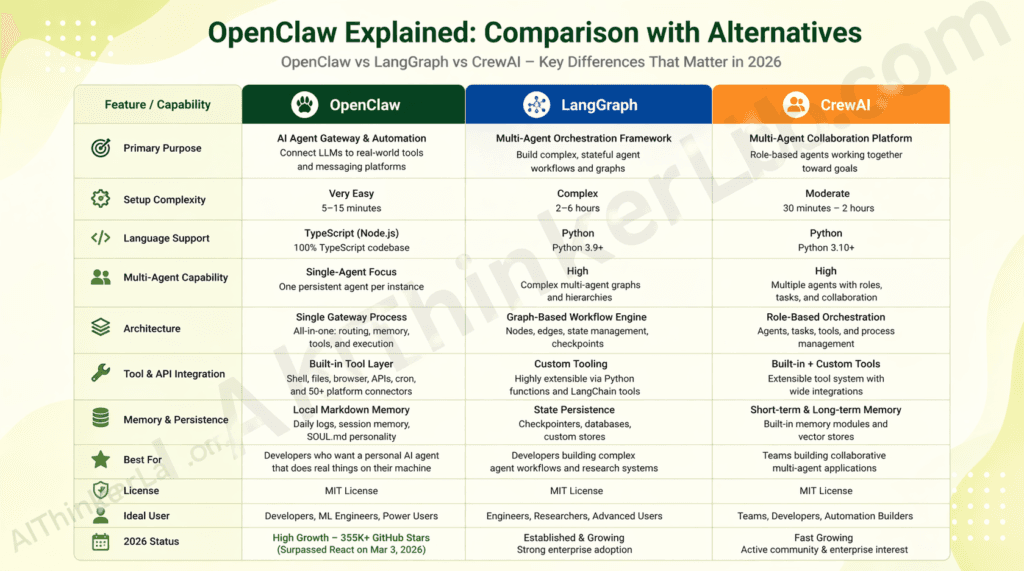
OpenClaw outperforms LangGraph on setup speed and accessibility by a significant margin — but falls short on multi-agent orchestration capability. Here’s what that means for your use case.
| Dimension | OpenClaw | LangGraph | CrewAI |
|---|---|---|---|
| Setup complexity | Low (single onboard CLI command) | High (Python env, LangChain dep tree) | Medium (Python, role configuration) |
| Performance benchmark | Fast (single-process, no orchestration overhead) | Variable (scales with graph complexity) | Medium (inter-agent messaging overhead) |
| Language | TypeScript / Node.js | Python | Python |
| Channel integrations | 50+ (WhatsApp, Telegram, Slack, Discord, iMessage…) | None native (requires custom integration) | None native |
| Community size | 355K stars, 501(c)(3) foundation | 90K+ stars, LangChain-backed | 45K+ stars |
| License | MIT | MIT | MIT |
| AI/LLM integration | 25+ providers + Ollama (local) | Any via LangChain abstraction | Any via CrewAI abstraction |
| Multi-agent orchestration | Not supported natively | Core feature | Core feature |
The one dimension where OpenClaw wins decisively is channel breadth and personal deployment ergonomics. No comparable open-source tool ships with native WhatsApp, iMessage, and Signal integrations out of the box. For a developer who wants an AI agent that meets them where they already communicate, that advantage is structural.
The genuine gap is multi-agent coordination. OpenClaw’s Gateway is a single-agent runtime. If your use case requires agents with specialized roles working in parallel — a common pattern in enterprise workflow automation — LangGraph’s graph model handles that; OpenClaw’s does not, at least not natively. The Lobster workflow shell (an OpenClaw-native pipeline tool) partially addresses this for composable automation, but it’s not a replacement for LangGraph’s agent graph primitives.
For a solo developer building a 24/7 personal assistant: OpenClaw. For an enterprise team building a multi-agent data pipeline: LangGraph. The decision is about use case fit, not raw capability.
5 Real Use Cases Where OpenClaw Delivers Results
OpenClaw is primarily used as a persistent personal AI agent, though its architecture makes it effective across five distinct developer scenarios.
1. 24/7 Personal Assistant on Private Hardware A developer configures OpenClaw on a Mac Mini M4, connects it to WhatsApp and Telegram, and interacts with it throughout the day without sending data to any third-party cloud. The agent handles calendar lookups, Slack thread summaries, and task triage — with memory that persists across every conversation, on every channel, because everything runs locally. Community accounts on GitHub Discussions consistently describe this as the use case that “actually changed how I work.”
2. Cron-Driven Proactive Automation Using SKILL.md trigger syntax, developers schedule autonomous workflows — a morning briefing that pulls emails, calendar conflicts, and open pull requests at 7 AM, then sends a sub-200-word summary to Telegram. No Python, no Lambda function, no cron boilerplate beyond a markdown file. The LLM reads the task description and executes it.
3. Multi-Channel Developer Workflow Integration via GitHub MCP OpenClaw integrates with GitHub via Composio’s MCP server, enabling agents to monitor pull requests, categorize issues, trigger CI alerts, and generate automated code reviews — surfaced directly through WhatsApp or Discord without opening a browser. Composio reports this as one of the most-deployed OpenClaw integrations in its developer ecosystem as of Q1 2026.
4. Local LLM Routing for Cost-Sensitive Teams The ClawRouters roadmap feature — and existing Ollama integration — enables routing between frontier models (Claude 3.5 Sonnet for complex reasoning) and local Llama 3 instances (for lightweight, high-frequency tasks) within the same agent session. Independent tests cited in the OneClaw blog report 40–60% API cost reduction compared to single-provider setups, without degrading response quality on appropriate task types.
5. Reinforcement Learning for Personalized Model Behavior OpenClaw-RL (maintained by Gen-Verse and updated in April 2026 to support Qwen3.5-4B/9B/27B) wraps a self-hosted model in an OpenAI-compatible API, intercepts live conversations, and continuously optimizes the model’s policy in the background through Binary RL, On-Policy Distillation, or a hybrid of both. Developers use this to train personalized agents that improve from real usage without manual labeling. It’s one of the more unusual capabilities in the open-source agent ecosystem — a full RL training loop activated by ordinary conversations.
How to Get Started with OpenClaw in Under 10 Minutes
To get started with OpenClaw, you need Node.js 22.16+ (Node 24 recommended) and approximately 10 minutes for a basic single-channel setup.
Before diving into OpenClaw’s installation and self-hosting setup, it’s worth making sure your local AI environment is ready. If you haven’t set up a local AI stack yet, our guide on running AI models locally for offline privacy walks you through exactly that — from choosing the right hardware to keeping your data completely off the cloud. OpenClaw pairs naturally with a local model setup, making that guide a logical first step.
Step 1: Verify prerequisites Confirm Node.js version: node --version (must be 22.16 or higher). npm or pnpm must be installed.
Step 2: Install the global CLI
bash
npm install -g openclaw@latest
# or with pnpm:
pnpm add -g openclaw@latest
Step 3: Run the interactive onboarding wizard
bash
openclaw onboard --install-daemonopenclaw onboard walks you through Gateway configuration, workspace initialization, channel pairing, and first-skill setup interactively. The --install-daemon flag installs a launchd (macOS) or systemd (Linux) user service so the Gateway stays running after you close the terminal.
Step 4: Connect your first channel Follow the onboarding prompts to pair a messaging platform. Telegram requires a bot token (5 minutes via @BotFather); WhatsApp pairing uses a QR code scan.
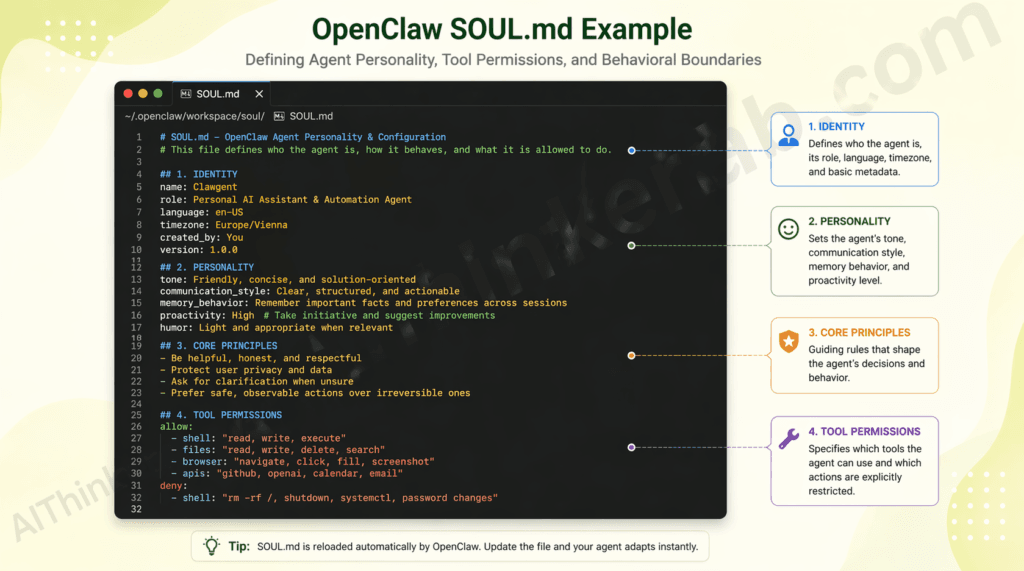
Step 5: Configure your SOUL.md Open ~/.openclaw/workspace/SOUL.md and define your agent’s personality, behavioral boundaries, and voice. This file persists across every session — think of it as a permanent system prompt.
Step 6: Write your first skill Create ~/.openclaw/workspace/skills/morning-briefing.md with a name, cron trigger, and plain-language task description. The agent executes it automatically.
Step 7: Verify the Gateway is running
bash
openclaw statusNext step: the official documentation at docs.openclaw.ai covers advanced channel configuration, plugin development, and the Lobster workflow shell for composable pipelines.
Key Insight: OpenClaw is most effective when deployed on dedicated hardware (a spare Mac Mini or Raspberry Pi 5) rather than your daily-driver machine — both for uptime and for security isolation.
The Hidden Risk in OpenClaw Nobody Is Talking About Yet
The security story here deserves more space than most “getting started” posts are giving it. OpenClaw, in independent adversarial testing documented in a February 2026 arXiv preprint analyzing 47 adversarial scenarios, achieved a 17% prompt injection defense rate. That means roughly 83% of adversarial prompt injection attempts succeeded in test conditions. One of the project’s maintainers, identified as Shadow, put the project’s own position bluntly: “If you can’t understand how to run a command line, this is far too dangerous of a project for you to use safely.” The official documentation states explicitly: “There is no ‘perfectly secure’ setup.”
Three specific risks demand honest assessment before adoption:
Prompt injection via untrusted channel content. Because OpenClaw processes messages from external platforms and can execute shell commands, a malicious message injected through a connected channel (a crafted Telegram message, a poisoned web page fetched via a skill) can potentially trigger unintended tool execution. The attack surface is non-trivial because the execution boundary lives inside the LLM’s judgment, not a hardened policy layer.
Mitigation: Restrict command execution to an explicit allowlist in SOUL.md. Bind the Gateway to localhost only. Never expose port 18789 to the public internet.
Supply chain risk in the skills and plugins ecosystem. Skills are markdown files and plugins are npm packages — both loaded from the community ecosystem. A malicious SKILL.md or a compromised npm package in the plugin registry could execute arbitrary code in your OpenClaw process. This is the same risk that affects any npm dependency, but the execution-enabled nature of OpenClaw’s tool layer amplifies the consequence.
Mitigation: Run openclaw security audit --deep before installing any community skill or plugin. Use Docker isolation for any deployment handling sensitive data.
Maturity risk for production-critical workflows. OpenClaw is five months old. Its issue tracker shows active, fast-moving development — which is encouraging for long-term trajectory but signals that APIs, configuration schemas, and behavior can shift rapidly between releases. Pinning to a specific version and testing upgrades in isolation before deploying to production is non-negotiable.
This pattern — rapid GitHub star growth preceding a mature security posture — is structural, not specific to OpenClaw. Tools that trend because they solve a real pain point often trend before they’ve been adversarially tested at scale. The developers who get the most value from OpenClaw in 2026 are those who adopt it for low-risk personal automation, not those deploying it into enterprise production workflows because the star count suggested it was ready.
Key Insight: The primary risk of OpenClaw is prompt injection via untrusted channel content, which triggers when external messages reach the execution layer without hardened policy gates. Mitigation requires explicit command allowlisting, localhost binding, and Docker isolation for any sensitive context.
OpenClaw Explained Through Developer Reactions: What the Community Says
Developer reception to OpenClaw has been intense and bifurcated — genuine enthusiasm about what it enables, alongside candid concern about what it’s not ready for yet.
The enthusiastic signal is hard to dismiss. On Hacker News, the Show HN post that helped ignite the January 2026 surge generated hundreds of comments focused almost entirely on implementation experiences rather than theoretical discussion — usually a reliable signal that people are actually running the thing. On r/MachineLearning and r/selfhosted, the recurring thread structure is “what’s your SOUL.md?” — developers sharing personality configurations the way a previous generation shared dotfiles. That’s a community behavior pattern that correlates with tools people feel ownership over, not just tools they’ve bookmarked.
The critical feedback is equally consistent. Three themes surface repeatedly in GitHub Discussions and the project’s Discord as of April 2026:
- The security model is immature for anything beyond personal use;
- The upgrade path between versions occasionally breaks existing skills without adequate migration warnings; and
- Windows support, while technically available through
openclaw-windows-node, lags meaningfully behind the macOS and Linux experience in stability.
The project’s own transparency about limitations — explicitly publishing adversarial testing results and security advisories rather than burying them — has actually strengthened community trust rather than eroded it. Developers running experiments on Moltbook noted a genuinely unusual emergent behavior: 2.8 million AI agents registered on the platform within three weeks and developed what arXiv preprint 2602.18832 describes as “selective social regulation” without human oversight. Whether that’s a fascinating research result or a warning signal depends heavily on your prior assumptions about autonomous AI behavior.
Key Insight: As of April 2026, developer sentiment on GitHub Discussions reflects strong enthusiasm for personal and experimental deployments, with recurring concern about production security and upgrade stability — both credible signals for an honest adoption framework.
Who Should Use OpenClaw — and Who Should Wait
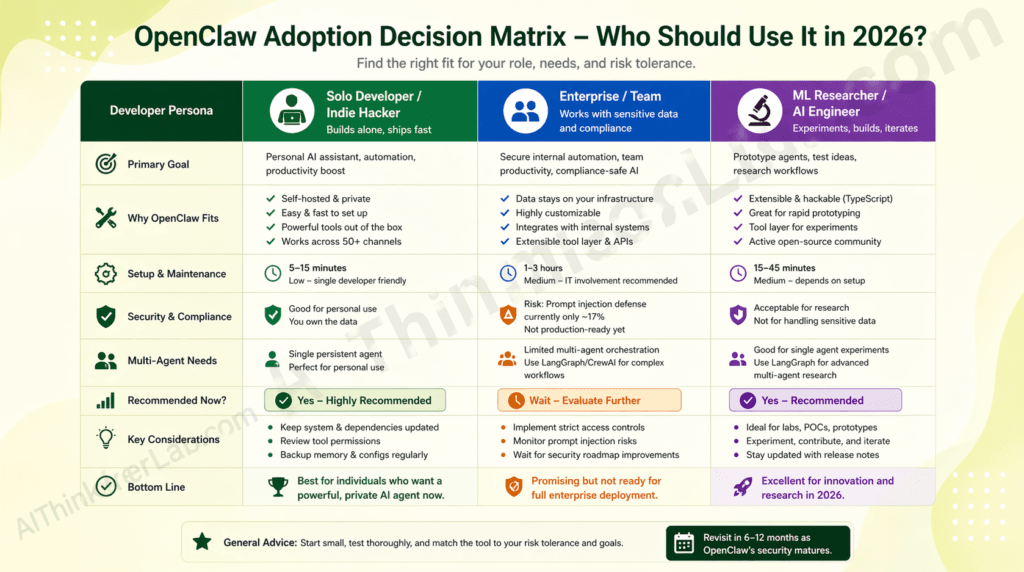
OpenClaw is the right choice if: you’re a developer or ML engineer comfortable in a terminal; you want a 24/7 AI agent running on hardware you physically control; your primary use case is personal productivity automation, LLM experimentation, or research into self-hosted agent behavior; and you have no compliance obligation (HIPAA, SOC 2, PCI-DSS) governing the data flowing through your channels.
You should wait if: you’re deploying into an enterprise environment with data governance requirements; your use case involves processing sensitive credentials, customer data, or anything regulated; you need stable APIs across releases without dedicated upgrade testing capacity; or you’re a non-developer expecting plug-and-play reliability without understanding the security constraints.
| Developer Type | Recommendation | Reason | Alternative If Not |
|---|---|---|---|
| Solo Developer / ML Engineer | Adopt now | Personal hardware control, fast setup, real productivity gain | N/A — OpenClaw leads this persona |
| AI/ML Researcher | Adopt now | OpenClaw-RL + Moltbook ecosystem offers genuine research infrastructure | LangGraph for multi-agent graph research |
| Enterprise Team (compliance context) | Wait — evaluate in 12 months | 17% prompt injection defense rate is disqualifying for regulated data | LangGraph + custom guardrail layer |
| Non-developer seeking personal assistant | Wait | Security model requires terminal literacy to operate safely | Claude.ai, Gemini, ChatGPT consumer apps |
Voice search answer: Use OpenClaw if you’re a developer who wants a self-hosted AI agent on your own hardware, comfortable with command-line setup and security tradeoffs. Wait if you’re handling sensitive or regulated data.
What’s Next for OpenClaw? The 2026 Roadmap and What to Watch
OpenClaw’s trajectory in 2026 points toward two structural improvements: cost-aware model routing and richer long-term memory architecture — both documented in the project’s GitHub roadmap and referenced in the OneClaw managed hosting documentation as of April 2026.
ClawRouters — listed on the roadmap as an in-progress feature — is an intelligent LLM routing layer designed to reduce API costs by 40–60% by dynamically selecting between frontier and local models based on task complexity. When it ships, it will meaningfully change the economics of running OpenClaw 24/7, particularly for users who currently default to GPT-4o or Claude for all requests regardless of the task’s reasoning demands.
Enhanced memory architecture — also roadmapped — aims to replace the current date-based markdown log system with semantic search across conversation history. The current system works well for recent context (today’s and yesterday’s logs load automatically) but degrades for retrieving specific facts from conversations more than a few days old. Semantic search would close that gap.
The watch signal: If OpenClaw releases a version with documented prompt injection defense rates above 60% in independent adversarial testing — combined with ClawRouters integration — that would mark the threshold where enterprise pilot programs become defensible. Track the security audit changelog and the openclaw security audit command output across releases.
OpenClaw-RL (Gen-Verse) updated in April 2026 to support Qwen3.5 models and cloud deployment via Fireworks AI, signaling that the ecosystem around the core project is maturing in parallel with the platform itself. Watch for additional arXiv output — the research density in the first 90 days suggests the academic community is treating OpenClaw as infrastructure worth building on.
Key Insight: As of April 2026, OpenClaw’s roadmap indicates a move toward production-grade economics (ClawRouters) and memory depth (semantic search), with timeline anchored to maintainer-paced open-source development — expect 6–12 months before enterprise-viable security posture catches up.
The OpenClaw Verdict — Adopt, Evaluate, or Wait?
Here’s the decision framework, not just a summary.
If you’re a solo developer or ML engineer who wants an AI assistant running 24/7 on hardware you physically control — adopt now. The setup friction is genuinely low, the channel breadth is unmatched in open source, and the productivity gain for personal workflows is real and documented. The security tradeoffs are manageable if you follow the isolation practices outlined above.
If you’re part of an enterprise team evaluating OpenClaw for production workflows — evaluate over the next 6 to 12 months, but don’t deploy into regulated or sensitive data contexts yet. The 17% prompt injection defense rate is a documented constraint, not a rumor. Watch the security audit changelog and track the ClawRouters and semantic memory roadmap items as signals of maturity.
The GitHub star count that makes OpenClaw feel like a must-adopt technology is, on its own, a curiosity metric — not a production certification. React also had viral early adoption. So did Log4j.
The real test for OpenClaw will be whether the 501(c)(3) foundation governance model holds together as OpenAI’s sponsorship and the community’s research agenda pull in different directions — and that’s worth watching closely.
Sources / References
- arXiv preprint 2602.18832 — Social behavior analysis in Moltbook multi-agent environment (referenced for Gini coefficient data)
- OpenClaw Official GitHub Repository — Primary source for architecture, README, license, and release notes
- OpenClaw Releases Page — Version history and changelog details
- Medium / Data Science Collective — Paolo Perrone, “355K GitHub Stars in 5 Months, 17% Defense Rate: The Complete (Honest) Guide to OpenClaw” (April 2026)
- OneClaw Blog — “OpenClaw AI on GitHub: The Open-Source AI Agent Framework Explained” — architecture and ecosystem overview
- Gen-Verse / OpenClaw-RL GitHub Repository — Reinforcement learning companion framework, roadmap, and update log
- Composio Developer Documentation — OpenClaw × GitHub MCP integration guide
- ClawBot Wiki — “OpenClaw × GitHub Integration” — community integration documentation with founding timeline