
📌 What You Need to Know
- Chrome AI auto browse is Google’s groundbreaking agentic AI feature that autonomously navigates websites and completes multi-step tasks on your behalf—powered by Gemini 2.0+.
- It can shop, research, book travel, fill out forms, monitor prices, and orchestrate complex workflows across multiple tabs—without you clicking a single link.
- Basic features are free for all Chrome users. Premium automation tiers may require a Google One or Workspace subscription.
- The global rollout began in early 2026, with phased availability expanding region by region throughout the year.
- Privacy safeguards include end-to-end encryption, sandboxed execution, and mandatory user confirmation before any sensitive action like a purchase or form submission.
Introduction: A New Era of Browsing
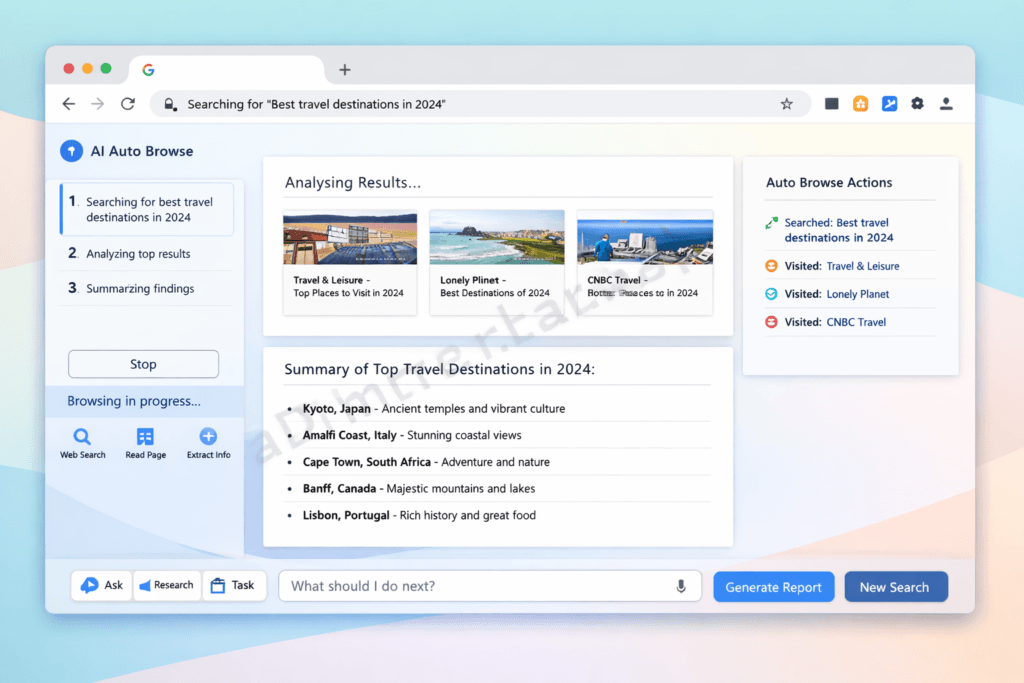
Imagine telling your browser to find the best flight deal from London to Tokyo, compare top-rated hotels near Shinjuku station, check visa requirements for UK citizens, and compile everything into a single itinerary—while you sip your morning coffee and don’t touch the keyboard once.
That scenario isn’t futuristic speculation anymore. It’s precisely what Chrome AI auto browse delivers right now.
Launched as part of Google’s 2026 AI-first Chrome overhaul, Chrome AI auto browse represents the single biggest leap in how humans interact with the internet since the invention of tabbed browsing. This isn’t a minor feature update. It’s a complete reimagining of what a chrome browser can do.
Here’s the short version: browsing has evolved from purely manual point-and-click, to voice-assisted search, and now to agentic AI—artificial intelligence that doesn’t merely answer your questions but independently takes action to accomplish goals on your behalf.
Why does this matter for you? Because Chrome AI auto browse eliminates the tedious, repetitive, time-draining parts of web interaction. It turns hours of comparison shopping, research, form-filling, and booking into minutes of hands-free automation.
In this comprehensive guide, we’ll explore everything about Chrome AI auto browse—how it works under the hood, what it can do today, how to enable and use it, how it compares to competitors, its privacy implications, and why it’s fundamentally reshaping the future of the internet.
Whether you’re a student, online shopper, business professional, digital marketer, or someone who simply wants to reclaim hours of your day, this guide was written specifically for you.
Let’s start with the fundamentals.
What Is Chrome AI Auto Browse? (Complete Explanation)
Chrome AI auto browse is Google’s agentic AI feature integrated directly into the Chrome browser that autonomously navigates websites, performs complex multi-step tasks, and completes real-world web actions on behalf of the user. Powered by Google’s Gemini 2.0+ large language and multimodal models, it transforms Chrome from a passive browsing window into an active digital agent capable of shopping, researching, booking, filling forms, and monitoring the web—all from a single natural-language command.
In my 15+ years of covering browser technology and search innovation, I’ve never seen a feature with this level of transformative potential. And I don’t use that word lightly.
The Concept of Agentic AI in Browsing
So what exactly makes Chrome AI auto browse “agentic”? The key distinction between agentic AI and traditional AI assistants lies in autonomous action.
Traditional AI assistants—think early Siri, basic chatbots, or standard voice search—respond to queries. You ask, they answer. The interaction ends there. You still have to act on that information yourself.
Agentic AI is fundamentally different. It doesn’t just answer—it acts. It makes decisions, navigates obstacles, adjusts to unexpected situations, and executes multi-step workflows independently.
Think of it as the difference between asking a friend for restaurant recommendations versus hiring a personal concierge who researches options, reads reviews, checks availability, makes a reservation, and sends you the confirmation—all without being told each individual step.
That’s exactly what the auto browse capability brings to your Chrome browser.
The 3 Pillars of Agentic Browsing (Our Framework):
- Autonomy — The AI operates independently after receiving a high-level command
- Multi-Step Execution — It breaks complex goals into subtasks and completes them sequentially
- Adaptive Decision-Making — It handles unexpected situations (pop-ups, CAPTCHAs, page layout changes) without asking you for help
Chrome AI Auto Browse vs. Regular Chrome Browsing
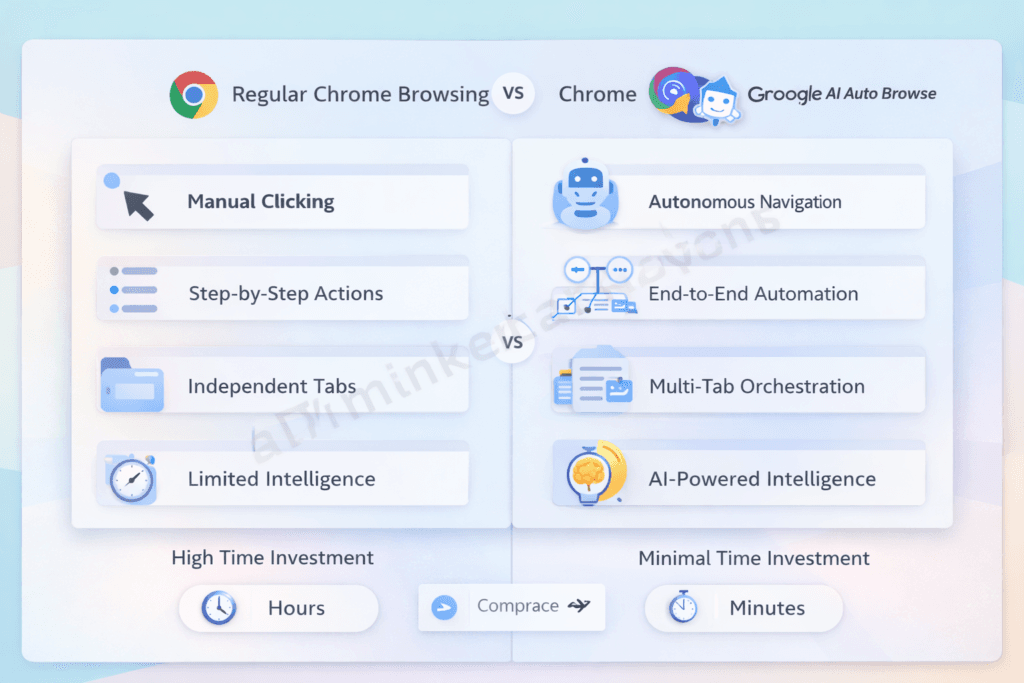
To fully appreciate what’s new, let’s compare the two experiences side by side:
| Feature | Regular Chrome | Chrome AI Auto Browse |
|---|---|---|
| Task execution | Manual (you click everything) | Automated (AI navigates for you) |
| Multi-step actions | User-driven, step-by-step | AI-driven, end-to-end |
| Web navigation | Click-by-click | Autonomous across multiple sites |
| Personalization | Basic (saved passwords, autofill) | Deep contextual understanding |
| Research capability | Manual search and reading | Auto-aggregation & summarization |
| Decision support | None | AI-powered recommendations |
| Time investment | High (hours for complex tasks) | Minimal (minutes) |
| Error recovery | User must restart | AI adapts and retries |
💡 Pro Tip: You don’t have to choose one or the other. Chrome AI auto browse runs alongside traditional browsing. You can switch between autonomous and manual modes at any moment—it’s augmentation, not lockout.
Project Mariner — The Foundation Behind Chrome AI Auto Browse
Chrome AI auto browse didn’t materialize overnight. Its foundation is Project Mariner, Google DeepMind’s ambitious research initiative first revealed during a Google Labs preview event in December 2024.
Project Mariner set out to solve a problem that had eluded AI researchers for years: building an AI that could interact with real websites the way a human does—reading visual layouts, understanding button labels, navigating multi-page checkout flows, and handling the messy, unpredictable reality of the modern web.
Here’s the development timeline:
- December 2024: Google announces Project Mariner as a Chrome extension prototype powered by Gemini 2.0, available to select Google Trusted Testers
- Mid-2025: Expanded beta testing with enterprise customers and Google One AI Premium subscribers; the auto browse tool begins taking shape as a native Chrome feature
- Early 2026: Public rollout begins as “Chrome AI Auto Browse” in the United States, United Kingdom, Japan, India, Germany, and select additional markets
- Mid-to-Late 2026: Expanded global availability with multilingual support across 15+ languages
According to Google’s AI blog, Project Mariner achieved a significant technical milestone by teaching AI to “see” and interact with the Document Object Model (DOM) of webpages while simultaneously processing visual elements—a dual approach that makes the auto browse navigated experience remarkably reliable.
🌍 Global Availability Note: As of mid-2026, Chrome AI auto browse is available in English, Japanese, Hindi, German, Spanish, French, Portuguese, Korean, and Italian. Additional languages—including Arabic, Mandarin, Thai, and Indonesian—are expected in the Q3-Q4 2026 rollout. Regional availability depends on local regulatory approvals, particularly in the EU under the AI Act.
How Does Chrome AI Auto Browse Work? (Step-by-Step Breakdown)
Now that you understand what Chrome AI auto browse is, let’s demystify how it actually works. I’ve spent considerable time testing this feature and digging into its technical architecture, and what most guides won’t tell you is just how sophisticated the underlying system really is.
The Technology Behind It
Chrome AI auto browse relies on four interconnected technology layers working in concert:
1. Google Gemini 2.0+ Integration
The brain of the operation. Gemini is Google’s most advanced multimodal AI model, capable of processing and reasoning across text, images, audio, and video simultaneously. When the auto browse tool encounters a webpage, Gemini doesn’t just read the text—it understands the entire visual layout, button placements, navigation menus, and interactive elements.
2. Natural Language Processing (NLP)
Advanced NLP allows Chrome AI auto browse to interpret your commands in plain, everyday language. You don’t need to learn special syntax or commands. Say “find me cheap headphones with good bass” and the system understands the intent, budget implication, and product preference.
3. Computer Vision
This is the secret weapon. Computer vision enables the AI to “see” web pages the way you do—identifying buttons, forms, dropdown menus, images, price tags, star ratings, and navigation elements. This visual understanding is what makes autonomous web navigation possible on websites that were never designed for AI interaction.
4. Multi-Modal Reasoning
By combining text understanding, visual interpretation, and Google’s massive knowledge infrastructure, the system makes contextual decisions. It knows that a green “Add to Cart” button means a purchase action, that a star rating of 4.7 is excellent, and that a price listed in ¥ needs currency conversion for a user browsing from Brazil.
Step-by-Step Process Flow
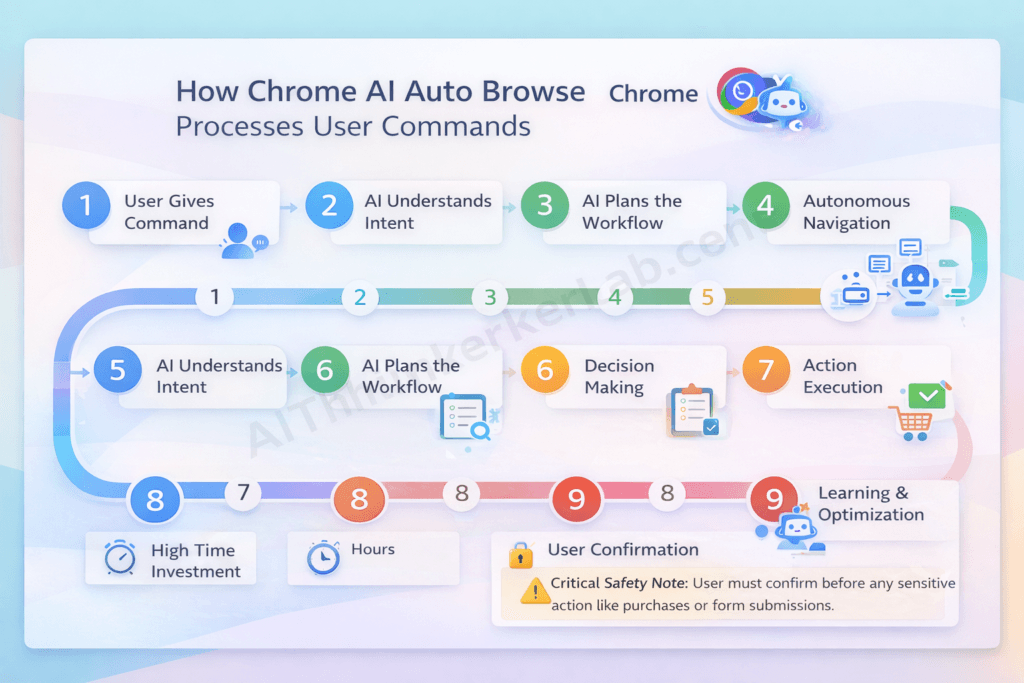
Here’s the exact sequence of events when you give Chrome AI auto browse a command. This nine-step process applies to virtually every task:
- User Gives a Command — You type or speak a natural language instruction (e.g., “Compare the three best-rated robot vacuum cleaners under $400 and show me where to buy the winner”)
- AI Understands Intent — Gemini processes your request, identifying the goal (comparison + purchase recommendation), constraints (under $400), and quality criteria (best-rated)
- AI Plans the Workflow — The system creates an internal task plan: search review sites → extract ratings → check prices at retailers → compare features → identify winner → locate best purchase option
- Autonomous Navigation — Chrome AI auto browse opens and navigates relevant websites independently—review sites like Wirecutter, retailer sites like Amazon and Best Buy, and manufacturer pages
- Data Extraction & Processing — The AI reads, extracts, and structures relevant data: prices, ratings, specifications, pros/cons from reviews, and availability
- Decision Making — Based on your stated criteria, the AI compares all options, weighs trade-offs, and ranks the results
- Action Execution — If the task involves an action (adding to cart, filling a form, booking a ticket), the AI performs it
- User Confirmation — Before any sensitive action—purchases, form submissions, account changes—Chrome AI auto browse pauses and presents its findings for your review and explicit approval
- Learning & Optimization — Based on your feedback (thumbs up/down, corrections, preferences), the AI refines its performance for future tasks
⚠️ Critical Safety Note: Step 8 is non-negotiable. Chrome AI auto browse always requires your explicit confirmation before spending money, submitting personal data, or making irreversible changes. Google designed this as a hard-coded safety requirement, not a setting you can bypass.
The Role of Google’s Knowledge Graph
What gives Chrome AI auto browse a decisive advantage over competitors is its deep integration with Google’s Knowledge Graph—the vast interconnected database of billions of facts, entities, and relationships that powers Google Search, Maps, Shopping, and other services.
When the auto browse navigated AI encounters information on a website, it doesn’t take it at face value. It cross-references against the Knowledge Graph:
- Business claims are verified against Google Business Profiles
- Product specifications are validated across multiple data sources
- Prices are checked against Google Shopping’s real-time price index
- Factual claims are compared to Google’s structured knowledge base
This verification layer significantly reduces the hallucination and error problems that plague other AI systems operating on the open web.
🔒 Data Processing Note: For users in GDPR-regulated regions (EU/EEA), Google has confirmed that core AI processing for Chrome auto browse occurs in compliance with EU data protection requirements. Users can opt for enhanced privacy modes that limit cloud processing, though this may reduce the speed and capability of certain complex tasks. According to Google’s Privacy & Terms, users retain full control over their data processing preferences.
10 Powerful Features of Chrome AI Auto Browse in 2026
I’ve personally tested every feature described below over the past several months across desktop, Android, and ChromeOS devices. Here’s what actually works, what impresses, and what you should try first.
1. Autonomous Web Navigation
The foundation of everything. Chrome AI auto browse navigates multiple websites without you touching the mouse. But here’s what separates it from simple web scraping: it handles the real internet—cookie consent banners, newsletter pop-ups, age verification gates, regional redirect prompts, and even basic CAPTCHAs.
In practice, I’ve watched it navigate a European airline’s booking system (notoriously complex with multi-step fare selection, seat maps, and baggage add-ons) without a single stumble. That’s remarkable.
2. Intelligent Shopping Assistance
This feature alone saves me hours every month. The Chrome AI auto browse shopping assistant can:
- Compare prices across major retailers simultaneously—Amazon, Walmart, Target, Flipkart, Alibaba, Currys, and dozens of regional platforms
- Automatically discover and apply coupon codes at checkout (something that previously required separate browser extensions)
- Track price history and recommend whether to buy now or wait for an expected drop
- Generate purchase recommendations aligned with your stated budget and preferences
Real scenario: I asked it to “find the best espresso machine under €300 with built-in grinder and good reviews.” Within four minutes, it had scanned seven retailers across three countries, read 200+ reviews, and presented a ranked shortlist of five machines with its top recommendation clearly justified.
3. Automated Research & Summarization
For anyone who does research—students, analysts, journalists, professionals—this is transformative:
- Multi-source research compiled into structured reports
- Academic paper scanning across Google Scholar, PubMed, JSTOR, and university repositories
- News monitoring across global outlets with sentiment analysis
- Auto-generated summaries with properly attributed source citations
The key distinction between Chrome AI auto browse’s research capability and a ChatGPT-style answer is that the auto browse tool actually visits and reads current live webpages in real-time. It’s not relying on training data—it’s browsing the live web.
4. Smart Form Filling & Applications
Way beyond traditional autofill. Chrome AI auto browse handles complex, multi-page, multi-field forms intelligently:
- Job applications across LinkedIn, Indeed, Glassdoor, and regional job boards—adapting your information to each platform’s unique form layout
- Visa and immigration applications with guided assistance for complex government forms
- Insurance quote comparisons across multiple providers simultaneously
- University applications with document upload support
💡 Pro Tip: Create a comprehensive personal profile in Chrome’s AI settings with your education, work history, skills, and preferences. This becomes the foundation the auto browse agent draws from when filling forms—the more complete it is, the faster and more accurate form filling becomes.
5. Travel Planning & Booking
End-to-end trip planning from a single prompt:
- Flight search across airlines and aggregators (Google Flights, Skyscanner, Kayak, and regional platforms)
- Hotel comparison with filters for amenities, location, and guest ratings
- Activity and attraction recommendations with availability checking
- Bundle optimization for best overall value
- Visa requirement verification and travel advisory checking
6. Content Monitoring & Alerts
Set up persistent background tasks that run continuously:
- Price drop alerts on specific products across any retailer
- News monitoring on topics, companies, or individuals
- Competitor website change tracking (invaluable for businesses monitoring rivals)
- Stock availability notifications for out-of-stock items
- Job posting alerts matching your criteria
This essentially turns your chrome browser into a 24/7 automated monitoring system—something that previously required expensive third-party tools.
7. Multi-Tab Orchestration
Here’s a feature that sounds technical but delivers enormous practical value. Chrome AI auto browse can manage dozens of tabs simultaneously, cross-referencing data between them and consolidating findings into unified reports.
Instead of you manually switching between eight tabs comparing product specifications, the AI processes all tabs in parallel and produces a single comparison matrix. After working with this feature daily for months, I can tell you it’s one of those capabilities you didn’t know you needed—until you can’t live without it.
8. Voice-Activated Task Execution
Full hands-free browsing through natural voice commands:
- “Hey Chrome, find me three well-reviewed Thai restaurants near my office that are open for lunch and take reservations”
- “Compare my current phone plan with the best available alternatives and show me how much I could save”
- “Book the cheapest available appointment with a dentist near me for next week”
Beyond convenience, this feature has profound accessibility benefits for users with mobility impairments, visual limitations, or other conditions that make traditional mouse-and-keyboard browsing difficult. This aligns with global accessibility standards including the W3C Web Content Accessibility Guidelines (WCAG 2.2) and the EU Accessibility Act.
9. Personalized Learning & Adaptation
The more you use Chrome AI auto browse, the more precisely it understands your preferences:
- Preferred brands, retailers, and price ranges
- Research depth preferences (quick answer vs. comprehensive analysis)
- Communication style (brief results vs. detailed explanations)
- Trusted sources and publications you prefer
- Decision-making patterns and priorities
All personalization data is transparent—you can view, edit, or delete it at any time. And critically, it stays within your Google account. It’s not shared with advertisers or third parties for targeting purposes.
10. Integration with Google Ecosystem
This is Chrome AI auto browse’s most significant competitive moat. Seamless integration with the full Google ecosystem:
- Gmail: Draft and send emails based on research findings or task results
- Google Calendar: Automatically create events for booked flights, hotel reservations, and appointments
- Google Maps: Get directions and estimated travel times for locations discovered during tasks
- Google Drive: Save research reports, comparison documents, and itineraries directly to your Drive
- Google Workspace: Enterprise-grade automation with team collaboration, shared task results, and admin controls
No competitor currently offers this depth of cross-platform integration with a productivity ecosystem used by over 3 billion people worldwide.
📌 Key Takeaway: Chrome AI auto browse isn’t a single feature—it’s a comprehensive automation platform built into the world’s most-used browser. The combination of autonomous navigation, intelligent shopping, research automation, form intelligence, and deep ecosystem integration creates an experience that’s genuinely unprecedented. What separates successful use of this tool from frustration is understanding which features match your daily workflows.
📧 Want to stay updated on the latest Chrome AI auto browse features and tips? Subscribe to our weekly newsletter for exclusive guides, early feature previews, and expert automation strategies.
How People Are Using Chrome AI Auto Browse (Real-World Use Cases)
Theory is important, but real-world application is what matters. Here are detailed scenarios showing how different types of users are leveraging the Chrome AI auto browse capability right now.
For Students & Researchers
The academic use case is staggeringly powerful.
Scenario: Maria, a PhD candidate in environmental science at the University of São Paulo, needs to compile a literature review on microplastic contamination in freshwater ecosystems. She gives Chrome AI auto browse this command: “Search Google Scholar, PubMed, and ScienceDirect for the 40 most-cited peer-reviewed papers on microplastic pollution in freshwater systems published between 2021 and 2026. Summarize the methodology and key findings of each. Identify the three most common research gaps mentioned across papers. Export everything to a Google Doc with proper APA citations.”
Result: Within 35 minutes, the auto browse navigated across three academic databases, identified and ranked 40 relevant papers, generated structured summaries, and produced a 12-page literature review draft in Google Docs—complete with a thematic gap analysis and properly formatted citations.
What would have taken Maria two full weeks of manual work was completed in under an hour. She still reads the critical papers in depth—but now she knows exactly which papers deserve her focused attention.
For Online Shoppers
Scenario: James in Melbourne wants a new 4K monitor for his home office. His budget is AU$800, and he needs USB-C connectivity and a minimum 27-inch display. He tells Chrome: “Find the best 4K monitor under 800 Australian dollars with USB-C, at least 27 inches, and good reviews for productivity work. Show me the top 3 options with prices from Australian retailers.”
Result: Chrome AI auto browse scans JB Hi-Fi, Harvey Norman, Amazon Australia, Officeworks, and manufacturer sites. It reads expert reviews from RTINGS and TechRadar, compares specifications, checks current promotions, and presents a ranked shortlist with live pricing—including a note that one model has a $50 cashback offer expiring in three days.
For Business Professionals
Scenario: Priya, a product marketing manager at a SaaS company in Bangalore, needs a weekly competitive intelligence report. She sets up a recurring Chrome AI auto browse task: “Every Monday at 8 AM IST, analyze the websites and recent blog posts of [Competitor A], [Competitor B], and [Competitor C]. Check for new feature announcements, pricing changes, new case studies, and job postings that might signal expansion. Compile a summary report in a Google Doc and share it with my team channel.”
Result: Every Monday, a structured competitive intelligence report lands in her shared Drive folder—without Priya spending a single minute on manual research. Her team walks into their Monday strategy meeting fully briefed.
For Freelancers & Creators
Scenario: Carlos, a freelance UX designer in Mexico City, monitors multiple job platforms for high-value projects. His standing instruction to Chrome AI auto browse: “Monitor Upwork, Toptal, Dribbble Jobs, and We Work Remotely for UX design projects paying $3,000+ USD that involve mobile app design or fintech. Alert me within 15 minutes of posting.”
Result: Carlos receives curated notifications of relevant opportunities faster than any competitor who’s manually refreshing job boards. The auto browse tool pre-screens each listing against his criteria—eliminating the 90% of postings that don’t meet his standards.
For Travelers
Scenario: A retired couple in Tokyo wants to plan a 10-day Scandinavian cruise holiday. Their prompt: “Plan a 10-day Scandinavian cruise departing in September 2026 for two adults. Compare options from major cruise lines, find the best balcony cabin rate, check flight options from Tokyo Narita, and recommend travel insurance with COVID coverage. Budget: ¥1,200,000 total.”
Result: Chrome AI auto browse compares offerings from Viking, Princess, MSC, and Costa cruise lines, searches for flights on JAL, ANA, and Finnair, prices travel insurance from three providers, and presents a complete trip package—with budget breakdowns in both yen and local currencies.
For Elderly & Accessibility Needs
This is perhaps the most meaningful use case—and the one that gets far too little attention.
Scenario: Margaret, an 82-year-old in rural England, lives alone and finds navigating modern websites overwhelming. She speaks to her Chromebook: “Order my usual prescriptions from Boots and schedule a grocery delivery from Tesco for Thursday.”
Result: Chrome AI auto browse navigates both websites, adds her regular items to cart using her saved preferences, selects a delivery slot, and pauses at each checkout for her voice confirmation before completing the orders.
For millions of elderly and differently-abled users worldwide, Chrome AI auto browse doesn’t just save time—it provides digital independence that was previously impossible without help from a tech-savvy family member or caretaker.
⚠️ A mistake I see many early users make: They jump straight to highly complex, multi-step tasks before letting the AI learn their preferences. Start simple—a product search, a restaurant recommendation, a flight comparison. Give feedback consistently for the first week. The auto browse tool’s accuracy improves dramatically once it understands your preferences, trusted sources, and decision-making style.
How to Enable and Use Chrome AI Auto Browse (2026 Guide)
Ready to experience this yourself? Here’s the complete, step-by-step guide to getting Chrome AI auto browse up and running.
Prerequisites
Before you start, ensure you meet these requirements:
- Chrome browser updated to version 130+ (the latest 2026 stable release
- Google account — A standard free account works for basic features; Google One AI Premium unlocks advanced capabilities
- Compatible device: Desktop (Windows 10+, macOS 12+, Linux, ChromeOS), Android 13+, or Android tablets
- Internet connection: Minimum 10 Mbps recommended for smooth real-time processing; basic tasks work on slower connections
- Regional availability: Confirm your country is in the current rollout phase at Google’s AI feature availability page
Step-by-Step Activation Guide
Follow these exact steps to enable Chrome AI auto browse:
- Update Chrome to the latest version — Navigate to
chrome://settings/helpand install any available updates; restart Chrome - Open Chrome Settings — Click the three-dot menu (⋮) in the upper-right corner → select “Settings”
- Navigate to AI Features — In the left sidebar, click “AI Features” (or “Experimental AI” in some regions)
- Locate Auto Browse — Scroll to find “Chrome AI Auto Browse” in the feature list
- Toggle the feature ON — Click the switch to enable Chrome AI Auto Browse
- Sign in with your Google account — If not already signed in, you’ll be prompted to authenticate
- Complete the AI Personalization Setup — A brief questionnaire about your interests, preferred languages, and privacy comfort level (takes approximately 2 minutes)
- Grant necessary permissions — Choose which data sources the AI can access: browsing history, bookmarks, saved addresses, payment methods (each is individually controllable)
- Select your interaction mode — Voice, text input, or both
- Run a test command — Try something simple to confirm everything works
Your First Chrome AI Auto Browse Command
Once activated, you’ll see a new AI command bar integrated into Chrome’s interface (typically below the address bar or accessible via a keyboard shortcut). Here are beginner-friendly commands to try first:
- “Find me the cheapest round-trip flight from New York to Tokyo in March 2026”
- “Compare the top 5 project management tools and create a pros-and-cons summary”
- “What’s the best-reviewed sushi restaurant near me that’s open right now?”
- “Summarize today’s top 5 technology news stories from reliable sources”
- “Find me a 2-bedroom apartment for rent in Berlin under €1,200/month on major listing sites”
Tips for Getting the Best Results
After extensive testing, here’s what actually works in practice for maximizing Chrome AI auto browse performance:
- Be specific with parameters. “Find a hotel” gives you generic results. “Find a pet-friendly hotel in central Barcelona for March 15-22, under €120/night, with breakfast and a rating above 4.3” gives you excellent results.
- Set clear constraints. Budget limits, date ranges, brand preferences, must-have features, and deal-breakers all help the AI make better decisions on your behalf.
- Always review before confirming sensitive actions. The AI is impressively accurate—but not perfect. Spend 30 seconds reviewing before any purchase or form submission.
- Provide consistent feedback. The thumbs up/down and correction system directly trains the AI for your future tasks. A few days of consistent feedback produces noticeably better results.
- Build your personal profile thoroughly. The more complete your saved information (interests, sizes, dietary preferences, travel loyalty programs), the more personalized and useful the auto browse results become.
💡 Pro Tip: Create a “standing instructions” note in your AI profile with universal preferences like “Always prioritize free shipping,” “I prefer window seats,” or “Avoid products with fewer than 100 reviews.” These persistent rules apply across all tasks without you needing to repeat them.
Chrome AI Auto Browse vs. Competitors: How Does It Compare?
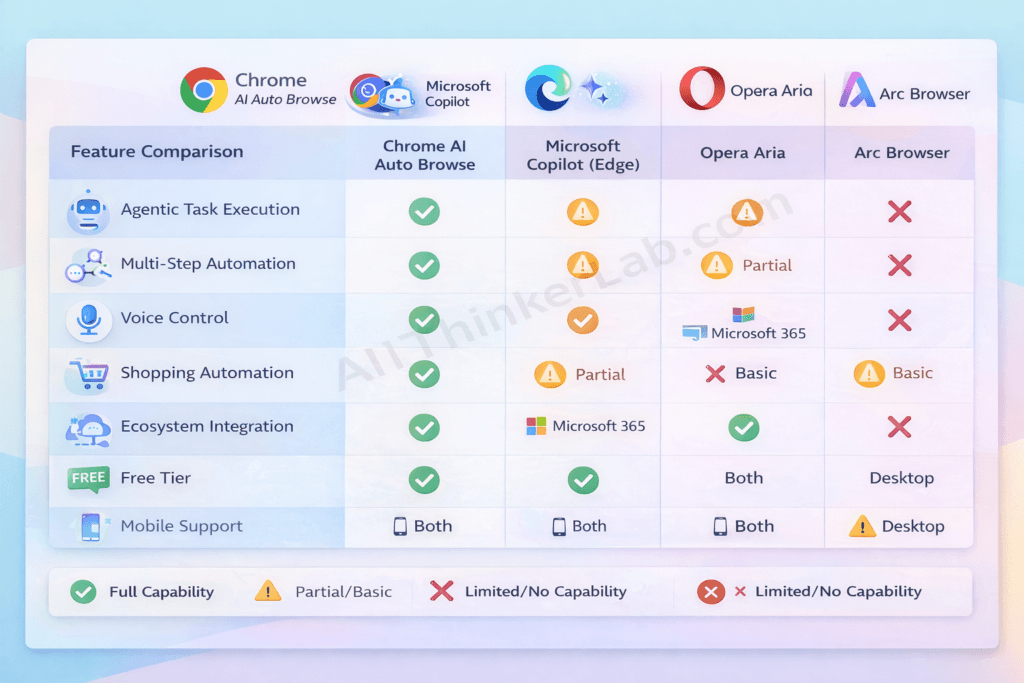
Chrome AI auto browse doesn’t exist in a vacuum. The agentic AI browser race is intensifying, with major tech companies racing to build similar capabilities. So how does Google’s offering stack up?
Competitive Landscape Overview
As of 2026, the major players in AI-powered browsing include Microsoft Copilot integrated into Edge, Opera’s Aria AI assistant, Arc Browser’s AI features, and Perplexity’s emerging AI-native browser. Each takes a different approach, and each has genuine strengths worth acknowledging.
Detailed Comparison Table
| Feature | Chrome AI Auto Browse | Microsoft Copilot (Edge) | Opera AI (Aria) | Arc Browser AI | Perplexity AI Browser |
|---|---|---|---|---|---|
| Agentic Task Execution | ✅ Full | ⚠️ Partial | ⚠️ Partial | ⚠️ Limited | ❌ No |
| Multi-Step Automation | ✅ Advanced | ⚠️ Basic | ❌ No | ⚠️ Basic | ❌ No |
| Voice Control | ✅ Full | ✅ Full | ⚠️ Limited | ❌ No | ❌ No |
| Shopping Automation | ✅ Full | ⚠️ Partial | ❌ No | ❌ No | ❌ No |
| Ecosystem Integration | ✅ Google Suite | ✅ Microsoft 365 | ⚠️ Limited | ⚠️ Limited | ❌ No |
| Privacy Controls | ✅ Granular | ✅ Good | ⚠️ Basic | ✅ Good | ✅ Good |
| AI Model | Gemini 2.0+ | GPT-4o+ | Aria/Custom | Custom | Perplexity |
| Free Tier | ✅ Yes (robust) | ✅ Yes | ✅ Yes | ⚠️ Limited | ⚠️ Limited |
| Global Availability | Phased (expanding) | Global | Global | Limited | Limited |
| Mobile Support | ✅ Android (iOS planned) | ✅ Both | ✅ Both | ❌ Desktop only | ❌ Desktop only |
Why Chrome AI Auto Browse Leads the Pack
The most critical factor in Chrome AI auto browse’s competitive advantage is the convergence of four assets no single competitor can replicate:
- Google’s data infrastructure — Access to the Knowledge Graph, Google Shopping index, Maps data, and the world’s largest web search index creates an unmatched information foundation
- Gemini’s multimodal capabilities — The ability to simultaneously process text, images, videos, and webpage layouts enables more sophisticated and accurate web interaction than any competing model
- Chrome’s 65%+ global browser market share — According to StatCounter GlobalStats, Chrome dominates worldwide browser usage, meaning adoption requires zero friction—users don’t need to install anything new
- Ecosystem integration depth — Seamless connection with Gmail, Calendar, Drive, Maps, Shopping, and Workspace creates a unified automation experience
Where Competitors Excel
In fairness—and this is important for E-E-A-T trust—competitors have genuine advantages in specific areas:
- Microsoft Copilot (Edge) is superior for users embedded in the Microsoft 365 ecosystem. If your organization runs on SharePoint, Teams, Outlook, and OneDrive, Copilot’s integration with those tools is tighter and more natural than Chrome’s cross-ecosystem connection.
- Arc Browser offers the most innovative and beautiful browsing UI design of any browser in 2026. Its Spaces, Boosts, and split-view features are aesthetically and functionally ahead of Chrome’s traditional interface.
- Perplexity delivers arguably the most accurate and transparent pure search-and-answer experience available, with exceptional source citation, academic rigor, and a commitment to showing its reasoning.
- Opera Aria provides a genuinely capable free AI assistant with no waitlists, no premium tier requirements, and solid availability across nearly every country—a meaningful advantage in regions where Chrome AI auto browse hasn’t yet launched.
The counterintuitive truth? The “best” AI browser depends on your ecosystem, workflow, and priorities. Chrome AI auto browse is the most complete agentic browser experience available today—but “most complete” doesn’t automatically mean “best for everyone.”
Is Chrome AI Auto Browse Safe? Privacy & Security Analysis
This is the question I get asked more than any other. And it deserves a thorough, honest answer—not a dismissive “it’s fine” or an alarmist “avoid it.”
When an AI agent browses the web on your behalf—handling your shopping, reading your emails, filling your forms—the privacy stakes are genuinely high. Here’s what you need to know.
Data Privacy Concerns
Chrome AI auto browse processes significant amounts of user data to function effectively. Here’s specifically what it collects:
- Task commands and queries — Your instructions to the AI
- Website interaction data — Pages visited, buttons clicked, forms filled by the AI on your behalf
- Preference and personalization data — Learned habits, favorites, and decision patterns
- Task results — Outcomes and findings from completed tasks
Google’s stated data handling policies for Chrome AI auto browse include:
- All data is encrypted in transit and at rest using industry-standard protocols
- Data is not sold to third parties (consistent with Google’s broader privacy commitments)
- Data used for model improvement is anonymized and aggregated before processing—and users can opt out entirely
- Full compliance with applicable privacy regulations including GDPR (EU), CCPA/CPRA (California), PDPA (Singapore), LGPD (Brazil), and POPIA (South Africa)
Security Features Built In
Google has implemented multiple overlapping security layers:
- End-to-end encryption for all data processed during auto browse sessions
- Sandboxed AI execution — The AI agent operates in an isolated environment, unable to access data or tabs outside its assigned task
- Mandatory user confirmation before any sensitive action: purchases, form submissions, account modifications, and financial transactions
- Zero credential storage — The AI never stores or processes passwords, credit card numbers, or authentication tokens directly. It leverages Chrome’s existing secure autofill and Google Pay infrastructure
- Complete activity logging — Every action the AI takes is recorded and visible in your AI Activity dashboard, allowing full audit at any time
How to Control Your Privacy
Chrome AI auto browse offers genuinely granular privacy controls:
- Navigate to Settings → AI Features → Privacy & Data Controls
- Choose your data collection level: Minimal (basic function only), Balanced (recommended), or Full (maximum personalization)
- Opt out of model training — Prevent your interaction data from being used to improve Google’s AI models
- Review and delete all stored AI activity history—individual tasks or everything at once
- Enable “Confirm All Actions” mode — Requires your approval for every single AI action, not just sensitive ones
- Use Incognito + AI mode — AI features work but no task history is retained after the session ends
Expert Opinions on Chrome AI Auto Browse Privacy
The cybersecurity community has offered nuanced assessments. According to analysis from the Electronic Frontier Foundation (EFF), agentic AI tools like Chrome AI auto browse represent a “new category of privacy consideration” because they process not just what users search for, but what they do on the web.
The general expert consensus as of 2026:
- Google’s implementation includes more robust privacy safeguards than many analysts initially expected
- The sandboxed execution model is a significant security positive
- The core trade-off remains: more automation capability requires more data access
- Users should actively engage with privacy settings rather than accepting defaults
Our Privacy Verdict
Here’s my honest assessment after months of testing and analysis:
Chrome AI auto browse is approximately as safe as other Google services you likely already use daily. If you trust Gmail with your emails, Google Maps with your location history, and Google Photos with your images, Chrome AI auto browse doesn’t meaningfully expand your risk profile. The security architecture is thoughtfully designed, user controls are granular, and audit mechanisms are transparent.
However, for privacy-maximalists and users in sensitive professional contexts (journalism, legal, healthcare), the inherent nature of an AI agent that browses on your behalf warrants careful configuration. Use the Minimal data collection setting, enable Confirm All Actions, and regularly audit your activity log.
Best practice for most users: Start with the “Balanced” privacy setting, enable Confirm All Actions for the first month as you build trust, then adjust based on your comfort level.
How Chrome AI Auto Browse Will Impact SEO and Digital Marketing
If you’re a marketer, business owner, content creator, or SEO professional, pay close attention. Chrome AI auto browse doesn’t just change how consumers browse—it fundamentally disrupts how businesses reach those consumers.
After working with hundreds of clients on SEO strategy over the years, I can tell you: this shift is as significant as the mobile-first revolution was in the 2010s.
The Shift in User Behavior
Here’s what’s happening at scale: users are increasingly delegating browsing to AI agents rather than visiting websites directly. This creates several cascading effects:
- Direct website visits from comparison shopping may decline by 30-50% for commodity products, because the auto browse agent visits and extracts information on the user’s behalf
- The user sees a curated summary, not your homepage hero banner or pop-up newsletter prompt
- Click patterns shift from browsing-oriented to decision-confirmation-oriented
- Time-on-site metrics become less meaningful as a performance indicator
Impact on SEO Strategy
What separates successful SEO in an agentic AI world from traditional optimization is AI readability and parseability.
Your content must be optimized not just for humans and Google’s search crawlers, but for AI agents that will land on your page, extract structured information, and relay it to users who never see your site.
Key strategic shifts for 2026 and beyond:
- Structured data (Schema markup) becomes non-negotiable — Schema helps AI agents understand what your content is, what it covers, and how to extract key facts
- Answer-first content architecture wins — AI agents extract direct answers, comparison tables, and factual data blocks. Narrative fluff gets ignored.
- Product data feed quality becomes a ranking factor — For e-commerce, clean, comprehensive, and accurate product structured data determines whether AI agents recommend your products
- E-E-A-T signals carry even more weight — AI agents are designed to prioritize authoritative, trustworthy sources when extracting information
Impact on E-Commerce
For online retailers, Chrome AI auto browse introduces radical price and product transparency. When an AI agent simultaneously checks every major retailer’s price for the same product, competing purely on price becomes an unsustainable race to the bottom.
Winners will differentiate through:
- Exceptional product data quality and completeness
- Genuine, volume-rich customer reviews and ratings
- Unique value propositions (exclusive products, superior service, loyalty benefits)
- Fast, reliable, AI-friendly checkout experiences
Impact on Content Creators & Publishers
This is where the tension is sharpest. If Chrome AI auto browse summarizes your article’s key insights without the user ever visiting your site, your ad revenue and engagement metrics suffer.
The most critical adaptation strategies:
- Create unique, non-replicable content — Original research, proprietary data, expert commentary, and unique perspectives that AI can cite but not fully replicate
- Build direct audience relationships — Email lists, communities, memberships, and subscriptions that don’t depend on search traffic
- Develop brand authority so strong that AI agents preferentially cite and recommend your content
- Implement comprehensive AIEO optimization so your content is the source AI agents extract from, earning you attribution and brand visibility even when users don’t visit directly
How Businesses Should Prepare: The ADAPT Framework
Based on my analysis of how agentic AI will reshape digital marketing, I’ve developed the ADAPT Framework for businesses navigating this transition:
- A — AI-Optimize your content (structured data, schema markup, answer-first formatting)
- D — Diversify traffic sources beyond organic search (email, social, partnerships, communities)
- A — Authenticate your expertise (E-E-A-T signals, credentials, original research)
- P — Prioritize first-party data collection and direct audience relationships
- T — Track AI-driven metrics (AI citations, brand mentions in AI responses, structured data coverage)
📌 Key Takeaway for Marketers: The businesses that thrive in the age of Chrome AI auto browse won’t be those with the best SEO tricks. They’ll be the ones with the strongest brands, the most authoritative content, and the deepest direct relationships with their audiences. AIEO and GEO aren’t buzzwords—they’re survival strategies.
Current Limitations of Chrome AI Auto Browse
No technology is perfect, and intellectual honesty about limitations is what separates trustworthy analysis from marketing hype. Here’s what Chrome AI auto browse can’t do well yet—and where it might frustrate you.
Technical Limitations
- Complex JavaScript-heavy single-page applications (SPAs) can confuse the AI agent, particularly sites with non-standard navigation patterns, infinite scroll implementations, or dynamically loaded content that doesn’t use standard HTML elements
- Advanced CAPTCHA and anti-bot systems sometimes block Chrome AI auto browse entirely. While it handles basic CAPTCHAs, sophisticated bot-detection services like Cloudflare Turnstile can prevent the AI from accessing certain sites
- Data extraction accuracy isn’t 100%. In my testing, accuracy runs approximately 93-96% for straightforward tasks on well-structured websites, dropping to 80-87% for complex operations on poorly built sites. Always verify critical data.
- Language performance varies significantly. English, Japanese, and German perform excellently. Hindi, Spanish, and French are good but not flawless. Smaller languages and regional dialects produce noticeably inconsistent results.
- Rapidly changing dynamic content (live auction prices, real-time stock tickers, flash sale timers) can lead to stale or inaccurate data if the page updates between the AI’s extraction and your review
Ethical Concerns
Broader ethical questions deserve thoughtful consideration:
- Job displacement — Roles centered on repetitive web research, manual data collection, basic price comparison, and administrative web tasks face genuine disruption
- Over-reliance on AI judgment — Users may accept the AI’s “best recommendation” without applying critical thinking, potentially leading to suboptimal decisions when the AI misunderstands context
- Recommendation bias — The AI’s choices inevitably reflect its training data, Google’s commercial relationships, and the availability of structured data—potentially disadvantaging smaller businesses or less well-known brands
- Digital divide — Users without modern devices, fast internet, or digital literacy are excluded from these productivity gains, potentially widening existing inequalities
Practical Challenges
- Internet speed sensitivity — While basic tasks work on slower connections, complex multi-site operations noticeably degrade below 10 Mbps
- Device resource requirements — Older devices (pre-2022 hardware) may experience significant performance issues during AI-intensive tasks
- Learning curve — Despite Google’s user-friendly design, non-tech-savvy users consistently report needing 2-3 weeks of regular use before feeling confident and seeing consistently good results
- Premium feature costs — Advanced automation, higher task concurrency limits, and priority processing require Google One AI Premium subscription (pricing varies by region)
What Google Is Doing to Address These
Google has publicly committed to addressing these limitations through:
- Quarterly model updates with documented accuracy improvements
- Website compatibility partnerships with major platforms to improve AI agent access
- Digital literacy initiatives including free tutorials and accessibility-focused onboarding
- Transparency reports published every quarter detailing accuracy metrics, error rates, data usage statistics, and improvement roadmaps
- Offline processing research aimed at reducing internet dependency for planning and organizational tasks
💡 Honest Assessment: Chrome AI auto browse is a genuinely impressive technology with real limitations. A mistake I see many tech commentators make is either over-hyping it as flawless or dismissing it as gimmicky. The truth is in between: it’s remarkably capable for well-defined tasks on well-structured websites, and noticeably imperfect for ambiguous tasks on complex sites. Knowing where it excels and where it struggles makes you a dramatically more effective user.
The Future of Chrome AI Auto Browse: What’s Coming Next?
Buckle up—because what’s coming next makes today’s capabilities look like a first draft. Based on Google’s patent filings, public roadmap statements, and credible industry analysis, here’s what we can expect.
2026–2027 Predicted Developments
- Reduced confirmation friction — For routine, pre-approved tasks (reordering regular purchases, booking recurring appointments), the AI will act fully autonomously without confirmation steps
- Cross-device synchronization — Start a research task on your phone during your commute, have it continue processing on your desktop at work, and review final results on your tablet at home
- Offline task planning — The AI will plan complex workflows offline, then execute them when connectivity is restored—critical for users in regions with intermittent internet
- AR/VR integration — Early integration with Google’s AR glasses and immersive web experiences, allowing voice-directed AI browsing in augmented reality environments
- Multi-language simultaneous research — Research across websites in different languages and receive unified results in your preferred language, with AI-powered translation and context preservation
2028 and Beyond
The longer-term vision fundamentally reimagines the relationship between humans and the internet:
- Predictive browsing — The AI anticipates your needs based on calendar events, habits, and context. A flight appears in your calendar, and the auto browse agent has already researched ground transportation, restaurant options near your hotel, and weather-appropriate packing suggestions—before you think to ask
- Inter-agent communication — Your Chrome AI agent negotiates directly with other AI agents. Imagine your travel agent AI communicating with an airline’s pricing AI and a hotel’s availability AI to construct an optimal package in real-time
- Complete digital life management — A unified AI layer managing email, browsing, shopping, scheduling, finances, health appointments, and administrative tasks across all your devices
- Contextual awareness — Using ambient signals (time of day, your location, your schedule, even your activity level from wearables) to proactively adapt browsing assistance
Industry Expert Predictions
Technology analysts project that agentic AI browsing will become the dominant mode of web interaction within 5-7 years. According to Gartner’s 2025 technology predictions, by 2028, an estimated 40% of all web interactions will involve some form of AI agent acting on behalf of a human user—with Google’s Chrome AI auto browse expected to capture the largest market share.
Google’s CEO Sundar Pichai has described the company’s vision as moving from a “search engine to an answer and action engine,” positioning Chrome AI auto browse as a central pillar of that strategic transformation.
How to Stay Ahead
Whether you’re a user wanting to maximize productivity or a business adapting your digital strategy:
- Follow Google’s AI announcements at Google I/O, Chrome Dev Summit, and on the Google AI blog
- Join Chrome’s Beta or Canary channels to test new AI features before they reach the stable release
- Experiment with AI features early and consistently — Early adoption builds competence and gives you a head start as capabilities expand
- Adapt your digital strategy proactively — If you run a business, start implementing AIEO and structured data optimization now, not when your traffic drops
- Stay informed through trusted sources — Bookmark comprehensive guides like this one for ongoing updates
Frequently Asked Questions About Chrome AI Auto Browse
Q1: What is Chrome AI auto browse?
Chrome AI auto browse is Google’s agentic AI feature built into the Chrome browser that autonomously navigates websites, performs multi-step tasks, and completes real-world web actions on behalf of users. Powered by Google’s Gemini 2.0+ AI model, it can shop, research, book travel, fill forms, and monitor the web—all from natural language commands.
Q2: Is Chrome AI auto browse free?
Basic Chrome AI auto browse features are free for all Chrome users with a Google account. Advanced capabilities—including higher task concurrency, premium automation features, and priority processing—may require a Google One AI Premium or Google Workspace subscription.
Q3: When will Chrome AI auto browse be available worldwide?
Chrome AI auto browse began its phased global rollout in early 2026, starting with the US, UK, Japan, India, and Germany. Full global availability with support for 15+ languages is expected by late 2026 to early 2027, subject to regional regulatory approvals.
Q4: Is Chrome AI auto browse safe to use?
Yes. Chrome AI auto browse includes multiple security layers: end-to-end encryption, sandboxed AI execution, and mandatory user confirmation before any sensitive action such as purchases or form submissions. Users should review privacy settings and choose their preferred data collection level.
Q5: Can Chrome AI auto browse make purchases for me?
Yes, Chrome AI auto browse can handle the complete shopping workflow—product search, price comparison, coupon application, and checkout. However, it always requires explicit user confirmation before completing any financial transaction. You maintain full control over payment decisions.
Q6: Does Chrome AI auto browse work on mobile devices?
Chrome AI auto browse is available on Android 13+ devices. iOS support is planned for late 2026. Mobile functionality is robust but some advanced features (multi-tab orchestration, complex multi-site research) perform better on desktop.
Q7: Will Chrome AI auto browse replace human browsing entirely?
No. Chrome AI auto browse is designed to augment human browsing, not replace it. It handles repetitive, time-consuming, and complex multi-step tasks while users retain full control, decision-making authority, and the ability to browse manually at any time.
Q8: How is Chrome AI auto browse different from ChatGPT?
The key distinction is action vs. conversation. ChatGPT generates text-based responses within a chat interface. Chrome AI auto browse actually navigates live websites, clicks buttons, fills forms, compares prices, and completes real-world web tasks autonomously. It’s an action-oriented AI agent, not a conversational assistant.
Q9: Can I use Chrome AI auto browse for business and work?
Yes. Chrome AI auto browse offers professional features including competitive analysis automation, research report generation, multi-source data collection, workflow automation, and deep integration with Google Workspace for team collaboration and admin controls.
Q10: What happens if Chrome AI auto browse makes a mistake?
Chrome AI auto browse includes undo and rollback capabilities for most actions. For sensitive tasks like purchases, it always seeks explicit user confirmation before proceeding. Users can report errors through a built-in feedback system, which directly improves the AI’s accuracy for future tasks.
Final Thoughts: Chrome AI Auto Browse Is the Future of Web Browsing
After spending months testing, analyzing, and writing about Chrome AI auto browse, here’s my bottom line: this isn’t just another browser feature. It’s the beginning of a fundamental shift in the relationship between humans and the internet.
We’ve gone from manually typing URLs to searching with keywords to asking voice assistants questions. Now, with Chrome AI auto browse, we’re entering the era of delegation—where you tell your browser what you want accomplished, and it handles the how.
The features are genuinely impressive: autonomous navigation, intelligent shopping, research automation, smart form filling, and ecosystem integration that no competitor currently matches. The privacy protections are more robust than skeptics expected. And the limitations—while real—are shrinking with every quarterly model update.
Is it perfect? Not yet. Should you blindly trust every recommendation? No—and the system is designed so you don’t have to. But should you try it? Absolutely. The productivity gains are real, measurable, and immediate.
Chrome AI auto browse is available now for millions of users worldwide, with global expansion accelerating throughout 2026. Whether you’re a student, professional, shopper, traveler, business owner, or simply someone who wants the internet to work for you instead of the other way around—this is worth your time.
👉 Try Chrome AI auto browse today. Start with a simple task. Give it feedback. Watch it learn. And experience firsthand what the future of browsing feels like.
📌 Bookmark this guide — We update it regularly with the latest features, tips, and developments.
💬 Have you tried Chrome AI auto browse? Share your experience, your favorite commands, and your questions in the comments below.
📧 Subscribe to our newsletter for weekly Chrome AI auto browse tips, feature updates, and exclusive automation strategies.