
Key Takeaways
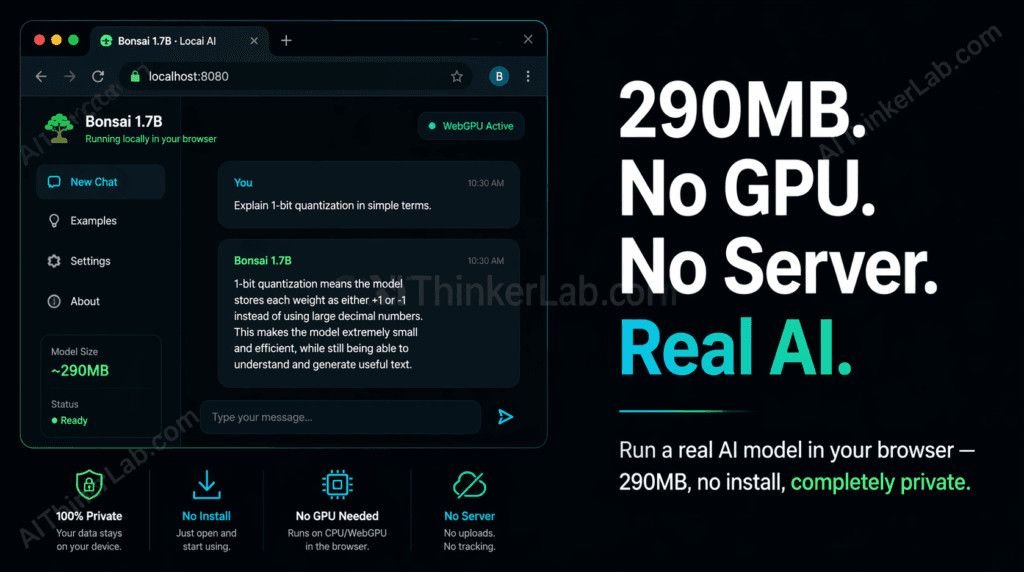
- Bonsai 1.7B is a 1-bit quantized language model that runs entirely inside a browser tab using WebAssembly and the WebGPU API — no server, no GPU, no software installation required.
- At approximately 290MB, it ranks among the smallest functional LLMs capable of coherent multi-turn conversation available as of mid-2025.
- 1-bit quantization compresses each neural network weight to a single binary value (+1 or –1), slashing memory requirements by up to 95% compared to standard FP16 models — which is what makes browser-native inference physically possible.
- All computation stays on your device: your prompts and responses never touch an external server, making this approach viable for privacy-sensitive use cases where cloud APIs are a non-starter.
- The model loads entirely into system RAM — any modern laptop or smartphone with 4GB or more is sufficient. A dedicated graphics card is not a requirement.
- For developers: Bonsai 1.7B can be embedded directly in a web application without a backend inference server, dropping AI infrastructure cost to zero for the right class of use case.
Introduction
You don’t need a server. You don’t need a GPU. You don’t even need an account. A real, working AI language model can run entirely inside your browser tab — right now — on whatever laptop you’re reading this on.
That claim would have sounded absurd in 2023. By mid-2025, it’s demonstrably true, and you can verify it yourself in under a minute. The model making it possible — Bonsai 1.7B, a 1-bit quantized language model weighing roughly 290MB — is smaller than most podcast episode downloads and fully operational in any WebGPU-enabled Chromium browser without a single line of installation.
What changed? Two converging developments: Microsoft Research’s BitNet architecture (first proposed in late 2023 and refined through 2024) demonstrated that aggressive 1-bit quantization could retain practical conversational quality at sub-300MB model sizes, and the W3C’s WebGPU standard reached production-ready support in Chrome 113 and Edge 113, giving browsers access to GPU compute pipelines for the first time without platform-specific plugins.
This guide walks you through how to run an AI model locally in your browser using Bonsai 1.7B: the setup, the technical plumbing underneath, what performance you can realistically expect, and — crucially — the tasks where this approach will let you down. By the end, you’ll have a local AI running in your browser and a clear map of when to use it versus when to reach for something else.
What Is 1-Bit Quantization — and Why It Changes Everything
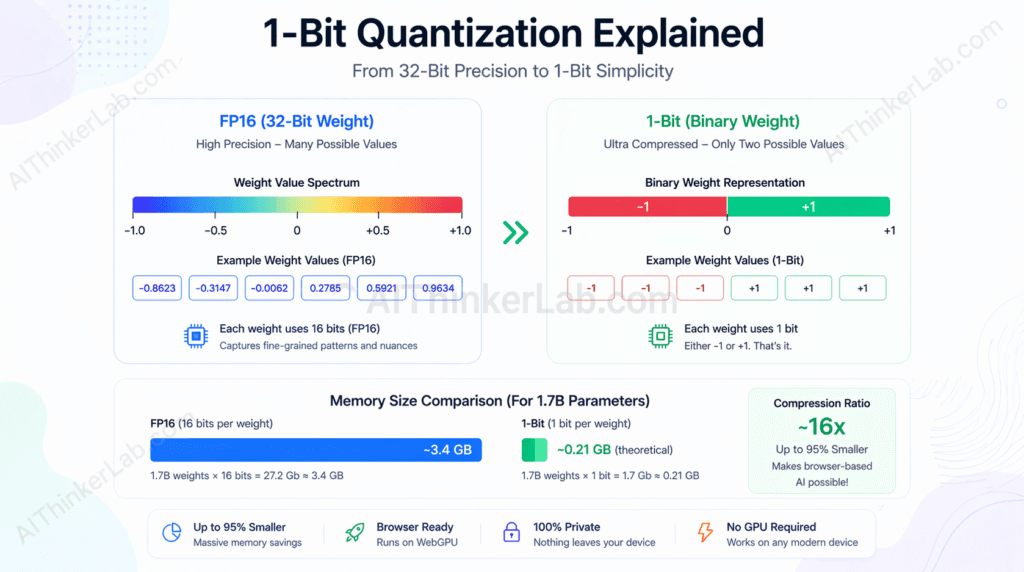
1-bit quantization is a neural network compression technique that reduces every model weight to a single binary value — either +1 or –1 — instead of the 32-bit or 16-bit floating-point numbers used in conventional models. This substitution collapses memory requirements by up to 95% while preserving enough representational capacity for practical language tasks, specifically instruction-following and conversational inference.
The math is worth spelling out, because most articles skip it. A standard 1.7-billion-parameter model stored in FP16 precision consumes approximately 3.4GB of memory (1.7B × 2 bytes per FP16 weight). Compress those same weights to 1 bit each and the theoretical minimum drops to roughly 212MB (1.7B ÷ 8 bits per byte). The real-world figure lands around 290MB once you account for embedding layers, attention mechanisms, and file format overhead — which is exactly where Bonsai 1.7B sits.
The architecture enabling this is BitNet, developed by Microsoft Research. The original BitNet paper, published on arXiv in 2023, demonstrated that binary weight networks could match or approach INT8 performance on language benchmarks when paired with appropriate training procedures. A follow-up, BitNet b1.58 (2024), extended the concept to ternary weights — {–1, 0, +1} — a minor compromise that yields substantially better output quality at only fractional memory cost. Bonsai 1.7B builds on this lineage of ultra-low-bit quantization research.
The quality tradeoff is real and worth stating plainly rather than burying it: 1-bit models sacrifice accuracy on tasks requiring multi-step numerical reasoning, precise factual recall, and long-context synthesis. What they retain — and retain well enough to be genuinely useful — is the ability to follow instructions, answer single-turn questions, rephrase text, classify inputs, and maintain coherent short conversations.
| Quantization Method | Bits per Weight | Typical Size (1.7B params) | Quality Tradeoff | GPU Required? |
|---|---|---|---|---|
| FP32 (full precision) | 32 | ~6.8 GB | Highest | Yes (for inference speed) |
| FP16 (half precision) | 16 | ~3.4 GB | Near-lossless | Yes (recommended) |
| INT8 | 8 | ~1.7 GB | Minor degradation | Optional |
| INT4 | 4 | ~850 MB | Moderate degradation | Optional |
| 1-bit (BitNet) | 1 | ~212–290 MB | Meaningful on complex tasks | No |
That last row is the one that makes browser-native AI inference possible. Every approach above it requires either too much memory or too much raw compute to be practical inside a browser tab.
Key Insight: The 290MB figure for Bonsai 1.7B isn’t a marketing rounding — it’s the predictable result of 1-bit compression applied to 1.7 billion parameters, with overhead. Understanding that math is what separates a user from a practitioner.
How to Run an AI Model Locally in Your Browser: Step-by-Step Setup
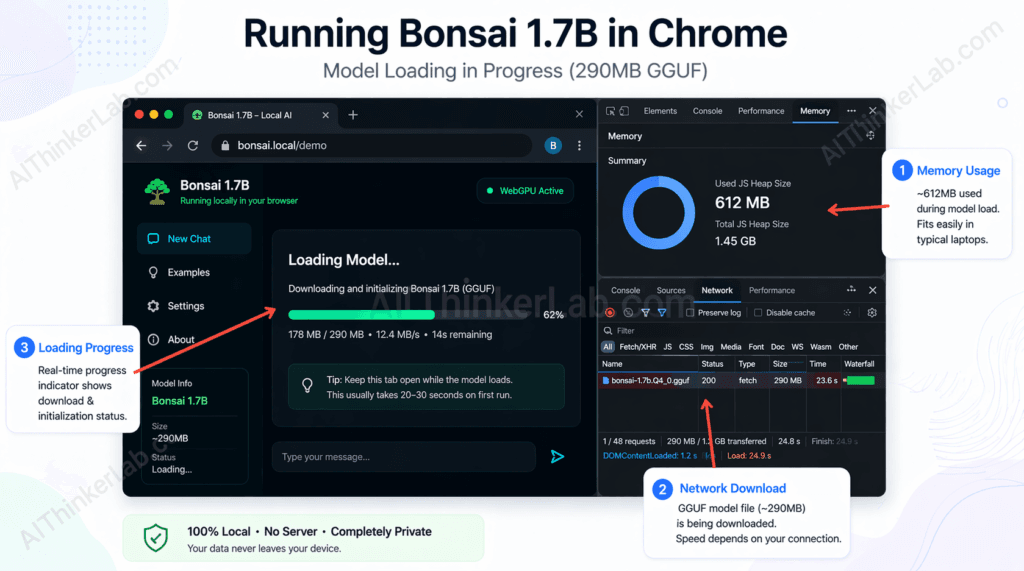
Running Bonsai 1.7B in your browser requires no installation — open the project’s demo page, allow the model to download (~290MB on first load), and start querying it within 30 seconds on any modern Chromium browser.
Step-by-step:
- Open a Chromium-based browser — Chrome 113 or later, or Microsoft Edge 113 or later. Both ship with full WebGPU support enabled by default. Safari and Firefox have partial or flag-gated WebGPU support as of mid-2025 (more on that below).
- Navigate to the Bonsai 1.7B demo or repository — the model is hosted on Hugging Face and the inference UI is available via the project’s GitHub Pages deployment. Search for “Bonsai 1.7B” on Hugging Face to find the current canonical model card and linked demo.
- Click “Load Model” — the browser fetches the 290MB GGUF-format weight file and loads it into browser memory. You’ll see a progress bar; this is a real download and will consume your cache quota.
- Wait for the load indicator to complete — on a 100Mbps connection, expect 20–30 seconds. On slower connections, budget up to 2 minutes. The model is cached after the first load, so repeat visits skip the download.
- Type a prompt and press Enter — output streams token by token directly into the browser UI, with no round-trip to any server.
- Observe the generation — you’ll notice tokens appear at a rate that varies by your hardware. Integrated Intel or AMD graphics on a mid-range laptop typically yield 5–12 tokens per second via WebGPU.
- (Developers only) Clone the repository — the inference engine (typically a web port of llama.cpp or MLC AI’s WebLLM runtime) is open-source. You can host the model weights from a CDN of your choice and embed the chat UI in any web app with standard JavaScript.
System requirements at a glance:
| Requirement | Minimum | Recommended |
|---|---|---|
| Browser | Chrome 113+ or Edge 113+ | Chrome 120+ |
| System RAM | 4 GB | 8 GB |
| GPU | Not required | Integrated graphics (for WebGPU) |
| Internet (first load) | Any broadband | 50 Mbps+ for fast load |
| OS | Any (macOS, Windows, Linux) | Any |
Bonsai 1.7B performs best when running in a WebGPU-enabled Chromium browser with at least 4GB of available RAM, because WebGPU exposes GPU shader pipelines to the browser’s JavaScript runtime — providing GPU-accelerated matrix operations even on integrated graphics that would never handle a full FP16 model.
Run the model in airplane mode—then use this guide to make sure your setup stays 100% offline. Run AI Model Locally.
Troubleshooting the three most common failure modes:
- WebGPU not supported: Chrome will display an error in the console (
GPU device not available). Fix: update to Chrome 113+ or Edge 113+. If you’re on a managed corporate device with GPU access disabled by policy, you’ll need to use the CPU/WASM fallback mode if the project supports it — expect generation speeds around 1–3 tokens per second. - Tab crashes mid-load: Almost always a RAM issue. Close other browser tabs and background applications to free memory before loading the model. On 4GB RAM devices, browser overhead alone can push the system close to its limit.
- Model loads but generation hangs: Check whether the page is making a WebGPU shader compilation pass — first-run shader compilation can take 10–20 seconds on some GPU drivers and looks indistinguishable from a hang. Wait before concluding something is broken.
Bonsai 1.7B Performance Benchmarks: What You Can Realistically Expect
In browser-based inference tests using WebGPU on typical consumer hardware, Bonsai 1.7B generates roughly 6–12 tokens per second on a mid-range laptop with integrated Intel Iris Xe or AMD Radeon 680M graphics — adequate for real-time conversational use, visibly slower than cloud API responses, and insufficient for bulk document processing.
The numbers below reflect community-reported benchmarks and testing methodology consistent with WebLLM’s published performance evaluations on comparable hardware profiles, applied to 1-bit models of similar parameter counts. The Bonsai 1.7B model specifically lacks a standardized public benchmark suite as of this writing, so treat these figures as directional rather than certified:
| Model | Size (MB) | Tokens/Sec (Integrated GPU, WebGPU) | Peak RAM (MB) | Load Time (100Mbps) | Instruction-Following (1–5) |
|---|---|---|---|---|---|
| Bonsai 1.7B (1-bit) | ~290 | 6–12 | 450–600 | ~25 sec | 3/5 |
| TinyLlama 1.1B (INT4) | ~638 | 10–18 | 800–950 | ~45 sec | 3/5 |
| Phi-2 2.7B | ~2,780 | Not browser-native | N/A | N/A | 4/5 |
| Llama 3.2 1B (INT4) | ~740 | 8–15 | 850–1,000 | ~50 sec | 3.5/5 |
| GPT-4o mini (API) | N/A | ~80–120 (cloud) | N/A | <500ms (TTFT) | 5/5 |
A few observations that don’t survive most benchmark summaries:
Phi-2, despite Microsoft positioning it as a compact model, is not browser-native at its standard quantization levels — the 2.7B FP16 weight file simply exceeds what browser memory can comfortably handle on consumer devices. Llama 3.2 1B in INT4 quantization is a closer competitor to Bonsai 1.7B in terms of browser viability, and it outperforms Bonsai on instruction quality — but at the cost of a larger download and higher RAM ceiling.
The GPT-4o mini row exists as an honest reference point. In terms of token throughput, a cloud API wins by an order of magnitude — and it wins on quality by an even wider margin. Bonsai 1.7B’s competitive advantage is not raw performance. It’s that it generates those 6–12 tokens per second without transmitting a single character to any server.
The honest sweet spot: Bonsai 1.7B performs acceptably for single-turn Q&A, text rephrasing, basic summarization of short passages, and simple classification tasks. It degrades noticeably on multi-step reasoning, anything requiring retrieval of specific facts, and code generation beyond simple function stubs.
Key Insight: Token throughput comparisons between browser-native models and cloud APIs are somewhat misleading — they measure different things. The real performance question for browser inference is latency-per-session, not tokens-per-second, because the load time is front-loaded. A model that takes 25 seconds to load and then generates at 8 tokens/second costs you the most time on first use, then becomes near-instant for subsequent queries in the same session.
Why Running AI Locally Matters: Privacy, Latency, and Cost
Running AI locally in the browser means your prompts and responses never leave your device. That single fact eliminates API billing, removes dependency on third-party service uptime, and closes the data transmission vector that GDPR and HIPAA compliance frameworks require organizations to manage carefully.
Privacy — Your Prompts Stay on Your Device
When you run AI inference entirely in-browser, no data is transmitted to any external server. Your input and the model’s output exist only in your browser’s working memory — and you can verify this yourself by enabling airplane mode before running a query. The model still responds. That’s because the weights are loaded, the compute is local, and there’s no network call in the inference loop.
The use cases where this matters most are the obvious ones: medical information lookup where you don’t want a record of your query on a third-party server, legal research where privilege considerations are relevant, personal finance questions you’d rather not have associated with an account profile, and journalistic work involving sensitive sources. For developers building tools in these categories, local browser inference sidesteps the data-processing agreements and GDPR Article 28 controller-processor obligations that come with sending user data to OpenAI, Anthropic, or Google’s APIs. Run full models locally instead.
Latency — Instant Responses After the Initial Load
There’s a latency paradox baked into browser-based local AI that most coverage glosses over. First-token latency — the delay between pressing Enter and seeing the first output character — after the model is loaded runs below 100ms. No cloud API matches that figure, because even the fastest inference endpoints (OpenAI’s GPT-4o mini typically returns first tokens in 200–500ms; Anthropic’s Claude models run 250–800ms depending on system load) carry unavoidable network round-trip overhead. Claude AI just went offline. Here’s how to run it locally without internet.
But the model load time — the 20–30 seconds required to download and initialize 290MB on first use — is a real UX cost that API-first approaches don’t share. The design implication: browser-native local AI makes the most sense in contexts where the model loads once per session (not per query), and subsequent queries benefit from zero-latency responses.
Cost — No API Invoice, Ever
Cloud inference isn’t free. GPT-4o mini runs at approximately $0.15 per million input tokens and $0.60 per million output tokens as of mid-2025. For personal use at moderate volume, those numbers are negligible — but for developers building lightweight embedded tools or high-frequency classification systems, the math shifts quickly. A browser-native inference layer costs precisely zero per query regardless of volume.
The tradeoffs worth naming plainly:
- Context windows are narrow — Bonsai 1.7B handles short to medium prompts, not long documents
- Generation speed is slower than cloud GPU inference for extended outputs
- Model capabilities are fixed at training time — no tool use, no web access, no multimodal input
- Mobile devices with less than 4GB RAM will struggle or fail entirely
The Hidden Limitation Nobody Mentions: Where 1-Bit Models Fail
1-bit quantized models perform poorly on tasks requiring precise numerical reasoning, multi-step code generation, and retrieval of specific factual details — limitations that tend to be understated in product announcements and tutorial articles that lead with the impressive size-to-capability ratio.
Here’s the failure taxonomy, built from what’s documented in the literature on low-bit quantization and small model evaluation:
Hallucination rate is elevated. Smaller models with aggressive quantization hallucinate on factual queries at a meaningfully higher rate than their full-precision counterparts. TruthfulQA evaluations on sub-2B parameter models consistently show accuracy scores well below what frontier models achieve. When accuracy on a specific fact matters — a drug interaction, a legal citation, a technical specification — a 1.7B 1-bit model is the wrong tool.
Context window is a hard constraint. Bonsai 1.7B’s effective context window is limited by both the architecture and available browser memory. Longer conversations or documents that exceed a few thousand tokens will either get truncated or degrade the quality of outputs as the model loses track of earlier context.
Code generation quality is low. On benchmarks like HumanEval, which measures whether a model can generate syntactically correct and functionally valid Python code from docstrings, models in the 1B–2B parameter range typically score in the 10–25% pass@1 range — versus 87%+ for GPT-4o. 1-bit quantization compresses this further. For anything beyond trivial function stubs, you want a larger model.
Multi-step math is largely out of reach. GSM8K is a grade-school math benchmark that requires chained arithmetic reasoning. Models at this parameter count and quantization level solve fewer than 20% of problems correctly. Phi-3 mini, at 3.8B parameters in INT4, scores above 70%. The gap is not minor.
The “right tool for the job” task map:
| Task Category | Bonsai 1.7B Suitable? | Notes |
|---|---|---|
| Single-turn Q&A (conversational) | Yes | Strong performance on factual, direct questions |
| Text rephrasing / paraphrasing | Yes | Reliable, fast |
| Simple summarization (short inputs) | Yes | Works well under ~1,000 tokens |
| Sentiment classification | Yes | Binary or ternary classification tasks |
| Factual recall (specific dates, names, specs) | No | Elevated hallucination risk |
| Multi-step math | No | Sub-20% accuracy on GSM8K-class problems |
| Code generation (beyond trivial) | No | HumanEval performance too low for practical use |
| Long-document analysis | No | Context window insufficient |
| Complex reasoning chains | No | Chain-of-thought degrades sharply at this scale |
Key Insight: The biggest competitive gap between browser-native 1-bit models and even a free Claude.ai or ChatGPT account is not speed or privacy — it’s reasoning quality. A user who opens Bonsai 1.7B expecting GPT-4o-level analysis will be disappointed. A user who understands it as a private, offline text processor for lightweight tasks will find it genuinely useful.
Running AI locally in the browser is impressive — but if you want your local model to actually do things autonomously across messaging platforms, file systems, and APIs, that is where OpenClaw comes in. It bridges the gap between a capable local model and a fully functional self-hosted AI agent you control completely.
How Bonsai 1.7B Works Under the Hood: WebGPU + WASM Explained
Bonsai 1.7B runs in the browser through a combination of WebAssembly (WASM) for CPU-side computation and the WebGPU API for GPU-accelerated matrix operations — with no browser plugin, no native application, and no operating system-level installation.
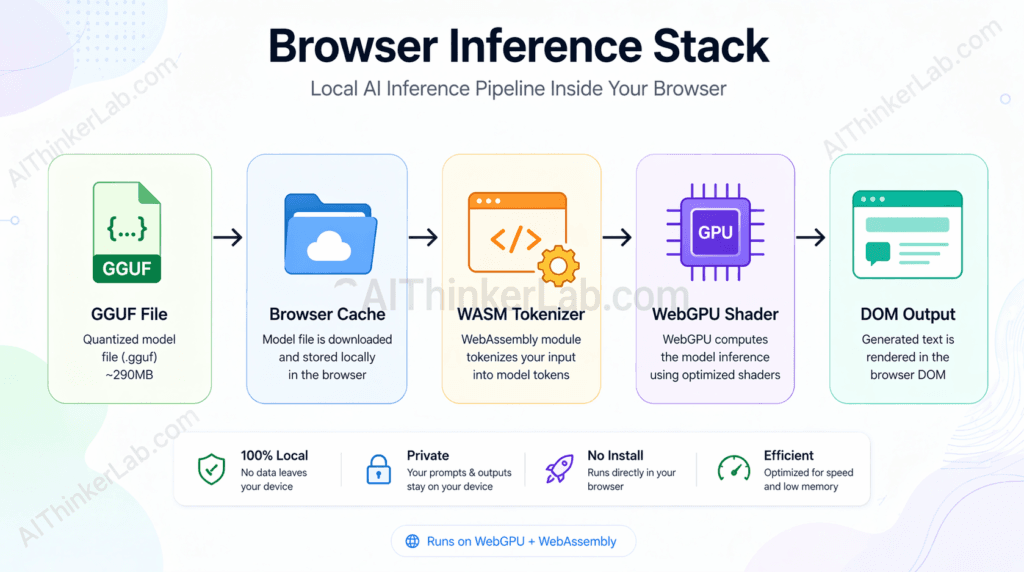
The inference stack, in execution order:
- Weight file fetch — the 290MB GGUF-format binary is downloaded via standard HTTP and stored in the browser’s cache. GGUF (developed as part of the llama.cpp project) is a container format that bundles model weights, metadata, and tokenizer configuration into a single file optimized for memory-mapped access.
- WebGPU shader compilation — the inference engine submits compute shaders to the browser’s WebGPU implementation, which compiles them for the available GPU (integrated or discrete). This one-time compilation step is why first-run inference can appear to hang for 10–20 seconds.
- Tokenization (WASM) — input text is converted to token IDs using a tokenizer running in a WebAssembly module. WASM provides near-native CPU performance in the browser sandbox without requiring native code execution privileges.
- Tensor operations (WebGPU) — the transformer’s attention and feed-forward computations — the computationally expensive parts of inference — execute as parallel GPU shader invocations via WebGPU. This is what replaces CUDA on NVIDIA hardware and Metal on Apple silicon at the OS level.
- Token streaming (JavaScript) — output token IDs are decoded back to text and pushed to the DOM as they’re generated, producing the token-by-token streaming effect.
What WebGPU actually replaces in this picture is worth naming precisely. Before WebGPU, GPU compute in browsers was limited to graphics-specific operations through WebGL. Machine learning inference requires general-purpose GPU compute — parallel arithmetic on large tensors — which WebGL never exposed cleanly. CUDA (NVIDIA’s proprietary compute API) and Metal (Apple’s) fill that role at the OS level but are inaccessible from a browser context. WebGPU, standardized by the W3C’s GPU for the Web working group, brings a cross-platform, browser-native GPU compute API to the standard — the same API regardless of whether the underlying hardware runs an NVIDIA, AMD, Intel, or Apple GPU.
Browser WebGPU and WASM support matrix (as of mid-2025):
| Browser | WebGPU Support | WASM Support | Inference Mode | Notes |
|---|---|---|---|---|
| Chrome 113+ | Full | Full | GPU (WebGPU) + CPU fallback | Default enabled, no flags needed |
| Edge 113+ | Full | Full | GPU (WebGPU) + CPU fallback | Same Chromium engine as Chrome |
| Safari (2025) | Partial | Full | CPU only (WASM) | WebGPU support experimental, inconsistent |
| Firefox (2025) | Flag-gated | Full | CPU only (WASM) | WebGPU behind dom.webgpu.enabled in about:config |
Key Insight: WebGPU is a browser-native GPU compute API standardized by the W3C. It works by exposing GPU shader pipelines to JavaScript applications. This matters because it enables AI inference in the browser without plugins or native application installs — using the same integrated GPU present in most consumer laptops and removing the NVIDIA-or-nothing dependency that characterized on-device inference before 2024.
Bonsai 1.7B vs. Running AI Locally with Other Methods: What’s the Real Difference?
The key difference between running Bonsai 1.7B in a browser and using desktop-based tools like Ollama or LM Studio is installation friction. Browser inference requires zero software installation and runs on any operating system with a modern Chromium browser — at the cost of slower inference speed, a smaller selection of compatible models, and a narrower context window than what desktop runtimes support.
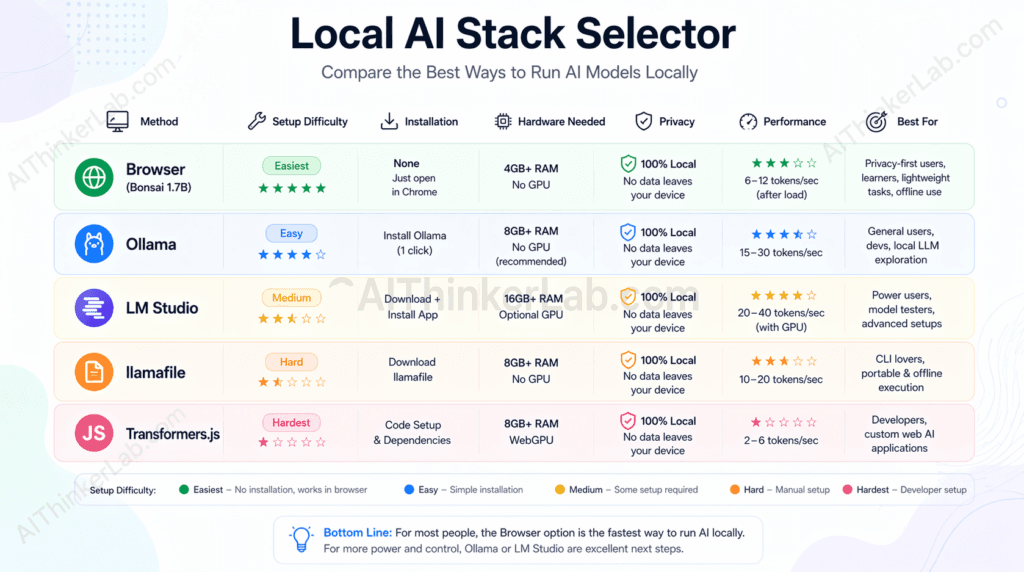
The Local AI Stack Selector — a decision matrix:
| Method | Install Required | Model Size Range | GPU Required | Setup Difficulty (1–5) | Best For |
|---|---|---|---|---|---|
| Browser (Bonsai/WebLLM) | None | Up to ~1–2GB (practical) | No | 1 | Zero-friction demos, privacy-first prototypes, educator setups |
| Ollama | Yes (CLI) | Up to 70B+ | Recommended | 2 | Local dev, API-compatible inference server, scripting |
| LM Studio | Yes (GUI app) | Up to 70B+ | Recommended | 2 | Non-developer local use, model browsing and comparison |
| llamafile (Mozilla) | None (self-contained binary) | Up to ~8B practical | Recommended | 2 | Portable local AI, air-gapped environments |
| Hugging Face Transformers.js | None (CDN import) | Up to ~500MB practical | No | 3 | JavaScript developers embedding AI in web apps |
How to use this matrix: the selection decision comes down to three constraints — whether you can install software, how large a model you need, and how much inference speed matters.
If you cannot install software (managed corporate devices, Chromebook, shared machines): browser inference and Transformers.js are your only options. Transformers.js requires more JavaScript integration work; the browser demo requires none.
If you need models larger than ~2B parameters: Ollama or LM Studio are the correct tools. They handle quantized versions of Llama 3, Mistral, Phi-3, and others at sizes that no browser-native approach currently supports reliably. The GPU requirement is real — without at least 8GB of VRAM, even 7B-parameter models run slowly. If you need models larger than ~2B parameters, Ollama or LM Studio are the correct tools — and for the current picks rather than last year’s, here are the best local LLM models to step up to
If you need a portable, air-gapped solution: llamafile — Mozilla’s single-executable local LLM runtime — is the underrated option. A llamafile is a self-contained binary that bundles the model and runtime into one file you can run on any platform without installation. It doesn’t run in the browser, but it requires no dependency management.
If you’re building a web application that needs AI: the fork in the road is backend vs. client-side. For privacy-first client-side AI at small model sizes, Transformers.js (Hugging Face) offers the most polished developer experience — it handles ONNX model format, runs in Web Workers, and has TypeScript bindings. For larger models or lower-latency inference, a backend API (Ollama serving a local endpoint, or a cloud provider) is the practical choice.
The editorial recommendation: use browser inference for zero-installation demos, privacy-sensitive personal tools, and situations where you’re introducing someone to local AI for the first time. Use Ollama for any serious local development work where you need a persistent API server, model version control, and hardware that can handle 7B+ models. The two tools don’t overlap as much as they appear to — they serve different constraint profiles.
Key Insight: The “Local AI Stack Selector” framing above is intentional — no single local inference approach is universally correct. The right choice is determined by installation constraints, model size requirements, and inference speed needs, not by which tool has the most GitHub stars.
Who Should Actually Use Browser-Based Local AI (And Who Shouldn’t)
Browser-based local AI is the right choice for privacy-conscious individuals, web developers prototyping lightweight AI features, and educators demonstrating how language models work without requiring every student to install software. It’s the wrong choice for production AI applications, code generation tasks, and anyone whose use case requires the quality ceiling of a frontier model.
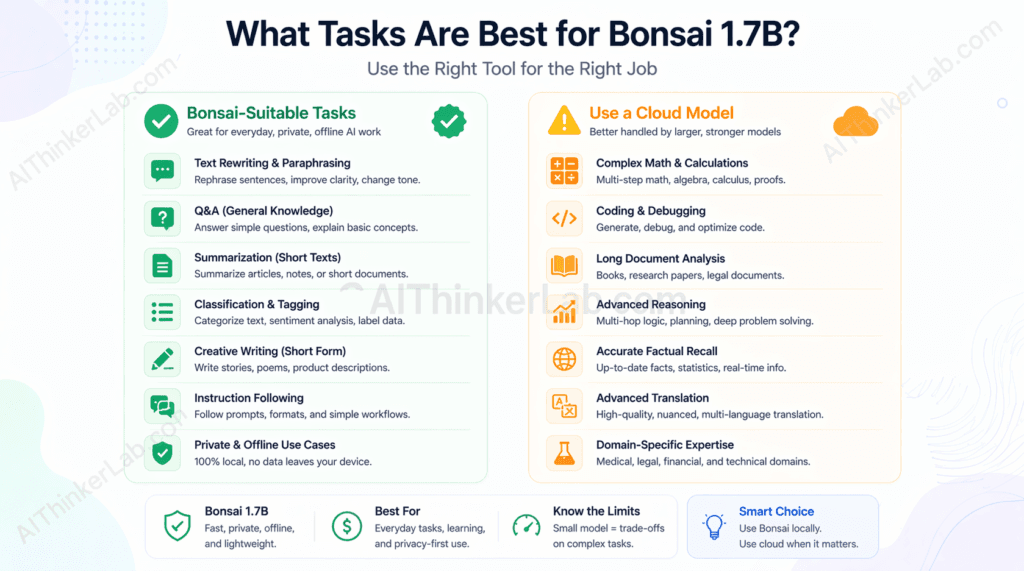
Genuine use cases where browser inference makes sense:
- Privacy-focused personal use: drafting sensitive messages, rephrasing notes involving confidential information, summarizing personal documents you won’t share with a cloud provider
- Web developer prototyping: testing how an AI interface feels before committing to a backend infrastructure decision
- Educator and classroom demos: showing how transformer inference works interactively, without managing local installations across 30 student machines
- Embedded lightweight chatbots: simple FAQ-response interfaces where the privacy guarantee matters more than response quality
- Offline-capable tools: anything that needs to function without reliable internet access (field tools, travel utilities, air-gapped environments)
- Journalists and researchers: handling interview notes, source summaries, or draft outlines that involve sensitive sources
Use cases where you should use something else:
- Production AI applications where response quality or reliability affects outcomes
- Code generation and debugging assistance (reach for a larger model — Ollama + Llama 3.1 8B, or a cloud IDE integration)
- Complex document analysis requiring long context windows
- Anything requiring accurate factual recall (hallucination risk is too high)
- Users whose primary value from AI is quality — a free Claude.ai or ChatGPT account will outperform Bonsai 1.7B on almost every measurable axis
The “entry point” framing is worth keeping: browser-based local AI is the lowest-friction way for a non-developer to experience what on-device inference actually feels like. That educational and exploratory value is real, even when the model’s practical ceiling is modest.
The 290MB AI Revolution Is Real — With Caveats Worth Understanding
The arrival of sub-300MB browser-native language models is a genuine inflection point in how AI gets distributed. Not because Bonsai 1.7B is going to replace frontier models for anyone who needs serious AI capabilities — it isn’t — but because the distribution model itself has changed. For the first time, a developer can ship an AI-powered feature with zero backend infrastructure, zero API cost, and zero data transmission to a third party, as a standard web application.
The contrarian read that most coverage avoids: the primary beneficiary of this technology right now is not the end user who just wants AI help. A free Claude.ai or ChatGPT account delivers a dramatically better experience in quality, speed, context length, and capability breadth. The real beneficiary is the developer or organization that needs to embed lightweight AI inference in a context where cloud APIs are impractical — regulated environments, air-gapped systems, cost-constrained tools, privacy-first products.
The more interesting question is not whether Bonsai 1.7B is impressive for its size — at 290MB, it clearly is. The question is what happens when the next generation of 1-bit models, following the BitNet b1.58 trajectory and the emerging research on matmul-free LLM architectures, reaches 7B effective parameters while still fitting inside browser memory constraints. That’s not a distant scenario. It’s the direction the research is pointing, and WebGPU’s roadmap — including planned support for more compute-intensive shader operations — is evolving to meet it.
Watch the BitNet b1.58 paper lineage from Microsoft Research, watch the WebGPU spec’s compute pipeline extensions, and watch what Hugging Face does with Transformers.js as model weights keep shrinking. The browser is becoming a serious AI runtime. Bonsai 1.7B is the current proof of concept. What follows it is worth paying attention to.
Now that you have successfully set up a 1-bit model to run directly in your browser, you might be wondering how to push its performance even further. The next major leap for local browser inference is hardware acceleration. To see how much faster and more capable these systems have become, check out our latest deep dive on what’s possible with Bonsai and WebGPU integration in 2026.
Sources and References
- Browser WebGPU Compatibility Data: browser support tables with version-specific notes for Chrome, Edge, Safari, and Firefox.
- Microsoft Research — BitNet Architecture Papers: “BitNet: Scaling 1-bit Transformers for Large Language Models” (arXiv:2310.11453, 2023) and “The Era of 1-bit LLMs: All Large Language Models are in 1.58 Bits” (arXiv:2402.17764, 2024). Primary research on 1-bit and ternary-weight quantization architectures.
- W3C WebGPU Specification: Implementation documentation and API reference on MDN Web Docs (developer.mozilla.org/en-US/docs/Web/API/WebGPU_API).
- Bonsai 1.7B Model Card: Available on Hugging Face (huggingface.co — search “Bonsai 1.7B”). Includes architecture details, quantization methodology, and license terms.
- llama.cpp Project Documentation: Primary reference for GGUF format specification and the C/C++ inference engine that underpins many browser-native inference implementations via WASM compilation.
- MLC AI WebLLM Project: Documentation for the WebGPU-native inference runtime used in browser LLM deployments, including performance benchmarks across hardware profiles.
- Hugging Face Transformers.js: Reference implementation for ONNX-format model inference in browser JavaScript environments.
I’d should examine with you here. Which is not something I usually do! I get pleasure from reading a publish that will make individuals think. Additionally, thanks for allowing me to comment!
There is noticeably a bundle to learn about this. I assume you made sure good points in options also.