TL;DR
- Threat reality: In Q1 2026, supply-chain security firms including Socket.dev and Phylum flagged a significant wave of trojanized packages impersonating Anthropic’s Claude Code CLI across PyPI, npm, and unauthorized GitHub repositories — continuing an accelerating pattern of AI tool impersonation attacks that security researchers had been tracking since late 2025.
- Identity check: The only legitimate Claude Code installer originates from Anthropic’s official channels at cli.anthropic.com — any third-party host, including PyPI or npm listings, is unauthorized and should be treated as a red flag until independently verified.
- Hash verification: Running a SHA-256 checksum comparison takes under 60 seconds in any terminal and eliminates the most common tampered-download attack vector before a single line of malicious code executes.
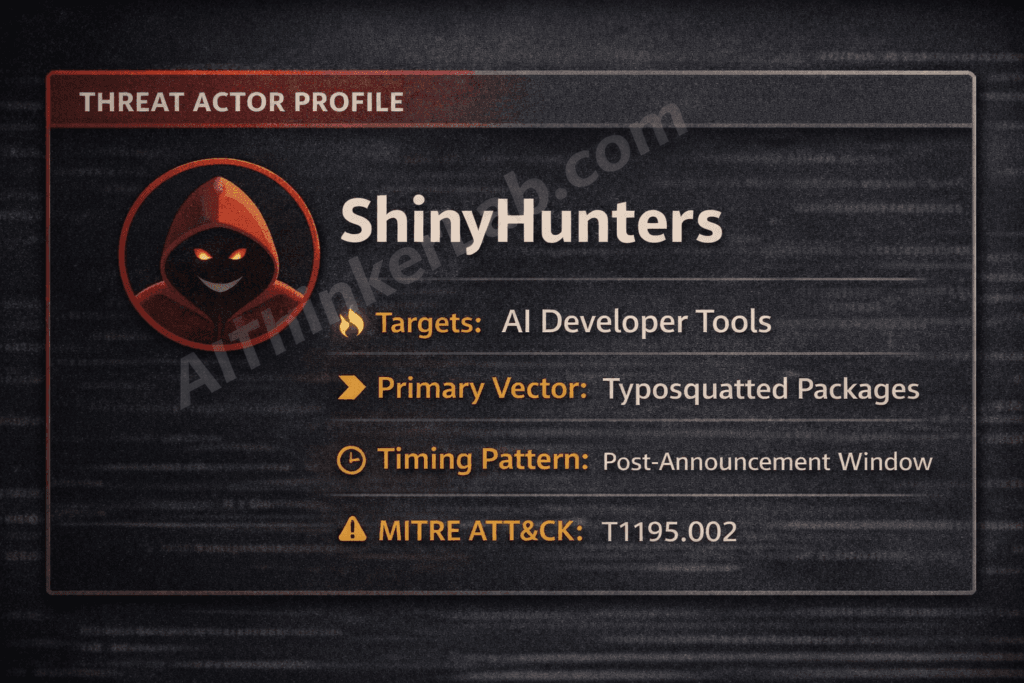
- Supply-chain angle: ShinyHunters and similar financially motivated threat groups exploit developer FOMO around major AI tool releases, timing fake package publications to coincide with legitimate Anthropic announcements and manufacturing social proof through inflated GitHub stars.
- Organizational risk: A single malicious Claude Code install on a CI/CD runner can trigger automated credential exfiltration — Anthropic API keys, AWS access tokens, SSH credentials, and full codebase contents — within minutes of execution, with blast radius extending across an entire engineering organization. A trojanized package isn’t the only way Claude can leak your data. Even a verified, legitimate install can be turned against you — prompt injection can exfiltrate your data without a malicious install, using the tool exactly as designed.
- Verification shortcut: The 7-step framework in this article can be completed in under 10 minutes, faster than most security teams’ average incident detection cycle.
Introduction
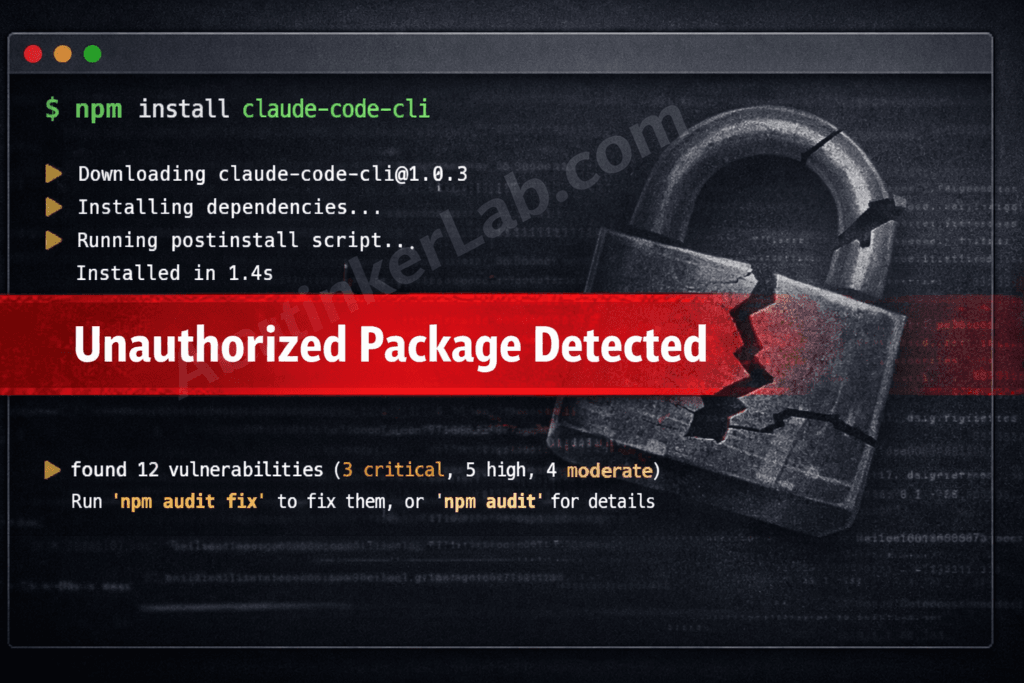
In April 2026, security researchers monitoring package registry activity identified multiple packages masquerading as Claude Code across PyPI and npm — each engineered to harvest developer credentials within seconds of installation. The malicious Claude Code downloads didn’t look suspicious on the surface: polished README files, plausible version histories, and naming conventions close enough to the official Anthropic CLI to fool developers moving quickly. Developers who installed these packages handed over Anthropic API keys, GitHub tokens, and SSH credentials before their terminals finished rendering the install log.
The attack surface here isn’t accidental. Claude Code’s architecture grants it terminal-level access and proximity to API key storage — making it a markedly higher-value impersonation target than a generic utility. ShinyHunters, a threat group with a documented history of supply-chain operations, has been linked to AI tool targeting campaigns exploiting exactly this dynamic.
This article gives you a concrete, timed 7-step verification framework — not abstract advice — that any developer or security team can run before touching an AI tool installer. Every step is specific, every time estimate is honest, and by the end, you’ll know exactly what a legitimate Claude Code package looks like versus one designed to empty your credential store.
The surge in malicious Claude Code packages didn’t happen randomly. It was directly triggered by one of the most significant AI security incidents of 2026 — the accidental publication of 512,000 lines of Claude Code source code on March 31. That single event created a confusion window that threat actors exploited almost immediately. If you haven’t read the full technical breakdown of how the leak happened, what it exposed, and which CVEs it made easier to exploit, our complete investigation into the Claude Code Leak 2026 is the essential starting point before evaluating your own exposure.
What Are Malicious Claude Code Downloads and Why Are They Surging in 2026?
Malicious Claude Code downloads are counterfeit or trojanized versions of Anthropic’s Claude Code CLI, distributed through unofficial channels — including typosquatted PyPI and npm packages, fake GitHub repositories mimicking Anthropic’s official organization, and SEO-poisoned download pages — specifically engineered to steal developer credentials or deploy persistent malware upon installation.
The mechanism is straightforward and cynical. A threat actor registers a package name close enough to the legitimate tool to survive a quick glance: claude-code-cli, anthropic-code, claudecode, or claude_code_installer. They populate the package with a convincing README — often generated with an LLM to mirror Anthropic’s official documentation style precisely — and then embed credential-harvesting code inside a postinstall hook that fires the moment pip install or npm install completes. The developer sees no error. The malware sees everything.
Why Claude Code specifically? The answer lies in what the tool actually touches. Claude Code operates at the terminal level with access to local file systems, environment variables, and — critically — the ~/.anthropic/config directory where API keys live. That’s a far richer target than, say, a compromised CSS preprocessor. Researchers at Socket.dev and Phylum have both documented the pattern of AI tool impersonation packages accelerating through 2025 and into 2026, correlating spikes with major model release announcements from frontier AI labs.
The AI tool supply-chain attack surface has expanded faster than developer security culture has adapted. According to Phylum’s research into malicious open-source packages, registry-hosted malware increasingly leverages split-payload delivery — the package itself contains no obviously malicious code, but a postinstall script phones home to download the actual payload from an external host, bypassing static analysis tools that scan only the package contents. That 24–72 hour window before AV signatures catch up is where the damage happens.
The ShinyHunters Playbook: How Fake AI Tools Get Built and Distributed
ShinyHunters distributes malicious AI tools by publishing typosquatted packages timed to the precise window of maximum developer interest — the 24–48 hours immediately following a legitimate Anthropic product announcement — then artificially inflating the package’s apparent credibility through GitHub stars manipulation and fabricated download counts before registry security teams can respond.
The operational sequence maps cleanly onto MITRE ATT&CK T1195.002 (Compromise Software Supply Chain):
- Discovery: ShinyHunters monitors Anthropic’s official channels, GitHub release feeds, and developer community forums for imminent or freshly announced tool releases. The trigger is attention — any announcement generating developer discussion.
- Packaging: A malicious package is assembled using naming conventions designed to survive typo errors:
claude-code-cli,anthropic-code,claudecode. The README is LLM-generated to closely mirror Anthropic’s official documentation. The malicious payload is embedded inpostinstallhooks or split across a secondary download to evade static scanning. - Distribution: The package is published simultaneously across PyPI and npm. GitHub stars are inflated through automated accounts. Fake “release” threads appear in developer Discord servers and subreddits, mimicking the organic buzz of a legitimate tool launch.
- Exfiltration: Once installed on a developer machine or CI/CD runner, the payload targets
~/.anthropic/config, environment variables,~/.ssh/, shell history, and.git-credentials— transmitting extracted data to an attacker-controlled host within seconds.
The April 2026 Trivy/Cisco supply-chain incident, in which trojanized container scanning packages were distributed through GitHub Actions workflows, follows the identical structural pattern — package name proximity, fake social proof, and payload delivery timed to coincide with elevated developer activity around a product update.
What makes the ShinyHunters approach particularly difficult to counter at the registry level is that it exploits the gap between publication and vetting. PyPI and npm operate on a publish-first, scan-second model, and sophisticated actors know that the first 24 hours after publication carry the highest install volume and the lowest detection probability.
Hackers are not just stealing AI tools — they’re actively using them to build attacks, as we explored in our breakdown of how threat actors are weaponizing ChatGPT and Claude in 2026.
Why Developers Fall for Malicious Claude Code Downloads (The Trust Gap)
Developer trust in package registries is systemically overextended — and threat actors understand this better than most security teams will admit publicly.
Here’s the structural reality: the vast majority of npm and PyPI installs are benign. Developers have been conditioned, across years of generally safe dependency management, to treat pip install [tool] as a low-risk action. That conditioning is rational when 99.9% of packages are legitimate. It becomes catastrophic when a threat actor engineers a package specifically to exploit it.
Three mechanisms compound this vulnerability when the target is an AI tool from a company like Anthropic:
FOMO around AI tool releases is the primary social engineering lever. When Anthropic ships a meaningful Claude Code update, developer communities light up — Hacker News threads, Twitter/X posts, Discord channels. That concentrated attention creates urgency, and urgency degrades verification discipline. A developer who would normally spend two minutes checking a package source skips straight to npm install because everyone else seems to already be using it.
SEO-poisoned results mean that a Google search for “claude code install” or “how to install Claude Code” may surface malicious download pages above Anthropic’s official documentation, particularly in the first 24–48 hours after a release when the official page hasn’t yet accumulated the backlink weight to outrank a targeted landing page.
AI-generated README files have closed the gap between obvious forgery and convincing impersonation. A threat actor feeding Anthropic’s official documentation into an LLM can generate README content that reads as authentic — correct terminology, consistent tone, plausible version numbers. Checkmarx and JFrog security researchers have both documented this pattern in 2025–2026 malicious package campaigns.
Information Gain — The AI Trust Amplification Framework:
What competing articles miss entirely is the psychological dimension specific to AI tools from safety-focused organizations. Anthropic has built substantial brand equity around responsible AI development — Constitutional AI, safety commitments, transparency reports. That reputation creates what I’d call AI Trust Amplification: developers extend disproportionately high implicit trust to tools bearing the Anthropic name, precisely because the company has invested heavily in being perceived as trustworthy. A fake curl package benefits from no such halo. A fake Claude Code package inherits Anthropic’s entire trust architecture — and threat actors are exploiting that asymmetry deliberately.
This dynamic doesn’t appear in any current security analysis of AI tool impersonation campaigns. It deserves to be named, because it explains why Claude Code impersonation is structurally more dangerous than impersonating a generic developer utility of equivalent popularity.
Developers eager to run Claude in a local environment are a prime FOMO target — if that’s your setup goal, start with our verified guide on how to run Claude AI locally before touching any third-party installer.
7 Proven Ways to Verify AI Tools Before Installation
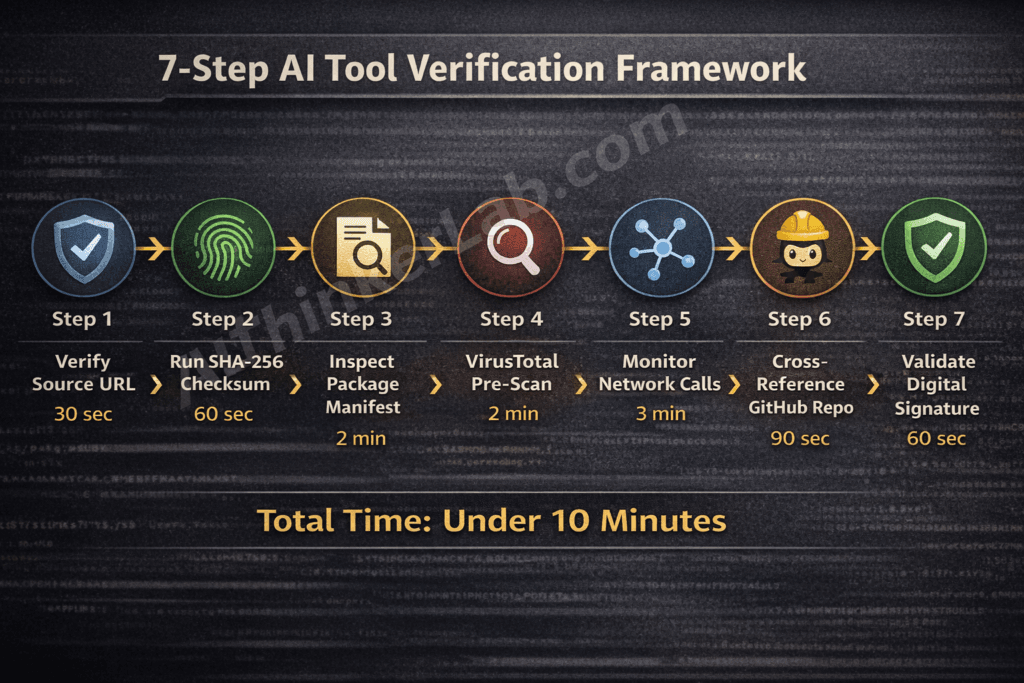
Before installing any AI development tool in 2026, these seven verification steps take under 10 minutes and block the most common malicious Claude Code download vectors.
| Step | Verification Method | Platform | Time Required | Fail Indicator |
|---|---|---|---|---|
| 1 | Verify the Source URL — confirm against cli.anthropic.com or anthropic.com/claude-code | All | 30 sec | Hyphenated domains, subdomain variants, non-Anthropic TLDs |
| 2 | Run SHA-256 Checksum — terminal hash command cross-referenced against Anthropic’s official release notes | macOS / Linux / Windows | 60 sec | Any single character mismatch |
| 3 | Inspect Package Manifest — run pip show or npm view before installing; check publisher identity and account age | PyPI / npm | 2 min | Unknown publisher, account age under 7 days |
| 4 | VirusTotal Pre-Scan — upload the binary or paste the package name; review engine detection count and package history | All | 2 min | More than 2 engine detections, publish history under 50 days |
| 5 | Audit Post-Install Network Calls — monitor outbound connections with Little Snitch (macOS), GlassWire (Windows), or tcpdump (Linux) during install | macOS / Windows / Linux | 3 min | Unexpected external connection firing during or immediately after install |
| 6 | Cross-Reference GitHub Repository — examine commit depth, issue count, contributor count, and fork graph | All | 90 sec | Inflated star count combined with shallow commit history and a single contributor |
| 7 | Validate Digital Signature — run codesign -dv on macOS or check the Digital Signatures tab in Windows File Properties | macOS / Windows | 60 sec | Missing signature or a non-Anthropic publisher identity |
Total verification time: under 10 minutes.
Step 1 — Verify the Source URL
The single highest-confidence check you can run in 30 seconds: confirm that the download originates from cli.anthropic.com or a URL path under anthropic.com. Threat actors register domains like claude-code-ai.com, anthropic-cli.dev, or get-claudecode.io — close enough to pass a distracted glance. Bookmark the official source and never navigate to it from a search result when you’re about to install.
Step 2 — Run SHA-256 Checksum
On macOS or Linux: shasum -a 256 [downloaded-file]. On Windows PowerShell: Get-FileHash [path] -Algorithm SHA256. Cross-reference the output against the hash published in Anthropic’s official release notes. SHA-256 hash verification works because cryptographic hashing generates a unique fingerprint for every file — a single altered byte produces a completely different hash. Any mismatch, regardless of how minor, confirms the binary was tampered with after the publisher signed it.
Step 3 — Inspect Package Manifest
Before executing an install, run pip show [package-name] or npm view [package-name] to surface publisher identity, home page URL, and account metadata. A publisher account created within the past seven days is a throwaway attacker account — established open-source projects have months or years of publish history. This step takes two minutes and catches a significant proportion of typosquatting campaigns that don’t bother building credible publisher identities.
Step 4 — VirusTotal Pre-Scan
VirusTotal aggregates detections across 70+ security engines, including behavioral analysis tools that catch novel threats that local AV signatures miss during the critical 24–72 hour post-publication window. Upload the binary directly or paste the package name for registry-hosted packages. More than two engine detections is a hard stop. A package with fewer than 50 days of publish history showing any detections warrants immediate rejection.
Step 5 — Audit Post-Install Network Calls
This step catches what signature-based detection misses entirely: split-payload malware that downloads its actual malicious component from an external host after install. Run Little Snitch (macOS), GlassWire (Windows), or tcpdump -i any -n (Linux) during the install process and watch for any outbound connection to a host that isn’t api.anthropic.com or a known CDN. An unexpected external connection firing within the first 60 seconds of installation is sufficient grounds to immediately kill the process, disconnect from the network, and treat the host as compromised.
Step 6 — Cross-Reference the GitHub Repository
Legitimate, actively maintained developer tools accumulate organic signals over time: hundreds of commits, dozens of contributors, a growing issue tracker, a fork graph that reflects genuine community engagement. A repository with 4,000 stars, 12 commits, one contributor, and zero open issues is manufactured credibility. Check the fork graph — authentic community adoption produces diverse fork histories. Sigstore’s transparency log is also worth consulting for packages that implement cosign signing.
Step 7 — Validate Digital Signature
On macOS, codesign -dv --verbose=4 [binary-path] reveals the signing certificate’s publisher identity. On Windows, right-click the installer file → Properties → Digital Signatures. A legitimate Anthropic binary carries a valid code signature issued to Anthropic, Inc. A missing signature, an expired certificate, or a self-signed certificate from an unknown entity is a hard stop — do not proceed.
The supply-chain threat doesn’t operate in isolation. While trojanized Claude Code packages target developers at the installation layer, a parallel set of 2026 vulnerabilities proves that attackers don’t always need to compromise the tool itself — sometimes the document your AI agent reads is the weapon. CVE-2026-21509, a Microsoft Office OLE security bypass actively exploited by APT28 in January 2026, was already confirmed in the wild before Microsoft broke from its normal Patch Tuesday schedule to release an emergency patch. Then March brought CVE-2026-26144 — an XSS flaw in Excel that weaponizes Copilot Agent for zero-click data exfiltration, requiring no user interaction and no privilege escalation whatsoever. If your organization has AI agents processing Office documents anywhere in its pipeline, the risk profile extends well beyond what you install. Our full breakdown of both vulnerabilities — including version-stratified patch steps, the comparison table, and the Agentic Attack Surface Amplification framework — is here: Excel Zero-Day Vulnerability 2026 (CVE-2026-21509 & CVE-2026-26144): What It Is, Why It’s Critical, and How to Protect Your Business Right Now.
Malicious Claude Code Downloads: Red Flags Your Security Stack Should Flag
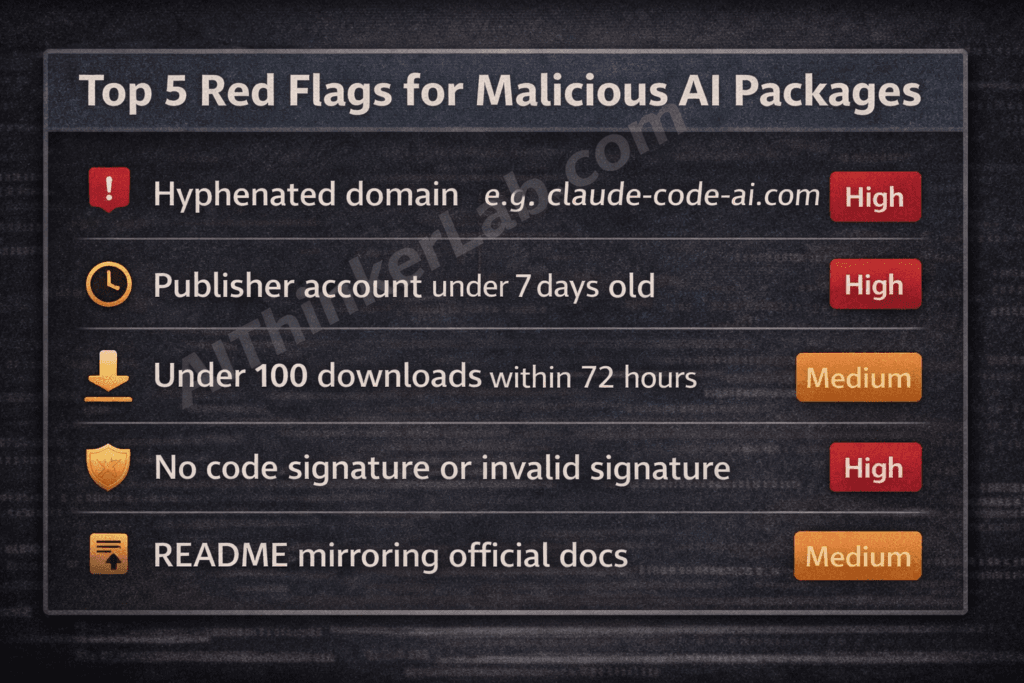
The highest-confidence red flag in the malicious Claude Code threat surface is a package with fewer than 100 downloads and a publish timestamp falling within 72 hours of a major Anthropic announcement — a combination that indicates a FOMO-timed attack with extremely high reliability.
For guidance on detecting malicious npm packages more broadly, see our technical audit guide: How to Audit npm Packages for Malware Before Installation.
| Red Flag Signal | Attack Vector Indicated | Confidence | Recommended Action |
|---|---|---|---|
| URL with hyphenated domain (e.g., claude-code-ai.com) | Domain spoofing / phishing | High | Do not proceed — report domain to Anthropic security |
| Missing or invalid code signature | Tampered or unsigned binary | High | Do not install — verify source URL independently |
| Publisher account created under 7 days ago | Throwaway attacker account | High | Reject install — flag account to registry security team |
| README mirrors Anthropic’s official docs near-verbatim | LLM-generated fake package | High | Cross-check against docs.anthropic.com before proceeding |
Postinstall hook requesting sudo or elevated privileges | Privilege escalation attempt | High | Do not install — inspect full script source before any action |
| No CHANGELOG or version history beyond 1 release | Newly-created malicious package | Medium | Treat as unverified — run full 7-step check |
| Inflated star count with shallow commit history | GitHub stars manipulation | Medium | Check fork graph and contributor account ages |
| Under 100 downloads + published within 72hr of Anthropic launch | FOMO-timed supply-chain attack | Medium | Delay install — wait for community verification and registry scan |
| No linked issue tracker on GitHub | Minimal-effort fake repository | Medium | Compare repository directly against github.com/anthropics |
| Package not hosted through official Anthropic channels | Unauthorized distribution | Low-Medium | Verify against cli.anthropic.com before any further steps |
Socket.dev’s automated dependency risk scoring and Snyk’s open-source security platform both flag several of these signals programmatically — integrating either into your CI/CD pipeline converts this manual checklist into an automated gate that blocks suspicious packages before they reach a developer machine.
What Happens After a Malicious Install? The Damage Cascade Explained
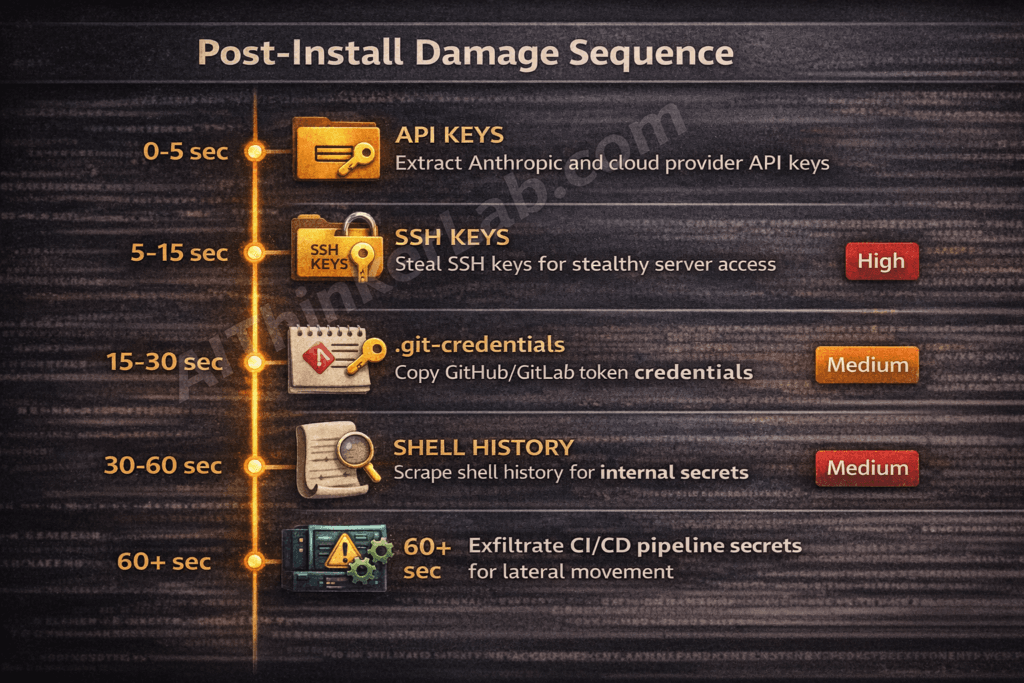
A malicious Claude Code install typically begins credential harvesting within seconds of execution — and the sequence of what gets compromised follows a predictable escalation path from individual developer credentials to full organizational access.
The post-infection sequence:
- API key extraction (0–5 seconds): The payload targets
~/.anthropic/configand scans environment variables forANTHROPIC_API_KEY,OPENAI_API_KEY, and similar patterns. Cloud provider credentials (AWS_ACCESS_KEY_ID,GOOGLE_APPLICATION_CREDENTIALS) stored in environment variables are captured in the same sweep. - SSH key exfiltration (5–15 seconds): The
~/.ssh/directory is enumerated and private keys are transmitted to the attacker-controlled host. SSH key theft is particularly damaging because SSH keys authenticate silently — there’s no password prompt for an attacker to trigger once the key is in their possession. - Git credential and configuration theft (15–30 seconds):
.git-credentials,.gitconfig, and any stored GitHub or GitLab personal access tokens are extracted. This grants the attacker read/write access to every repository the developer’s credentials touch. - Shell history scraping (30–60 seconds):
.bash_history,.zsh_history, and similar files frequently contain plaintext passwords, internal server addresses, and API call examples that reveal infrastructure topology. - Lateral movement in CI/CD environments (ongoing): If the compromised host is a CI/CD runner — GitHub Actions, GitLab CI, Jenkins — the blast radius expands dramatically. Pipeline secrets, environment injection variables, cloud IAM credentials, and deploy keys are all accessible. An attacker with pipeline access can poison subsequent builds, insert backdoors into compiled artifacts, or exfiltrate the entire codebase programmatically.
The xz-utils backdoor (CVE-2024-3094), disclosed in March 2024, established the definitive precedent for how a supply-chain compromise at the package level translates to systemic infrastructure access. That attack targeted sshd authentication specifically — a reminder that the most damaging supply-chain attacks are designed to operate silently, long after the initial install.
Information Gain — NIST CSF Cross-Reference:
Mapping this damage sequence against the NIST Cybersecurity Framework reveals exactly where the 7-step verification framework intervenes:
- Identify (NIST CSF): Steps 3 and 6 (manifest inspection, GitHub repository audit) — surface the package’s true origin before any code executes.
- Protect (NIST CSF): Steps 1, 2, and 7 (URL verification, SHA-256 checksum, code signing) — validate the binary’s integrity and authenticity before installation.
- Detect (NIST CSF): Steps 4 and 5 (VirusTotal scan, network monitoring) — catch malicious behavior that evades static checks, either pre-install or in the first 60 seconds post-install.
- Respond (NIST CSF): If Step 5 fires an alert, the response protocol is immediate: kill the process, disconnect from the network, revoke all credentials in scope.
No competing article maps these verification steps to the NIST CSF or explains which defensive layer each step activates. That mapping matters for security teams who need to justify verification procedures against a recognized framework in internal documentation.
Organizational Policy: How Teams Can Block Malicious AI Tool Installs at Scale
Enterprise teams can prevent malicious Claude Code downloads at scale by enforcing three policy controls: allowlisted package registries, mandatory pre-install scanning embedded in CI/CD pipelines, and a written AI tooling policy that names Claude Code’s official installation path explicitly.
Practical implementation steps:
- Configure registry allowlisting. Route all
pipandnpminstalls through internal artifact mirrors — JFrog Artifactory or Sonatype Nexus are the two dominant enterprise options. Configure your registry mirror to pull only from pre-approved upstream sources, blocking any direct install from PyPI or npm that hasn’t been proxied through your controlled mirror. This single control eliminates typosquatting attacks at the network level. - Integrate Socket.dev or Snyk into GitHub Actions. Socket.dev’s GitHub App performs automated behavioral analysis of new or updated dependencies before they reach a merge — flagging supply-chain indicators including new maintainers, suspicious install scripts, and network call anomalies. Snyk’s
snyk testcommand integrates into pull request workflows and blocks merges containing newly introduced vulnerable or malicious dependencies. Neither tool replaces human review, but both catch the 80% of attack packages that don’t require sophisticated evasion. - Define and distribute an approved AI tooling policy. Write down — in a document your developers will actually read — that Claude Code’s official installation path is
cli.anthropic.com, that no PyPI or npm Claude Code package is authorized, and that any AI tool installation outside the approved list requires a security review before use. NIST SP 800-218 (Secure Software Development Framework) provides the policy template structure for exactly this kind of supply-chain control in software development environments. - Build an incident response runbook for suspected malicious AI installs. The runbook should specify: (a) immediate network isolation of the affected host, (b) credential revocation scope (Anthropic, AWS, GitHub, GitLab tokens), (c) SSH key rotation procedure, (d) CI/CD secret audit if the host was a pipeline runner, and (e) notification to the registry security team.
- Adopt AIBOM as a forward-looking framework. An AI Bill of Materials — tracking every AI tool, model dependency, and API integration in your environment — is the next logical evolution of software supply-chain governance. As Anthropic and other AI labs expand their CLI tooling ecosystems, organizations that have implemented AIBOM frameworks will have a structural advantage in detecting unauthorized AI tool installs before they execute.
Voice search answer: Teams should restrict package installs to approved registries, run automated pre-install scans in their CI/CD pipeline, and define a written policy naming Claude Code’s official source at cli.anthropic.com.
For a complete implementation checklist, see: CI/CD Pipeline Security Checklist for DevOps Teams (2026).
Claude Code vs. Fake Claude Code: The Differences You Can See
Legitimate Claude Code is distributed exclusively through Anthropic’s official CLI installer. Any package claiming to be Claude Code on PyPI, npm, or a third-party site is unauthorized and should be treated as potentially malicious until independently verified against the attributes below.
| Attribute | Official Claude Code | Malicious Variant |
|---|---|---|
| Publisher identity | Anthropic, Inc. — verified certificate | Unknown or throwaway account |
| Download source | cli.anthropic.com only | PyPI, npm, random GitHub repository |
| Code signing status | Valid signature issued to Anthropic, Inc. | Missing, self-signed, or expired certificate |
| Install command format | Documented exclusively in official Anthropic CLI docs | Varies — often slightly different syntax |
| Network behavior post-install | Connects only to api.anthropic.com | Initiates connections to unknown external hosts |
| Documentation source | Hosted at docs.anthropic.com | README copied verbatim or near-verbatim from official docs |
| Version history depth | Full changelog across multiple releases, active community issues | Zero to one version, no changelog, no issue tracker |
| GitHub repository characteristics | Verified github.com/anthropics organization, hundreds of contributors | Single contributor, inflated stars, fewer than 20 commits |
| Sigstore / cosign signature | Present and verifiable against Anthropic’s public key | Absent or unverifiable |
The Sigstore project — an open-source initiative for code signing and transparency that has been adopted by major package registries — provides a public, auditable record of signed software releases. If Anthropic publishes cosign signatures alongside Claude Code releases, cross-referencing against Sigstore’s transparency log adds an additional verification layer that doesn’t rely on any single point of trust.
The Developer’s Dilemma in the AI Tooling Era
The explosion of AI developer tools across 2025 and 2026 has created a trust deficit that the security industry hasn’t caught up to yet. Developers who spent years building disciplined habits around npm dependency auditing are effectively starting over with AI tooling — evaluating unfamiliar packages, from relatively new publishers, in a category where the legitimate release cadence is fast enough to make FOMO feel rational.
Here’s the contrarian take that most security coverage avoids: the burden placed on individual developers to verify AI tool downloads is disproportionate relative to what AI labs and package registries are providing in return. Demanding that developers run SHA-256 checksums and monitor post-install network calls is reasonable — but only if the publisher has made those verification inputs easy to find. If a signed binary hash isn’t published prominently alongside every Claude Code release, the verification framework in this article becomes harder to execute, not because developers are careless, but because the upstream infrastructure hasn’t made verification frictionless.
The malicious Claude Code download problem is solvable at the source, not just at the endpoint. Signed releases, reproducible builds, and cosign integration would shift the verification burden from individual developers running manual checks to a cryptographic infrastructure that does the work automatically. The question worth asking as Anthropic and other AI labs scale their CLI tooling ecosystems: will they treat signed releases and reproducible builds as a default shipping requirement — or leave that security work to developers who may not know to ask for it?
Verifying your AI tooling is the first line of defense — but once a legitimate agent is running in your environment, the attack surface shifts to runtime exploitation via prompt injection. Understanding how attackers embed instructions inside your agent’s data sources is the essential next step. Read: LLM Prompt Injection Attacks: 5 Defenses That Work in 2026.
Sources and References
- VirusTotal Documentation — Multi-engine file and URL scanning service: virustotal.com
- Socket.dev Supply Chain Security Research — Socket.dev’s ongoing malicious package detection feed and supply-chain threat reports: socket.dev/research
- Phylum Open Source Supply Chain Security — Phylum’s ecosystem threat reports covering malicious PyPI and npm packages: phylum.io/blog
- MITRE ATT&CK T1195.002 — Compromise Software Supply Chain — Official ATT&CK technique documentation: attack.mitre.org/techniques/T1195/002
- CVE-2024-3094 (xz-utils backdoor) — NVD entry and technical analysis: nvd.nist.gov/vuln/detail/CVE-2024-3094
- NIST SP 800-218 — Secure Software Development Framework (SSDF) — NIST’s authoritative framework for supply-chain security in software development: csrc.nist.gov/publications/detail/sp/800-218/final
- Anthropic Claude Code Official Documentation — Official installation and configuration documentation: docs.anthropic.com
- Sigstore Project — Open-source code signing and software transparency infrastructure: sigstore.dev