
TL;DR
- CVE-2026-21509 (CVSS 7.8) is a confirmed zero-day in Microsoft Office that bypasses OLE/COM security controls, allowing attackers to execute arbitrary code through crafted Excel, Word, or PowerPoint files — with active exploitation confirmed before Microsoft’s emergency patch dropped on January 26, 2026.
- CVE-2026-26144 (CVSS 7.5) is a second, distinct Excel flaw patched in March 2026 Patch Tuesday — a cross-site scripting bug that weaponizes Microsoft Copilot Agent to exfiltrate corporate data with zero user interaction required.
- CISA classified CVE-2026-21509 as a Known Exploited Vulnerability and set a February 16, 2026 remediation deadline for all US federal agencies — a signal that targeted, sophisticated threat actors are behind the attacks.
- Microsoft 365, Office 2021, and LTSC 2024 users receive automatic service-side protection from CVE-2026-21509 but must restart all Office applications for it to activate. Office 2016 and 2019 users have no automatic protection and require manual registry key changes.
- The Copilot Agent attack (CVE-2026-26144) is structurally different — it requires no file interaction from the target, exploits AI agent network permissions, and silently routes sensitive spreadsheet data to attacker-controlled infrastructure.
- Patching is necessary but not sufficient. Both vulnerabilities expose a deeper structural problem: AI agents inherit document trust without any explicit governance policy — a gap that traditional endpoint security tools weren’t built to close.
Introduction
On January 26, 2026, Microsoft broke from its regular Patch Tuesday cadence and pushed an emergency out-of-band fix for a vulnerability already being exploited in the wild. When a company that schedules security patches like clockwork abandons that schedule, you pay attention.
The Excel zero-day vulnerability 2026 is not a single flaw — it’s two distinct attacks sharing the same attack surface: the Office document. CVE-2026-21509, the January emergency disclosure, allows attackers to bypass the OLE/COM security controls that Office uses to determine which embedded objects are safe to load. CVE-2026-26144, disclosed six weeks later in the March 2026 Patch Tuesday release, turns a routine cross-site scripting bug into a zero-click corporate data heist — with Microsoft Copilot Agent doing the exfiltrating.
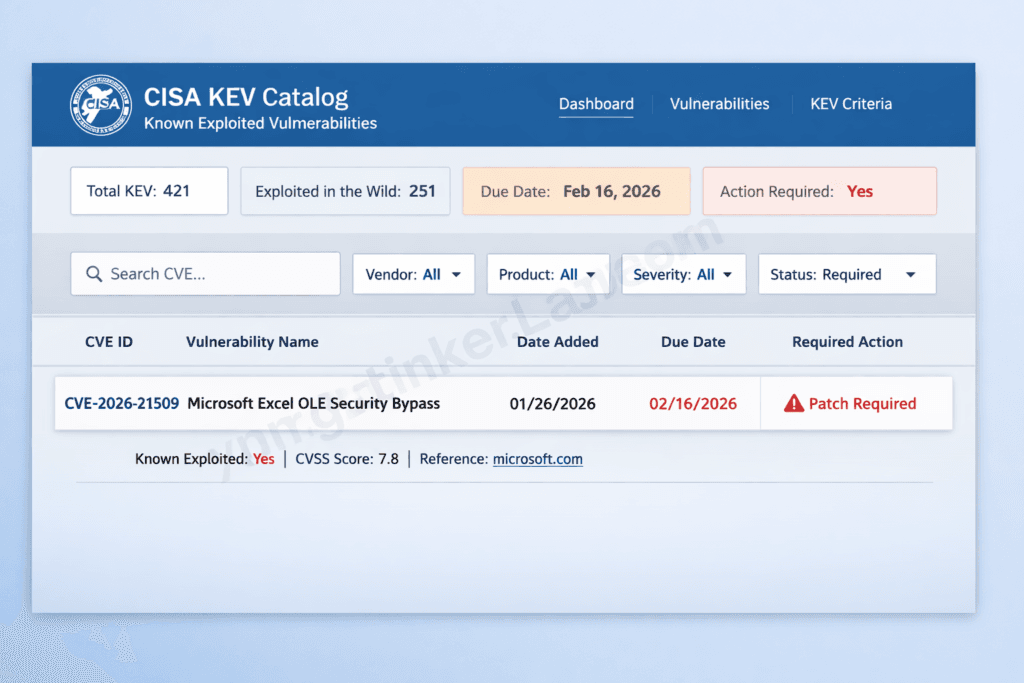
CISA listed CVE-2026-21509 in its Known Exploited Vulnerabilities (KEV) catalog the same day Microsoft patched it. That’s not routine process — that’s a signal that targeted threat actors with specific intelligence objectives were already inside the blast radius.
If your organization sends, receives, or previews Microsoft Office documents from any external party — a client, a vendor, a contractor — you have skin in this game. And if you’ve deployed Copilot, the second flaw means your AI assistant may be the attack vector nobody in your SOC is watching.
The Excel zero-day does not exist in isolation. May 2026 has produced a rare and dangerous convergence — simultaneous unpatched zero-days across both the Windows and Linux stacks. While this CVE targets Excel’s parsing layer, the Linux ecosystem is simultaneously carrying CVE-2026-31431, a 732-byte kernel exploit that achieves root privilege escalation on every distribution shipped since 2017 with no official patch in production. Security teams managing mixed infrastructure cannot treat these as separate incidents — they represent a compounding exposure window demanding parallel remediation tracks. Our full technical breakdown of the Linux zero-day exploit 2026 covers the detection, mitigation, and patch timeline for the kernel-side of this month’s dual-platform crisis. How AI bug hunters are reshaping open-source security.
What Is the Excel Zero-Day Vulnerability 2026? (CVE-2026-21509 Explained)
CVE-2026-21509 is a Microsoft Office Security Feature Bypass vulnerability (CVSS 7.8) that lets attackers circumvent the OLE/COM protection layer built into Office documents — and execute malicious code on the victim’s machine without triggering the safeguards Microsoft specifically designed to prevent exactly that. Active exploitation was confirmed before a public patch existed, which is the defining characteristic of a true zero-day.
To understand why this works, you need to understand what OLE and COM actually do. Object Linking and Embedding (OLE) is the framework Microsoft built to let different applications share data — it’s why you can embed a live Excel table inside a Word document, or drop a PowerPoint slide into an email. Component Object Model (COM) sits underneath OLE as the underlying communication protocol between those objects. Office maintains a blocklist of COM/OLE objects it considers too dangerous to execute inside a document. CVE-2026-21509 exploits CWE-807 — “Reliance on Untrusted Inputs in a Security Decision” — which means Office makes its trust determination based on data that an attacker can manipulate. The flaw tricks the validation process into treating a dangerous embedded object as harmless, and from there, arbitrary code execution follows.
One detail that competing coverage frequently muddles: the Preview Pane is not an attack vector here. The target must actually open the file. That distinction matters for detection modeling — it means user behavior (opening a document from an external sender) is a required precondition, which gives defenders a behavioral tripwire to exploit.
Microsoft confirmed exploitation before the patch dropped, and CISA added CVE-2026-21509 to the KEV catalog simultaneously with Microsoft’s emergency disclosure on January 26, 2026. No public proof-of-concept was available at that point — which is cold comfort, because the window between patch release and the first reverse-engineered PoC tends to close in days, not weeks.
The Second Threat — CVE-2026-26144 and the Copilot Agent Attack
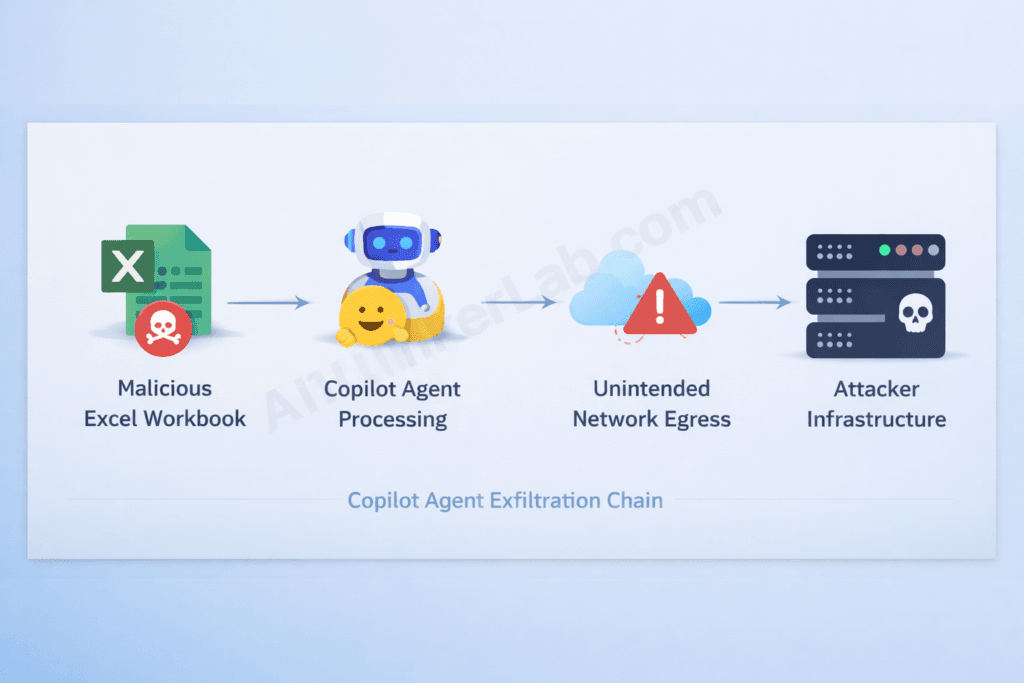
Here’s the part that most patch advisories gloss over: a cross-site scripting bug in a spreadsheet application should be a medium-severity headache at worst. In 2026, it’s a zero-click corporate data exfiltration pipeline — because Excel now ships with an AI agent that has network access.
CVE-2026-26144 is classified as a Microsoft Excel Information Disclosure vulnerability with a CVSS score of 7.5. The root cause is CWE-79 — improper neutralization of input during web page generation, the textbook definition of cross-site scripting. What makes it extraordinary isn’t the bug itself. It’s the consumer.
The attack chain works like this: an attacker crafts a workbook containing a malicious XSS payload. Excel processes that workbook — and triggers Copilot Agent mode. Because Copilot Agent operates with network egress permissions (it needs them to function), the XSS payload causes the agent to route data outbound through unintended network connections. The spreadsheet’s contents — financial models, HR records, M&A data, operational details — leave the environment without a single click from the target. No privilege escalation required. No user interaction at all.
Zero Day Initiative’s Dustin Childs, covering the March 2026 Patch Tuesday release, called this “a fascinating bug” and flagged it as “an attack scenario we’re likely to see more often.” That’s an understatement with significant strategic weight.
What CVE-2026-26144 actually represents is an inflection point where document security and AI agent security are no longer separate disciplines. Historically, XSS in an Office application was an application-layer risk — scoped to the document renderer, bounded by what the document could do. Copilot Agent blows that boundary open. The document is no longer the endpoint. The agent is.
This is the threat class nobody in traditional endpoint security was built to address: agentic consumers that inherit and amplify document-layer vulnerabilities, converting low-interaction risks into fully automated attack pipelines. CVE-2026-26144 isn’t an outlier — it’s the proof of concept for a new category of enterprise attack.
Why the Excel Zero-Day Vulnerability 2026 Is More Dangerous Than Its CVSS Score Suggests
The honest answer to “how bad is CVE-2026-21509?” is: considerably worse than a 7.8 CVSS score implies. Here’s why that number undersells the real exposure.
1. The installed base problem. Microsoft Office runs on over one billion devices globally. CVSS scores are calculated at the vulnerability level — they don’t compound for ubiquity. A moderate flaw in software that sits on every corporate workstation on the planet is categorically different from the same flaw in a niche application, even if the raw score is identical.
2. Document trust is a social engineering accelerant. Excel files are everyday business communication. Employees open spreadsheets from partners, clients, and vendors dozens of times a day without suspicion. An attacker doesn’t need to craft an elaborate pretense — “Q1 forecasts from Vendor X.xlsx” is all the social engineering required.
3. No Preview Pane trigger means fewer detection signals. Several recent Office CVEs trigger via the Preview Pane, which gives EDR tools a behavioral signal before the user even opens the file. CVE-2026-21509 requires the file to be opened — but that also means detection logic that fires on Preview Pane rendering won’t catch this attack at all.
4. AI agent integration multiplies the blast radius. CVE-2026-26144 demonstrates that a document opened by Copilot Agent creates a network-egress exposure that didn’t exist in pre-AI Office environments. Your attack surface is no longer just the machine that opens the file.
5. CISA KEV listing is an APT signal. CISA adds vulnerabilities to the Known Exploited Vulnerabilities catalog only when it has evidence of real-world exploitation. Simultaneous listing with the patch disclosure — before any public PoC — points toward sophisticated, targeted threat actors who had this exploit before Microsoft’s own security teams could get a fix out.
6. The PoC window is closing. The absence of a public proof-of-concept at disclosure time provides organizations a narrow remediation runway. Security researchers routinely reverse-engineer emergency patches within days. Every hour between patch release and full deployment is an hour that window is shrinking.
Who Is Being Targeted? Attack Vectors and Threat Actor Profile
Microsoft has not publicly attributed CVE-2026-21509 exploitation to a named threat group. What it has confirmed is that the attacks are targeted — not the indiscriminate spray of commodity malware campaigns. That profile points toward nation-state actors or sophisticated financially motivated groups with specific intelligence objectives, not opportunistic ransomware operators scanning the internet for unpatched systems.
That matters for risk prioritization. If you’re a mid-market manufacturer with no government contracts, your risk profile differs from a defense contractor or a financial institution — though both are meaningfully exposed.
The realistic delivery vectors, as documented by Orca Security and Microsoft’s MSRC advisory, break down into three primary channels:
- Spear-phishing with a crafted attachment. The attacker sends a targeted email with a weaponized Excel, Word, or PowerPoint file. The document appears legitimate — budget templates, contract attachments, regulatory filings — and exploits the user’s professional routine of opening documents from external contacts.
- Shared network drives and collaboration repositories. A malicious file planted on a shared drive, SharePoint library, or collaboration platform (Teams, Confluence, OneDrive) gets opened by an internal user. No email filter catches it because it didn’t arrive via email.
- Server-side document rendering services. Web applications or mail clients that render Office document previews server-side can trigger the exploit without the end user’s machine ever directly executing the payload.
The Hidden Attack Vector in Excel That Bypasses Your Email Gateway
The third vector deserves specific attention: any system that renders or previews Office documents server-side — including some enterprise email gateways — may process malicious content before the payload ever reaches an end-user device. This category of attack bypasses endpoint detection entirely and lands in infrastructure nobody was watching for Office CVEs.
For CVE-2026-26144, the attack surface is broader still. Network access is the only technical requirement. Any environment where Copilot Agent can reach a crafted workbook — via email attachment, cloud storage sync, or collaborative editing — is potentially in scope.
Patching CVE-2026-21509 closes the document-layer entry point. But the deeper strategic question CVE-2026-26144 surfaces — what happens when AI tools become operational weapons — already has a confirmed, real-world answer. Between December 2025 and mid-February 2026, a single threat actor leveraged Anthropic’s Claude Code and OpenAI’s GPT-4.1 to breach nine Mexican government agencies, exfiltrating hundreds of millions of citizen records while Claude Code autonomously generated and executed roughly 75% of all remote commands during the intrusion. The attack didn’t rely on exotic zero-days or nation-state infrastructure — it relied on commercial AI tools your organization likely already pays for. Understanding exactly how attackers weaponize ChatGPT and Claude to compress attack timelines, bypass guardrails, and scale operations that previously required entire threat actor teams is no longer optional threat intelligence — it’s operational context for every security leader reading this. Our full breakdown of the mechanics, documented case evidence, and defensive countermeasures is here: Hackers Use ChatGPT and Claude to Build Cyberattacks in 2026.
How to Protect Your Business from the Excel Zero-Day Vulnerability 2026
Applying Microsoft’s patch is the single most important action your organization can take — and the specific steps depend on which version of Office you’re running. Here’s the version-stratified remediation path.
Step 1 — Microsoft 365, Office 2021, and LTSC 2024 You’re automatically protected via a service-side change Microsoft deployed on January 26, 2026. But “automatically protected” doesn’t mean “immediately protected.” The fix requires all Office applications to be restarted before it takes effect. That means Word, Excel, Outlook, and PowerPoint — all of them. Push a restart enforcement policy through Microsoft Intune or your endpoint management console if you can’t rely on users to do it manually.
Step 2 — Office 2016 and Office 2019 No automatic protection exists for these versions. You must apply registry key modifications under HKEY_LOCAL_MACHINE\SOFTWARE\Microsoft\Office\16.0\Common\COM Compatibility\ to block the vulnerable COM object class. Before touching the registry: back it up. Exit all Office applications first. Microsoft’s MSRC advisory includes the exact registry path and the CLSID values to block — follow that documentation precisely, as errors here can disable legitimate Office functionality.
Step 3 — CVE-2026-26144 (Copilot Agent flaw) Apply the March 2026 cumulative update from Patch Tuesday. Beyond patching, audit your Copilot Agent configuration: restrict outbound network egress to explicitly allowlisted domains, and disable agent access to file sources you don’t control. Microsoft deployed a server-side fix, but your egress controls are a defense-in-depth layer that matters if a similar flaw surfaces in a future release.
Step 4 — Process and policy changes Subscribe to CISA KEV catalog alerts so your team gets immediate notification when confirmed exploited vulnerabilities land. Review your external document intake workflows — who receives attachments from outside the organization, through which channels, and with what automated scanning in place. If those answers are unclear, that gap is your real risk exposure.
Step 5 — Detection Microsoft’s advisory identifies a specific behavioral indicator of compromise: anomalous network connections initiated by EXCEL.EXE, WINWORD.EXE, or POWERPNT.EXE to unknown external hosts. If your EDR or SIEM isn’t already alerting on Office process outbound connections to non-Microsoft domains, build that rule today. It’s also a retroactive forensics signal — run it against your historical logs to determine whether exploitation preceded your patch deployment.
CVE-2026-21509 vs. CVE-2026-26144: Two Excel Threats, Two Different Risks
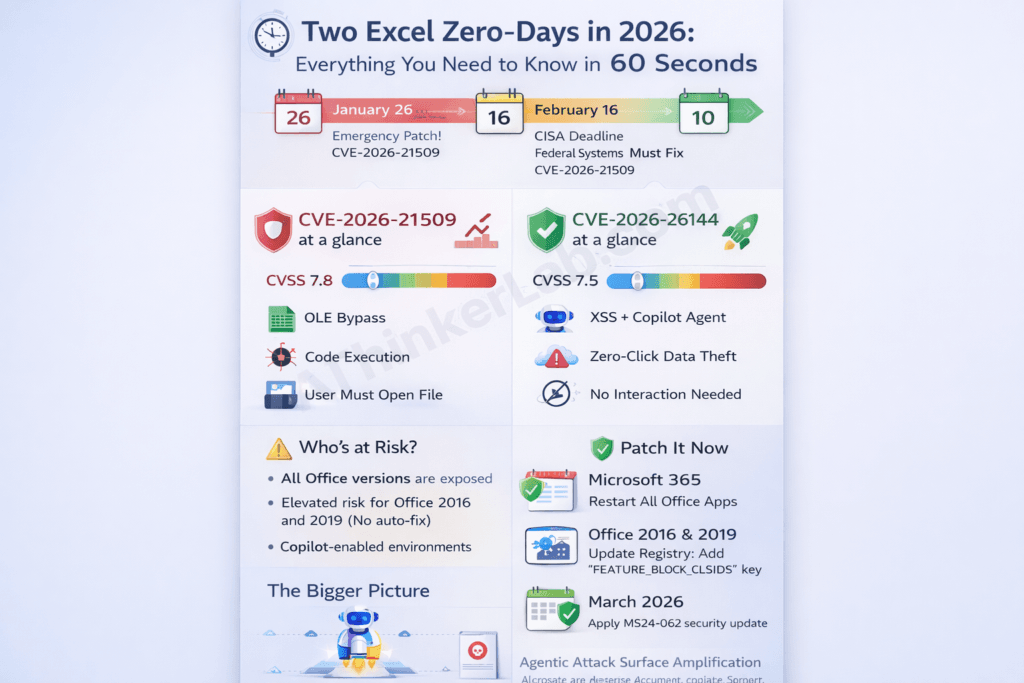
Both vulnerabilities exploit Office’s document-processing architecture — but they operate through entirely different mechanisms, carry different exploitation requirements, and demand different organizational responses.
| Attribute | CVE-2026-21509 | CVE-2026-26144 |
|---|---|---|
| Disclosure Date | January 26, 2026 | March 10, 2026 |
| CVSS Score | 7.8 (High) | 7.5 (High) |
| Vulnerability Type | Security Feature Bypass (OLE/COM) | Information Disclosure (XSS) |
| CWE Classification | CWE-807 | CWE-79 |
| Attack Vector | Crafted Office document | Crafted workbook + Copilot Agent |
| User Interaction Required | Yes (open file) | No (zero-click) |
| Active Exploitation Confirmed | Yes | Not confirmed at patch time |
| CISA KEV Listed | Yes | No (at time of writing) |
| Patch Type | Emergency out-of-band | Standard Patch Tuesday |
| Auto-Protected (M365/2021) | Yes (restart required) | Yes (server-side fix) |
| Manual Action Required | Office 2016/2019 registry keys | Apply March 2026 cumulative update |
| Primary Risk | Code execution, persistence, lateral movement | Data exfiltration, intellectual property theft |
Reading this table side by side makes the layered threat picture clear. CVE-2026-21509 is the legacy-trust attack — it exploits the institutional habit of opening Office documents from external parties, a behavior too embedded in business operations to eliminate. CVE-2026-26144 is the next-generation attack — it requires no user habit to exploit at all.
Organizations facing both simultaneously need layered defense postures, not sequential patch queues. Patching one without urgency on the other leaves a fully functional attack surface intact.
The AI Attack Surface Problem Nobody Is Talking About
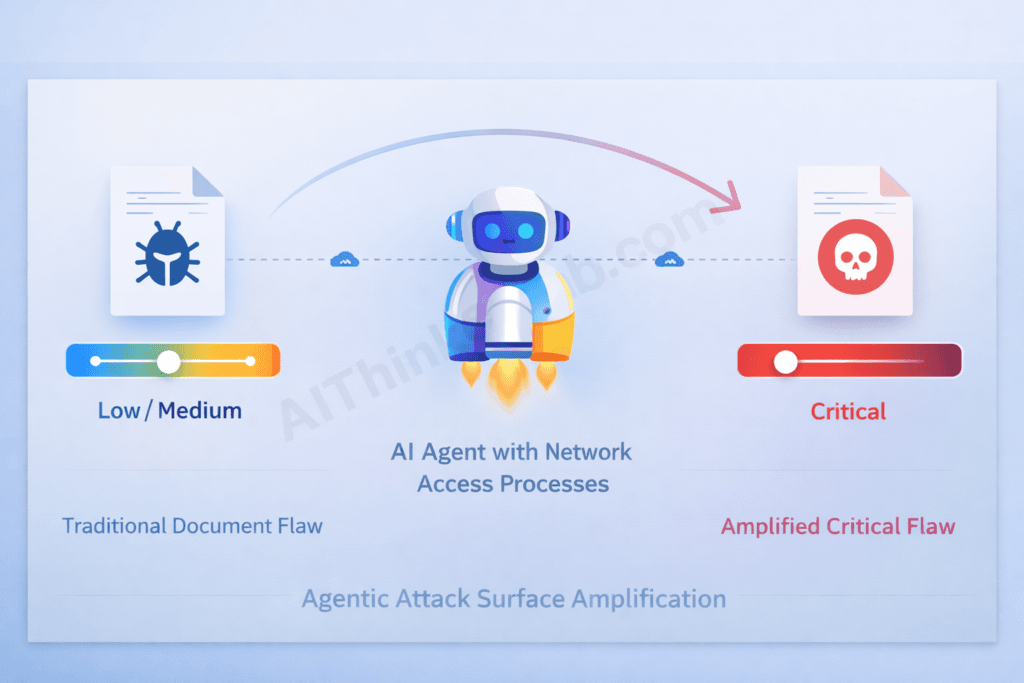
CVE-2026-26144 is not an anomaly. It’s the opening case study for a threat category the security industry doesn’t have a clean name for yet.
Call it Agentic Attack Surface Amplification: the phenomenon where traditional document vulnerabilities — historically rated Low or Medium because their exploitability depended on user interaction and bounded application permissions — are reclassified as High or Critical the moment an AI agent with network or API access begins processing those documents.
Understanding what permissions Copilot Agent operates under — and why those instructions are invisible to the users whose data they govern — is the subject of our investigation into the hidden instruction layer governing how AI agents like Copilot interpret and act on the content they process.
The mechanism is structural, not coincidental. AI agents are built to act on document content. That’s their function. They read files, interpret data, make API calls, send requests, and route outputs — autonomously, at speed, and often without a human reviewing individual actions. When you put an agent with those capabilities in front of a document containing a malicious payload, the agent becomes the exploit delivery mechanism. It doesn’t “get hacked” — it executes its designed function against content that was engineered to abuse that function.
This amplification mechanism isn’t confined to the document layer — our audit of the same AI trust amplification pattern generating Critical vulnerabilities in AI-built production applications documents how the same structural failure produces a different attack surface in AI-generated code.
Zero Day Initiative flagged this pattern explicitly in its March 2026 coverage: the attack scenario demonstrated by CVE-2026-26144 is one “we’re likely to see more often.” The parallel CVE-2026-26030 — a CVSS 9.9 flaw in Microsoft Semantic Kernel’s InMemoryVectorStore, the AI orchestration framework powering many Copilot integrations — confirms that the AI framework layer itself is becoming a high-value attack surface. A 9.9 in the infrastructure that handles RAG (Retrieval Augmented Generation) queries means the data retrieval layer your agents depend on is exploitable for remote code execution.
The arrival of XBOW — a fully autonomous AI penetration testing agent that earned a CVE credit (CVE-2026-21536, CVSS 9.8) for discovering a critical Windows vulnerability without human guidance — adds a further dimension: AI is now both the attack surface and, increasingly, the attacker.
What this demands from security leaders isn’t just another patch cycle. It’s a new governance practice: AI agent permission governance — a dedicated, enforceable policy defining what data agents are permitted to read, what actions they can take, what external domains they can contact, and what constitutes an anomalous agent behavior pattern. This doesn’t exist as a distinct practice in most enterprise security programs today. It needs to.
The threat doesn’t stop at the document layer. While CVE-2026-26144 demonstrates how a malicious workbook can quietly weaponize Copilot Agent to exfiltrate data, a parallel attack class is targeting the AI tools your developers use to build and process those workbooks in the first place. In Q1 2026, supply-chain security firms including Socket.dev and Phylum documented a wave of trojanized packages impersonating Anthropic’s Claude Code CLI across PyPI, npm, and unauthorized GitHub repositories — with threat actors timing fake package publications to the exact 24–48 hour window following legitimate Anthropic product announcements. If your organization has integrated AI coding assistants into its development or document-processing pipelines, understanding how attackers exploit that trust is the logical next step. Our full breakdown of the attack mechanics, verification steps, and detection indicators is covered in Malicious Claude Code Downloads: 7 Proven Ways to Stay Safe (2026).
What IT Teams and Security Leaders Should Do Right Now
Beyond patching, six organizational actions materially reduce exposure from both CVEs. These are sequenced by urgency, not complexity.
- Verify patch deployment status across every Office version in your environment. Run a version audit through Microsoft Intune, SCCM, or your endpoint management console. Assume you have Office 2016 or 2019 instances you’re not tracking — shadow IT in larger enterprises almost guarantees it. Those unmanaged endpoints are your highest-risk nodes.
- Add both CVEs to your vulnerability tracking dashboard with CISA KEV priority weighting. CVE-2026-21509 already carries KEV status. If CVE-2026-26144 receives KEV classification post-publication, your tracking system should trigger an immediate escalation response — not a routine patch queue entry.
- Audit Copilot Agent permissions before your next deployment. This isn’t optional maintenance — it’s a security architecture decision. Restrict agent network egress to explicitly allowlisted domains. Implement sandbox file processing so agents don’t operate on untrusted documents with full network access. If you can’t enumerate what your agents are allowed to do and where they’re allowed to send data, you don’t have a Copilot security posture — you have hope.
- Deploy behavioral detection rules for anomalous Office process network connections.
EXCEL.EXE,WINWORD.EXE, andPOWERPNT.EXEinitiating connections to non-Microsoft external hosts is a confirmed exploitation indicator. This rule should be live in Microsoft Defender for Endpoint or your SIEM before you finish reading this article. - Brief employees on the social engineering vector — with specifics. Generic “be careful with attachments” awareness doesn’t change behavior. Tell people specifically: a crafted spreadsheet from a known vendor contact is a realistic attack scenario right now. If an Excel file is unexpected, verify through a separate channel before opening it.
- Evaluate your Office 2016/2019 upgrade path. The manual registry key requirement for these versions isn’t just a one-time inconvenience — it’s a preview of what every future critical Office CVE will look like for these legacy environments. If you’re managing a significant fleet of legacy Office installations, the operational overhead of manual mitigations is an argument the CFO should hear.
The New Normal: When Your Spreadsheet Becomes a Security Risk
Patching CVE-2026-21509 and CVE-2026-26144 is the right immediate action. But treating these two vulnerabilities as a patch-and-move-on event misses what they actually signal.
The OLE bypass flaw is a reminder that Office document trust — the institutional reflex to open a spreadsheet from a recognized contact — is a permanent attack surface. That trust isn’t going away. Office documents are too deeply embedded in business operations to treat as untrusted by default. Attackers know this, which is why Office document-based attacks have persisted as a primary enterprise intrusion vector for over a decade and won’t stop in 2026.
The Copilot Agent flaw is something different in kind. It marks the moment when AI agent integration became an active ingredient in enterprise attack chains, not a theoretical risk. Document vulnerabilities that once required user interaction to exploit now have an autonomous executor with network access. The blast radius has changed permanently.
Security programs built for the pre-AI Office era weren’t designed to answer a question that now has genuine operational urgency: If your AI agents can read files and make network requests, what is your explicit policy for what data they’re permitted to handle, what actions they’re authorized to take, and how do you enforce that boundary when an attacker deliberately tests it?
That question doesn’t have a patch. It has an organizational answer — or it doesn’t, and the next CVE with an agentic amplification angle finds an environment that still isn’t ready for it.
The Excel CVE does not exist in isolation — it is part of a much larger wave of critical vulnerabilities that AI systems are actively uncovering in 2026. Our monthly roundup of AI-discovered bugs in 2026 tracks the most significant flaws across software, firmware, and cloud platforms — showing how automated discovery is reshaping the vulnerability landscape far beyond any single CVE.
How to Protect Yourself / Mitigation: From Awareness to Enforcement
The “How to Protect Your Business” and “What IT Teams Should Do Right Now” sections above lay out the strategic response. This section provides the operational layer — exact commands, ready-to-deploy detection queries, Copilot Agent hardening steps in the Microsoft 365 admin center, instructions for finding the unmanaged Office endpoints the article warns about, and an incident response protocol for organizations that may have been inside the exploitation window before patching. Both CVEs are covered separately, because their attack surfaces and remediation paths are genuinely different.
Step 0 — Confirm Your Exact Patch Status Before Anything Else
You cannot remediate what you haven’t verified. Run this PowerShell on any Windows endpoint to confirm the installed Office version and build number:
# Check installed Office version and build
$officeReg = "HKLM:\SOFTWARE\Microsoft\Office\ClickToRun\Configuration"
if (Test-Path $officeReg) {
    $version = (Get-ItemProperty $officeReg).VersionToReport
    Write-Host "Microsoft 365 / Click-to-Run build: $version"
} else {
    # MSI-based installs (Office 2016/2019)
    Get-WmiObject -Class Win32_Product |
    Where-Object { $_.Name -like "*Microsoft Office*" } |
    Select-Object Name, Version | Format-Table -AutoSize
}
Cross-reference the build number against Microsoft’s published fix: for CVE-2026-21509, the minimum protected build for Microsoft 365 Apps is the January 26, 2026 update. Any build dated earlier has not received the service-side fix — even if it installed since then without a user-triggered update. Confirm Office apps have been fully restarted after that date; an un-restarted instance of Excel running since before January 26 is not protected regardless of what the version string reports.
To find every Office installation across your fleet via Microsoft Intune or Endpoint Configuration Manager:
# Run via Intune PowerShell script deployment or ConfigMgr
Get-ChildItem "HKLM:\SOFTWARE\Microsoft\Office" -ErrorAction SilentlyContinue |
    ForEach-Object { $_.Name } |
    Where-Object { $_ -match "\d+\.\d" }
Flag any machines returning 16.0 (Office 2016 or 2019) — those require the manual registry intervention below.
Exact Registry Fix for Office 2016 and Office 2019
The article correctly identifies these versions as unprotected by Microsoft’s automatic service-side change and requiring manual registry key modifications. Here is the exact remediation.
The article notes that the fix involves blocking the vulnerable COM object CLSID under HKEY_LOCAL_MACHINE\SOFTWARE\Microsoft\Office\16.0\Common\COM Compatibility\. Apply this via PowerShell (run as Administrator) or deploy as a GPO/Intune script across your managed fleet:
# Back up the existing COM Compatibility key first
$backupPath = "C:\OfficeCOMBackup_$(Get-Date -Format 'yyyyMMdd').reg"
reg export "HKLM\SOFTWARE\Microsoft\Office\16.0\Common\COM Compatibility" $backupPath /y
Write-Host "Registry backup saved to $backupPath"

# Apply the COM object restriction (replace with the CLSID from Microsoft's MSRC advisory)
$regPath = "HKLM:\SOFTWARE\Microsoft\Office\16.0\Common\COM Compatibility\{CLSID-FROM-MSRC-ADVISORY}"
if (-not (Test-Path $regPath)) {
    New-Item -Path $regPath -Force | Out-Null
}
Set-ItemProperty -Path $regPath -Name "Compatibility Flags" -Value 0x400 -Type DWord
Write-Host "COM object restriction applied. Close and reopen all Office applications."
Critical: Pull the exact CLSID value from Microsoft’s MSRC advisory for CVE-2026-21509 — do not guess or estimate it. An incorrect CLSID blocks a different COM object entirely and leaves the vulnerable one active. Verify the change took effect by attempting to load the blocked object class in a test document on a non-production machine before fleet-wide deployment.
Confirm no legitimate Office functionality broke after applying the restriction before rolling out broadly. Test Excel data connections, embedded objects in Word, and PowerPoint OLE-linked charts — the three most likely areas to notice a disruption if the wrong CLSID is targeted.
Discovering Unmanaged Office Endpoints — Shadow IT Fleet Sweep
The article warns: “Assume you have Office 2016 or 2019 instances you’re not tracking.” Here is how to find them before an attacker does.
Run an Nmap-based or PowerShell-based SMB fingerprint across your network to identify Windows hosts, then cross-reference against your endpoint management enrollment list:
# Compare AD computer objects against Intune/MECM enrolled devices
# (Requires AzureAD and MSGraph PowerShell modules)
$adComputers = Get-ADComputer -Filter * | Select-Object -ExpandProperty Name
$intuneDevices = Get-MgDeviceManagementManagedDevice | Select-Object -ExpandProperty DeviceName
$unmanaged = Compare-Object $adComputers $intuneDevices |
    Where-Object { $_.SideIndicator -eq "<=" } |
    Select-Object -ExpandProperty InputObject
Write-Host "Potentially unmanaged endpoints: $($unmanaged.Count)"
$unmanaged | Export-Csv "unmanaged_endpoints.csv" -NoTypeInformation
Any machine that appears in Active Directory but not in your endpoint management console is potentially running an unpatched, unmonitored Office version. Prioritize physical investigation of those nodes — they are your highest-risk exposure points for both CVEs.
Copilot Agent Hardening — Specific M365 Admin Center Steps
CVE-2026-26144’s zero-click exfiltration path runs entirely through Copilot Agent’s network permissions. The article correctly states that restricting egress and auditing agent access is mandatory — here is exactly how to do it in the Microsoft 365 admin center.
Restrict Copilot Agent outbound network connections:
- In the Microsoft 365 Admin Center, navigate to Settings → Copilot → Agent settings.
- Under Network egress policy, switch from “Allow all” to “Allowlist only” and enumerate the specific Microsoft-owned domains your agents legitimately need (
graph.microsoft.com,*.sharepoint.com,*.microsoft.com). Remove any wildcard entries. - Under File access scope, set agents to “Managed locations only” — this prevents agents from processing files synced from external or personal storage, which is the delivery path for a crafted workbook from an untrusted source.
Via PowerShell (Microsoft Graph API):
# Requires Microsoft.Graph PowerShell module
Connect-MgGraph -Scopes "Policy.ReadWrite.All"

# Review current Copilot agent policy
Get-MgPolicyPermissionGrantPolicy | Where-Object { $_.Id -like "*copilot*" }

# Restrict agent to internal tenant content only
# Follow Microsoft's Copilot governance documentation for the specific
# Set-MgPolicyCopilotAgentScope cmdlet parameters for your tenant configuration
Disable Copilot Agent access to externally-sourced files for untrusted file processing:
In SharePoint Admin Center → Settings → Copilot access, set the document processing scope to exclude external sharing locations and disable agent processing for files flagged as externally originated by Microsoft’s sensitivity labeling. This directly cuts the delivery path for a malicious workbook reaching the agent without a user opening it.
Enable Copilot audit logging so any anomalous agent network activity is captured:
# Enable unified audit logging for Copilot events
Set-AdminAuditLogConfig -UnifiedAuditLogIngestionEnabled $true
# Confirm Copilot-specific event categories are included
Search-UnifiedAuditLog -StartDate (Get-Date).AddDays(-7) -EndDate (Get-Date) `
    -RecordType CopilotInteraction -ResultSize 10
Detection Rules You Can Deploy Today
The article correctly identifies anomalous Office process network connections as the primary behavioral indicator for CVE-2026-21509. Here are deployable KQL queries for Microsoft Sentinel and Defender for Endpoint.
KQL — Anomalous Office process outbound connections (live detection):
// Microsoft Sentinel / Defender for Endpoint — Advanced Hunting
DeviceNetworkEvents
| where InitiatingProcessFileName in ("EXCEL.EXE", "WINWORD.EXE", "POWERPNT.EXE")
| where RemoteUrl !endswith ".microsoft.com"
    and RemoteUrl !endswith ".office.com"
    and RemoteUrl !endswith ".office365.com"
    and RemoteUrl !endswith ".microsoftonline.com"
| where ActionType == "ConnectionSuccess"
| project Timestamp, DeviceName, InitiatingProcessFileName,
          RemoteUrl, RemoteIP, RemotePort, InitiatingProcessCommandLine
| order by Timestamp desc
KQL — Retroactive hunt for prior exploitation (run against 90-day log history):
// Hunt for historical exploitation indicators before patch deployment date
DeviceNetworkEvents
| where Timestamp between (datetime(2026-01-01) .. datetime(2026-01-26))
| where InitiatingProcessFileName in ("EXCEL.EXE", "WINWORD.EXE", "POWERPNT.EXE")
| where RemoteUrl !endswith ".microsoft.com"
    and RemoteUrl !endswith ".office.com"
| summarize
    ConnectionCount = count(),
    UniqueDestinations = dcount(RemoteUrl),
    Destinations = make_set(RemoteUrl)
    by DeviceName, InitiatingProcessFileName
| where ConnectionCount > 2
| order by ConnectionCount desc
This retroactive query is specifically important: CVE-2026-21509 was confirmed exploited before the January 26 patch. Any organization that applied the patch promptly but has not run a retrospective hunt is operating without knowledge of whether they were inside the exploitation window. Run this against your full log retention period.
KQL — CVE-2026-26144 Copilot Agent anomalous egress (post-exploitation indicator):
// Detect Copilot Agent network calls to non-Microsoft destinations
CloudAppEvents
| where Application == "Microsoft Copilot"
| where ActionType == "NetworkRequest"
| where parse_url(RawEventData.DestinationUrl).Host !endswith "microsoft.com"
    and parse_url(RawEventData.DestinationUrl).Host !endswith "office.com"
| project Timestamp, AccountDisplayName, AccountUpn,
          RawEventData.DestinationUrl, RawEventData.FilePath
| order by Timestamp desc
Hardening the Document Intake Pipeline
The article identifies three delivery vectors for CVE-2026-21509: spear-phishing attachments, shared drives, and server-side document rendering services. Each requires a specific control.
For email delivery — route all inbound Office attachments through dynamic analysis: Configure your email gateway (Defender for Office 365, Proofpoint, Mimecast) to submit all .xlsx, .xls, .xlsm, .docx, .doc, .pptx, and .ppt files from external senders to sandbox detonation before delivery. In Microsoft Defender for Office 365:
- Navigate to Security & Compliance → Threat Management → Safe Attachments
- Set policy action to “Block” during analysis, not “Monitor”
- Enable “Apply the Safe Attachments policy to messages sent within the organization” for internal document circulation from accounts that receive external mail
For shared drives — enable sensitivity scanning on SharePoint and OneDrive: Apply Microsoft Purview Information Protection policies to flag externally-sourced files before they’re accessible to Copilot Agent or other internal consumers. Any file that entered the environment from outside your tenant boundary should carry an “External Origin” label that restricts agent processing until reviewed.
For server-side rendering — the hidden attack vector the article flags: Any web application or email system that renders Office document previews server-side (Exchange Web Services document preview, some CRM attachment viewers, browser-based Office Online renderers) is potentially in scope for CVE-2026-21509 exploitation on the server infrastructure, not the end-user device. Audit every service in your environment that processes or renders Office files programmatically. Patch those server-side Office SDKs and rendering libraries using the same Office build timeline as desktop endpoints — they are not auto-updated on the same cadence.
For Individual Employees — Personal Protection Checklist
The article’s existing guidance is written for IT teams. Here is what individual employees need to know and do.
- Verify your Office version is current. Open any Office application → File → Account → About [App]. The build number and date should reflect an update after January 26, 2026. If it doesn’t, contact IT immediately — and do not open any Office files from external sources until it does.
- Restart Excel, Word, and PowerPoint. Microsoft 365’s service-side fix for CVE-2026-21509 requires all Office applications to be fully closed and reopened. Leaving Excel running for days without a restart is a genuine risk factor for this specific vulnerability.
- Verify unexpected Office files through a separate channel before opening. The article’s social engineering vector is precise: a realistic-looking spreadsheet from a known contact. If a file arrives unexpectedly — even from someone familiar — send a quick message via a different channel (Teams, Slack, phone) asking if they sent it before opening. This step defeats the entire CVE-2026-21509 delivery chain.
- Do not open Office files from shared drives unless you expected them. The article identifies shared network drives and SharePoint libraries as a delivery path that bypasses email filters entirely. Treat an unexpected file appearing in a shared folder with the same caution as an unexpected email attachment.
- Report anomalous Copilot behavior immediately. Because CVE-2026-26144 requires no user interaction, you may not see anything unusual. But if Copilot produces unexpected outputs, references data it shouldn’t have accessed, or generates outbound requests you didn’t initiate, report it to your IT security team. Don’t dismiss it as an AI quirk — it may be the signature of the zero-click exfiltration chain in progress.
Incident Response — If You Were in the Exploitation Window
If your fleet had unpatched Office 2016/2019 endpoints or un-restarted Microsoft 365 installations between CVE-2026-21509’s active exploitation and your patch deployment, follow this triage sequence.
Hour 1 — Scope the exposure window: Identify which endpoints were unpatched during the CISA KEV confirmed-exploitation period. Cross-reference against email logs to find external Office file deliveries to those machines. Any machine that (a) was unpatched and (b) received and opened an external Office file during the window is a potential compromise node.
Hour 2–4 — Hunt for persistence indicators on flagged endpoints:
# Check for scheduled tasks created by EXCEL.EXE or WINWORD.EXE processes
Get-ScheduledTask | Where-Object { $_.TaskName -notlike "Microsoft*" -and
    $_.Principal.UserId -ne "SYSTEM" } |
    Select-Object TaskName, TaskPath, @{N='Actions';E={$_.Actions.Execute}}

# Check for new registry run keys
Get-ItemProperty "HKLM:\SOFTWARE\Microsoft\Windows\CurrentVersion\Run"
Get-ItemProperty "HKCU:\SOFTWARE\Microsoft\Windows\CurrentVersion\Run"

# Look for unusual processes spawned from Office parent processes in recent logs
Get-WinEvent -LogName Security -MaxEvents 5000 |
    Where-Object { $_.Message -match "EXCEL.EXE|WINWORD.EXE" -and
                   $_.Id -eq 4688 } |
    Select-Object TimeCreated, Message | Export-Csv "office_spawn_audit.csv"
Hour 4–24 — Cyber insurance and regulatory clock: If exploitation is confirmed or strongly suspected, call your cyber insurance carrier before engaging an external IR firm — most policies require pre-authorization for covered IR services, and using a non-preferred vendor can affect claim eligibility. Begin the regulatory notification clock assessment: GDPR Article 33 gives 72 hours from confirmed breach discovery; US state breach notification laws vary but most require 30–72 days for non-federal entities. Federal agencies were under a CISA-mandated February 16, 2026 deadline for CVE-2026-21509 remediation — any federal entity that missed that deadline should treat their compliance posture as compromised.
For CVE-2026-26144 post-compromise indicators: Review Copilot unified audit logs for unexpected network egress events during the March 2026 patch window. Any Copilot-initiated connection to a non-Microsoft destination during the period between the March 10 disclosure and your cumulative update installation is a forensic priority. Correlate with SharePoint access logs for the specific files the agent was processing at the time.
The Governance Gap You Need to Close Now
Every technical control in this section addresses the immediate threat from two specific CVEs. What neither patch nor registry key resolves is the structural gap the article names: AI agents inherit document trust without any explicit governance policy.
Closing that gap requires one new policy artifact that most enterprise security programs don’t yet have — an AI Agent Permission Charter. At minimum it should define: what data sources each agent deployment is authorized to read; what external domains agents are authorized to contact; what constitutes anomalous agent behavior and who is notified when it’s detected; and what the data-handling policy is for documents entering the environment from untrusted sources before they reach any agent. CVE-2026-26144 is the proof-of-concept that without this policy, every future agentic vulnerability starts with full access to your most sensitive spreadsheets and ends with silent exfiltration. The patch closes this one instance. The policy closes the category.
Immediate Mitigation Steps for System Owners
If you operate systems that may be affected:
For individuals and small teams
- Identify which of your systems run the affected software/kernel version.
- Apply the latest available vendor security patches the moment they’re released — subscribe to the official vendor advisory mailing list now.
- Until a patch is released, follow the vendor’s recommended interim mitigations (linked in their security advisory).
- Review logs for any unusual activity matching the indicators of compromise published by the security research team that disclosed this issue.
For enterprise and infrastructure teams:
- Run an asset inventory query to identify exposure across your environment.
- Prioritize internet-facing systems running the affected versions for emergency patching.
- Coordinate with your SOC / detection-engineering team to add IOC-based monitoring for indicators published by the disclosing researchers.
- Document the response in your incident-response playbook for similar future zero-day events.
- If patches will take >7 days to deploy, evaluate compensating controls (network segmentation, WAF rules, EDR detection rules).
This article does not provide proof-of-concept code, exploit payloads, or step-by-step attack instructions. For verified technical detail used in detection engineering, refer to the original vendor advisory and the security researcher’s disclosure paper.
Sources & References
- SANS Internet Storm Center — March 2026 Patch Tuesday Roundup: Independent vulnerability prioritization and detection guidance.
- Microsoft Security Response Center (MSRC) — CVE-2026-21509 Advisory: Primary technical disclosure, patch guidance, and registry key mitigation for Office 2016/2019.
- CISA Known Exploited Vulnerabilities Catalog — CVE-2026-21509: Official KEV listing with February 16, 2026 federal remediation deadline.
- Orca Security Blog — “CVE-2026-21509: Microsoft Office Zero-Day Active Exploit” (January 29, 2026): Detailed technical analysis of OLE bypass mechanism, attack paths, and IOC documentation.
- Malwarebytes Threat Intelligence Blog — “Microsoft Office zero-day lets malicious documents slip past security checks” (January 29, 2026): Plain-language explanation of OLE/COM exploit mechanism and business impact.
- Zero Day Initiative — “The March 2026 Security Update Review” (March 10, 2026): Authoritative Patch Tuesday analysis by Dustin Childs covering CVE-2026-26144, CVE-2026-26030, and the XBOW AI discovery of CVE-2026-21536.
- BleepingComputer — “Microsoft March 2026 Patch Tuesday fixes 2 zero-days, 79 flaws” (March 10, 2026): Full CVE coverage including CVE-2026-26144 critical rating and Copilot Agent attack surface analysis.
- The Register — “Critical Microsoft Excel bug weaponizes Copilot Agent for zero-click information disclosure attack” (March 10, 2026): Expert commentary on CVE-2026-26144 from Action1 vulnerability research director Jack Bicer.

Pingback: MAD Bugs Month of AI Discovered Bugs 2026: 500+ Zero-Days