TL;DR — Key Takeaways
- No official integration exists between Bonsai.js and WebGPU as of July 2026, but three architectural patterns make it viable without waiting for one.
- WebGPU is no longer experimental — Chrome 113+ (May 2023), Safari 18+ (2024), and partial Firefox support make it a real deployment target for most audiences.
- The biggest opportunity isn’t rendering — it’s offloading L-system procedural tree generation to WebGPU compute shaders, a connection almost no tutorial covers.
- Three.js WebGPURenderer (r171) is the lowest-friction bridge for developers already in the Three.js ecosystem.
- The “Rendering Surface Handoff” Framework (introduced in this article) gives you a three-question decision tree to pick the right integration pattern before writing any code.
Bonsai.js runs on WebGL. WebGPU is what WebGL is turning into. At some point you have to ask: what would it actually take to connect them?
That question started circulating seriously in developer communities sometime after Chrome shipped WebGPU in stable in May 2023 — the moment the API stopped being a spec-chaser’s hobby and became a real deployment target. By mid-2026, with WebGPU achieving Baseline 2024 status according to MDN Web Docs, the question has sharpened: not if you can wire Bonsai WebGPU integration together, but which of the available patterns makes sense for your project.
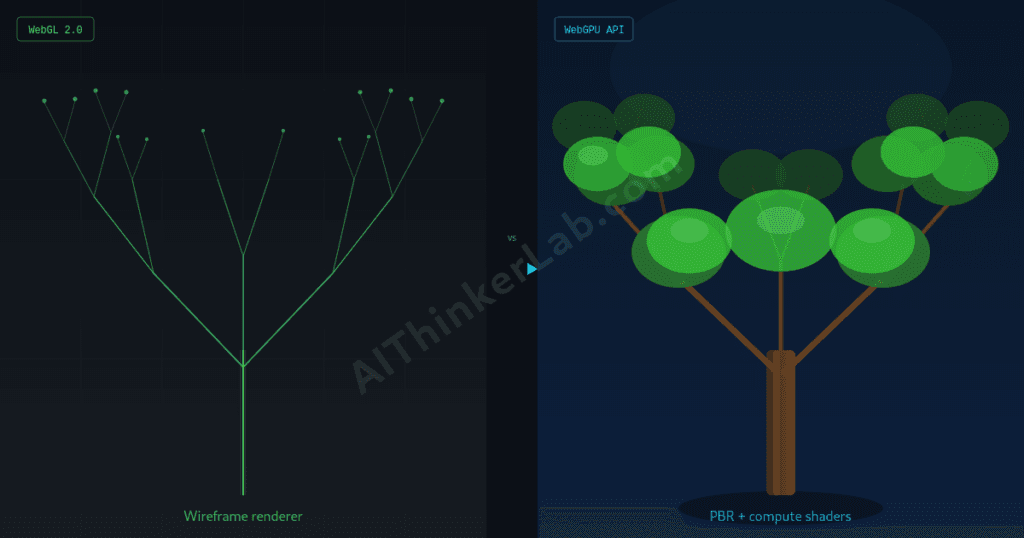
Quick disambiguation before anything else: “Bonsai” in this article means Bonsai.js, the browser-based graphics and animation library — not the Japanese tree cultivation art, not the Bonsai subscription management SaaS. And “integration” doesn’t mean a plugin you install. It means an architectural choice about how WebGPU slots into or alongside what Bonsai already does.
While WebGPU unlocks massive performance gains for 2026, it all builds on the foundational breakthrough of ultra-lightweight, client-side inference. If you haven’t experimented with this technology yet, seeing the core mechanics in action is the best place to start. Check out our previous guide to learn how to run a 1-bit Bonsai model locally in your browser—it serves as the perfect primer for understanding how these hardware-friendly, privacy-first systems operate before adding WebGPU acceleration to the mix.
Two Technologies That Don’t Know Each Other Yet
Bonsai.js is a JavaScript graphics library that renders 2D and procedural graphics in the browser, built on top of WebGL as its GPU interface. Its tree-generation capabilities rely on L-systems — the algorithmic grammar invented by botanist Aristid Lindenmayer in 1968 for modeling plant growth through recursive string rewriting. Feed it a ruleset, get a branching structure. It’s elegant, it runs client-side, and it’s built entirely on a rendering stack that predates what modern GPU APIs can do.
WebGPU is the successor to WebGL — but calling it a “successor” undersells the structural difference. WebGL is a JavaScript binding to OpenGL ES, which is a 1990s-origin API designed for rasterization. WebGPU exposes a fundamentally different abstraction: compute shaders, explicit resource management, pipeline state objects, and a command buffer model that maps directly to how Vulkan, Metal, and Direct3D 12 actually work. The single biggest capability gap is compute shaders — GPU programs that run arbitrary parallel workloads, not just graphics.
That gap is what makes the Bonsai + WebGPU question interesting. The obvious integration (replace the rendering backend) is the least interesting one.
Is WebGPU Ready Enough to Build On in 2026?
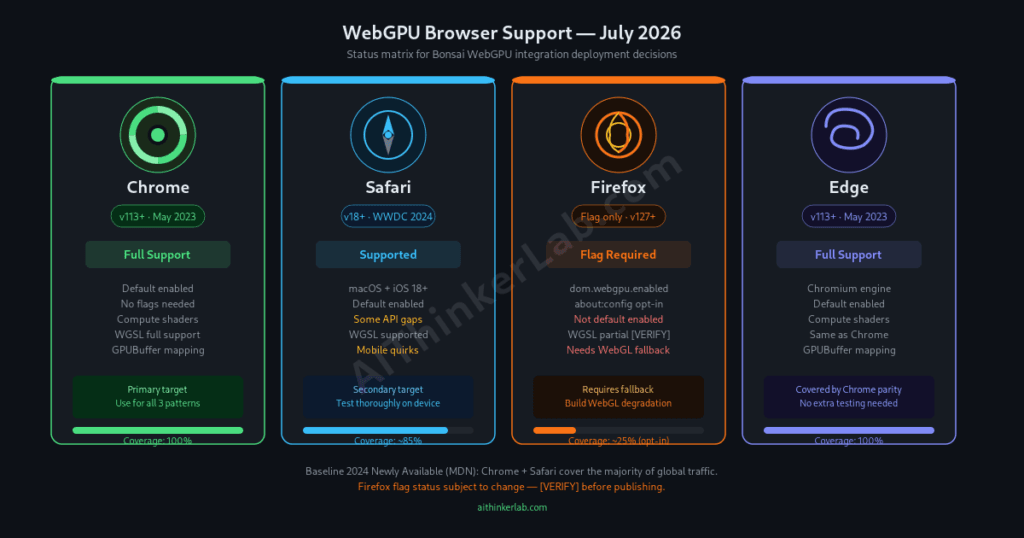
As of July 2026, WebGPU runs without polyfills in Chrome 113+ (shipped May 2, 2023), Safari 18+, Firefox 141+ (shipped with WWDC 2024 releases). According to MDN Web Docs, WebGPU reached Baseline 2024 Newly Available status, meaning the two largest browser engines ship it by default. For most web audiences, that’s sufficient coverage — though Firefox’s flag-gated status means any production deployment needs a graceful WebGL fallback.
The “wait until it’s stable” advice you’ll find in articles from 2022 is outdated. Three years of shipping in Chrome, plus Safari’s 2024 adoption, have shaken out the worst API instability. What you’re dealing with now is a maturing API with a few known rough edges, not an experimental prototype.
Where It Works Today
Chrome and Chromium-based browsers (Edge, Brave, Opera) get full support. Safari 18+ on both macOS and iOS. The combined market share of Chrome + Safari alone covers the large majority of global browser usage. For creative web applications, that’s a deployable target.
Where It Still Breaks
While desktop coverage is solid, fragmentation remains high elsewhere. Firefox users on Linux or Android still hit the flag wall unless they manually opt-in via about:config. Furthermore, Chrome on Android suffers from notorious device-specific GPU driver quirks (such as Chromium Chromium/Dawn issue trackers noting silent pipeline compilation issues and workgroup memory bugs on newer mobile chipsets like the Imagination PowerVR/Tensor architectures). Finally, the WebGPU error model catches developers off guard. Instead of WebGL’s immediate, synchronous exceptions, WebGPU handles errors entirely asynchronously through uncaptured error scopes and GPUDevice.lost promises. If a heavy compute shader triggers a hardware timeout or runs out of physical VRAM, the application fails silently until an asynchronous promise resolves—requiring a complete paradigm shift in how developers write resilient graphics code
What Does a Bonsai WebGPU Integration Actually Look Like?
A Bonsai WebGPU integration isn’t a single API call — it’s a choice between three architectural patterns: replace Bonsai’s WebGL renderer entirely with a WebGPU-native rendering pipeline (full port), run WebGPU compute shaders alongside Bonsai’s existing WebGL renderer to accelerate procedural generation (compute hybrid), or migrate Bonsai’s scene graph output into Three.js WebGPURenderer as a bridge layer. Each pattern has a different complexity ceiling and a different payoff.
Pattern 1 — Full Renderer Replacement means taking Bonsai’s scene graph and wiring it to a custom GPURenderPipeline. You’d need to rewrite shaders from GLSL to WGSL, manage your own GPUDevice, GPUCommandEncoder, and swap buffer strategy, and rebuild Bonsai’s texture and geometry upload path. It’s the most work and yields the most control. Almost nobody should start here.
Pattern 2 — Compute Hybrid leaves Bonsai’s WebGL renderer completely untouched. You add a parallel GPUDevice context, run L-system generation in a compute shader, read the geometry back to JavaScript via GPUBuffer.mapAsync(), and hand it to Bonsai’s existing pipeline. Harder to set up than it sounds (more on the cross-context complexity below), but it targets the actual performance bottleneck for large tree scenes.
Pattern 3 — Three.js WebGPURenderer Migration uses Three.js as the rendering host. Three.js r171 ships a WebGPURenderer that accepts a standard Three.js scene graph. If your Bonsai usage is generating geometry that feeds into a Three.js scene, this is the lowest-friction path — swap the renderer, adapt the Bonsai output, keep most of your existing scene code.
Can WebGPU Speed Up Procedural Tree Generation?
L-system string rewriting — the algorithm Bonsai uses to generate tree branch structures — is embarrassingly parallel at scale. Each character in an L-system string can be rewritten independently according to a production rule, which is exactly the workload profile that GPU compute shaders handle well. This is a connection most WebGPU tutorials miss entirely, because they frame WebGPU purely as a rendering API rather than a general-purpose GPU compute platform.
Aristid Lindenmayer’s 1968 formalism (later formalized in The Algorithmic Beauty of Plants by Prusinkiewicz and Lindenmayer, 1990) describes rewriting systems where a string of symbols is simultaneously replaced by applying production rules to every symbol in parallel. That parallel structure maps almost directly to a WGSL compute shader dispatch: one GPU thread per symbol, each reading from an input GPUBuffer and writing a replacement sequence to an output buffer.
Why the Parallelism Maps to Compute Shaders
A CPU running L-system generation processes symbols sequentially — or at best uses Web Workers for coarse parallelism across generation steps. A GPU compute shader can process thousands of symbols simultaneously in a single dispatch call. For a simple tree (generation depth 5–6, alphabet of 8 symbols), the CPU overhead is negligible. But for a forest of 500 trees at depth 8+, or for real-time animated growth sequences where the L-system re-evaluates every frame, the compute path starts to matter.
The catch: the output of an L-system rewrite step is variable-length. Each symbol can expand to zero or more symbols. Managing dynamic-length output on the GPU requires either a two-pass approach (first pass counts output lengths, second pass fills output) or pre-allocated worst-case buffers with a compaction step. Neither is trivial.
A Sketch of the WGSL Compute Approach
The minimum viable architecture uses two GPUBuffers — one for the current generation string encoded as u32 values, one for output — plus a small uniform buffer carrying the production rule table. A single compute shader dispatched with passEncoder.dispatchWorkgroups(ceil(stringLength / 64)) handles the rewrite in parallel.
This is exactly the kind of workload WebGPU compute was designed for. The fact that nobody has published a working Bonsai + WGSL implementation yet is an opportunity, not a warning sign.
What Are the Real Blockers for Bonsai + WebGPU Right Now?
Three blockers stand between interest and a working Bonsai WebGPU integration: Bonsai.js’s rendering abstraction is tightly coupled to WebGL contexts, WGSL has no direct production-ready transpiler from GLSL, and Firefox’s incomplete WebGPU support means any production deployment needs a tested fallback strategy on day one.
Blocker 1 — WebGL Context Coupling. Bonsai’s internal renderer creates and owns a WebGLRenderingContext. WebGPU uses a completely separate GPUCanvasContext — the two can share a <canvas> element but not a GPU context. Running them simultaneously means managing two GPU contexts, which browsers handle inconsistently and which complicates resource (texture, buffer) sharing. Pattern 2 (compute hybrid) partially sidesteps this by using WebGPU only for off-screen compute work, never for canvas output.
Blocker 2 — GLSL to WGSL Shader Translation. If you’re replacing Bonsai’s rendering backend, every existing GLSL shader needs to become WGSL. There’s no stable, production-ready browser-side transpiler for this path as of mid-2025. The Rust-based naga translator (part of the wgpu project) can do the translation, but it runs server-side or in a build step, not at runtime in the browser. This is a one-time cost per shader, not a runtime cost — but it’s a real migration effort.
Blocker 3 — Firefox Coverage Gap. If your audience includes meaningful Firefox usage, Pattern 1 or 2 requires a complete WebGL fallback code path. That’s double the rendering code to maintain. Pattern 3 (Three.js WebGPURenderer) handles this more gracefully — Three.js’s renderer abstraction includes fallback logic — but it also means your Bonsai output has to be compatible with Three.js’s scene graph format, which may require adapters.
The Rendering Surface Handoff Framework
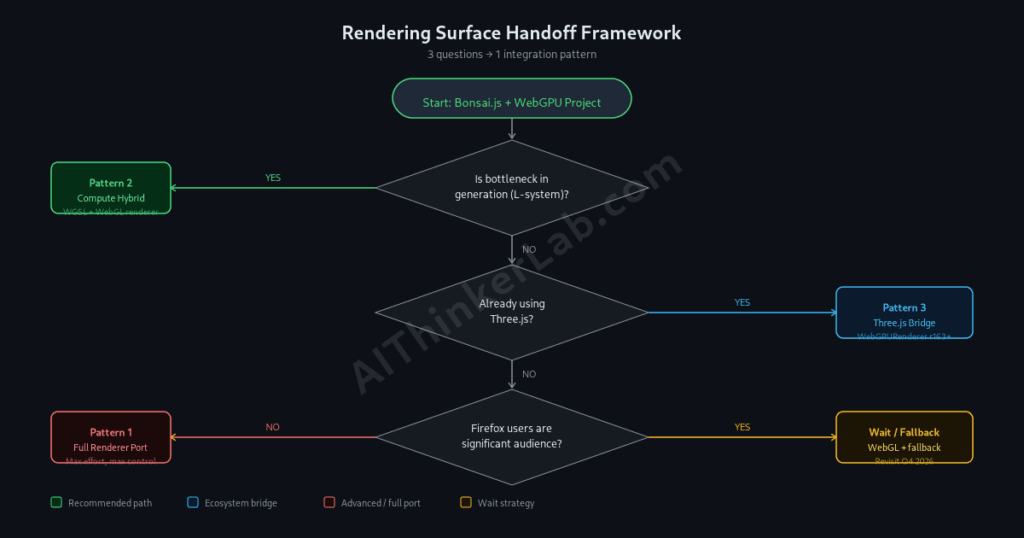
Before writing a single line of WebGPU code alongside Bonsai, answer three questions: Is your bottleneck in rendering or in geometry generation? Does your project already use Three.js as a rendering host? Are Firefox users a significant share of your target audience? Your answers route you to one of three integration patterns — cleanly, before you’ve committed to an architecture.
Is your perf bottleneck in GENERATION (L-systems, geometry)?
├─ YES → Pattern 2: Compute Hybrid
│         (WebGPU compute + Bonsai's existing WebGL renderer)
└─ NO → Is your project already on Three.js?
         ├─ YES → Pattern 3: Three.js WebGPURenderer Migration
         │         (lowest friction, best ecosystem support)
         └─ NO → Do Firefox users matter to your audience?
                  ├─ YES → Stay on WebGL for now; revisit Q4 2026
                  └─ NO → Pattern 1: Full Renderer Replacement
                           (maximum control, maximum effort)
Route A (Compute Hybrid): Your tree scenes are complex enough that generation time — not frame rendering time — is the bottleneck. You keep Bonsai’s WebGL renderer exactly as-is and add a WebGPU compute pass that produces geometry data, handed back to Bonsai via JavaScript arrays. More setup, but it targets the actual problem.
Route B (Three.js WebGPURenderer): You’re already using Three.js, or you’re willing to adopt it as your rendering layer. Bonsai generates geometry; Three.js WebGPURenderer draws it. The migration is mostly a renderer swap, not an architecture rewrite.
Route C (Wait or Full Port): Either your use case genuinely requires a full custom WebGPU renderer (rare), or your audience’s Firefox usage makes any WebGPU-first approach premature right now. Neither is failure — both are correct reads of your actual situation.
Three.js WebGPURenderer as the Practical Bridge
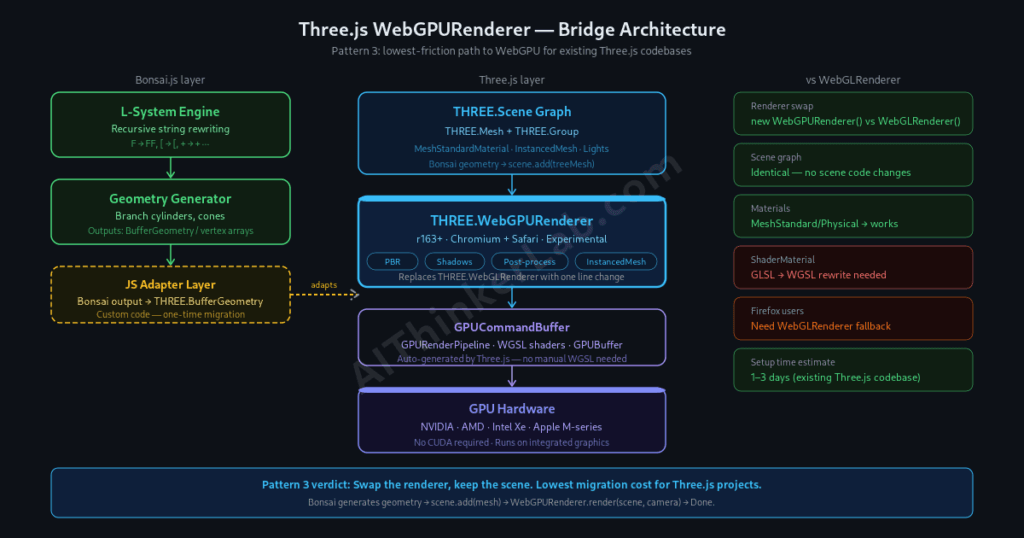
Three.js r171 ships a WebGPURenderer that accepts a standard Three.js scene graph — the same scene graph that Bonsai’s geometry output can feed into with adapters. According to the Three.js changelog, the WebGPURenderer handles PBR materials, shadows, and post-processing pipelines, making it the lowest-friction path to WebGPU for anyone already in the Three.js ecosystem.
The practical workflow: Bonsai generates a branch structure as a series of cylinder/cone primitives or a custom BufferGeometry. You build a standard THREE.Mesh from that geometry, add it to a THREE.Scene, and hand the scene to a THREE.WebGPURenderer instead of the classic THREE.WebGLRenderer. In many cases, that’s it — your Bonsai-generated tree renders on WebGPU without touching the generation code at all.
What WebGPURenderer Actually Supports Today
The stable surface includes: MeshStandardMaterial and MeshPhysicalMaterial (full PBR), directional and point lights with shadows, post-processing effects via the new node-based TSL (Three.js Shading Language), and InstancedMesh — which matters for rendering forests of repeated tree geometry efficiently.
What It Doesn’t (Known Gaps)
While core features like SkinnedMesh and skeletal animations are now fully supported natively on the GPU, migration still requires cautious handling. Legacy ShaderMaterial architectures that rely on WebGL-specific GLSL extensions are completely incompatible with the new WebGPU backend and must be entirely rewritten into Three Shader Language (TSL). Furthermore, cutting-edge codebases are still exposing edge cases—current Three.js GitHub issue tracking highlights ongoing community optimization work around slow initial material compilation times, uniform buffer overhead for highly un-batched scenes, and minor memory leaks when aggressively changing scenes. Checking the issue tracker for your specific scene architecture is highly recommended before fully committing.
Writing Your First WGSL Compute Shader for Tree Generation
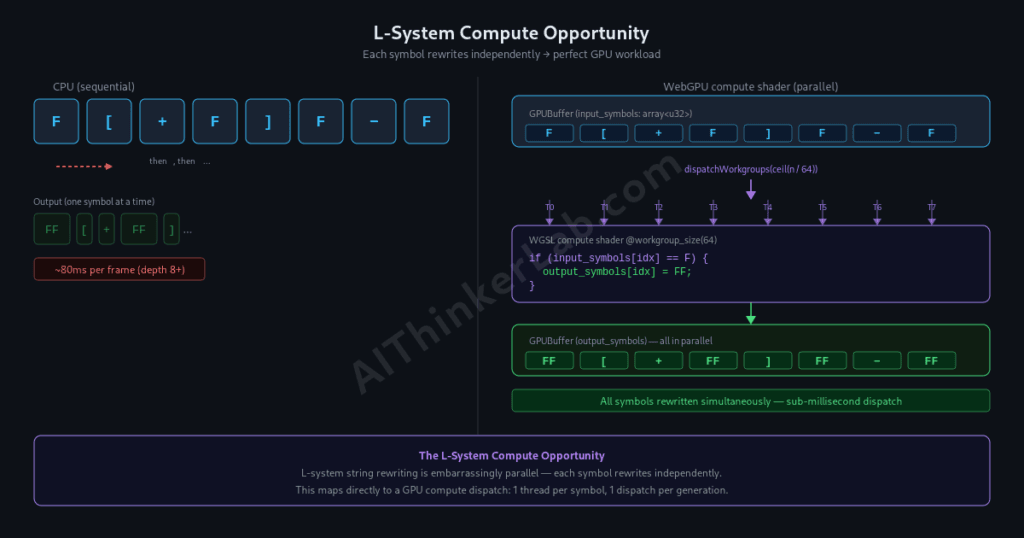
A minimal WGSL compute shader for L-system rewriting needs three things: an input buffer holding the current generation string as u32 values, an output buffer for the next generation, and a dispatch call sized to the string length. Here’s what that skeleton looks like.
wgsl
// l_system.wgsl
// Input: one u32 per L-system symbol
// Output: rewritten symbols (assumes fixed 1:1 expansion for simplicity)

@group(0) @binding(0) var<storage, read>  input_symbols : array<u32>;
@group(0) @binding(1) var<storage, read_write> output_symbols : array<u32>;

@compute @workgroup_size(64)
fn main(@builtin(global_invocation_id) gid : vec3<u32>) {
  let idx = gid.x;
  if (idx >= arrayLength(&input_symbols)) { return; }

  let symbol = input_symbols[idx];

  // Production rules: expand symbol 0 → 1, symbol 1 → 1 (stub)
  // Replace with your actual ruleset
  output_symbols[idx] = select(1u, symbol, symbol == 0u);
}
javascript
async function initializeWebGPU(canvasElement) {
  // 1. Broad Feature Detection
  if (!navigator.gpu) {
    console.warn("WebGPU is not exposed by this browser. Falling back to WebGL.");
    return fallbackToWebGL(canvasElement);
  }

  // 2. Request Physical Adapter (GPU instance)
  const adapter = await navigator.gpu.requestAdapter({
    powerPreference: 'high-performance' // Options: 'low-power', 'high-performance'
  });

  if (!adapter) {
    console.warn("WebGPU API is present, but no compatible graphics hardware was found.");
    return fallbackToWebGL(canvasElement);
  }

  // 3. Request Logical Device Connection
  // Chrome 113+ baseline configuration using automatic hardware constraints
  const device = await adapter.requestDevice({
    // Optional: Request advanced features if hardware supports them
    requiredFeatures: adapter.features.has('texture-compression-astc')
      ? ['texture-compression-astc']
      : [],
    requiredLimits: {
      maxBindGroups: Math.min(adapter.limits.maxBindGroups, 4) // Baseline limit is 4
    }
  });

  // 4. Handle Hardware / Context Loss Asynchronously
  device.lost.then((info) => {
    console.error(`WebGPU Device Lost: ${info.message}. Reason: ${info.reason}`);
    if (info.reason !== 'destroyed') {
      // Proactively attempt recovery or downshift context
      alert("Graphics context crashed. Reloading components...");
    }
  });

  // 5. Configure the Drawing Surface (Canvas Context)
  const context = canvasElement.getContext('webgpu');
  if (!context) {
    throw new Error("Failed to instantiate WebGPU canvas context context wrapper.");
  }

  // Fetch optimal swap chain formatting dictated by the client GPU/OS
  const canvasFormat = navigator.gpu.getPreferredCanvasFormat();

  context.configure({
    device: device,
    format: canvasFormat,
    alphaMode: 'opaque' // Options: 'opaque', 'premultiplied'
  });

  // Return the active core components to feed your app engine loops
  return { device, context, canvasFormat };
}

function fallbackToWebGL(canvas) {
  const gl = canvas.getContext('webgl2');
  if (!gl) {
    throw new Error("Hardware lacks WebGPU and WebGL 2 capabilities completely.");
  }
  console.log("WebGL 2 context fallback initialization completed successfully.");
  return { type: 'webgl2', context: gl };
}
This is a starting point, not a finished integration. The real complexity is in the variable-length output problem: in a real L-system, symbol 0 might expand to three symbols, not one. Handling that on the GPU requires a parallel prefix-sum (or scan) pass to compute precise memory layout offsets before you can safely write the expanded string. While it’s a solved GPU computing problem—often implemented using a classic multi-pass Reduce-Scan-Scatter architecture—it adds significant weight to your application pipeline, requiring at least three distinct shader dispatches just to align memory bounds between string generations. For clean reference material on writing memory-parallel array manipulations in WGSL, developers typically have to piece together raw shader logic from community implementations or study the structural buffer layouts found in the WebGPU Samples Bitonic Sort Demo.
What Most Integration Guides Get Wrong
Every WebGPU integration tutorial I’ve read focuses on replacing the rendering backend. Swap WebGL for WebGPU, rewrite the shaders, get faster rasterization. For most libraries, that framing makes sense.
For Bonsai specifically, it’s the wrong target.
A tree scene — even a complex one with 50,000 branch segments — is not a rendering-bottleneck workload. Rendering thin organic geometry is something WebGL handles reasonably well. The frame budget problem, when it exists, is almost never “WebGL can’t draw this fast enough.” It’s “generating this geometry on the CPU is eating 80ms per frame and leaving 0ms for everything else.”
That’s a compute problem. And WebGPU’s compute shaders are a direct answer to it.
Most guides are solving the wrong problem because they’re generalizing from different use cases — large voxel worlds, real-time fluid simulations, physics solvers — where rendering throughput genuinely is the bottleneck. Bonsai’s bottleneck profile is different. Shift your mental model from “WebGPU as a faster renderer” to “WebGPU as a parallel geometry processor,” and the integration case for Bonsai specifically gets significantly stronger.
Where This Lands in July 2026
The Bonsai + WebGPU combination is viable right now — just not in the form most developers expect. The rendering replacement path is the hardest route for the smallest gain. The compute acceleration path, specifically for L-system geometry generation, is the hardest to find written about and the most interesting technically. And the Three.js WebGPURenderer bridge is the path that will work for the most people with the least friction today.
Pick your pattern using the Rendering Surface Handoff Framework above, not gut instinct about what “WebGPU integration” should mean. If your tree scenes are running fine and you just want modern GPU features, Pattern 3 is your move. If you’re building a forest renderer or real-time growth animations where CPU generation is visibly hurting performance, Pattern 2 is worth the setup cost.
The gap in published work here is real. Nobody has published a complete Bonsai + WGSL compute integration with variable-length L-system output. That’s both a warning — this is still pioneer territory — and an opening.
Sources
- MDN Web Docs — WebGPU API — https://developer.mozilla.org/en-US/docs/Web/API/WebGPU_API
- W3C WebGPU Specification (Candidate Recommendation) — https://www.w3.org/TR/webgpu/
- W3C WGSL Specification — https://www.w3.org/TR/WGSL/
- Google Chrome Developers — “From WebGL to WebGPU” — https://developer.chrome.com/blog/from-webgl-to-webgpu/
- WebGPU Samples (official Google Chrome team) — https://webgpu.github.io/webgpu-samples/