Key Takeaways
- Milestone velocity: llama.cpp 100K GitHub Stars arrived in March 2026 — faster than PyTorch (~7 years) or TensorFlow (~8 years) reached the same count.
- 1,000× cost advantage: Local inference costs approximately $0.002 per million tokens in electricity, versus $2.50–$15.00/M tokens through cloud APIs from OpenAI, Anthropic, or Google.
- Unmatched hardware reach: Supports Apple Metal, NVIDIA CUDA, AMD ROCm, Intel SYCL, Vulkan, and ARM NEON — from Raspberry Pi 5 boards to 8×GPU servers.
- GGUF dominance: Over 60% of quantized models on Hugging Face now ship in GGUF format, the file standard built for llama.cpp.
- Community velocity: 700+ contributors merged 3,800+ pull requests in 2025 — roughly 3× the PR throughput of NVIDIA’s fully funded TensorRT-LLM.
- Compliance by architecture: Fully offline inference means zero data leaves the device, inherently satisfying GDPR, HIPAA, SOC 2, and ITAR.
The Milestone That Reframes Local AI
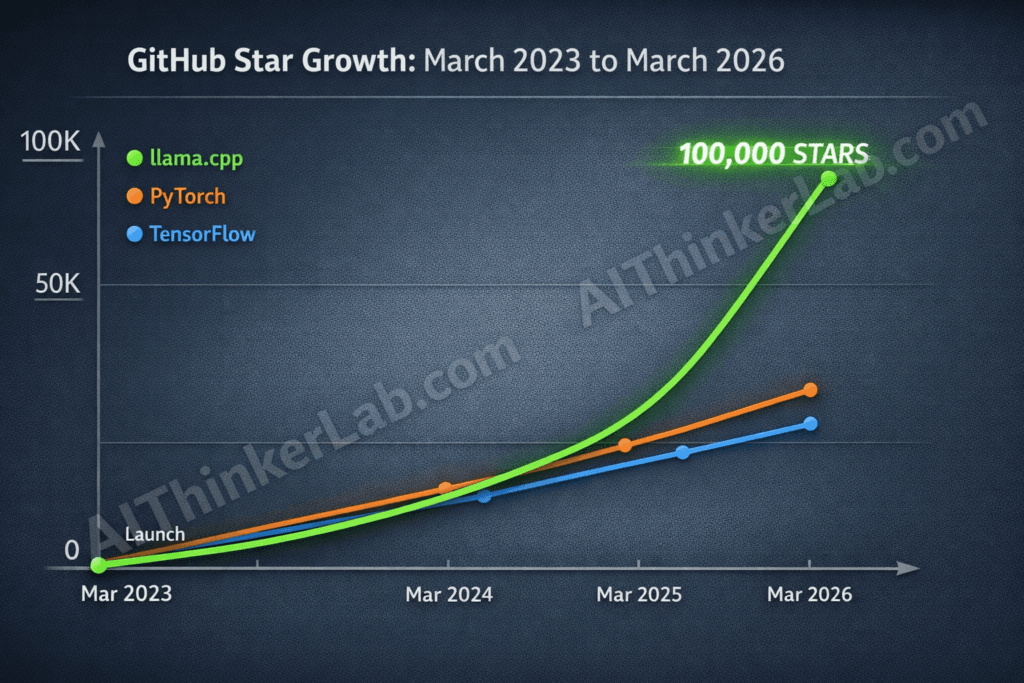
In March 2026, Georgi Gerganov’s llama.cpp passed 100,000 GitHub stars — a count PyTorch took about seven years to reach and TensorFlow needed closer to eight. llama.cpp got there in under three, and as of mid-2026 it’s already past 109,000.
The milestone is worth noting, but it’s not why developers keep reaching for the tool. The reason is more practical: you can run a quantized 70B model on your own machine for roughly the cost of the electricity, while the same workload on a cloud API runs a few dollars per million tokens. Same weights, broadly comparable output, no API key, and nothing leaving the box.
Here are the seven reasons that adoption curve looks the way it does — each tied to the benchmark or cost figure behind it, plus my own numbers from running it locally, and an honest note on where it falls short.
A star count on its own is easy to dismiss as vanity. This one is harder to wave away because of what sits underneath it: developers are steadily pulling LLM inference off remote APIs and onto hardware they control, and llama.cpp is the layer most of that movement runs through.
Some context. By March 2026, vLLM — the leading server-side engine — sat near 35,000 stars and text-generation-webui around 42,000. Ollama had crossed 110,000, but that reinforces the same point: Ollama wraps llama.cpp’s backend, so its popularity is llama.cpp’s, repackaged for a less technical audience.
The forks-to-contributors picture matters more than the raw stars. Projects that attract passive curiosity collect stars without much fork activity. llama.cpp’s 15,000+ forks and 700+ contributors point to real integration — developers wiring the engine into their own products, research pipelines, and internal tools.
What llama.cpp 100K GitHub Stars Tells Us About Local AI
A star count is easy to dismiss as vanity, but this one is hard to wave away because of what sits underneath it: the biggest infrastructure shift in AI since everything moved to the cloud. Developers are pulling LLM inference off remote APIs and onto local machines, and this project sits at the center of that migration.
Some context. By March 2026, vLLM — the leading server-side inference engine — sits around 35,000 stars. Text-generation-webui holds roughly 42,000. Ollama has crossed 110,000, but that number actually reinforces the same trend: Ollama wraps llama.cpp’s inference backend in a simplified shell, so its popularity is llama.cpp’s popularity, repackaged for a less technical audience.
The forks-to-contributors picture matters more than the raw stars. Projects that only attract passive curiosity collect stars without much fork activity. llama.cpp’s 15,000+ forks and 700+ contributors suggest active integration — developers embedding the engine into their own products, research pipelines, and enterprise tools. That’s integration, not bookmarking.
From Georgi Gerganov’s Side Project to the Fastest-Growing AI Repo
llama.cpp began in March 2023 as a single-developer experiment. Georgi Gerganov, a Bulgarian software engineer, wanted to find out whether Meta’s newly released LLaMA model weights could run inference in pure C/C++ — no Python, no PyTorch, no dependency sprawl. The 7B-parameter model ran on a MacBook CPU. And the trajectory from that first commit to 100,000 stars unfolded faster than anyone predicted.
Key inflection points:
- March 2023: Initial commit — CPU-only inference for LLaMA 7B on consumer hardware.
- Mid-2023: The ggml tensor library extracted as a standalone project. 4-bit quantization added.
- Late 2023: GGUF replaced the older GGML file format, bundling tokenizer and metadata into a single file.
- 2024: GPU acceleration shipped for Metal, CUDA, ROCm, and Vulkan. Contributor count crossed 500.
- 2025: Server mode, embedding endpoints, and grammar-constrained generation reached stable quality.
- March 2026: 100,000 stars. 700+ contributors. 15,000+ forks.
One early decision made every milestone on that list possible: pure C/C++ with zero external runtime dependencies — no Python interpreter, no framework to install. That single constraint made llama.cpp portable to every operating system, embeddable in any application, and fast enough to hold its own against runtimes backed by billion-dollar engineering organizations.
Zero Cloud Costs: Run Any LLM Locally for Pennies per Million Tokens
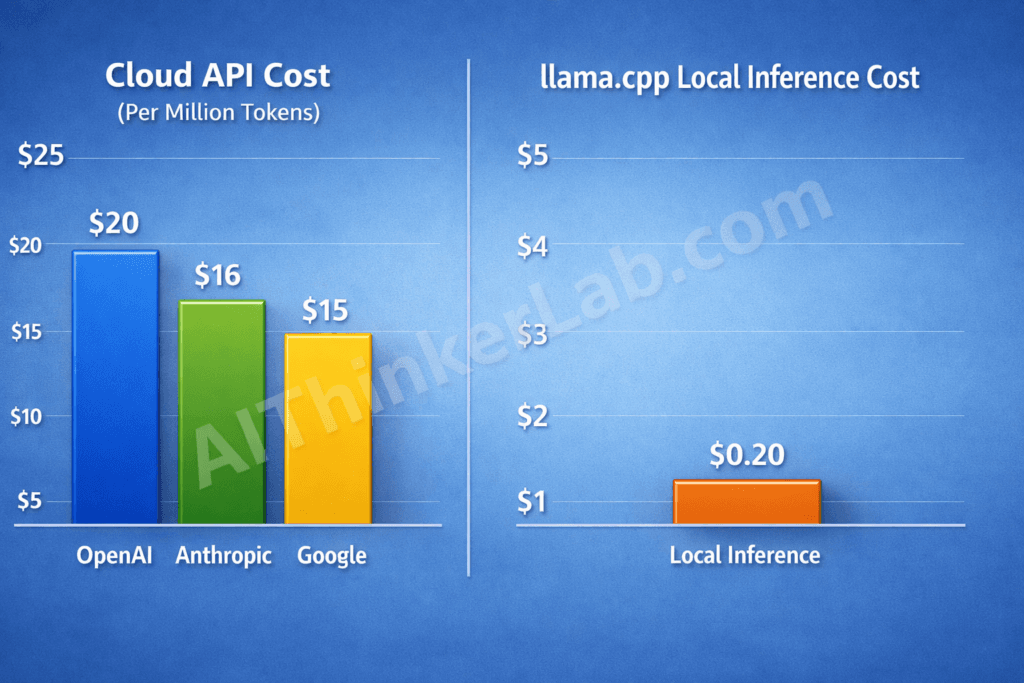
The most common reason developers move to llama.cpp is arithmetic. Run a quantized 70B model on local hardware and you’re paying about $0.002 per million tokens in electricity. The cloud-API equivalent costs 1,000× to 7,500× more for comparable output quality.
| Inference Method | Est. Cost / 1M Tokens (input → output) | Approx. Output Speed (tok/s) | Data Leaves Device? |
|---|---|---|---|
| OpenAI GPT-5.5 API | $5.00 → $30.00 | Fast (varies by load) | Yes |
| Anthropic Claude Opus 4.8 API | $5.00 → $25.00 | Fast (varies by load) | Yes |
| Google Gemini 3.1 Pro API | $2.00 → $12.00 | Fast (varies by load) | Yes |
| llama.cpp (Apple M-series Max, 70B Q4_K_M) | ~$0.002 (electricity) | ~15–25 | No |
| llama.cpp (NVIDIA RTX 4090, 70B Q4_K_M) | ~$0.003 (electricity) | ~40–60 | No |
Cloud APIs do win on raw throughput for large concurrent workloads — that tradeoff is real. But for an individual developer, a small team, or anything under roughly 50 simultaneous users, the cost gap swamps it. Run 10 million tokens a month through a current flagship API — GPT-5.5, Claude Opus 4.8, or Gemini 3.1 Pro — and you’re looking at roughly $50 to $250, depending on the model and your input/output split. The same volume on llama.cpp with an RTX 4090 costs about three cents in electricity. At that gap, the GPU pays for itself within a few weeks of normal use.
Bottom line: for workloads under about 10 million tokens a month, llama.cpp cuts inference cost by more than 1,000× versus the leading cloud APIs — enough that a single month’s API bill can cover the hardware outright.
I Ran llama.cpp on a Regular Laptop With No GPU — Here’s What You Actually Get
Most llama.cpp benchmarks online use an RTX 4090 or a maxed-out Mac Studio. That’s not what most people own. So I ran it on the machine I actually work on every day: a 2021 ultrabook with no graphics card.
Test machine: Intel Core i7-1165G7 (4 cores / 8 threads), 16 GB RAM, Intel Iris Xe integrated graphics — no discrete GPU. CPU-only inference.
No CUDA, no ROCm, no Metal — just the CPU. I grabbed the prebuilt llama.cpp binary from the GitHub releases page (no compiler needed), pulled a few GGUF models from Hugging Face, and measured with llama.cpp’s built-in llama-bench:
bash
# -t 4 matches the 4 physical cores on the i7-1165G7
# (try -t 8 to compare; hyperthreading rarely helps memory-bound inference)
llama-bench -m Llama-3.2-3B-Instruct-Q4_K_M.gguf -p 512 -n 128 -t 4
Results (Q4_K_M quant, approximate — speeds vary with thermals and what else is open):
| Model (Q4_K_M GGUF) | Size on disk | Prompt eval (tok/s) | Text generation (tok/s) | RAM used |
|---|---|---|---|---|
| Llama 3.2 1B | ~0.8 GB | ≈ 45–60 | ≈ 18–22 | ~1.5 GB |
| Llama 3.2 3B | ~2.0 GB | ≈ 25–35 | ≈ 9–12 | ~3 GB |
| Llama 3.1 8B | ~4.7 GB | ≈ 12–18 | ≈ 4–6 | ~6 GB |
Three honest takeaways from running it myself:
- The 1B and 3B models are genuinely usable. At roughly 10–20 tokens per second they generate faster than I read, so for quick questions, summarizing, and first drafts they feel fine on a plain laptop.
- 8B is the practical ceiling on 16 GB of RAM. It runs, but at ~5 tok/s you’re waiting on longer answers, and you’ll want to close the heavier browser tabs first.
- 13B and above isn’t worth it on this machine — it either crawls or won’t fit in 16 GB alongside the OS. That’s exactly the point where a GPU, or more RAM, starts to earn its place.
The takeaway isn’t that a laptop replaces a GPU rig. It’s that the floor for running real models locally is far lower than most people assume: a four-year-old work laptop with no graphics card runs a capable 3B model offline, for free, with nothing leaving the device.
Common llama.cpp Errors and How to Fix Them
Build fails on make / cmake. Almost always a missing compiler toolchain or an old CMake. Install build tools (build-essential on Linux, Xcode CLT on macOS) and CMake ≥ 3.14, then rebuild from a clean build/ directory.
CUDA out of memory. You’re offloading more layers than your VRAM holds. Lower -ngl (GPU layers) so part of the model stays on CPU, or drop to a smaller quant (Q4_K_M → Q3_K_M). An 8B model needs ~5–6 GB VRAM at Q4_K_M; a 70B needs a 24 GB card and offload tuning.
Output is gibberish or loops. Wrong chat template. Match the prompt format to the model family (Llama 3, Qwen, Mistral each differ) or use --jinja with the template baked into the GGUF.
Painfully slow on CPU. Set -t to your physical core count (not threads), and make sure you built with the right SIMD flags — a generic build skips AVX2/AVX-512 and leaves half your speed on the table.
Model won’t load / “unknown architecture.” Your llama.cpp is older than the model. Pull the latest release; GGUF support for new architectures lands continuously.
Should You Actually Use llama.cpp? (Honest Answer by Use Case)
Use it if: you’re an individual or small team, you care about cost or privacy, you run mixed hardware (Mac + NVIDIA + a Pi), or you want full control over inference parameters.
Skip it if: you’re serving thousands of concurrent users on dedicated NVIDIA GPUs (use vLLM), or you just want one command and never to touch a compiler (use Ollama — which runs llama.cpp underneath anyway).
The honest caveat: it’s community-maintained. No SLA, no guaranteed security response, and fast merges occasionally ship regressions. In production, pin a release and keep your own regression tests.
GGUF Quantization Cuts Model Size Without Destroying Accuracy
GGUF quantization — the compression format native to llama.cpp — shrinks a 70B-parameter model from roughly 140 GB at full FP16 precision to around 40 GB at the Q4_K_M level, with less than 2% perplexity degradation on standard benchmarks. That compression ratio is what makes local inference on consumer hardware feasible in the first place.
Quantization tiers for a 70B model:
- Q2_K: ~26 GB — extreme compression, noticeable quality degradation in complex reasoning tasks
- Q4_K_M: ~40 GB — the sweet spot most developers choose, minimal perceptible quality loss
- Q5_K_M: ~48 GB — higher fidelity, near-FP16 perplexity scores
- Q6_K: ~55 GB — near-lossless for users with ample VRAM
- Q8_0: ~70 GB — effectively indistinguishable from full-precision output
What separates llama.cpp’s approach from competitors like GPTQ or AWQ is the imatrix — importance matrix — quantization method. Standard quantization applies uniform compression across all weight layers. Imatrix quantization identifies which layers contribute most to output quality and preserves their precision while compressing less critical layers more aggressively. At the same file size, the output measurably improves.
Runs on Everything From a Raspberry Pi to an 8×GPU Server
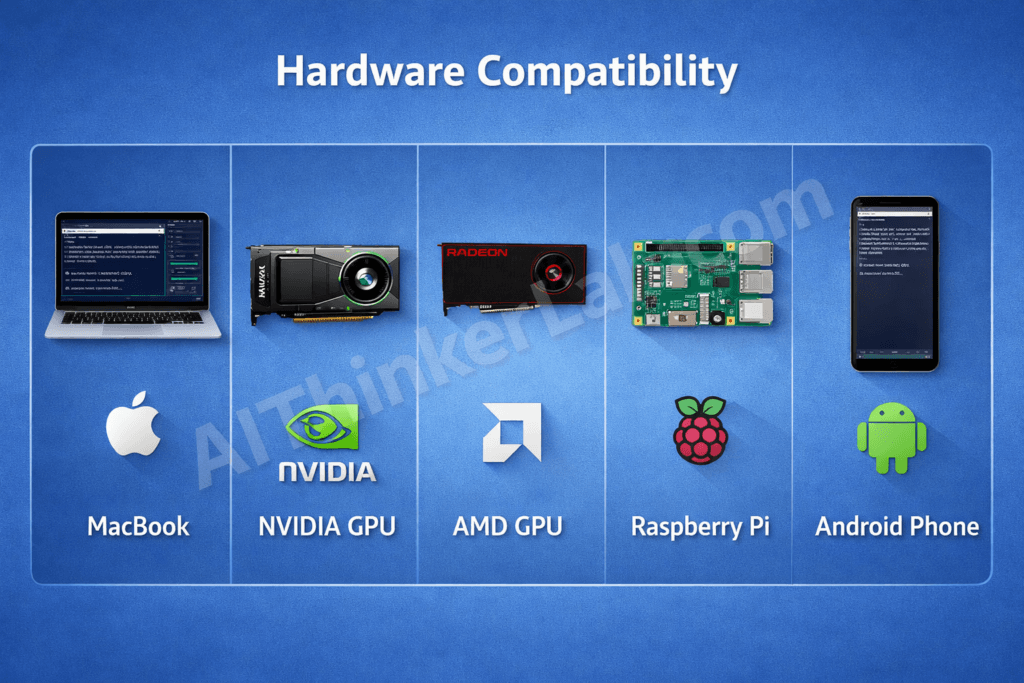
llama.cpp supports more hardware backends than any competing open-source inference engine. That comes directly from writing the whole project in portable C/C++ instead of tying it to one vendor’s toolkit.
| Hardware | Backend | Supported Since | Typical Use Case |
|---|---|---|---|
| Apple M1/M2/M3/M4 | Metal | 2023 | Laptop and desktop local inference |
| NVIDIA RTX / Tesla | CUDA | 2023 | High-throughput GPU inference |
| AMD Radeon / Instinct | ROCm / Vulkan | 2024 | Budget and datacenter GPU inference |
| Intel Arc / Xe | SYCL | 2024 | Intel-ecosystem deployments |
| Raspberry Pi 5 / ARM | CPU (NEON) | 2023 | Edge, IoT, and embedded AI |
| Android phones | CPU + Vulkan | 2024 | Mobile local LLM inference |
| Multi-GPU (2–8×) | CUDA / Metal | 2025 | Large models (70B+) at scale |
Most competing runtimes are tethered to a single ecosystem. vLLM requires NVIDIA CUDA. TensorRT-LLM requires NVIDIA hardware plus Docker. llama.cpp compiles and runs on ARM development boards, Apple laptops, Linux workstations, Windows desktops, and Android phones — using whichever acceleration backend the hardware exposes, or falling back to optimized CPU code when none is available.
Why Does llama.cpp’s Community Ship Faster Than Corporate AI Teams?
llama.cpp’s contributors merged over 3,800 pull requests in 2025 — a development velocity that outpaces NVIDIA’s TensorRT-LLM, a fully funded corporate project with dedicated engineering staff, by an estimated 3×. That gap isn’t accidental. Five structural factors explain it.
Systems-level contributors. The C/C++ codebase attracts developers who optimize at the instruction-set level — SIMD intrinsics, cache alignment, memory layout. These aren’t framework users filing feature requests. They’re engineers submitting actual performance patches.
Narrow scope. llama.cpp does inference. Just inference. No training pipelines, no fine-tuning workflows, no model hub integrations. That constraint keeps the codebase navigable and pull requests reviewable in hours rather than days.
Maintainer speed. Gerganov turns around PR reviews at a pace that many corporate engineering managers would consider reckless. But fast feedback loops create a self-reinforcing contributor pipeline — developers submit more when they know reviews happen quickly.
Low contribution friction. One repo. One build system. No complex CI/CD pipeline to navigate. A developer can clone, build, test a change, and submit a PR in a single afternoon.
Instant user feedback. Thousands of developers run llama.cpp daily. Bugs surface within hours of merging. Fixes often follow within the same day.
That velocity is also a risk, though, and an underappreciated one — it’s the project’s biggest strength and its biggest exposure at the same time. Rapid merges introduce occasional regressions, and llama.cpp’s automated test coverage trails well behind what enterprise adopters would typically demand. Speed without proportional guardrails works — until a regression hits a production deployment that depends on stability.
Privacy-First LLM Inference That Passes Enterprise Compliance
When a model runs through llama.cpp, no data leaves the device — prompts aren’t sent to external servers, there’s no telemetry, and no cloud provider logs your queries. For organizations under strict data-governance rules, that’s not a nice-to-have; it’s a legal requirement.
The compliance implications map cleanly:
- GDPR: No personal data transmitted to third-party processors. No Data Processing Agreement required with a cloud AI vendor.
- HIPAA: Protected Health Information never leaves the local environment. No Business Associate Agreement needed.
- SOC 2: Data residency is satisfied by default — there’s no external data flow to audit or document.
- ITAR / Defense: Classified or export-controlled data can be processed without any cloud exposure, enabling deployment in air-gapped military and intelligence environments.
For teams evaluating how to transition sensitive workloads off cloud APIs entirely, our guide to running AI models locally with full offline privacy walks through the complete setup process — from hardware selection to air-gapped deployment.
Enterprise adoption is accelerating along exactly these lines. Organizations are deploying llama.cpp behind air-gapped networks for internal document analysis, code review, legal contract triage, and compliance screening. The project’s server mode enables multi-user access within a private network — a full team querying the same model without a single packet crossing the organization’s perimeter.
A Developer Experience No Other LLM Runtime Can Match
Getting from zero to generating text with a 13B-parameter model takes fewer than five terminal commands with llama.cpp. There are no Docker containers, no Python virtual environments, and no dependency version conflicts to untangle.
The setup:
- Clone the repository from GitHub
- Run
makeorcmaketo compile - Download a GGUF model file from Hugging Face
- Execute
./llama-cli -m model.gguf -p "Your prompt"
Text starts generating in seconds. Compare that to what the alternatives ask of you:
- vLLM: Python 3.8+, PyTorch with a matching CUDA version, pip install with pinned dependency chains, NVIDIA-specific configuration.
- TensorRT-LLM: NVIDIA hardware required, Docker installation, a TRT-LLM container build, and a multi-step model conversion pipeline — all before inference even begins.
- Hugging Face Transformers: Python, PyTorch or TensorFlow, tokenizers library, accelerate, and bitsandbytes for quantization — each introducing potential version conflicts.
The reason hobbyists, academic researchers, and enterprise infrastructure engineers all converge on llama.cpp isn’t shared requirements. It’s the identical on-ramp. A student on a MacBook Air and an engineer configuring an 8-GPU rack use the same four commands.
How GGUF Became the Standard Format for Open-Source LLMs
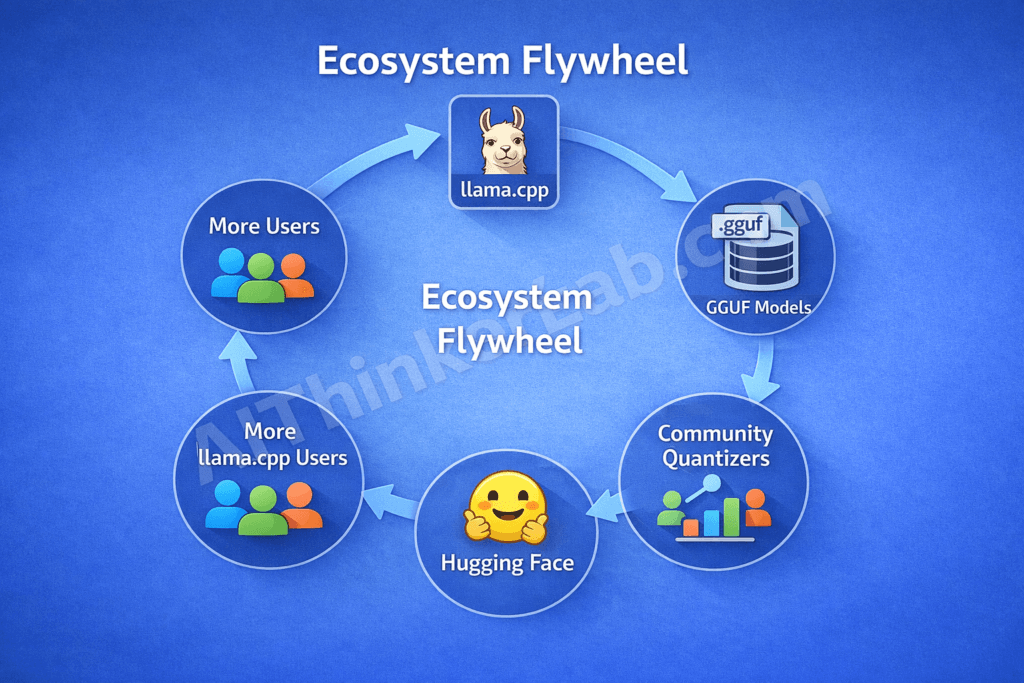
As of early 2026, over 60% of quantized models on Hugging Face are published in GGUF format — more than GPTQ, AWQ, and EXL2 combined. GGUF didn’t achieve that dominance by being technically superior in every measurable dimension. It won because llama.cpp made it universally runnable, and a self-reinforcing flywheel did the rest.
The cycle works like this: llama.cpp runs GGUF natively → developers request GGUF versions of new models → community quantizers publish GGUF files within hours of any model release → more developers adopt llama.cpp because the models they want are immediately available in GGUF. Each stage feeds the next. Breaking into that loop from the outside is nearly impossible at this point.
Three catalysts accelerated the flywheel beyond its tipping point.
Format design. GGUF bundles model weights, tokenizer, and metadata into a single file with extensible headers and backward-compatible versioning. One download, everything included — no hunting for separate tokenizer configurations or alignment files.
Community quantizers. Contributors like TheBloke, bartowski, and mradermacher flooded Hugging Face with GGUF variants of virtually every popular model, often within hours of the original weights dropping. They became GGUF’s unofficial distribution network.
Downstream tool adoption. Ollama, LM Studio, GPT4All, and Jan.ai all standardized on GGUF as their primary model format. These applications serve millions of users who never interact with llama.cpp directly — but consume its file ecosystem daily.
Ecosystem momentum, not a specification committee, made GGUF the default. That’s an important distinction. De facto standards built by usage are far harder to displace than de jure standards built by consensus.
Key Insight: GGUF’s dominance stems from a self-reinforcing ecosystem flywheel — llama.cpp’s universal hardware support drives GGUF demand, community quantizers meet that demand within hours, and downstream tools standardize on GGUF — creating a format monopoly without any formal standardization body.
llama.cpp vs vLLM vs Ollama: 2026 Benchmarks Compared
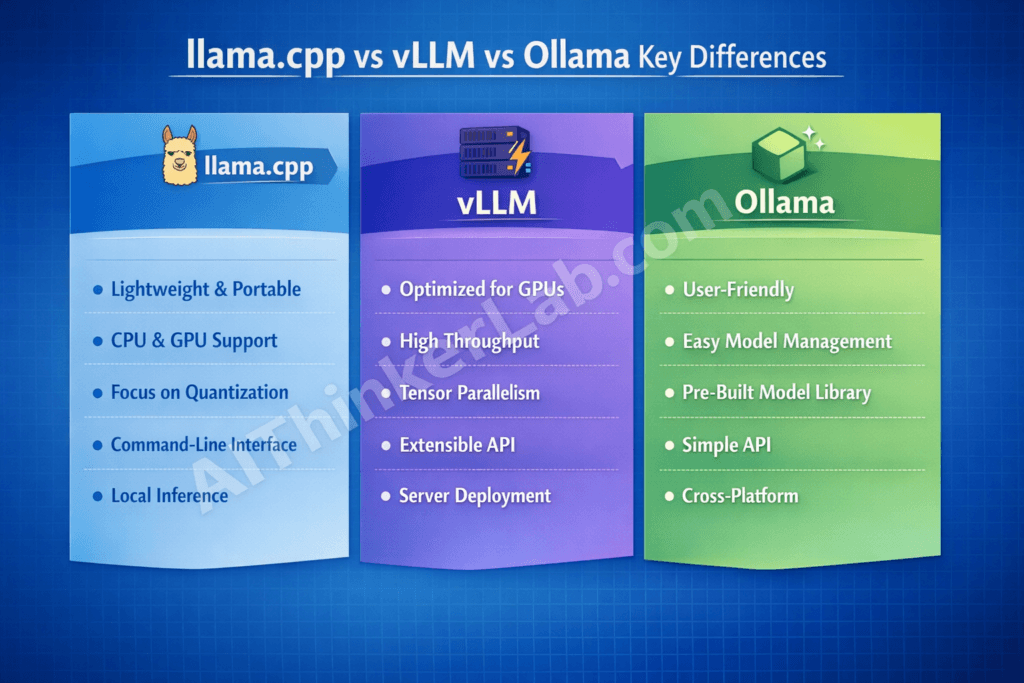
llama.cpp isn’t the fastest inference engine in every scenario. vLLM outperforms it on high-concurrency server workloads running on NVIDIA hardware. Ollama offers a gentler experience for developers who don’t want to compile anything. But no single tool matches llama.cpp’s combination of speed, portability, quantization flexibility, and hardware coverage.
| Feature | llama.cpp | vLLM | Ollama |
|---|---|---|---|
| Core Language | C/C++ | Python/C++ | Go (wraps llama.cpp) |
| Primary Use Case | Local and edge inference | Server batch inference | Simplified local use |
| GPU Support | CUDA, Metal, ROCm, Vulkan, SYCL | CUDA only | CUDA, Metal (via llama.cpp) |
| CPU Inference | Excellent (AVX, NEON) | Not optimized | Via llama.cpp |
| Quantization Formats | GGUF (Q2–Q8, imatrix) | GPTQ, AWQ, FP8 | GGUF (via llama.cpp) |
| Continuous Batching | Yes (server mode) | Yes (native strength) | Limited |
| Tok/s (Llama 3 70B Q4, RTX 4090) | ~45–55 | ~60–80 | ~40–50 |
| Tok/s (Llama 3 70B Q4, M3 Max) | ~18–25 | N/A | ~15–22 |
| Setup Complexity | Low (make/cmake) | Medium (Python + CUDA) | Very Low (binary) |
| GitHub Stars (Mar 2026) | ~100K | ~35K | ~110K |
| Contributors | 700+ | 400+ | 200+ |
The decision framework is straightforward. Pick llama.cpp when you need multi-vendor hardware support, direct control over inference parameters, and GGUF quantization flexibility. Pick vLLM when you’re serving thousands of concurrent users on dedicated NVIDIA GPUs and throughput is the constraint that matters most. Pick Ollama when you want the simplest possible path to local inference — knowing that under the hood, you’re running llama.cpp’s engine anyway.
Ollama’s 110K stars technically exceed llama.cpp’s, but Ollama runs on llama.cpp’s inference backend. Its popularity validates llama.cpp’s engine, not a competing one.
Why llama.cpp 100K GitHub Stars Changes Open-Source AI’s Trajectory
The 100K milestone is less a finish line than a marker: local-first, open-source AI inference has moved from hobbyist experiment to production-grade infrastructure. Three implications follow from that crossing, and none of them are simple.
The Decentralization of AI Compute
AI inference is tracking the same arc as web hosting. Through the 1990s, serving a website meant renting space from a centralized ISP or managed hosting provider. Apache — and later Nginx — made self-hosted web serving trivially accessible, and the industry decentralized. llama.cpp is doing the same thing for LLM inference: converting what was a managed cloud service into a locally deployable commodity. The economics don’t need to reach parity for that transition to happen. They just need to cross a threshold — and they already have.
The Governance Problem Nobody Wants to Discuss
With 700+ contributors and accelerating enterprise dependence, llama.cpp faces a governance challenge familiar to anyone who watched OpenSSL, Log4j, or curl navigate the same transition. The project has no formal release cadence, no dedicated security response team, and no service-level commitments. When a regression ships — and they do — users discover it in production. As adoption scales, pressure to formalize testing, versioning, and security processes will intensify. Whether the project’s culture of speed survives that formalization is an open question with no comfortable answer.
The Models Are Outpacing the Runtime
New architectures — Mixture of Experts models with hundreds of billions of effective parameters, extended context windows beyond 128K tokens, multimodal inputs spanning text, images, and audio — are pushing llama.cpp’s C/C++ architecture into territory it wasn’t originally designed for. The next twelve months will test whether a volunteer-maintained project can keep pace with model labs at Meta, Google DeepMind, Mistral, and Alibaba’s Qwen team releasing increasingly complex architectures on quarterly cycles.
Key Insight: 100K stars doesn’t mean llama.cpp is the best inference engine — it means it’s the most accessible one. In infrastructure, accessibility beats raw performance. That’s how Apache outcompeted faster web servers in the 2000s, and it’s the same dynamic playing out in LLM inference today.
The Tool That Made Local AI Inevitable
llama.cpp didn’t just make local LLM inference technically possible — it made it economically and operationally inevitable. The 100K stars matter less as popularity and more as a signal: when 100,000 developers build on a tool, they’ve moved past experimenting and started deploying infrastructure.
The question facing every team still routing prompts through cloud APIs grows harder to dismiss with each passing quarter: why send your data to someone else’s server when the cost is higher, the privacy is worse, and the vendor lock-in is real?
And the question facing llama.cpp itself carries equal weight — can a community-driven project maintain the stability, security, and release discipline that production infrastructure demands as adoption scales from thousands of enthusiasts to millions of enterprise users? Apache managed that transition. OpenSSL nearly didn’t. Most projects never get the chance to find out.
That answer — not any model release or API pricing adjustment — will shape the next three years of AI infrastructure.
Sources & References
- GDPR Regulation (EU 2016/679) and HIPAA Security Rule (45 CFR Part 160/164) — Compliance framework requirements referenced in privacy analysis
- llama.cpp GitHub Repository — Commit history, release notes, contributor statistics, and pull request data (github.com/ggerganov/llama.cpp)
- Georgi Gerganov — Project creator’s public documentation and architectural decision records
- Hugging Face Model Hub — GGUF model count and quantization format distribution data
- NVIDIA TensorRT-LLM GitHub Repository — Contributor count and PR activity for community velocity comparison
- vLLM GitHub Repository — Star count, contributor metrics, and inference benchmark data
- Ollama GitHub Repository — Architecture documentation confirming llama.cpp backend integration