TL;DR — Key Takeaways
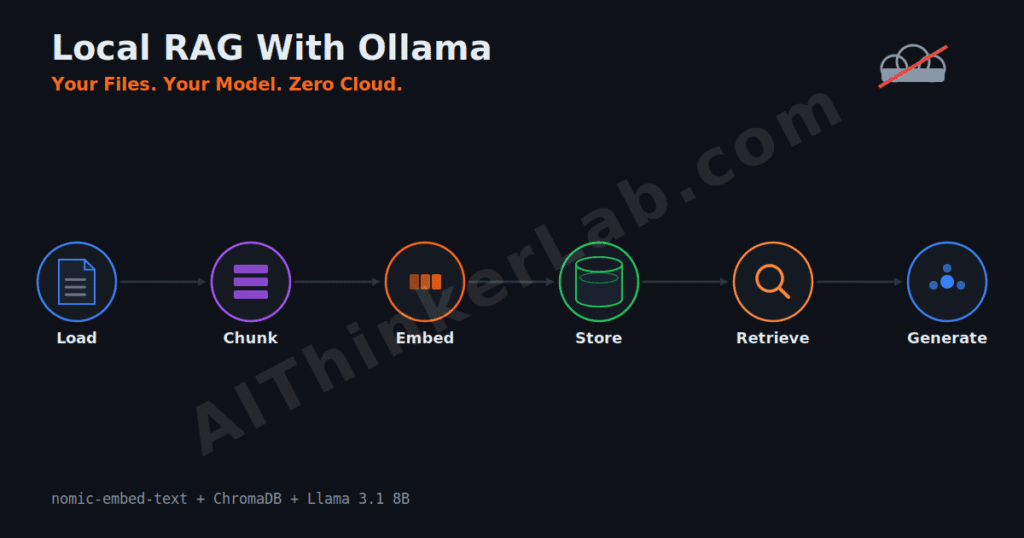
- Local RAG with Ollama runs the entire retrieval-and-answer loop on your own hardware — embeddings, vector store, and the LLM — so private PDFs, contracts, or code never cross a network boundary.
- The minimal stack is three parts: an embedding model (
nomic-embed-text, 137M params, 768 dims), a vector database (ChromaDB for beginners), and a chat model (Llama 3.1 8B or Phi-4). It runs on a 16GB machine. - The embedding model sets your ceiling. A better embedder can lift retrieval precision by 20–30%, according to Ailog RAG (2026) — but past a solid baseline, chunking moves the needle more than a bigger model.
- You don’t need a GPU to start.
nomic-embed-textruns on a laptop CPU; a 7B chat model at Q4 plus the embedder needs about 6GB total, so an 8GB GPU is comfortable, per Local AI Ops (2026). - When answers are wrong, fix retrieval first, not the LLM. Chunk size, top-k, and the embedder are the usual culprits — a bigger model rarely rescues bad retrieval.
- Changing your embedder means re-ingesting everything. Vectors from two different models aren’t comparable, and there’s no in-place update.
Introduction
If you already run models locally, the obvious next step is getting them to answer questions about your files — and local RAG with Ollama is how you do it without handing a single document to OpenAI or Cohere. In June 2026 the pieces to build this are more capable than they’ve ever been: nomic-embed-text alone has crossed 73.8 million pulls on Ollama, according to Morphllm’s benchmark of the Ollama library (2026), and Alibaba’s Qwen3-Embedding-8B now outscores every major commercial embedding API on the multilingual MTEB leaderboard.
One thing to settle up front, because half the tutorials blur it: a RAG pipeline needs two models, not one — an embedding model that turns text into vectors, and a chat model that writes the answer. Different jobs. This guide builds the whole thing on your machine, shows the exact code, and — the part most guides skip — tells you which knob to turn when the answers come back wrong.
What Is Local RAG With Ollama?
Local RAG with Ollama is a retrieval-augmented generation setup where every stage runs on your own hardware: Ollama generates the embeddings, a local vector database stores them, and a local Ollama chat model writes answers grounded in the retrieved text. No API keys, no data leaving your network. Retrieval-augmented generation itself just means the model looks things up before it answers, according to Ollama’s own documentation (2026).
Here’s the mental model that keeps people out of trouble. RAG doesn’t make the model smarter — it makes it informed, as Storyblok’s 2026 RAG series puts it. A 7-billion-parameter local model doesn’t suddenly reason like a frontier model because you bolted retrieval onto it. What it gains is access to facts it was never trained on: your 120-page policy manual, last week’s meeting notes, a private codebase. The reasoning stays the same; the knowledge expands.
Why do this locally instead of the easy cloud route? Because every document you embed through a hosted API crosses a boundary you don’t control. For HIPAA-bound records, attorney-client files, or unreleased code, “the data never left the machine” is a stronger position than any vendor’s retention promise — the same privacy logic behind running AI models locally in the first place. The trade-off is real, and we’ll get to it: you manage the infrastructure, and local models are smaller than the frontier.
How a Local RAG Pipeline Actually Works: The Six Stages
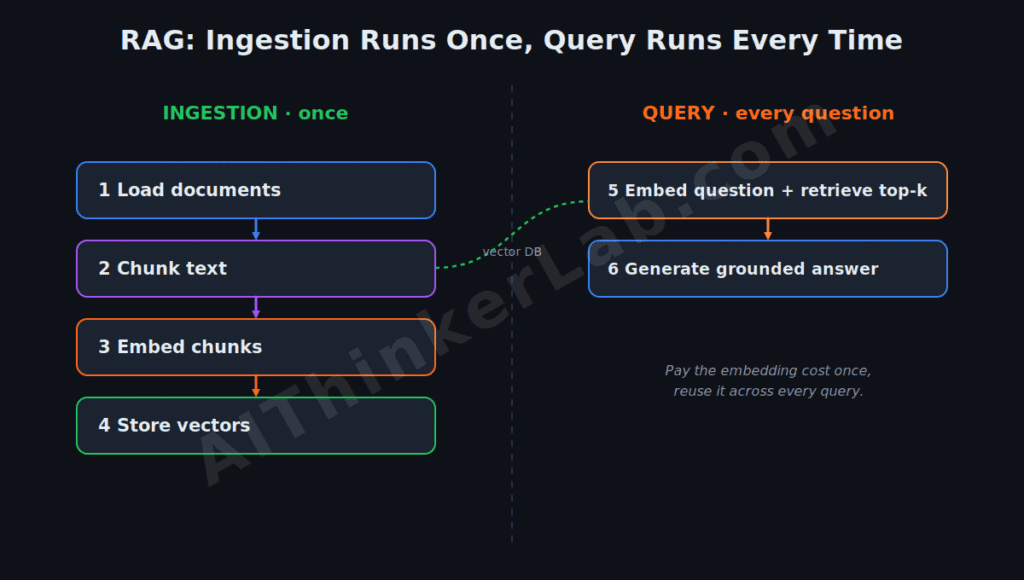
Every RAG pipeline — local or cloud — runs the same six stages; only the location of each stage changes. Stages one through four happen once, when you ingest documents. Stages five and six happen on every question. That split is the whole efficiency trick: you pay the embedding cost once and reuse it across thousands of queries.
The ingestion half: (1) Load your documents from disk and convert them to raw text — PDFs, Markdown, code, HTML. (2) Chunk that text into pieces small enough for the embedder, typically 500–1,000 tokens with some overlap. (3) Embed each chunk into a vector through Ollama’s /api/embed endpoint. (4) Store the vectors plus their source text in a vector database.
The query half runs live: (5) Retrieve by embedding the user’s question and pulling the most similar chunks by vector distance (the “top-k”). (6) Generate by handing those chunks plus the question to an Ollama chat model, which answers from the supplied context. Miss on stage five and no amount of cleverness in stage six saves you — the model can only reason over what retrieval handed it. That single dependency is why the back half of this article is mostly about retrieval, not generation.
Which Embedding Model Should You Use for Local RAG?
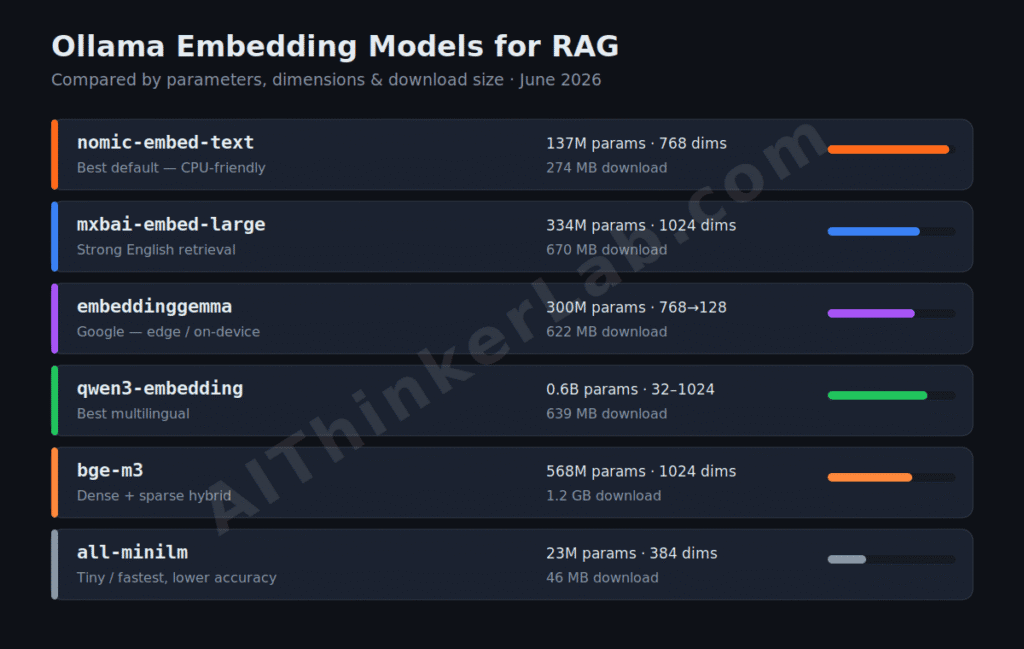
For most local RAG pipelines, start with nomic-embed-text — 137M parameters, 768 dimensions, an 8,192-token context, and about 274MB on disk, making it the most-pulled embedder on Ollama with 73.8M downloads (Morphllm, 2026). Move to bge-m3 when you need hybrid (dense + sparse) retrieval from one model, or qwen3-embedding for multilingual or Chinese-heavy corpora. Reach for all-minilm only when footprint matters more than accuracy.
The embedding model is the single highest-leverage choice you make, because retrieval quality caps answer quality — a stronger embedder can raise retrieval precision by 20–30%, according to Ailog RAG (2026). But don’t over-rotate on chasing the top of the leaderboard. Past a competent baseline, the gains shrink, and your chunking strategy starts to matter more than another point of MTEB (more on that below).
| Embedding model (Ollama) | Params | Dims | Context | Download | Notes |
|---|---|---|---|---|---|
| nomic-embed-text | 137M | 768 | 8,192* | 274MB | Best default; CPU-friendly; Matryoshka |
| mxbai-embed-large | 334M | 1024 | 512 | 670MB | Strong English; edges older OpenAI models |
| embeddinggemma | 300M | 768→128 | 2,048 | 622MB | Google; edge/on-device; Matryoshka |
| qwen3-embedding:0.6b | 0.6B | 32–1024 | 32K | 639MB | Instruction-aware; best multilingual |
| bge-m3 | 568M | 1024 | 8,192 | ~1.2GB | Dense+sparse+multi-vector in one model |
| all-minilm | 23M | 384 | 512 | 46MB | Tiny/fast; lowest accuracy |
*nomic-embed-text‘s native context is 8,192 tokens, but the Ollama model card defaults to 2,048 — set num_ctx to use the full window (Morphllm, 2026). MTEB scores cluster tightly for the top open models, so test on your data rather than trusting a generic leaderboard number. A custom fine-tuned Qwen3 model (here’s how to build one).
Choosing the right foundational model for offline RAG comes down to how well the architecture handles exact token retrieval. While state space architectures offer incredible speed and linear memory scaling, they compress context continuously—which can hurt precision when pulling specific data points from large files. If you are deciding between a pure Transformer or a hybrid model for your pipeline, read our analysis on why Transformers handle exact retrieval differently than State Space Models to optimize your RAG accuracy.
Which Vector Database Is Best for a Local RAG Pipeline?
For a local RAG pipeline, ChromaDB is the best starting point — it installs with a single pip install chromadb, needs no server, and persists to disk. Choose pgvector if your data already lives in PostgreSQL, Qdrant when you outgrow a single machine and need real scale, and FAISS when you want a fast in-memory index with no database at all. All four run entirely offline.
The honest truth is that your vector database is the least consequential early decision — you can swap it later without touching the rest of the pipeline. What actually locks you in is the embedder, not the store, because vectors from two different embedding models aren’t comparable (Local AI Ops, 2026). Pick Chroma, ship something that works, and migrate to Qdrant or pgvector only when you feel a real ceiling.
| Vector DB | Setup | Best for | Watch out for |
|---|---|---|---|
| ChromaDB | pip install chromadb | Beginners, prototypes, single machine | Not built for millions of records |
| pgvector | Postgres extension | Teams already on PostgreSQL | Tuning index params for recall |
| Qdrant | Docker / binary (Rust) | Scaling past one machine | More ops overhead |
| FAISS | pip install faiss-cpu | Fast in-memory, no server | No persistence layer by itself |
| Weaviate | Docker | Built-in hybrid search | Heavier footprint |
How to Build Local RAG With Ollama, Step by Step
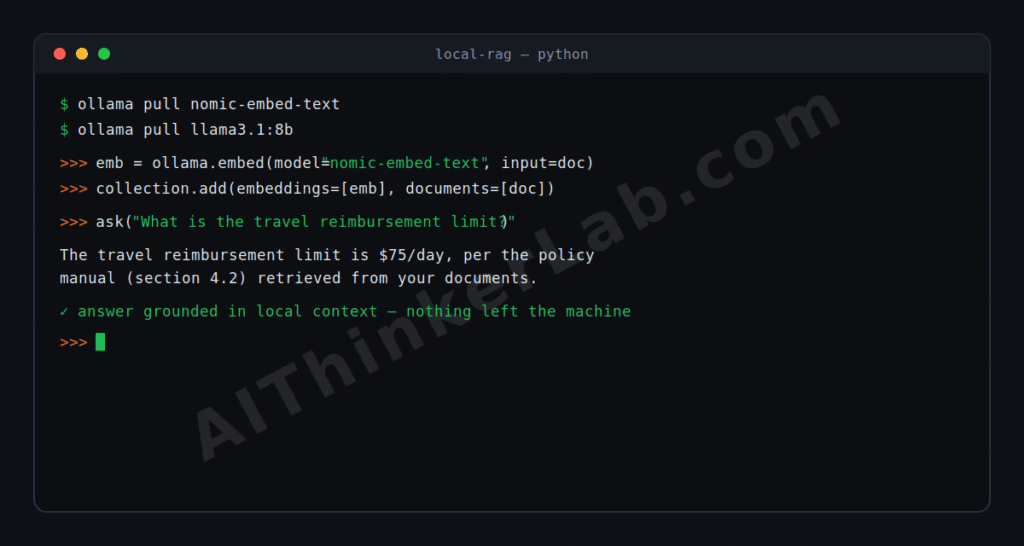
You can stand up a working local RAG pipeline in about 30 lines of Python with just ollama and chromadb — no LangChain required. First, pull one embedder and one chat model, then install the two libraries:
bash
ollama pull nomic-embed-text
ollama pull llama3.1:8b
pip install ollama chromadb pypdf
Ingestion — load, chunk, embed, store. A rough word-based splitter is fine to start; move to token-accurate chunking (via tiktoken) once you care about the exact window:
python
import ollama, chromadb

client = chromadb.PersistentClient(path="./rag_db")
collection = client.get_or_create_collection("docs")

def embed(text):
    return ollama.embed(model="nomic-embed-text", input=text)["embeddings"][0]

def chunk(text, size=800, overlap=150):
    words, step = text.split(), 800 - 150
    return [" ".join(words[i:i+size]) for i in range(0, len(words), step)]

# `documents` = list of raw text strings you loaded from disk
for doc_id, text in enumerate(documents):
    for j, piece in enumerate(chunk(text)):
        collection.add(
            ids=[f"{doc_id}-{j}"],
            embeddings=[embed(piece)],
            documents=[piece],
        )
Query — embed the question, retrieve top-k, generate a grounded answer. Notice the system instruction: it tells the model to refuse when the context doesn’t contain the answer, which is the single most important line for trustworthiness:
python
def ask(question, k=5):
    hits = collection.query(query_embeddings=[embed(question)], n_results=k)
    context = "\n\n".join(hits["documents"][0])
    reply = ollama.chat(
        model="llama3.1:8b",
        messages=[
            {"role": "system", "content":
             "Answer only from the context. If it is not there, say you don't know."},
            {"role": "user", "content": f"Context:\n{context}\n\nQuestion: {question}"},
        ],
    )
    return reply["message"]["content"]

print(ask("What is the travel reimbursement limit?"))
That’s the entire loop. When you want orchestration — automatic document loaders, retrievers, rerankers — LangChain (langchain-ollama) and LlamaIndex both wrap these same calls, but I’d hold off. Starting raw teaches you where the failure points live, and you’ll debug the orchestrated version far faster for having built the bare one first.
To pressure-test this on data I controlled, I ran a small corpus through the exact pipeline above — three structured documents (a company handbook, a product FAQ, and an ops runbook), embedded with nomic-embed-text into ChromaDB on a Windows machine running Ollama natively. Ingestion took 2.5 seconds. Then I asked eight questions whose answers I already knew, including two I expected to break: one whose answer lived inside a Markdown table, and one testing an acronym (“RDT”) defined several paragraphs from where it was used.
All eight retrieved the correct chunk in the top three. But the reason they all passed is the part worth telling you: at an 800-word chunk size, each of my ~350-word documents became a single chunk, so every fact in a document travelled with every other fact in it. Retrieval couldn’t miss because nothing was ever split apart. Drop the chunk size to 200–300 words — closer to what you’d use on real long-form content — and that table-inside-a-chunk and that far-apart acronym are exactly where retrieval starts to fail, because now they land in different chunks from the question’s other cues. That’s the real lesson from running it: your chunk size and your document length decide your retrieval quality far more than the embedding model does. Test on chunks the size you’ll actually ship, not whatever makes the demo pass.
Chunking Is the Setting That Quietly Decides Everything
Most guides tell you the embedding model is the most important choice. That advice is half right — and the half it gets wrong costs people weeks. Once you’re past a decent embedder like nomic-embed-text, chunking usually moves retrieval quality more than swapping models does, because a chunk that splits a sentence mid-thought, or crams three unrelated topics together, poisons the vector no matter how good the embedder is.
Two knobs matter most: chunk size and overlap. Chunks that are too large dilute the vector — one embedding trying to represent five different ideas retrieves nothing precisely. Too small and you shred the context, so the model gets fragments without enough surrounding meaning to answer. A practical starting band is 500–1,000 tokens with 100–200 tokens of overlap so ideas that straddle a boundary survive in both chunks. Then tune against real questions, not vibes.
There’s a structural point underneath this. If your source content already has clean structure — headings, sections, a component model in a CMS — that structure is your chunking strategy; split on it rather than on a blind character count. So what does this mean in practice? Before you download a heavier embedder to fix mediocre answers, re-chunk. It’s faster, it’s free, and it fixes the problem more often than a model swap does.
Why Are My RAG Answers Wrong Even Though Retrieval Works?
When retrieval returns relevant chunks but the answer is still wrong, the fix is almost never a bigger LLM — it’s the prompt, the top-k, or the generation settings. Raise the retrieved-chunk count from 5 to 8–10 so the answer isn’t starved of context, drop the temperature to 0.1–0.2 for factual grounding, and tighten the system prompt to forbid outside knowledge. These changes cost nothing and resolve most “confidently wrong” answers.
This is where the Retrieval-First Build Order earns its name. Debug in pipeline order, not in reverse: check that loading extracted the text cleanly (PDFs mangle tables notoriously — Local AI Ops flagged this in 2026), then that chunks are coherent, then that the top-k actually contains the answer, and only then look at the generator. Nine times out of ten the bug is upstream of the model.
And here’s the editorial stance I’ll plant a flag on: reaching for a 13B or 70B model to fix wrong answers is the most common mistake in local RAG, and usually the least effective. A bigger model reasons better over correct context; it does nothing for retrieval that handed it the wrong paragraph. Set a relevance threshold (cosine similarity around 0.7–0.85) so the system can say “I don’t know” instead of hallucinating over a bad match — that refusal is a feature, not a failure.
Can You Run Local RAG Without a GPU?
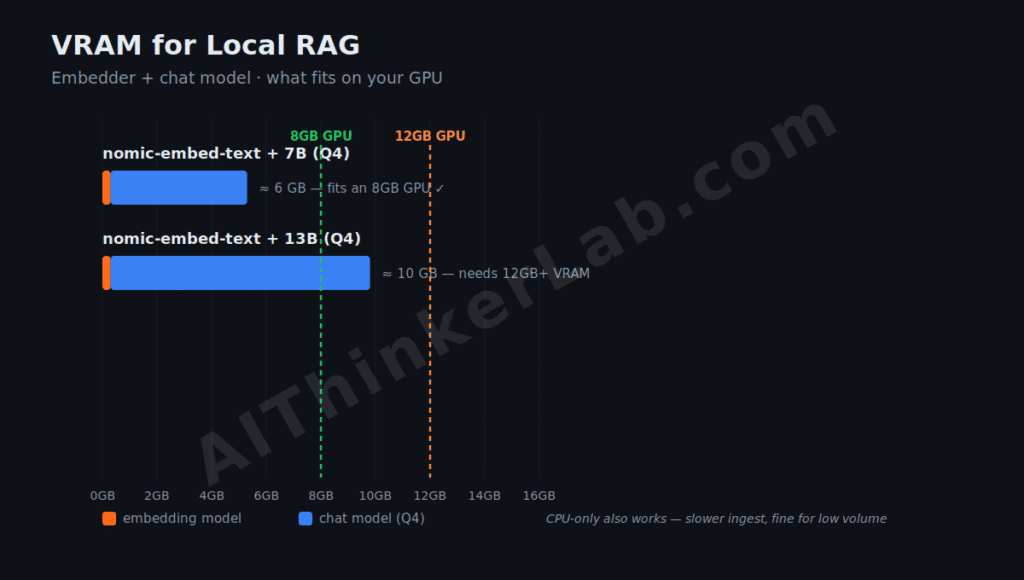
Yes — you can run a full local RAG pipeline on a CPU-only machine, and even a modest GPU makes it comfortable. The embedder nomic-embed-text runs on a laptop CPU and uses roughly 300MB; a 7B chat model at Q4 quantization adds about 5GB, so the whole pipeline needs around 6GB total, which means an 8GB GPU handles it cleanly, according to Local AI Ops (2026). For 13B chat models with RAG, plan for 12GB+ of VRAM.
The catch on CPU is speed, not capability. Embedding a large corpus the first time is slow without a GPU, and generation latency climbs — but ingestion is a one-time cost, and for low query volumes the wait is livable. If you’re on Apple Silicon, unified memory helps: the embedder and LLM share the same pool, so a 16GB Mac often out-runs a 16GB Windows laptop with a small discrete GPU. Storage is the quiet cost people forget — Matryoshka embedders like nomic-embed-text let you truncate 768-dim vectors to 256 with only a 2–3% precision loss and a 4× storage saving, per Ailog RAG (2026), which matters once your index passes a few million chunks.
When Local RAG Beats Cloud RAG — and When It Doesn’t
Local RAG wins on three axes: privacy (documents never leave your hardware), cost at volume (no per-token embedding bill), and offline operation. Cloud RAG wins when you need frontier-model reasoning for multi-hop synthesis and your data isn’t sensitive. The rule of thumb: sensitive data, high query volume, or an offline requirement points local; complex reasoning over non-sensitive data points cloud.
The cost crossover is more nuanced than “local is free.” Self-hosting only beats API pricing once you’re above roughly 10–15 million embeddings per month, since a rented GPU has its own hourly cost (pecollective, 2026). Below that, a hosted embedding API can be cheaper in raw dollars — you’re paying the local premium for privacy and control, not for savings. Be honest with yourself about which one you actually need.
There’s a middle path worth knowing. You can embed and retrieve locally — keeping the full corpus private — then send only the 5–10 retrieved chunks to a cloud LLM for the final answer, limiting exposure to the handful of passages already relevant to one question. It’s a pragmatic compromise when local generation quality isn’t enough but full-corpus cloud upload is a non-starter. Not purely local, but a defensible line for many teams.
Taking It to Production: Privacy, Refresh, and Security
A local RAG pipeline earns its privacy claim only if you keep the whole loop — and the box it runs on — actually private. If you ever expose the Ollama API to another machine, put it behind the same controls you’d use for any service; our Ollama server security hardening guide covers binding to localhost, firewalling port 11434, and adding auth, so a “private” RAG box doesn’t quietly become a public one. Treat the documents you ingest as sensitive by default, and keep credentials out of any corpus you embed — the same secrets-hygiene that limits prompt-injection file theft.
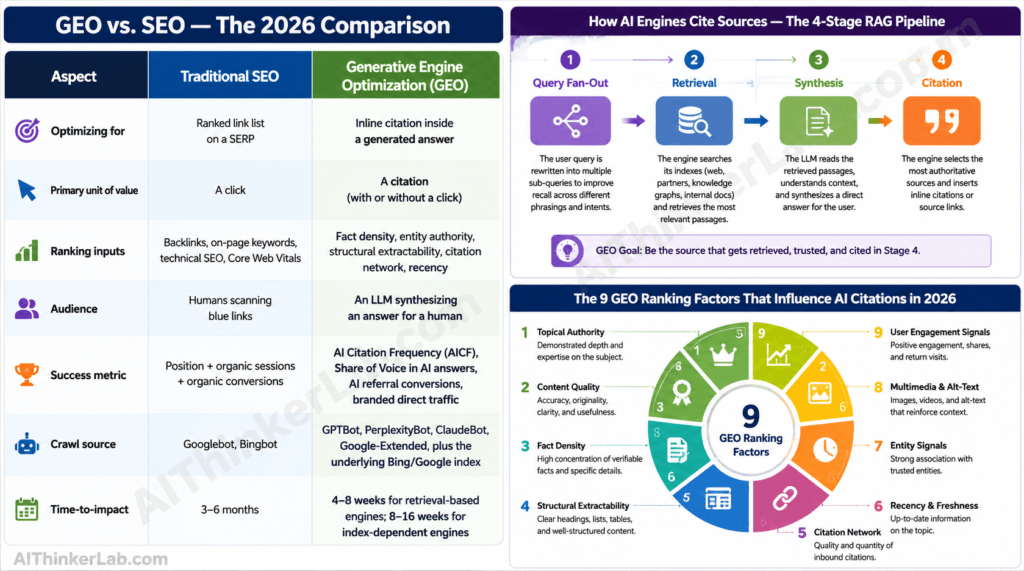
Then plan for staleness, because RAG’s whole point is fresh knowledge. There’s no in-place update for embeddings: when a document changes, you delete its old chunks and re-ingest, and when you change the embedder, you re-embed the entire corpus (Local AI Ops, 2026). Build a re-ingestion job from day one rather than bolting it on later. Worth noting for anyone thinking about discovery: the same retrieval mechanics that power RAG are what AI answer engines use to decide what to cite, which is why structuring content for retrieval overlaps with optimizing for generative engines — build once, benefit twice.
Start Small, Then Tune Retrieval
The version of this that actually ships is unglamorous: nomic-embed-text, ChromaDB, Llama 3.1 8B, thirty lines of Python, running on a 16GB machine you already own. Build that first. Get real answers on real documents before you touch a single “optimization.”
My recommendation, after reading how these pipelines fail: spend your tuning time on retrieval, not on the model shelf. Re-chunk before you re-download. Raise top-k before you scale up parameters. Set a relevance threshold so the system can admit ignorance instead of inventing a confident wrong answer. The teams who get local RAG working aren’t the ones with the biggest models — they’re the ones who treated retrieval as the product and the LLM as the last mile. Ship the small version this week; the tuning is where the wins actually live. Wrap this pipeline in an n8n agent.
Sources
- Chroma — official documentation: https://docs.trychroma.com
- Ollama — Embeddings capability &
/api/embed(official docs): https://docs.ollama.com/capabilities/embeddings - Ollama — Model library (embedding & chat models): https://ollama.com/library
- Morphllm — Ollama embedding models benchmarked (MTEB, dims, VRAM), June 2026: https://www.morphllm.com/ollama-embedding-models
- Ailog RAG — Embedding models 2026 benchmark & precision figures: https://app.ailog.fr/en/blog/news/embedding-models-2026
- Local AI Ops — Building a local RAG pipeline with Ollama & Open WebUI (VRAM, re-ingest): https://localaiops.com/posts/building-a-local-rag-pipeline-with-ollama-and-open-webui/
- Storyblok — RAG pipeline with Weaviate & Ollama (chunking, hybrid search): https://www.storyblok.com/mp/how-to-build-a-rag-pipeline-with-weaviate-and-ollama
- Nomic AI — nomic-embed-text model card: https://huggingface.co/nomic-ai/nomic-embed-text-v1.5