TL;DR / Key Takeaways
- Shadow AI now factors into 43% of AI-related security incidents, up from 20% a year earlier, according to IBM’s 2026 Cost of a Data Breach Report (Ponemon Institute, published July 29, 2026).
- Breaches involving shadow AI cost $5.39 million on average, versus $4.99 million overall — a premium for not knowing what’s running.
- The approval gate is loosening, not tightening: only 38% of breached organizations required IT sign-off before AI deployment in 2026, down from 45% — while incidents doubled in the same period.
- Self-hosted AI (Ollama, LM Studio, Open WebUI) can close the data-exfiltration gap — but only when IT deploys and monitors it. Cisco Talos found 1,139 Ollama servers exposed to the open internet.
- The EU AI Act’s Article 50 transparency duties apply from August 2, 2026, regardless of the Annex III high-risk deferral agreed in May 2026 — a shadow AI inventory is now a compliance line item, not a nice-to-have.
- The verdict: banning tools doesn’t work. Shipping an approved alternative fast enough that people don’t need to go around you, does.
Forty-three percent. That’s the share of AI-related security incidents where shadow AI showed up as a factor in IBM’s 2026 Cost of a Data Breach Report, released July 29 — more than double last year’s 20%. If you’re reading this in September 2026 wondering whether your shadow AI security posture is actually protecting enterprise IP, or just producing a slide deck nobody reads, that number is worth stopping for. Shadow AI isn’t shadow IT with a new coat of paint, either, even though the instinct to lump them together is understandable. An unapproved SaaS subscription doesn’t ingest your source code and learn from it. And “shadow AI” now covers more than a rogue ChatGPT tab — browser copilots, OAuth-connected agents, and someone’s weekend Ollama install all count. Here’s what’s actually driving the risk, and what’s worth doing about it.
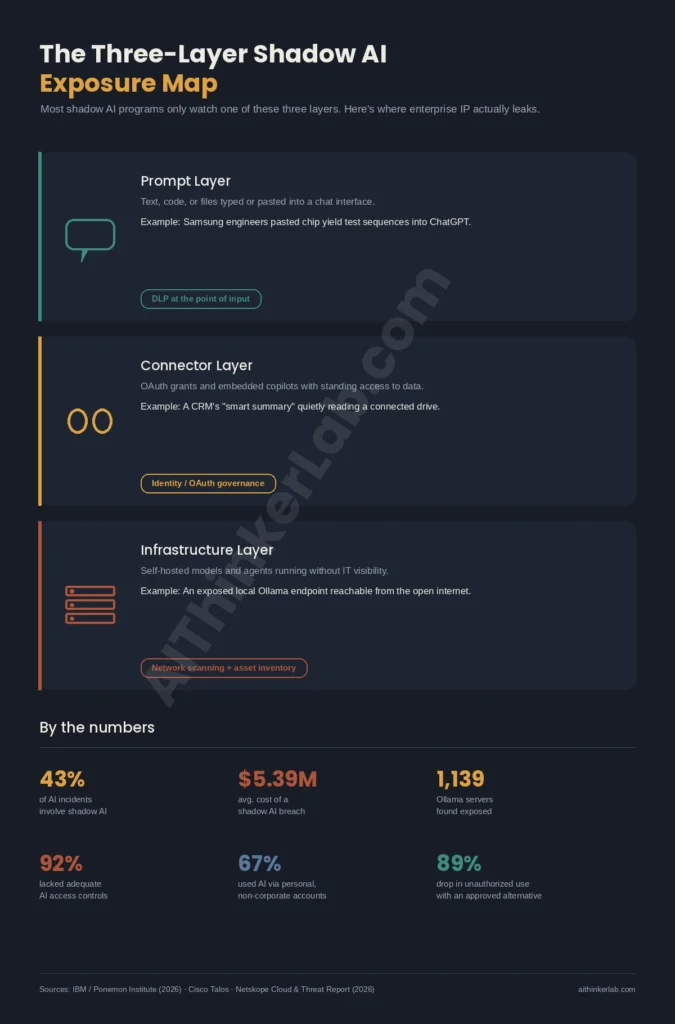
| Layer | What It Covers | Real-World Example | Primary Control |
|---|---|---|---|
| Prompt Layer | Text, code, or files typed or pasted into a chat interface | Samsung engineers pasting chip yield test sequences into ChatGPT | DLP at the point of input (Copilot DLP, Browser Data Security) |
| Connector Layer | OAuth grants, embedded copilots, API keys tied to personal accounts | A marketing tool’s “AI assistant” quietly reading a connected Google Drive | Identity/OAuth governance (Nudge Security, Reco) |
| Infrastructure Layer | Self-hosted models, agents, and MCP servers running without IT visibility | An exposed local Ollama endpoint reachable from the open internet | Network scanning + asset inventory (Cisco Talos-style discovery) |
What Is Shadow AI, and Why Is It Different From Shadow IT?
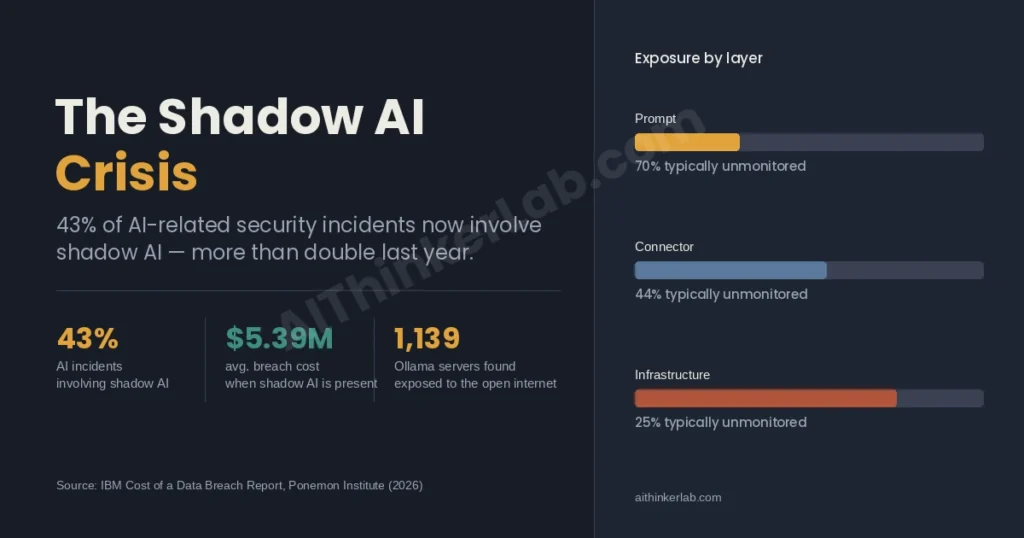
Shadow AI is any AI tool, model, or agent that touches company data without security review or IT approval — a ChatGPT tab open next to a ticketing system, a browser copilot baked into Chrome, a personal API key, or a local model someone spun up on a spare GPU. Unlike shadow IT, the danger isn’t unauthorized access. It’s unauthorized learning: the data doesn’t just sit somewhere unapproved, it gets processed — and sometimes retained — by a system nobody vetted.
That distinction matters more than most policy documents admit. A rogue Dropbox account is a storage problem; you find it, you revoke it, you’re mostly done. A rogue AI tool is a data-transformation problem. By the time IT notices, the prompt has already left the building, and there’s no way to know what happened to it on the other side. Gartner’s 2025 survey of 302 cybersecurity leaders found 69% suspect or have evidence that employees are using prohibited generative AI tools — and that figure predates the current wave of agentic coding assistants, which raise the stakes further. An agent doesn’t just read a document. It can browse, execute code, and call APIs on its own, which means a single ungoverned connection can traverse far more of your environment than a chat window ever could.
The category has also quietly widened. Microsoft’s own shadow AI discovery guidance now explicitly includes SaaS-embedded copilots, MCP servers, and model-provider frameworks in the discovery surface — not just standalone chatbots. So when someone says “we’ve handled shadow AI, we blocked ChatGPT on the network,” that’s the prompt layer only. Two more layers are usually still wide open.
How Big Is the Shadow AI Problem in 2026?
Big, and getting bigger faster than most governance programs can track. PagerDuty’s 2026 international Shadow AI Survey — 1,250 office professionals at companies with $500 million-plus in revenue across Australia, Japan, the UK, and the US — found two-thirds had used an unauthorized AI tool at work. Salesforce’s 2026 Workforce AI Survey puts AI usage at 67% of employees, against only 18% of organizations with a formal AI security policy. The gap between those two numbers is, functionally, the entire shadow AI problem in one sentence.
Volume is the part that surprises people. Netskope’s 2026 Cloud and Threat Report found the data sent to SaaS generative AI apps grew sixfold in a single year — from roughly 3,000 to 18,000 prompts per month in the median organization — and that around 3% of users generate an average of 223 data-policy violations each, every month. That’s not a rounding error; that’s a small group of power users carrying most of the risk. Cyberhaven’s 2026 AI Adoption & Risk Report adds the sensitivity angle: 39.7% of AI interactions involve sensitive data, and the average employee pastes something confidential into an AI tool roughly once every three days. Put plainly — this isn’t an edge case anymore. It’s Tuesday.
There’s a counterintuitive bright spot buried in the same data. Personal-account AI usage — the riskiest pattern, since it bypasses enterprise logging entirely — fell from 78% to 47% year over year, per Netskope’s tracking. Verizon’s 2026 DBIR still puts personal-account use at 67% among employees accessing AI on corporate devices, so the trend lines don’t fully agree. But the direction is the same: as sanctioned alternatives improve, some of the riskiest behavior recedes on its own, without a single new control being deployed.
Where Does Shadow AI Actually Leak Enterprise IP?
Three layers, and most governance programs only watch one of them. The table above sketches the shape; here’s what it looks like in practice. The prompt layer is the one everyone pictures — someone typing proprietary code, a draft contract, or a customer list into a chat box. Samsung’s 2023 incident is still the reference case, and it’s aged well as a teaching example: three semiconductor engineers pasted source code, meeting transcripts, and chip yield test sequences into ChatGPT inside a single month. Samsung’s first move was a blanket ban. That didn’t hold — the company reversed course and built an internal AI tool instead, which is the pattern almost every serious governance program eventually converges on, because bans just push usage further underground.
The connector layer is quieter and, honestly, scarier. This is the AI feature bolted onto a SaaS tool you already pay for — a CRM’s “smart summary,” a project tool’s embedded assistant — that reads more of your connected data than anyone realized when someone clicked “allow.” Nobody typed anything sensitive; the tool just had standing access. Identity-focused platforms like Nudge Security and Reco exist specifically because OAuth grants like this don’t show up in a normal network scan.
The infrastructure layer is where AIThinkerLab’s own beat — local and self-hosted AI — gets complicated, and it deserves its own section, because the obvious fix isn’t as clean as it sounds. A documented case of an AI agent exfiltrating files via prompt injection.
Can Self-Hosted AI Actually Stop Shadow AI?
Most guides tell you the fix for shadow AI’s data-exfiltration problem is simple: run the model yourself, and the data never leaves the building. That advice is incomplete, and treating it as a full answer is exactly the mistake worth avoiding. A local model running on a laptop or an unmanaged server is shadow AI — it’s just shadow AI with a hardware bill attached, and often with weaker security than the SaaS tool it replaced.
Cisco Talos’s internet-scanning research found 1,139 publicly exposed Ollama servers reachable from the open web — instances someone stood up, pointed at a real IP, and never firewalled. That’s not a hypothetical; that’s the infrastructure layer failing in exactly the way the prompt layer already has. Self-hosted tooling also carries its own supply-chain risk that a chat interface doesn’t: CVE-2026-47155 showed vLLM applying model-revision pins inconsistently across the artifacts a single model loads, and CVE-2024-37032 was a runtime vulnerability in Ollama itself, both reminders that “local” doesn’t automatically mean “secure by default.” Hardening a self-hosted Ollama server.
None of that means self-hosting is the wrong call — it’s the right call, deployed the right way. Ollama (currently at v0.33.1, released August 26, 2026) paired with Open WebUI or LM Studio, sitting behind the same network segmentation, patching cadence, and access logging as any other production service, genuinely does keep sensitive prompts off third-party servers. The difference between “shadow AI with extra steps” and “a real fix” is entirely about who’s watching it after day one. An Ollama + Open WebUI setup.
What Tools Actually Detect and Govern Shadow AI?
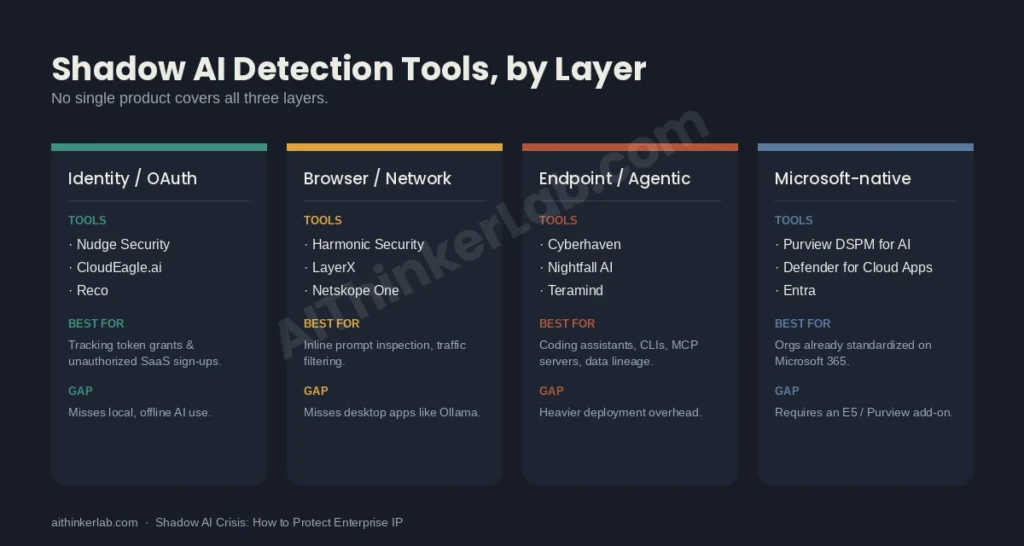
No single product covers all three layers, which is the part vendor pitch decks tend to skip. Shadow AI shows up across identity, browser/network, and endpoint surfaces, and the right tool depends on which layer is leaking.
| Layer | Example Tools | Best For | Coverage Gap |
|---|---|---|---|
| Identity / OAuth | Nudge Security, CloudEagle.ai, Reco | Tracking token grants and unauthorized SaaS sign-ups | Misses local, offline AI use entirely |
| Browser / Network | Harmonic Security, LayerX, Netskope One | Inline prompt inspection, SSE traffic filtering | Misses desktop apps like Ollama or Claude Desktop |
| Endpoint / Agentic | Cyberhaven, Nightfall AI, Teramind, Proofpoint AI Security | Coding assistants, CLIs, MCP servers, data lineage | Heavier deployment, higher operational overhead |
| Microsoft-native | Purview DSPM for AI + Defender for Cloud Apps + Entra | Orgs already standardized on Microsoft 365 | Requires an E5 or Purview add-on license |
Microsoft’s own deployment sequence for this — discover, block unsanctioned tools, block sensitive data from reaching sanctioned tools, then govern continuously — is worth borrowing even outside a Microsoft shop, because the order matters more than the vendor. You can’t set policy on AI usage you haven’t found yet. The market itself is consolidating fast around this problem: Zscaler closed its acquisition of SquareX in February 2026, and SentinelOne agreed to acquire Prompt Security in a deal reportedly worth around $250 million, both bets that AI-specific security is now its own category rather than a checkbox inside existing DLP suites. Defending against prompt injection.
Is the EU AI Act a Shadow AI Compliance Risk?
Yes — and the timeline is messier than most compliance calendars currently reflect. Article 50’s transparency obligations under the EU AI Act (Regulation (EU) 2024/1689) take effect August 2, 2026, requiring organizations to disclose when people are interacting with an AI system. That deadline held regardless of a separate May 7, 2026 political agreement that deferred the higher-stakes Annex III high-risk system obligations to December 2027. It’s easy to read “the deadline got pushed” and assume the whole thing moved. It didn’t.
Shadow AI makes this specific problem worse, not incidental to it. IDC’s 2026 research found 57% of European enterprises had discovered at least one instance of shadow AI in the past 12 months, while Gartner’s parallel 2026 tracking puts full AI-usage visibility at under 18% of organizations. You can’t file an accurate transparency disclosure, or correctly classify a system’s risk tier, for a tool your own security team doesn’t know is running. So what does that mean in practice? An AI inventory — the unglamorous spreadsheet-and-scan exercise everyone deprioritizes — has quietly become a regulatory prerequisite, not a security nice-to-have, for any organization with EU exposure.
How Do You Build a Shadow AI Governance Program That Actually Works?
Here’s the part IBM’s own data makes uncomfortable: organizations tightened the wrong lever. Approval requirements fell from 45% to 38% of breached organizations year over year, at the exact moment incidents doubled from 20% to 43%. Meanwhile, a Healthcare Brew survey found that giving employees an approved AI alternative cuts unauthorized tool use by 89%. Read those two data points together and the conclusion isn’t subtle — restriction alone isn’t the lever that moves the number. Fast, competitive access is.
A working program runs roughly four moves, in order, because skipping the first one wastes the other three:
- Discover what’s already running — network-layer scanning for exposed endpoints, OAuth audits for connector-layer grants, and a plain survey of teams, since a surprising amount of shadow AI shows up the moment you just ask.
- Classify and set data boundaries — decide what can never go into any AI tool (customer PII, unreleased financials, source code for regulated products) before deciding which tools are allowed.
- Ship an approved alternative fast — this is the step most programs underinvest in. If the sanctioned option is slower or weaker than the free tool an employee already knows, the policy is a suggestion, not a rule.
- Enforce at the point of use, then keep watching — DLP on prompts and uploads, sensitivity labels that travel with the data, and a recurring discovery cycle, because new AI tools appear faster than any annual audit can catch them.
What Should a Small or Mid-Size Team Do This Quarter?
You don’t need a six-figure DLP rollout to move the needle, and most of AIThinkerLab’s audience shouldn’t try to buy one. Start with a single named person who can approve or reject a new AI tool within a week — not a committee, a person — because a slow “maybe” is what sends people back to a personal ChatGPT account in the first place. Pair that with a one-page acceptable-use policy: which data categories never touch an AI tool, which tools are approved today, and where to ask for a new one.
Then, if data sensitivity or cost is the real driver, evaluate a self-hosted stack — Ollama plus Open WebUI is the fastest path from zero to a working internal AI tool most teams can stand up in an afternoon — but put it behind the same access controls as any other internal service on day one, not “once we get to it.” That single sequencing choice is the difference between closing the infrastructure layer and quietly opening a fourth one. Eight tested offline AI setups.
The Bottom Line
Shadow AI security isn’t a tooling purchase, and it isn’t a ban either — both are the reactive move, and IBM’s own numbers show reactive moves aren’t working. The organizations closing the gap are the ones that discover what’s actually running across all three layers, then compete for adoption with something fast enough that employees don’t feel the need to go around it. If there’s one thing to take from a year where incidents doubled while approval processes loosened, it’s that visibility buys you the option to act — but only a genuinely usable sanctioned alternative gets people to actually choose it. Start with the inventory. Ship the alternative before you tighten the policy. That order matters more than which vendor logo ends up on the dashboard.
Sources
- IBM Newsroom, One in Four Malicious Breaches Are AI-Enabled (July 29, 2026) — https://newsroom.ibm.com/2026-07-29-ibm-study-one-in-four-malicious-breaches-are-ai-enabled,-costing-companies-6-million-on-average
- IBM & Ponemon Institute, Cost of a Data Breach Report 2026 — https://www.ibm.com/reports/data-breach
- Cybersecurity Dive, As data breaches grow costlier, ungoverned AI creates new risks — https://www.cybersecuritydive.com/news/data-breach-costs-ai-governance-ibm/826463/
- Kodem Security, Self-Hosted LLM Security: Local AI Risks (Cisco Talos Ollama exposure data) — https://www.kodemsecurity.com/resources/self-hosted-llm-security-kimi-deepseek-qwen
- Travers Smith, EU agrees to delay key AI Act compliance deadlines — https://www.traverssmith.com/knowledge/knowledge-container/eu-agrees-to-delay-key-ai-act-compliance-deadlines/
- BabyBots, Shadow AI Governance in Microsoft 365 — https://www.babybots.ai/guides/shadow-ai-governance-microsoft-365-2026
- CloudNuro, Shadow AI and the EU AI Act: A Compliance Checklist — https://www.cloudnuro.ai/blog/shadow-ai-eu-ai-act-compliance-checklist-august-2026