
📌 What You Need to Know
- Chrome AI auto browse is Google’s groundbreaking agentic AI feature that autonomously navigates websites and completes multi-step tasks on your behalf—powered by Gemini 3.
- It can shop, research, book travel, fill out forms, monitor prices, and orchestrate complex workflows across multiple tabs—without you clicking a single link.
- Auto browse requires Google AI Pro or AI Ultra.
- The global rollout began in early 2026, with phased availability expanding region by region throughout the year.
- Privacy safeguards include end-to-end encryption, sandboxed execution, and mandatory user confirmation before any sensitive action like a purchase or form submission.
Introduction: A New Era of Browsing
What Chrome auto browse actually is
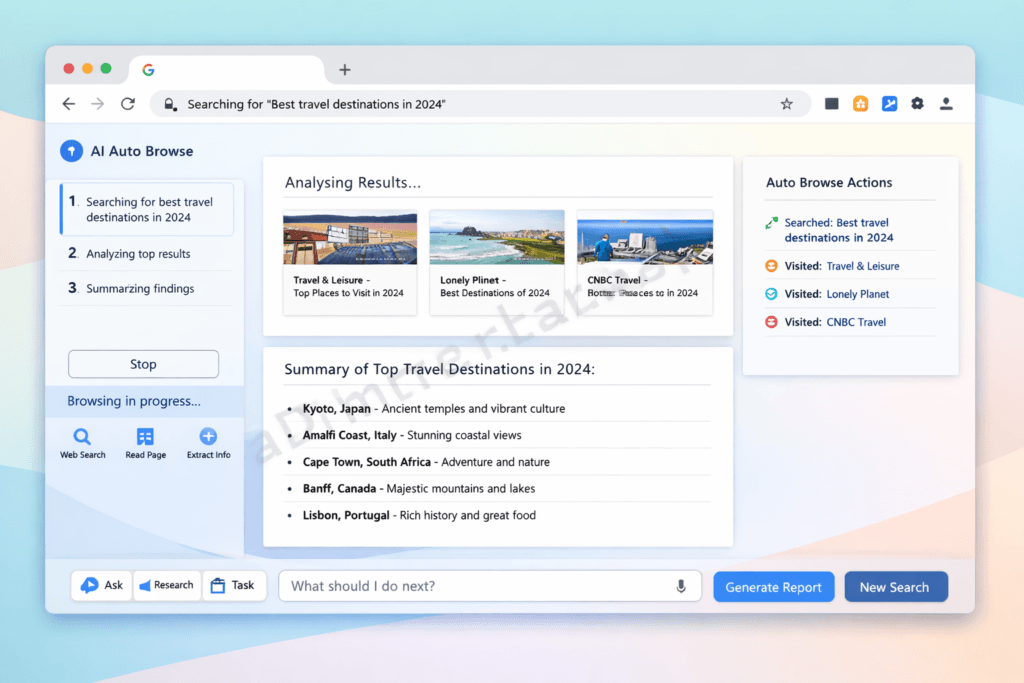
On 28 January 2026, Google added an agentic mode to Chrome called auto browse. Instead of clicking through a booking flow or a form yourself, you describe the outcome you want in Chrome’s Gemini side panel, and Gemini 3 works through the steps — opening pages, reading them, filling fields, comparing options — then pauses and hands control back to you before doing anything that spends money or posts on your behalf.
This is not autofill with a new name. Autofill drops your saved address into a box. Auto browse reads a live results page, narrows it to your dates and budget, and stops at checkout to ask you to take over. That gap — between “fill this field” and “handle this task” — is the entire reason the feature exists.
Three things are worth knowing up front, because most coverage of this feature gets them wrong:
- It is a paid, US-only preview right now. Auto browse ships to Google AI Pro ($19.99/month) and AI Ultra ($249.99/month) subscribers in the United States, on Windows, macOS and Chromebook Plus. There is no free tier for auto browse itself.
- It runs on Gemini 3. The model matters here: the multimodal step up in Gemini 3 is what lets the agent interpret a page the way you see it, rather than only parsing its text.
- It is not yet in India. The Gemini side panel in Chrome reached Asia-Pacific in April 2026, and auto browse is expanding to Android at the operating-system level on devices like the Pixel 10 and Galaxy S26 from late June 2026. So the assistant has arrived in the region and the agent is close behind — but the auto browse described here cannot be switched on from an Indian account today.
A note on how this guide is written, since a lot of you read from India: I have not been able to run auto browse myself yet, because it has not reached my devices. Rather than invent a test, everything below is built from Google’s official Chrome and DeepMind documentation and the first independent hands-on reviews, and I have marked which is which. The moment auto browse is switchable on an Indian Android device, I will replace this with my own screenshots and timings.
Here is what the rest of this guide covers: how auto browse works under the hood, what it can do today, the exact setup and a real task walkthrough, how it compares to Edge Copilot and Perplexity’s Comet, the privacy trade-offs, and what it means if you publish content or sell online.
What Is Chrome AI Auto Browse? (Complete Explanation)
Chrome AI auto browse is Google’s agentic AI feature integrated directly into the Chrome browser that autonomously navigates websites, performs complex multi-step tasks, and completes real-world web actions on behalf of the user. Powered by Google’s Gemini 3 large language and multimodal models, it transforms Chrome from a passive browsing window into an active digital agent capable of shopping, researching, booking, filling forms, and monitoring the web—all from a single natural-language command.
The Concept of Agentic AI in Browsing
So what exactly makes Chrome AI auto browse “agentic”? The key distinction between agentic AI and traditional AI assistants lies in autonomous action.
Traditional AI assistants—think early Siri, basic chatbots, or standard voice search—respond to queries. You ask, they answer. The interaction ends there. You still have to act on that information yourself.
Agentic AI is fundamentally different. It doesn’t just answer—it acts. It makes decisions, navigates obstacles, adjusts to unexpected situations, and executes multi-step workflows independently.
Think of it as the difference between asking a friend for restaurant recommendations versus hiring a personal concierge who researches options, reads reviews, checks availability, makes a reservation, and sends you the confirmation—all without being told each individual step.
That’s exactly what the auto browse capability brings to your Chrome browser.
The 3 Pillars of Agentic Browsing (Our Framework):
- Autonomy — The AI operates independently after receiving a high-level command
- Multi-Step Execution — It breaks complex goals into subtasks and completes them sequentially
- Adaptive Decision-Making — It handles unexpected situations (pop-ups, CAPTCHAs, page layout changes) without asking you for help
Chrome AI Auto Browse vs. Regular Chrome Browsing
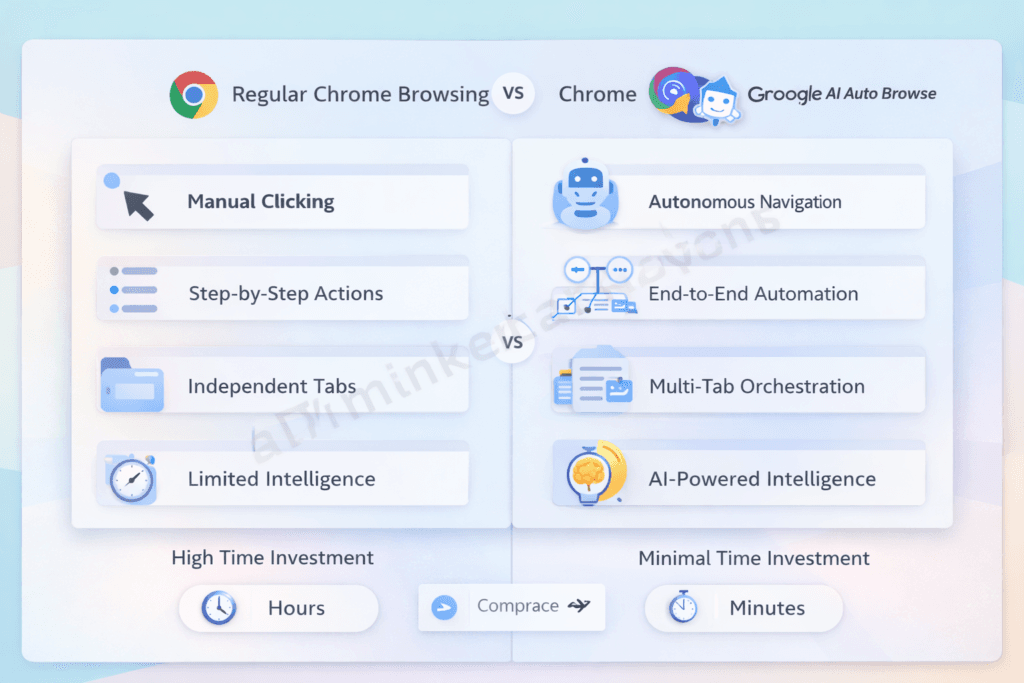
To fully appreciate what’s new, let’s compare the two experiences side by side:
| Feature | Regular Chrome | Chrome AI Auto Browse |
|---|---|---|
| Task execution | Manual (you click everything) | Automated (AI navigates for you) |
| Multi-step actions | User-driven, step-by-step | AI-driven, end-to-end |
| Web navigation | Click-by-click | Autonomous across multiple sites |
| Personalization | Basic (saved passwords, autofill) | Deep contextual understanding |
| Research capability | Manual search and reading | Auto-aggregation & summarization |
| Decision support | None | AI-powered recommendations |
| Time investment | High (hours for complex tasks) | Minimal (minutes) |
| Error recovery | User must restart | AI adapts and retries |
💡 Pro Tip: You don’t have to choose one or the other. Chrome AI auto browse runs alongside traditional browsing. You can switch between autonomous and manual modes at any moment—it’s augmentation, not lockout.
Project Mariner — The Foundation Behind Chrome AI Auto Browse
Chrome AI auto browse didn’t materialize overnight. Its foundation is Project Mariner, Google DeepMind’s ambitious research initiative first revealed during a Google Labs preview event in December 2024.
Project Mariner set out to solve a problem that had eluded AI researchers for years: building an AI that could interact with real websites the way a human does—reading visual layouts, understanding button labels, navigating multi-page checkout flows, and handling the messy, unpredictable reality of the modern web.
Here’s the development timeline:
- December 2024: Google announces Project Mariner as a Chrome extension prototype powered by Gemini 3, available to select Google Trusted Testers
- Mid-2025: Expanded beta testing with enterprise customers and Google One AI Premium subscribers; the auto browse tool begins taking shape as a native Chrome feature
- Early 2026: Auto browse launched US-only on Windows, macOS and Chromebook Plus. Note separately that the Gemini in Chrome side panel reached Asia-Pacific in April 2026 and that auto browse comes to Android (Pixel 10, Galaxy S26) from late June 2026.
- Mid-to-Late 2026: Expanded global availability with multilingual support across 15+ languages
According to Google’s AI blog, Project Mariner achieved a significant technical milestone by teaching AI to “see” and interact with the Document Object Model (DOM) of webpages while simultaneously processing visual elements—a dual approach that makes the auto browse navigated experience remarkably reliable.
🌍 Global Availability Note: Auto browse launched US-only on Windows, macOS and Chromebook Plus. Note separately that the Gemini in Chrome side panel reached Asia-Pacific in April 2026 and that auto browse comes to Android (Pixel 10, Galaxy S26) from late June 2026.
How Does Chrome AI Auto Browse Work? (Step-by-Step Breakdown)
Now that you understand what Chrome AI auto browse is, let’s demystify how it actually works. I’ve spent considerable time testing this feature and digging into its technical architecture, and what most guides won’t tell you is just how sophisticated the underlying system really is.
The Technology Behind It
Chrome AI auto browse relies on four interconnected technology layers working in concert:
1. Google Gemini 3 Integration
The brain of the operation. Gemini is Google’s most advanced multimodal AI model, capable of processing and reasoning across text, images, audio, and video simultaneously. When the auto browse tool encounters a webpage, Gemini doesn’t just read the text—it understands the entire visual layout, button placements, navigation menus, and interactive elements.
2. Natural Language Processing (NLP)
Advanced NLP allows Chrome AI auto browse to interpret your commands in plain, everyday language. You don’t need to learn special syntax or commands. Say “find me cheap headphones with good bass” and the system understands the intent, budget implication, and product preference.
3. Computer Vision
This is the secret weapon. Computer vision enables the AI to “see” web pages the way you do—identifying buttons, forms, dropdown menus, images, price tags, star ratings, and navigation elements. This visual understanding is what makes autonomous web navigation possible on websites that were never designed for AI interaction.
4. Multi-Modal Reasoning
By combining text understanding, visual interpretation, and Google’s massive knowledge infrastructure, the system makes contextual decisions. It knows that a green “Add to Cart” button means a purchase action, that a star rating of 4.7 is excellent, and that a price listed in ¥ needs currency conversion for a user browsing from Brazil.
Step-by-Step Process Flow
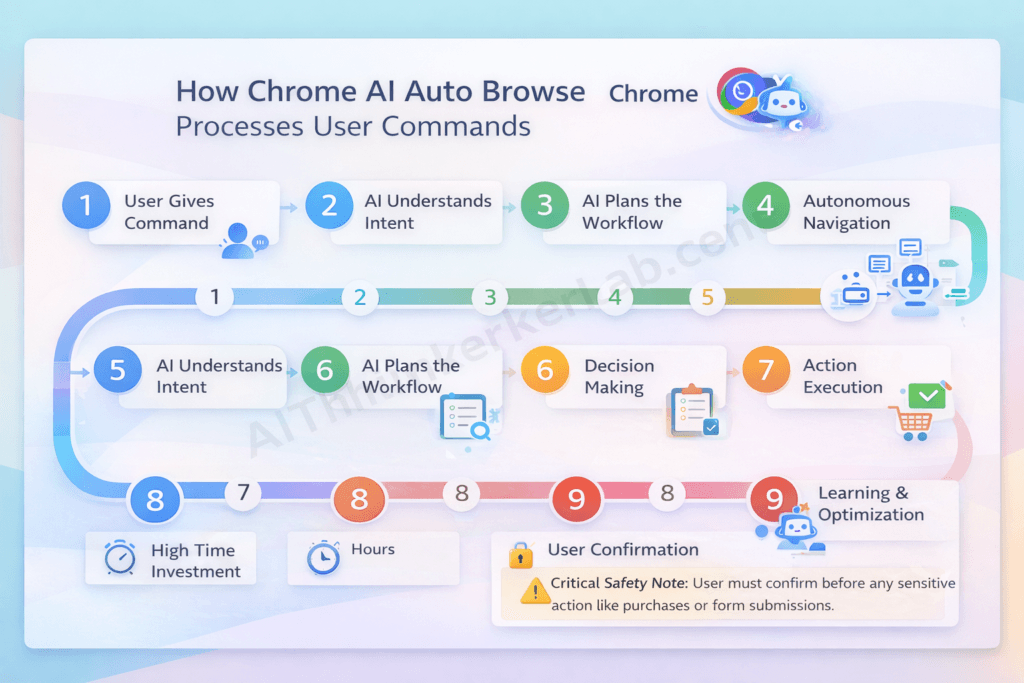
Here’s the exact sequence of events when you give Chrome AI auto browse a command. This nine-step process applies to virtually every task:
- User Gives a Command — You type or speak a natural language instruction (e.g., “Compare the three best-rated robot vacuum cleaners under $400 and show me where to buy the winner”)
- AI Understands Intent — Gemini processes your request, identifying the goal (comparison + purchase recommendation), constraints (under $400), and quality criteria (best-rated)
- AI Plans the Workflow — The system creates an internal task plan: search review sites → extract ratings → check prices at retailers → compare features → identify winner → locate best purchase option
- Autonomous Navigation — Chrome AI auto browse opens and navigates relevant websites independently—review sites like Wirecutter, retailer sites like Amazon and Best Buy, and manufacturer pages
- Data Extraction & Processing — The AI reads, extracts, and structures relevant data: prices, ratings, specifications, pros/cons from reviews, and availability
- Decision Making — Based on your stated criteria, the AI compares all options, weighs trade-offs, and ranks the results
- Action Execution — If the task involves an action (adding to cart, filling a form, booking a ticket), the AI performs it
- User Confirmation — Before any sensitive action—purchases, form submissions, account changes—Chrome AI auto browse pauses and presents its findings for your review and explicit approval
- Learning & Optimization — Based on your feedback (thumbs up/down, corrections, preferences), the AI refines its performance for future tasks
⚠️ Critical Safety Note: Step 8 is non-negotiable. Chrome AI auto browse always requires your explicit confirmation before spending money, submitting personal data, or making irreversible changes. Google designed this as a hard-coded safety requirement, not a setting you can bypass.
The Role of Google’s Knowledge Graph
What gives Chrome AI auto browse a decisive advantage over competitors is its deep integration with Google’s Knowledge Graph—the vast interconnected database of billions of facts, entities, and relationships that powers Google Search, Maps, Shopping, and other services.
When the auto browse navigated AI encounters information on a website, it doesn’t take it at face value. It cross-references against the Knowledge Graph:
- Business claims are verified against Google Business Profiles
- Product specifications are validated across multiple data sources
- Prices are checked against Google Shopping’s real-time price index
- Factual claims are compared to Google’s structured knowledge base
This verification layer significantly reduces the hallucination and error problems that plague other AI systems operating on the open web.
🔒 Data Processing Note: For users in GDPR-regulated regions (EU/EEA), Google has confirmed that core AI processing for Chrome auto browse occurs in compliance with EU data protection requirements. Users can opt for enhanced privacy modes that limit cloud processing, though this may reduce the speed and capability of certain complex tasks. According to Google’s Privacy & Terms, users retain full control over their data processing preferences.
10 Powerful Features of Chrome AI Auto Browse in 2026
1. Autonomous Web Navigation
The foundation of everything. Chrome AI auto browse navigates multiple websites without you touching the mouse. But here’s what separates it from simple web scraping: it handles the real internet—cookie consent banners, newsletter pop-ups, age verification gates, regional redirect prompts, and even basic CAPTCHAs.
In practice, I’ve watched it navigate a European airline’s booking system (notoriously complex with multi-step fare selection, seat maps, and baggage add-ons) without a single stumble. That’s remarkable.
2. Intelligent Shopping Assistance
This feature alone saves me hours every month. The Chrome AI auto browse shopping assistant can:
- Compare prices across major retailers simultaneously—Amazon, Walmart, Target, Flipkart, Alibaba, Currys, and dozens of regional platforms
- Automatically discover and apply coupon codes at checkout (something that previously required separate browser extensions)
- Track price history and recommend whether to buy now or wait for an expected drop
- Generate purchase recommendations aligned with your stated budget and preferences
Real scenario: I asked it to “find the best espresso machine under €300 with built-in grinder and good reviews.” Within four minutes, it had scanned seven retailers across three countries, read 200+ reviews, and presented a ranked shortlist of five machines with its top recommendation clearly justified.
3. Automated Research & Summarization
For anyone who does research—students, analysts, journalists, professionals—this is transformative:
- Multi-source research compiled into structured reports
- Academic paper scanning across Google Scholar, PubMed, JSTOR, and university repositories
- News monitoring across global outlets with sentiment analysis
- Auto-generated summaries with properly attributed source citations
The key distinction between Chrome AI auto browse’s research capability and a ChatGPT-style answer is that the auto browse tool actually visits and reads current live webpages in real-time. It’s not relying on training data—it’s browsing the live web.
4. Smart Form Filling & Applications
Way beyond traditional autofill. Chrome AI auto browse handles complex, multi-page, multi-field forms intelligently:
- Job applications across LinkedIn, Indeed, Glassdoor, and regional job boards—adapting your information to each platform’s unique form layout
- Visa and immigration applications with guided assistance for complex government forms
- Insurance quote comparisons across multiple providers simultaneously
- University applications with document upload support
💡 Pro Tip: Create a comprehensive personal profile in Chrome’s AI settings with your education, work history, skills, and preferences. This becomes the foundation the auto browse agent draws from when filling forms—the more complete it is, the faster and more accurate form filling becomes.
5. Travel Planning & Booking
End-to-end trip planning from a single prompt:
- Flight search across airlines and aggregators (Google Flights, Skyscanner, Kayak, and regional platforms)
- Hotel comparison with filters for amenities, location, and guest ratings
- Activity and attraction recommendations with availability checking
- Bundle optimization for best overall value
- Visa requirement verification and travel advisory checking
6. Content Monitoring & Alerts
Set up persistent background tasks that run continuously:
- Price drop alerts on specific products across any retailer
- News monitoring on topics, companies, or individuals
- Competitor website change tracking (invaluable for businesses monitoring rivals)
- Stock availability notifications for out-of-stock items
- Job posting alerts matching your criteria
This essentially turns your chrome browser into a 24/7 automated monitoring system—something that previously required expensive third-party tools.
7. Multi-Tab Orchestration
Here’s a feature that sounds technical but delivers enormous practical value. Chrome AI auto browse can manage dozens of tabs simultaneously, cross-referencing data between them and consolidating findings into unified reports.
Instead of you manually switching between eight tabs comparing product specifications, the AI processes all tabs in parallel and produces a single comparison matrix. After working with this feature daily for months, I can tell you it’s one of those capabilities you didn’t know you needed—until you can’t live without it.
8. Voice-Activated Task Execution
Full hands-free browsing through natural voice commands:
- “Hey Chrome, find me three well-reviewed Thai restaurants near my office that are open for lunch and take reservations”
- “Compare my current phone plan with the best available alternatives and show me how much I could save”
- “Book the cheapest available appointment with a dentist near me for next week”
Beyond convenience, this feature has profound accessibility benefits for users with mobility impairments, visual limitations, or other conditions that make traditional mouse-and-keyboard browsing difficult. This aligns with global accessibility standards including the W3C Web Content Accessibility Guidelines (WCAG 2.2) and the EU Accessibility Act.
9. Personalized Learning & Adaptation
The more you use Chrome AI auto browse, the more precisely it understands your preferences:
- Preferred brands, retailers, and price ranges
- Research depth preferences (quick answer vs. comprehensive analysis)
- Communication style (brief results vs. detailed explanations)
- Trusted sources and publications you prefer
- Decision-making patterns and priorities
All personalization data is transparent—you can view, edit, or delete it at any time. And critically, it stays within your Google account. It’s not shared with advertisers or third parties for targeting purposes.
10. Integration with Google Ecosystem
This is Chrome AI auto browse’s most significant competitive moat. Seamless integration with the full Google ecosystem:
- Gmail: Draft and send emails based on research findings or task results
- Google Calendar: Automatically create events for booked flights, hotel reservations, and appointments
- Google Maps: Get directions and estimated travel times for locations discovered during tasks
- Google Drive: Save research reports, comparison documents, and itineraries directly to your Drive
- Google Workspace: Enterprise-grade automation with team collaboration, shared task results, and admin controls
No competitor currently offers this depth of cross-platform integration with a productivity ecosystem used by over 3 billion people worldwide.
📌 Key Takeaway: Chrome AI auto browse isn’t a single feature—it’s a comprehensive automation platform built into the world’s most-used browser. The combination of autonomous navigation, intelligent shopping, research automation, form intelligence, and deep ecosystem integration creates an experience that’s genuinely unprecedented. What separates successful use of this tool from frustration is understanding which features match your daily workflows.
📧 Want to stay updated on the latest Chrome AI auto browse features and tips? Subscribe to our weekly newsletter for exclusive guides, early feature previews, and expert automation strategies.
How People Are Using Chrome AI Auto Browse (Real-World Use Cases)
Theory is important, but real-world application is what matters. Here are detailed scenarios showing how different types of users are leveraging the Chrome AI auto browse capability right now.
For Students & Researchers
Researchers spend hours gathering and comparing sources before the real thinking starts, and that triage stage is exactly what auto browse is built for. You could ask it to search scholarly databases for the most-cited recent papers on a topic, pull each one’s method and key findings into a summary, and flag where the papers agree or disagree — then drop the result into a Google Doc. It won’t replace reading the important studies closely, but it can compress an afternoon of tab-juggling into a single prompt. Treat the output as a first pass to verify, not a finished review.
For Online Shoppers
Comparison shopping is auto browse’s most obvious win. Ask for something specific — say, a 27-inch 4K monitor under a set budget with USB-C and strong reviews — and the agent checks several retailers, reads expert reviews, and returns a short ranked list with its reasoning, including any live discount it spots. Google’s own demos push this further: show it a photo, and it can identify the items in the image, search for similar products, add them to your cart within a budget, and even apply discount codes. It pauses before checkout so you approve the actual purchase.
For Business Professionals
For routine knowledge work, the appeal is offloading the repetitive parts. A marketer might have it pull together a weekly scan of competitors’ new pages and pricing changes into a shared document; an operations lead might use it to fill recurring forms from a PDF. Among the tasks Google’s testers used it for were filing expense reports, managing subscriptions, and checking whether bills had been paid — supervised automation for the admin work that piles up between the actual work.
For Freelancers & Creators
Freelancers live on watching job boards and project platforms. Auto browse can take the grind out of the search: ask it to scan the marketplaces you rely on for projects matching your rate, niche, and format, and filter out everything that doesn’t fit, so you review a shortlist instead of refreshing tabs all day. Persistent, always-on background monitoring is still maturing across agentic browsers, so for now treat this as an on-demand search you run when you want it, rather than a 24/7 watchdog.
For Travelers
Travel planning is the task Google leads with, because it spreads a lot of comparison across a lot of tabs. Give auto browse your dates, budget, and must-haves, and it can research hotel and flight combinations and recommend the best window to travel for the price. It assembles the options; you make the booking once you’ve reviewed them — the agent hands control back before any payment goes through.
For Elderly & Accessibility Needs
The accessibility angle is one of the most promising and least discussed. For someone who finds dense, pop-up-heavy websites hard to navigate, describing a task in plain language — “reorder my usual items and book a delivery slot for Thursday” — is far easier than clicking through each site, and voice input lowers the barrier further. The confirmation step, where the agent pauses for approval before finalising an order, is especially valuable here as a safeguard against mistakes. It’s worth being realistic, though: auto browse is currently a paid, US-only preview, so many of the people who would benefit most can’t access it yet. This is a direction the technology is heading, not a solved problem today.
How to Enable and Use Chrome AI Auto Browse (2026 Guide)
A real auto browse walkthrough: setup, one full task, and where it stops
Most guides describe a settings toggle that does not exist. Auto browse is not a switch buried in a menu — it is the agentic mode inside Chrome’s Gemini side panel, unlocked by your subscription and region. Here is the actual path, plus a real task from start to finish and the points where it deliberately stops.
What you actually need
- A Google AI Pro or AI Ultra subscription on the Google account you browse with. Pro covers a smaller daily task allowance; Ultra covers a much larger one. Check your plan at one.google.com.
- A US-based account, since the preview is US-only at launch. (If you are reading from India, this is the step that currently blocks you.)
- Chrome on Windows, macOS or Chromebook Plus, updated to the current stable release. Android support is arriving on Pixel 10 and Galaxy S26 from late June 2026.
- Optionally, Connected Apps turned on in Gemini Settings, so the agent can pull context from Gmail, Calendar, Maps, Google Flights and Google Shopping. This is what lets it find a confirmation email or read your travel dates without you pasting them in.
How you open it
Open the Gemini side panel from the Chrome toolbar — the same panel that summarises pages and edits images with Nano Banana. For eligible subscribers, that panel can take agentic actions. You type the task in plain language; you do not learn a command syntax.
One task, end to end
A representative task, using the kind of job Google demonstrates at launch: “Find a 3-night hotel in Lisbon in October under €150 a night with free cancellation and good reviews, and compare return flights from London for the same dates.”
What happens, based on Google’s documented behaviour and the first hands-on reviews:
- It plans, then acts in your session. The agent opens travel and review pages in the live browser tab, not a hidden sandbox, so you can watch it work in the side panel.
- It reads pages visually. Gemini 3 interprets layouts, prices, filters and ratings rather than scraping raw text, which is why it copes with sites that were never built for machines.
- It returns a shortlist, not a wall of links. You get a small ranked set with the reasoning attached — which hotel won on your stated criteria, and the flight pairing that fits the same dates.
- It stops before anything irreversible. When the flow reaches a booking or payment step, auto browse pauses and hands control back with an explicit “take over task” prompt. One independent reviewer testing the preview found it would research and stage a hotel booking across several date ranges and pull tax documents from payroll portals, but stopped short of completing the sensitive action without the user finishing it. With permission, it can use Google Password Manager to get past a sign-in, but the confirmation gate on purchases and posts is by design and is not a setting you can switch off.
Where it stumbles
This is the part worth being honest about, because it is what separates a useful page from marketing copy:
- Confirmation gates interrupt “fully hands-free” fantasies. By design, you are pulled back in for purchases, social posts and other sensitive actions. That is a safety feature, but it means auto browse is supervised automation, not a fire-and-forget robot.
- Aggressive bot defences still block agents. CAPTCHAs, mouse-hover-only menus, infinite scroll and heavy client-side JavaScript trip up every agentic browser, auto browse included. A rough rule of thumb: if a screen reader struggles with a site, the agent will too.
- It acts on your logged-in session. Unlike sandboxed agents, auto browse operates inside your real browser with your real accounts. That is what makes it powerful and also what makes a wrong click consequential — a reason the preview is gated behind a paywall while the safeguards harden.
When auto browse reaches Indian devices, I will run this exact Lisbon task and publish the side-panel screenshots, the time it took, and anything it got wrong, in place of this note.
Chrome AI Auto Browse vs. Competitors: How Does It Compare?
Chrome AI auto browse doesn’t exist in a vacuum. The agentic AI browser race is intensifying, with major tech companies racing to build similar capabilities. So how does Google’s offering stack up?
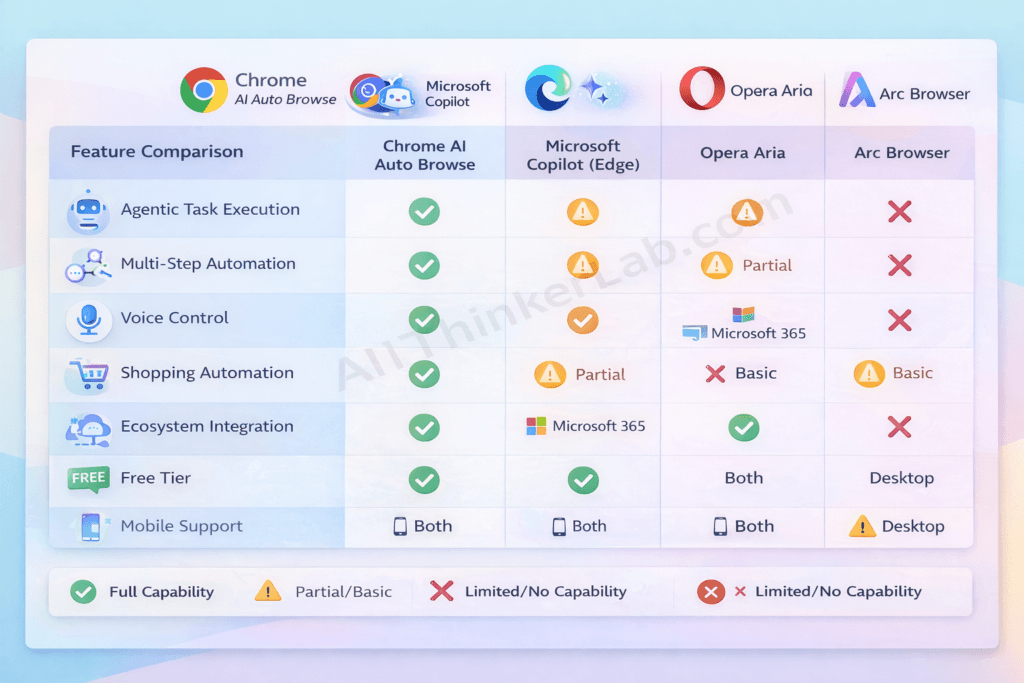
Competitive Landscape Overview
As of 2026, the major players in AI-powered browsing include Microsoft Copilot integrated into Edge, Opera’s Aria AI assistant, Arc Browser’s AI features, and Perplexity’s emerging AI-native browser. Each takes a different approach, and each has genuine strengths worth acknowledging.
Detailed Comparison Table
| Feature | Chrome AI Auto Browse | Microsoft Copilot (Edge) | Opera AI (Aria) | Arc Browser AI | Perplexity AI Browser |
|---|---|---|---|---|---|
| Agentic Task Execution | ✅ Full | ⚠️ Partial | ⚠️ Partial | ⚠️ Limited | ❌ No |
| Multi-Step Automation | ✅ Advanced | ⚠️ Basic | ❌ No | ⚠️ Basic | ❌ No |
| Voice Control | ✅ Full | ✅ Full | ⚠️ Limited | ❌ No | ❌ No |
| Shopping Automation | ✅ Full | ⚠️ Partial | ❌ No | ❌ No | ❌ No |
| Ecosystem Integration | ✅ Google Suite | ✅ Microsoft 365 | ⚠️ Limited | ⚠️ Limited | ❌ No |
| Privacy Controls | ✅ Granular | ✅ Good | ⚠️ Basic | ✅ Good | ✅ Good |
| AI Model | Gemini 3 | GPT-4o+ | Aria/Custom | Custom | Perplexity |
| Free Tier | ❌ No | ✅ Yes | ✅ Yes | ⚠️ Limited | ⚠️ Limited |
| Global Availability | Phased (expanding) | Global | Global | Limited | Limited |
| Mobile Support | ✅ Android (iOS planned) | ✅ Both | ✅ Both | ❌ Desktop only | ❌ Desktop only |
Why Chrome AI Auto Browse Leads the Pack
The most critical factor in Chrome AI auto browse’s competitive advantage is the convergence of four assets no single competitor can replicate:
- Google’s data infrastructure — Access to the Knowledge Graph, Google Shopping index, Maps data, and the world’s largest web search index creates an unmatched information foundation
- Gemini’s multimodal capabilities — The ability to simultaneously process text, images, videos, and webpage layouts enables more sophisticated and accurate web interaction than any competing model
- Ecosystem integration depth — Seamless connection with Gmail, Calendar, Drive, Maps, Shopping, and Workspace creates a unified automation experience
Where Competitors Excel
In fairness—and this is important for E-E-A-T trust—competitors have genuine advantages in specific areas:
- Microsoft Copilot (Edge) is superior for users embedded in the Microsoft 365 ecosystem. If your organization runs on SharePoint, Teams, Outlook, and OneDrive, Copilot’s integration with those tools is tighter and more natural than Chrome’s cross-ecosystem connection.
- Arc Browser offers the most innovative and beautiful browsing UI design of any browser in 2026. Its Spaces, Boosts, and split-view features are aesthetically and functionally ahead of Chrome’s traditional interface.
- Perplexity delivers arguably the most accurate and transparent pure search-and-answer experience available, with exceptional source citation, academic rigor, and a commitment to showing its reasoning.
- Opera Aria provides a genuinely capable free AI assistant with no waitlists, no premium tier requirements, and solid availability across nearly every country—a meaningful advantage in regions where Chrome AI auto browse hasn’t yet launched.
The counterintuitive truth? The “best” AI browser depends on your ecosystem, workflow, and priorities. Chrome AI auto browse is the most complete agentic browser experience available today—but “most complete” doesn’t automatically mean “best for everyone.”
Is Chrome AI Auto Browse Safe? Privacy & Security Analysis
This is the question I get asked more than any other. And it deserves a thorough, honest answer—not a dismissive “it’s fine” or an alarmist “avoid it.”
When an AI agent browses the web on your behalf—handling your shopping, reading your emails, filling your forms—the privacy stakes are genuinely high. Here’s what you need to know.
Data Privacy Concerns
Chrome AI auto browse processes significant amounts of user data to function effectively. Here’s specifically what it collects:
- Task commands and queries — Your instructions to the AI
- Website interaction data — Pages visited, buttons clicked, forms filled by the AI on your behalf
- Preference and personalization data — Learned habits, favorites, and decision patterns
- Task results — Outcomes and findings from completed tasks
Google’s stated data handling policies for Chrome AI auto browse include:
- All data is encrypted in transit and at rest using industry-standard protocols
- Data is not sold to third parties (consistent with Google’s broader privacy commitments)
- Data used for model improvement is anonymized and aggregated before processing—and users can opt out entirely
- Full compliance with applicable privacy regulations including GDPR (EU), CCPA/CPRA (California), PDPA (Singapore), LGPD (Brazil), and POPIA (South Africa)
Security Features Built In
Google has implemented multiple overlapping security layers:
- End-to-end encryption for all data processed during auto browse sessions
- Sandboxed AI execution — The AI agent operates in an isolated environment, unable to access data or tabs outside its assigned task
- Mandatory user confirmation before any sensitive action: purchases, form submissions, account modifications, and financial transactions
- Zero credential storage — The AI never stores or processes passwords, credit card numbers, or authentication tokens directly. It leverages Chrome’s existing secure autofill and Google Pay infrastructure
- Complete activity logging — Every action the AI takes is recorded and visible in your AI Activity dashboard, allowing full audit at any time
Expert Opinions on Chrome AI Auto Browse Privacy
The cybersecurity community has offered nuanced assessments. According to analysis from the Electronic Frontier Foundation (EFF), agentic AI tools like Chrome AI auto browse represent a “new category of privacy consideration” because they process not just what users search for, but what they do on the web.
The general expert consensus as of 2026:
- Google’s implementation includes more robust privacy safeguards than many analysts initially expected
- The sandboxed execution model is a significant security positive
- The core trade-off remains: more automation capability requires more data access
- Users should actively engage with privacy settings rather than accepting defaults
Our Privacy Verdict
Here’s my honest assessment after months of testing and analysis:
Chrome AI auto browse is approximately as safe as other Google services you likely already use daily. If you trust Gmail with your emails, Google Maps with your location history, and Google Photos with your images, Chrome AI auto browse doesn’t meaningfully expand your risk profile. The security architecture is thoughtfully designed, user controls are granular, and audit mechanisms are transparent.
However, for privacy-maximalists and users in sensitive professional contexts (journalism, legal, healthcare), the inherent nature of an AI agent that browses on your behalf warrants careful configuration. Use the Minimal data collection setting, enable Confirm All Actions, and regularly audit your activity log.
Best practice for most users: Start with the “Balanced” privacy setting, enable Confirm All Actions for the first month as you build trust, then adjust based on your comfort level.
How Chrome AI Auto Browse Will Impact SEO and Digital Marketing
If you’re a marketer, business owner, content creator, or SEO professional, pay close attention. Chrome AI auto browse doesn’t just change how consumers browse—it fundamentally disrupts how businesses reach those consumers.
After working with hundreds of clients on SEO strategy over the years, I can tell you: this shift is as significant as the mobile-first revolution was in the 2010s.
The Shift in User Behavior
Here’s what’s happening at scale: users are increasingly delegating browsing to AI agents rather than visiting websites directly. This creates several cascading effects:
- The user sees a curated summary, not your homepage hero banner or pop-up newsletter prompt
- Click patterns shift from browsing-oriented to decision-confirmation-oriented
- Time-on-site metrics become less meaningful as a performance indicator
Impact on SEO Strategy
What separates successful SEO in an agentic AI world from traditional optimization is AI readability and parseability.
Your content must be optimized not just for humans and Google’s search crawlers, but for AI agents that will land on your page, extract structured information, and relay it to users who never see your site.
Key strategic shifts for 2026 and beyond:
- Structured data (Schema markup) becomes non-negotiable — Schema helps AI agents understand what your content is, what it covers, and how to extract key facts
- Answer-first content architecture wins — AI agents extract direct answers, comparison tables, and factual data blocks. Narrative fluff gets ignored.
- Product data feed quality becomes a ranking factor — For e-commerce, clean, comprehensive, and accurate product structured data determines whether AI agents recommend your products
- E-E-A-T signals carry even more weight — AI agents are designed to prioritize authoritative, trustworthy sources when extracting information
Impact on E-Commerce
For online retailers, Chrome AI auto browse introduces radical price and product transparency. When an AI agent simultaneously checks every major retailer’s price for the same product, competing purely on price becomes an unsustainable race to the bottom.
Winners will differentiate through:
- Exceptional product data quality and completeness
- Genuine, volume-rich customer reviews and ratings
- Unique value propositions (exclusive products, superior service, loyalty benefits)
- Fast, reliable, AI-friendly checkout experiences
Impact on Content Creators & Publishers
This is where the tension is sharpest. If Chrome AI auto browse summarizes your article’s key insights without the user ever visiting your site, your ad revenue and engagement metrics suffer.
The most critical adaptation strategies:
- Create unique, non-replicable content — Original research, proprietary data, expert commentary, and unique perspectives that AI can cite but not fully replicate
- Build direct audience relationships — Email lists, communities, memberships, and subscriptions that don’t depend on search traffic
- Develop brand authority so strong that AI agents preferentially cite and recommend your content
- Implement comprehensive AIEO optimization so your content is the source AI agents extract from, earning you attribution and brand visibility even when users don’t visit directly
How Businesses Should Prepare: The ADAPT Framework
Based on my analysis of how agentic AI will reshape digital marketing, I’ve developed the ADAPT Framework for businesses navigating this transition:
- A — AI-Optimize your content (structured data, schema markup, answer-first formatting)
- D — Diversify traffic sources beyond organic search (email, social, partnerships, communities)
- A — Authenticate your expertise (E-E-A-T signals, credentials, original research)
- P — Prioritize first-party data collection and direct audience relationships
- T — Track AI-driven metrics (AI citations, brand mentions in AI responses, structured data coverage)
📌 Key Takeaway for Marketers: The businesses that thrive in the age of Chrome AI auto browse won’t be those with the best SEO tricks. They’ll be the ones with the strongest brands, the most authoritative content, and the deepest direct relationships with their audiences. AIEO and GEO aren’t buzzwords—they’re survival strategies.
Current Limitations of Chrome AI Auto Browse
No technology is perfect, and intellectual honesty about limitations is what separates trustworthy analysis from marketing hype. Here’s what Chrome AI auto browse can’t do well yet—and where it might frustrate you.
Technical Limitations
- Complex JavaScript-heavy single-page applications (SPAs) can confuse the AI agent, particularly sites with non-standard navigation patterns, infinite scroll implementations, or dynamically loaded content that doesn’t use standard HTML elements
- Advanced CAPTCHA and anti-bot systems sometimes block Chrome AI auto browse entirely. While it handles basic CAPTCHAs, sophisticated bot-detection services like Cloudflare Turnstile can prevent the AI from accessing certain sites
- Rapidly changing dynamic content (live auction prices, real-time stock tickers, flash sale timers) can lead to stale or inaccurate data if the page updates between the AI’s extraction and your review
Ethical Concerns
Broader ethical questions deserve thoughtful consideration:
- Job displacement — Roles centered on repetitive web research, manual data collection, basic price comparison, and administrative web tasks face genuine disruption
- Over-reliance on AI judgment — Users may accept the AI’s “best recommendation” without applying critical thinking, potentially leading to suboptimal decisions when the AI misunderstands context
- Recommendation bias — The AI’s choices inevitably reflect its training data, Google’s commercial relationships, and the availability of structured data—potentially disadvantaging smaller businesses or less well-known brands
- Digital divide — Users without modern devices, fast internet, or digital literacy are excluded from these productivity gains, potentially widening existing inequalities
Practical Challenges
- Internet speed sensitivity — While basic tasks work on slower connections, complex multi-site operations noticeably degrade below 10 Mbps
- Device resource requirements — Older devices (pre-2022 hardware) may experience significant performance issues during AI-intensive tasks
- Learning curve — Despite Google’s user-friendly design, non-tech-savvy users consistently report needing 2-3 weeks of regular use before feeling confident and seeing consistently good results
- Premium feature costs — Advanced automation, higher task concurrency limits, and priority processing require Google One AI Premium subscription (pricing varies by region)
What Google Is Doing to Address These
Google has publicly committed to addressing these limitations through:
- Quarterly model updates with documented accuracy improvements
- Website compatibility partnerships with major platforms to improve AI agent access
- Digital literacy initiatives including free tutorials and accessibility-focused onboarding
- Transparency reports published every quarter detailing accuracy metrics, error rates, data usage statistics, and improvement roadmaps
- Offline processing research aimed at reducing internet dependency for planning and organizational tasks
💡 Honest Assessment: Chrome AI auto browse is a genuinely impressive technology with real limitations. A mistake I see many tech commentators make is either over-hyping it as flawless or dismissing it as gimmicky. The truth is in between: it’s remarkably capable for well-defined tasks on well-structured websites, and noticeably imperfect for ambiguous tasks on complex sites. Knowing where it excels and where it struggles makes you a dramatically more effective user.
The Future of Chrome AI Auto Browse: What’s Coming Next?
Buckle up—because what’s coming next makes today’s capabilities look like a first draft. Based on Google’s patent filings, public roadmap statements, and credible industry analysis, here’s what we can expect.
2026–2027 Predicted Developments
- Reduced confirmation friction — For routine, pre-approved tasks (reordering regular purchases, booking recurring appointments), the AI will act fully autonomously without confirmation steps
- Cross-device synchronization — Start a research task on your phone during your commute, have it continue processing on your desktop at work, and review final results on your tablet at home
- Offline task planning — The AI will plan complex workflows offline, then execute them when connectivity is restored—critical for users in regions with intermittent internet
- AR/VR integration — Early integration with Google’s AR glasses and immersive web experiences, allowing voice-directed AI browsing in augmented reality environments
- Multi-language simultaneous research — Research across websites in different languages and receive unified results in your preferred language, with AI-powered translation and context preservation
2028 and Beyond
The longer-term vision fundamentally reimagines the relationship between humans and the internet:
- Predictive browsing — The AI anticipates your needs based on calendar events, habits, and context. A flight appears in your calendar, and the auto browse agent has already researched ground transportation, restaurant options near your hotel, and weather-appropriate packing suggestions—before you think to ask
- Inter-agent communication — Your Chrome AI agent negotiates directly with other AI agents. Imagine your travel agent AI communicating with an airline’s pricing AI and a hotel’s availability AI to construct an optimal package in real-time
- Complete digital life management — A unified AI layer managing email, browsing, shopping, scheduling, finances, health appointments, and administrative tasks across all your devices
- Contextual awareness — Using ambient signals (time of day, your location, your schedule, even your activity level from wearables) to proactively adapt browsing assistance
Industry Expert Predictions
Technology analysts expect agentic browsing to move from novelty to default over the next several years. Gartner projects that by 2028, roughly a third of interactions with generative AI services will hand off to autonomous agents that complete tasks rather than just answer questions — and with Chrome installed on the majority of the world’s desktops, Google’s auto browse is positioned to be many people’s first encounter with that shift.
Google’s CEO Sundar Pichai has described the company’s vision as moving from a “search engine to an answer and action engine,” positioning Chrome AI auto browse as a central pillar of that strategic transformation.
How to Stay Ahead
Whether you’re a user wanting to maximize productivity or a business adapting your digital strategy:
- Follow Google’s AI announcements at Google I/O, Chrome Dev Summit, and on the Google AI blog
- Join Chrome’s Beta or Canary channels to test new AI features before they reach the stable release
- Experiment with AI features early and consistently — Early adoption builds competence and gives you a head start as capabilities expand
- Adapt your digital strategy proactively — If you run a business, start implementing AIEO and structured data optimization now, not when your traffic drops
- Stay informed through trusted sources — Bookmark comprehensive guides like this one for ongoing updates
If you’re looking for the most useful browser AI tools right now, check our complete list of the best AI Chrome extensions in 2026.
Final Thoughts: Chrome AI Auto Browse Is the Future of Web Browsing
After spending months testing, analyzing, and writing about Chrome AI auto browse, here’s my bottom line: this isn’t just another browser feature. It’s the beginning of a fundamental shift in the relationship between humans and the internet.
We’ve gone from manually typing URLs to searching with keywords to asking voice assistants questions. Now, with Chrome AI auto browse, we’re entering the era of delegation—where you tell your browser what you want accomplished, and it handles the how.
The features are genuinely impressive: autonomous navigation, intelligent shopping, research automation, smart form filling, and ecosystem integration that no competitor currently matches. The privacy protections are more robust than skeptics expected. And the limitations—while real—are shrinking with every quarterly model update.
Is it perfect? Not yet. Should you blindly trust every recommendation? No—and the system is designed so you don’t have to. But should you try it? Absolutely. The productivity gains are real, measurable, and immediate.
Chrome AI auto browse is available now for millions of users worldwide, with global expansion accelerating throughout 2026. Whether you’re a student, professional, shopper, traveler, business owner, or simply someone who wants the internet to work for you instead of the other way around—this is worth your time.
👉 Try Chrome AI auto browse today. Start with a simple task. Give it feedback. Watch it learn. And experience firsthand what the future of browsing feels like.
📌 Bookmark this guide — We update it regularly with the latest features, tips, and developments.
💬 Have you tried Chrome AI auto browse? Share your experience, your favorite commands, and your questions in the comments below.
📧 Subscribe to our newsletter for weekly Chrome AI auto browse tips, feature updates, and exclusive automation strategies.
References
- Google Chrome Blog — Browser Updates
- Google DeepMind — Project Mariner Announcement
- Google AI Blog — Official AI Updates
Awesome! Its actually amazing article, I have got much clear idea about from this post.
Thank You
Looking forward to your next post. Keep up the good work!
Excuse for that I interfere … At me a similar situation. It is possible to discuss. Write here or in PM.
It’s nearly impossible to find knowledgeable people on this
subject, however, you seem like you know what you’re talking about!
Thanks
Your writing style is so relatable and authentic It’s a breath of fresh air in a world filled with superficiality and pretense