TL;DR / Keytake aways
- Local agentic AI in n8n needs a tool-calling model served by Ollama (the v0.34.x line, with v0.34.2 tagged September 15, 2026) and an AI Agent node wired to the Ollama Chat Model node, because n8n’s docs say the plain Ollama Model node lacks tool support. Releasesn8n
- Ollama gives GPUs under 24 GiB of VRAM a 4k-token context by default, and its docs suggest at least 64,000 tokens for agents. Raise the window before you blame the model. Ollama
- In a March 2026 forum case (n8n 2.10.3), a four-tool agent dropped its second tool call on every 7B to 24B model tried, and qwen3:8b fixed it. Budget one or two tools per agent. n8n
- Five different models returned an empty output through Docker Model Runner in August 2026 (n8n 2.33.4), so check the endpoint before swapping models. n8n
- Gartner (June 2025) expects over 40% of agentic AI projects to be canceled by the end of 2027. The Fork Test says to use an agent at the fork, not for the whole road. Gartner
- Since n8n 2.6.0 (January 26, 2026), a human-approval step can gate any individual tool call. Put one in front of anything you can’t undo.
In August 2026, an n8n forum user pointed one local agentic AI workflow at five different models and got the same empty output from every one. llama3.2, mistral, medgemma, gpt-oss, qwen3.5. Nothing. According to a reply in that thread, the models were fine and the connection layer was swallowing the tool call. That single case explains why local setups feel flaky: the fault rarely sits where you’d look first. This guide, current as of September 2026, walks through building local agentic AI workflows in n8n with Ollama, then gives you a debugging order that saves afternoons. Two definitions up front. “Local” means the model runs on hardware you control (not that the machine is offline). “Agentic” means the model chooses the next tool instead of following a path you drew.
What is local agentic AI, and how does it differ from a self-hosted workflow?
Local agentic AI is a setup where a language model running on hardware you control decides which tools to call and in what order, while an orchestrator such as n8n executes those calls. In practice, Ollama 0.34.x supplies the reasoning and n8n 2.39.x supplies the hands, according to each project’s release notes (September 2026). Releases
Three terms get mashed together here, and the mashing leads to bad hardware purchases. Local means inference runs on a machine you control. Self-hosted means you run the orchestrator, which says nothing about where the model lives: an n8n instance in your closet can still ship every prompt to a cloud API. On-device means a phone or laptop NPU. Only the first term buys the privacy property most readers are chasing.
Agentic needs pinning down too. A normal n8n workflow runs the path you drew. An AI Agent node lets the model pick the next tool from the ones you attached. Everything below assumes the second.
The stack is popular, for whatever that’s worth. A September 2026 release tracker shows n8n at roughly 204K GitHub stars, labeled fair-code (source-available rather than OSI-approved open source), with 400+ integrations. The same tracker puts Ollama near 181K stars, with releases landing every day or two. Popularity tells you nothing about whether your 8GB card can carry a four-tool agent. The rest of this guide lives in that gap.
Should you build an agent at all? The Fork Test
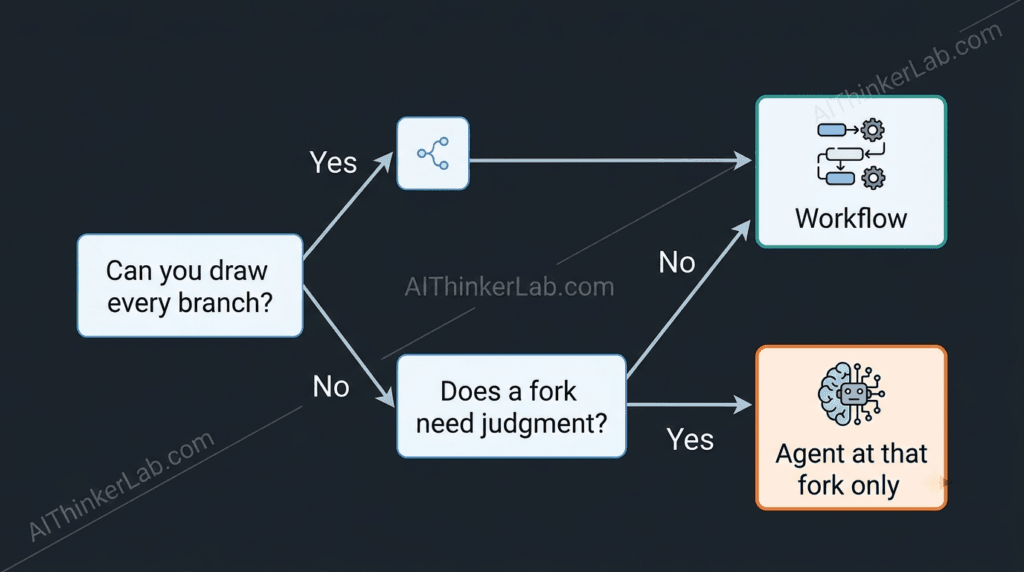
Build an agent only when the order of steps depends on what earlier steps return. If every branch can be drawn on paper before the run starts, a fixed n8n workflow with one model call costs less and debugs faster. Gartner (June 2025) predicts that over 40% of agentic AI projects will be canceled by the end of 2027.
Most guides open with the agent. I’d open with a pencil.
Gartner’s forecast rests partly on a January 2025 poll of 3,412 webinar attendees, where 19% reported significant agentic AI investment and 42% conservative investment. Its analyst Anushree Verma described most current projects as early experiments driven by hype and often misapplied, and Gartner counted only about 130 real vendors among the thousands claiming agentic products. Forbes (Robert J. Szczerba, July 7, 2026) revived the warning, which leaves roughly fifteen months on the clock.
The Fork Test turns that skepticism into a rule you can apply in five minutes. Draw your process on paper, start to finish. Circle every fork. If a fork’s condition fits an IF or Switch node (invoice above a threshold, sender on a known list), leave it deterministic. If the condition needs judgment about free text, or about what a previous tool returned, hand that single fork to a model. An agent belongs at the fork, not along the whole road.
Local models make the Fork Test mandatory rather than optional. A small model on an 8GB card punishes sprawl quickly, as the forum evidence below shows. I’d rather ship a boring workflow with one model call than a clever agent that works four runs in five.
So the cheapest reliability upgrade in many local stacks is deleting an agent, not buying a GPU.
What hardware and versions do you need for local agentic AI in n8n?
VRAM sets the ceiling on your agent, because Ollama ties its default context window to it: 4k tokens under 24 GiB, 32k from 24 to 48 GiB, and 256k at 48 GiB or more, according to Ollama’s context-length documentation (September 2026).
| VRAM tier | Ollama’s default context | Candidates to test first | Agent shape that fits (editorial judgement) |
| Under 24 GiB (most 8–16 GB cards) | 4k tokens | qwen3:8b; gemma4:e4b (9.6 GB) | One agent, one or two tools, context raised by hand |
| 24–48 GiB | 32k tokens | gemma4:26b (18 GB, MoE); qwen3.6:27b (17 GB); gpt-oss:20b | One agent with three or four tools, or a router plus two specialists |
| 48 GiB and up | 256k tokens | llama3.3:70b (43 GB) | Router plus several specialists, longer histories |
Context defaults come from Ollama’s docs. Gemma 4 sizes come from a DEV Community setup guide, and the 17 GB and 43 GB figures come from an August 2026 Ollama model roundup by Morph. The right-hand column is my judgement, not a benchmark. The models are candidates, not verdicts.
Versions matter as much as VRAM. Gemma 4 needs Ollama v0.20.0 or later, so an old install won’t find it. n8n 2.0.0 (December 5, 2025) turned on task runners, blocked environment-variable access from Code nodes, and disabled the ExecuteCommand and LocalFileTrigger nodes by default, so tutorials written for 1.x that lean on those features need rewriting. And n8n’s docs point newcomers to a self-hosted AI Starter Kit built around Ollama, Qdrant and PostgreSQL for a first proof of concept.
Pick your row before you pick your model. For a deeper hardware breakdown, Eight tested tools for running models locally.
How do you connect n8n to Ollama?
Create an Ollama credential in n8n whose base URL matches where each service runs, then attach the Ollama Chat Model node, not the plain Ollama Model node, to an AI Agent node. n8n’s documentation says the plain node lacks tool support, so it cannot drive an agent.
Five steps get a working agent, and the third causes most of the pain:
- Pull a model tagged for tools from Ollama’s library, for example
ollama pull qwen3:8b. - Start n8n. The official
n8nio/n8nDocker image works, and the Starter Kit bundles n8n, Ollama, Qdrant and PostgreSQL if you’d rather begin from a template. - Create the Ollama credential with the right base URL (next heading).
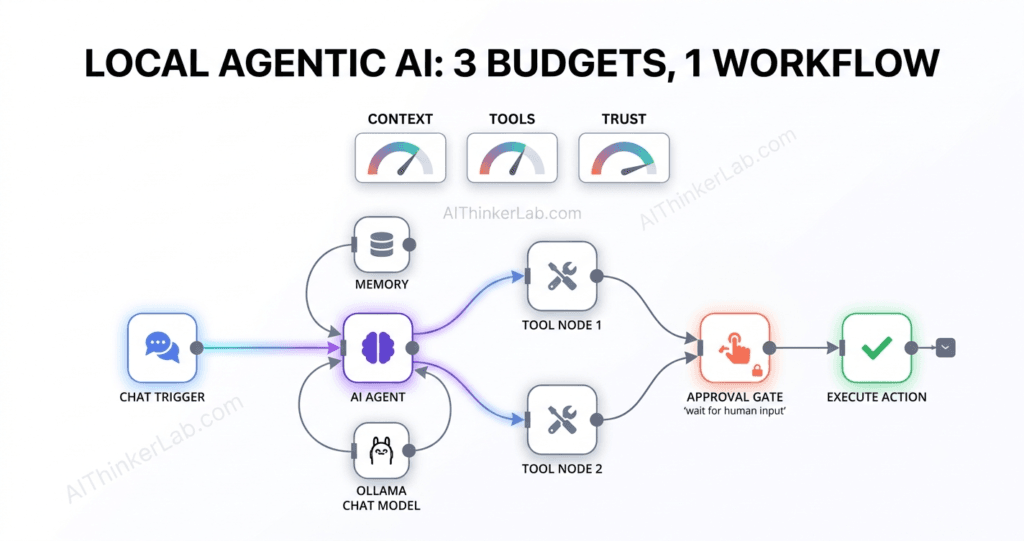
- Build the spine: Chat Trigger → AI Agent → Ollama Chat Model, plus Simple Memory and one tool.
- Run a prompt that needs exactly one tool call, then read the execution log to confirm the call fired.
Which base URL belongs in the Ollama credential?
Three topologies cover the cases on n8n’s Ollama common-issues page. With both on the host, use http://127.0.0.1:11434; the numeric address avoids the ECONNREFUSED ::1 error that appears when IPv6 is on and Ollama listens on IPv4 only. With n8n in Docker and Ollama on the host, use http://host.docker.internal:11434, adding --add-host host.docker.internal:host-gateway on Linux, since Docker Desktop configures it for you. With both in Docker, use the Ollama container’s name, such as http://my-ollama:11434. (Ports, for the record: 5678 for n8n, 11434 for Ollama. You’ll forget both by Thursday.) Hardening steps for Ollama servers
Get the URL wrong and the symptom is a connection error. Get everything else wrong and the symptom is silence, which is worse. If you want a chat front end on top.
Why does your local agent forget its tools halfway through a run?
Ollama defaults to a 4k-token context window on GPUs with under 24 GiB of VRAM, according to its context-length documentation (September 2026). Ollama’s docs recommend at least 64,000 tokens for agents. Set OLLAMA_CONTEXT_LENGTH=64000 on the server, then confirm the CONTEXT column in ollama ps. Ollama
Every local agent runs on three budgets, and overspending any one produces the same symptom: an agent that seems to have gotten dumber. The context budget is tokens. The tool budget is how many tools one model can juggle. The trust budget is how many actions the agent may take without a human. Context comes first because it fails quietly.
The window holds your system prompt, tool schemas, chat history and current message all at once, and when the total crosses the limit, Ollama trims tokens from the front, according to a mid-September 2026 write-up on betterclaw.io. No error appears. The model keeps answering, minus the instructions you wrote. (I’d rule this out before touching anything else on a sub-24 GiB card.)
Two ways to raise the ceiling: set the server variable, or use the Context Length option on n8n’s Ollama Chat Model node (a third-party node write-up notes tool results pile up in that window; option labels drift between versions, so check yours). One trap deserves a flag. Two independent write-ups, betterclaw.io and the README of a GitHub project called Local-Coding-Agent, report that Ollama’s OpenAI-compatible /v1 endpoint doesn’t reliably honor num_ctx sent in the request. Route n8n through an OpenAI-style credential and you’ll need the server variable or a Modelfile with num_ctx baked in.
How do you check the window you actually got?
Run ollama ps and read the CONTEXT column. Ollama’s own FAQ, Modelfile reference and context page have disagreed about the default (4096, 2048, and a VRAM-based tier respectively), as an SSD Nodes analysis documents. Trust the running server, not the page. Bigger windows cost memory, and on a small card the KV cache competes with the model weights.
Which Ollama model should you pick for tool calling?
In a March 2026 n8n forum case (n8n 2.10.3), a four-tool agent failed to call its second tool on every 7B to 24B model tried, including qwen2.5 14B, yet worked on qwen2.5:32b and, after a swap, qwen3:8b. Model generation beat parameter count in that report.
One report is one report. Still, the pattern is worth testing. The reply that solved it pointed to qwen3:8b because, per that reply, Ollama’s own tool-calling docs use qwen3 as the reference model. I disagree with the reflex to move up a parameter tier first. Try a newer generation at the same size before you buy more VRAM.
Current candidates, as of September 2026: Ollama’s library carries the Qwen 3.5 family (0.8B to 122B, 256K context on every size) and Gemma 4, and Parallel’s integration docs say Qwen 3.5, Gemma 4 and Llama 3.1+ support native tool calling, calling Qwen 3.5 the most reliable of the three. That’s a vendor guide, so treat it as a lead, not a verdict. (The August thread shows qwen3.5 returning blanks, but the endpoint was at fault there, not the model.)
Don’t choose from a table, mine included. Build a ten-run harness: one prompt that requires exactly two tool calls, ten executions, and a count of clean successes. Also note whether the model ever writes a tool call as plain text, which is the failure the March thread describes.
Filter Ollama’s library by the tools tag before you pull anything. A model without that tag will chat happily and never fire a tool.
How many tools can one local agent handle?
Start with one or two tools per agent and give the rest to sub-agents. In the March 2026 forum case, the model called its first tool correctly and then described the second call in plain text instead of firing it, and the replies that helped recommended splitting the four tools across smaller agents.
One reply offered a mechanism: after the first tool returns, the window holds the system prompt, the question, the call and its result, and 7B-class models lose the habit of emitting structured calls. Plausible, though unproven.
n8n gives you building blocks for the split. The AI Agent Tool exposes an agent as a tool to a parent, the Call n8n Workflow Tool exposes a sub-workflow, and the MCP Client Tool reaches external servers. Picture a router agent with a short menu and specialists that each see only their own tools. The parent’s context stays small, and each specialist’s task stays narrow.
MCP needs a caution label. n8n 2.22.0 (May 19, 2026) added a way to attach select MCP servers without hand-building a credential. Convenient. Every attached server also adds its tool definitions to the context you’re already rationing. On an 8B model with a small window, attach only the two or three tools the workflow needs.
My working rule, offered as a heuristic and not a benchmark: one or two tools for a 7–8B model, a third only after ten clean runs, and a split the moment the second tool starts misfiring. Splitting also helps your debugging, since a router that picks the wrong specialist is easier to see than one model quietly mangling four tool schemas. For retrieval tools, A local RAG pipeline on Ollama.
What should a local agent never do without your approval?
Anything you can’t undo. Since n8n 2.6.0 (January 26, 2026), you can put a human-review step on the connection between an AI Agent and any tool, so a gated tool cannot run until someone approves, and the approval can travel through channels such as Slack, email or the Chat node.
That gate is deterministic. A system prompt saying “ask before deleting” is a suggestion to a probabilistic model, which is precisely the weakness n8n’s own release note says the feature removes. n8n 2.5.0 (January 20, 2026) added Chat node actions that pause a run and wait for a reply, so a local agent can ask you a question mid-run without leaving n8n. Chrome’s auto browse.
The trust budget works like this: sort every tool into one of three bins. Read-only tools (search, fetch, list) run freely. Reversible writes (draft an email, add a row) run with logging. Irreversible actions (send, delete, publish, pay) get an approval gate. Ten minutes of sorting beats any amount of prompt-writing.
Local doesn’t mean safe from bad input. An agent that reads email or web pages is reading text written by strangers, and instructions hidden in that text can steer a model that holds write tools. Keep read tools and write tools in separate agents where you can, and don’t hand a model shell access. n8n 2.0 disabled the ExecuteCommand node and blocked environment-variable access from Code nodes by default, and those defaults exist for good reason. (This section is defensive, aimed at protecting your own instance.)
For visibility, n8n 2.15.0 (March 30, 2026) began emitting OpenTelemetry traces for workflow runs, and AI Agent telemetry followed in n8n 2.20. Whatever backend you already run can now show you which tool the agent called and when.
Why is your n8n agent returning an empty output?
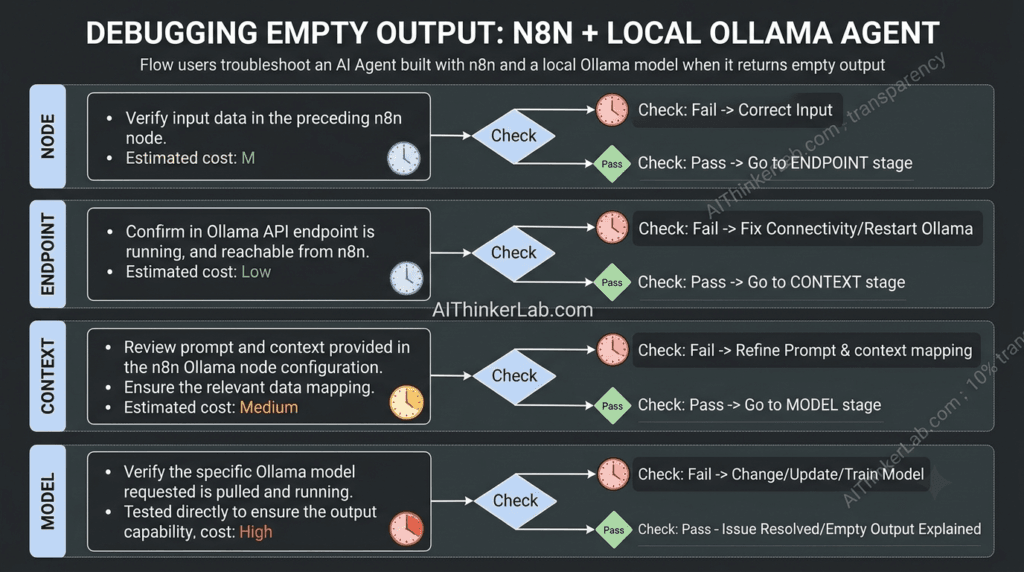
When an n8n AI Agent returns an empty output with a local model, check four layers in order: node type, endpoint, context window, then model. A community reply in an August 2026 forum case (n8n 2.33.4) traced identical empty outputs across five models to Docker Model Runner’s Ollama-compatible endpoint, which returned finish_reason tool_calls with no tool_calls array.
The order is the point. Checks get more expensive as you go down the list:
- Node. Confirm the model sub-node is Ollama Chat Model. The plain Ollama Model node lacks tools support and belongs with the Basic LLM Chain. Cost: ten seconds.
- Endpoint. If you aren’t talking to Ollama’s native API directly (Docker Model Runner, a proxy, LiteLLM), inspect the raw response. The working fix in the August thread was an OpenAI Chat Model node pointed at the runner’s OpenAI-compatible URL, and n8n staff opened internal ticket AI-2713. Cost: a few minutes.
- Context. Run
ollama psand compare the CONTEXT column with what your prompt plus tool schemas need. Cost: a minute, plus a restart. - Model. Only now swap models, and watch for the plain-text tool call symptom. Cost: an afternoon.
The first reply in that thread blamed the model choice. Five models then returned the same empty string. Identical output across different models points upstream of the model, and that small piece of logic saves hours.
I’ve hit the cloud-side cousin of this. In a 35-node n8n workflow I built for topic research, two of the fixes that took longest were Gemini 503 errors and LLM JSON that got cut off. Local inference removes the first (there’s no provider outage, only your own GPU). Truncated output has more than one local cause, including the context window and the output-token cap, so I’d check both first.
What’s a first local agentic workflow worth building?
A research-and-triage agent: it takes a topic, checks the web through a local SearXNG instance, and drafts three findings for you to approve. SearXNG Tool is in n8n’s built-in tools list, and the popular community local-AI package bundles SearXNG alongside Ollama, n8n and Qdrant.
The design spends all three budgets on purpose. Context: a 64,000-token window if your VRAM allows it, or the largest that fits. Tools: two, both read-only (SearXNG search and an HTTP fetch). Trust: the draft goes through a Chat node “send a message and wait for response” step before anything gets written. One agent, two tools, one gate.
Define “working” before you build. Gartner’s cancellation reasons start with escalating costs and unclear business value, and a number fixes the second. Pick three: clean-run rate over twenty executions, median seconds per run, and peak VRAM.
Sources
- Secondary: DEV Community Gemma 4 guide, Morph model roundup, betterclaw.io on num_ctx, SSD Nodes on num_ctx, Local-Coding-Agent README, Parallel Ollama tool-calling guide, Hackceleration node write-up, Webhuis ollama-websearch README
- Gartner press release, June 25, 2025
- Forbes, Robert J. Szczerba, July 7, 2026
- n8n docs: release notes 2.x
- n8n docs: Ollama Model node
- n8n docs: Ollama common issues
- Ollama docs: context length
- Ollama release index and GitHub tag v0.33.3
- n8n Community: 2nd tool never executed (Mar 23, 2026)
- n8n Community: Docker Ollama not being able to call tools (Aug 7, 2026)
- Release Alert: n8n and Ollama