TL;DR
- Qwen3 (Apr 2025) is no longer Alibaba’s newest open-weight family — Qwen3.5 shipped February 2026 and Qwen3.6 followed in April 2026, but Qwen3’s dense 4B/8B/14B lines are still a solid, well-documented local fine-tuning target in 2026.
- QLoRA trains a small set of low-rank adapter weights on top of a frozen, 4-bit-quantized base model — that’s the whole trick, and it’s why an 8B model’s training footprint drops from roughly 32GB to something a single consumer GPU can plausibly handle.
- Inference VRAM and training VRAM are different numbers. A Qwen3-8B GGUF runs inference in under 5GB; QLoRA fine-tuning the same model needs meaningfully more headroom for gradients, optimizer states, and activations.
- Unsloth is currently the most practical local path — Alibaba’s own Qwen team and independent benchmarks both point to it cutting VRAM use substantially versus a plain Transformers + PEFT + bitsandbytes stack.
- Fine-tuning the Qwen3 MoE variants (30B-A3B) locally is possible but comes with real caveats: the router layer shouldn’t be trained, and the full 16-bit checkpoint often needs to be downloaded before on-the-fly 4-bit conversion.
Local fine-tuning stopped being a research-lab-only exercise a while back, and Qwen3 is a big part of why. It’s August 2026, and if you searched “Qwen3 QLoRA” hoping for a straight how-to, the honest first answer isn’t a command — it’s a question: are you sure you want Qwen3, and not Qwen3.5? Alibaba’s open-weight lineup moved fast this year. This guide covers both — which model actually fits your GPU, what QLoRA is doing under the hood, and the exact steps to get a working local adapter, including the MoE edge cases most tutorials skip entirely.
What Changed Since Qwen3 Launched — And Should You Even Use It in 2026?
Here’s the thing nobody selling a “definitive Qwen3 guide” wants to admit: Qwen3 isn’t the newest Qwen anymore, and hasn’t been since February 2026. Alibaba released Qwen3 on April 29, 2025, as a family of six dense models (0.6B, 1.7B, 4B, 8B, 14B, 32B) plus two Mixture-of-Experts models (30B-A3B and the 235B-A22B flagship). A mid-cycle refresh landed in July–August 2025 under the “2507” tag, adding long-context variants and a 1M-token option on select checkpoints. Then, in February 2026, Alibaba shipped Qwen3.5 — a natively multimodal family spanning 0.8B to 122B parameters — as its new open-weight flagship, according to a 2026 Qwen lineage report from Presenc AI. Qwen3.6 followed in April 2026, and by May 2026 the proprietary Qwen3.7 Max/Plus tier had arrived too. Our head-to-head benchmark of Qwen 3.6 vs Gemma 4.
So why write — or read — a Qwen3 guide in August 2026? Because “newest” and “right for your project” aren’t the same thing. Qwen3’s dense models are text-only, extensively documented, and have had over a year of community tooling, GGUF quants, and fine-tuning tutorials built around them. If your task is text classification, a domain-specific assistant, or a structured-output agent — nothing that needs native vision — Qwen3-4B or Qwen3-8B is still a reasonable, well-supported choice, not a legacy one. I’d push back on the instinct to always chase the newest release name. Pick Qwen3.5 if you specifically need multimodal input or the newest benchmark numbers; pick Qwen3 if you want the most battle-tested local fine-tuning path with the fewest surprises. That’s the actual decision, and it’s the one most guides skip by pretending Qwen3.5 doesn’t exist. Our own dev-focused ranking already recommends Qwen 3.6-27B for local work.
What Is QLoRA, and Why Does It Matter for Qwen3?
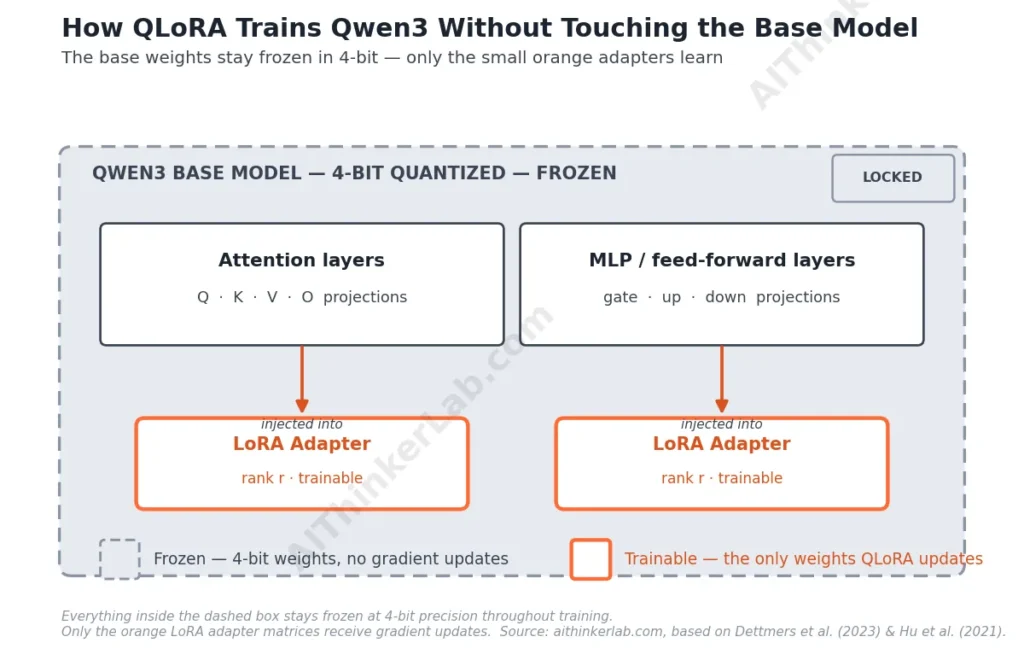
QLoRA is a fine-tuning method that freezes a large language model’s weights in 4-bit precision and trains only a small set of injected low-rank adapter matrices on top, according to Dettmers et al.’s 2023 paper that introduced the technique. The base model never changes during training — only the adapters do, and they’re a tiny fraction of the total parameter count.
That distinction matters practically. Full fine-tuning of an 8B model means updating and storing gradients for all 8 billion parameters, which is why it traditionally demanded multi-GPU setups. LoRA alone reduces the trainable parameter count by inserting rank-decomposed matrices into attention and feed-forward layers, an approach Hu et al. described in their original 2021 LoRA paper. QLoRA adds one more layer: it quantizes the frozen base weights to 4-bit, which is what actually shrinks the memory footprint enough to matter on a single consumer card. Combine the two and an 8B model’s weight storage drops from roughly 32GB at fp16 down to around 8GB — before you’ve even started training, per a widely cited 2025 practical fine-tuning writeup. That’s the entire reason “local fine-tuning” and “Qwen3” belong in the same sentence at all.
Which Qwen3 Size Actually Fits Your GPU?
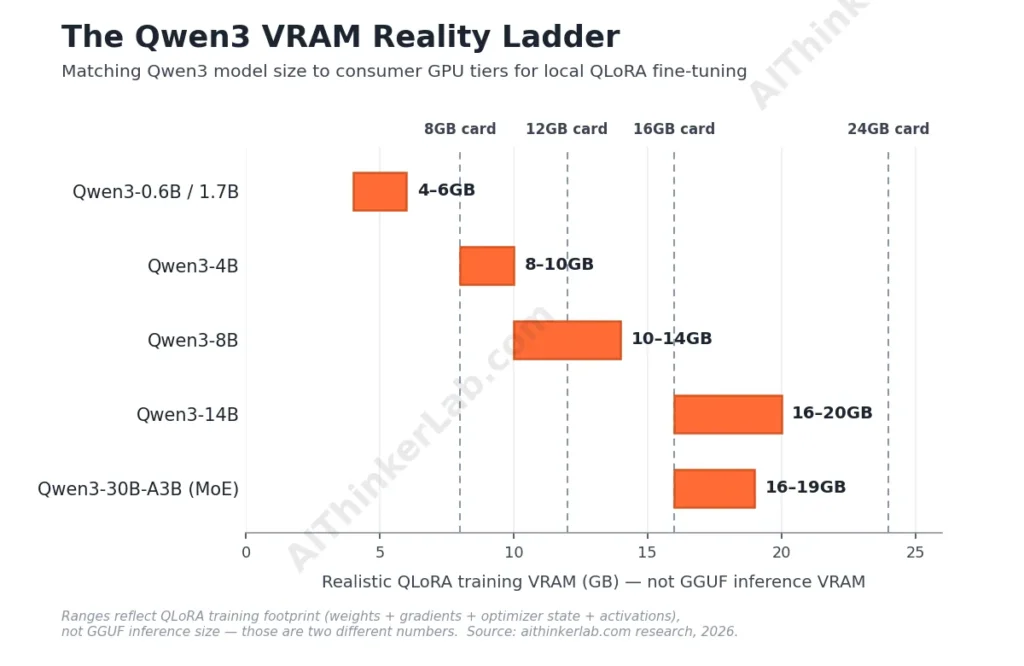
This is where most guides quietly lie to you by accident: they quote inference VRAM numbers and let readers assume training will fit in the same budget. It won’t. A Qwen3-8B model quantized to Q4_K_M needs roughly 4.9GB of VRAM to run inference, according to hardware-compatibility data from willitrunai.com. Fine-tuning that same model with QLoRA needs meaningfully more — you’re storing gradients, optimizer states, and activation memory on top of the frozen weights, not just running a forward pass.
| Qwen3 model | Params | Realistic QLoRA training VRAM | Best-fit consumer GPU tier |
|---|---|---|---|
| Qwen3-0.6B / 1.7B | 0.6–1.7B | 4–6GB | 6–8GB cards |
| Qwen3-4B | 4B | ~8–10GB | 8–12GB cards |
| Qwen3-8B | 8B | ~10–14GB | 12–16GB cards |
| Qwen3-14B | 14B | ~16–20GB | 16–24GB cards |
| Qwen3-30B-A3B (MoE) | 30B total / 3B active | ~17.5GB* | 24GB cards |
*Per Unsloth’s own documentation — but the MoE row comes with a real asterisk, covered below.
Treat this table as a floor, not a guarantee — sequence length, batch size, and whether you enable gradient checkpointing all move the number. If you’re working with an 8GB card, the honest range is Qwen3-0.6B through a tightly configured Qwen3-4B run with short sequences — not the 8B model, no matter what an inference benchmark implies about “fitting.” Why small language models cut AI bills by up to 90%.
What You Need Before You Start
You’ll want a recent NVIDIA GPU with CUDA support, current NVIDIA drivers, and Python 3.10 or newer. The practical stack for local Qwen3 QLoRA is Unsloth (which wraps and accelerates Hugging Face’s Transformers, PEFT, and bitsandbytes), plus a training dataset already in a chat-style format your target model expects.
Unsloth’s own documentation for Qwen3 reports roughly 70% lower VRAM use and up to 8x longer usable context versus a stock Transformers-plus-bitsandbytes setup — which is the main reason it’s become the default path for local fine-tuning rather than an optional convenience. Install it inside a fresh virtual environment; version-pin it, because Unsloth ships updates frequently and older configs occasionally break against newer releases. You’ll also want at least 32GB of system RAM if you’re working with a 4B+ model — the RAM budget for loading and converting checkpoints is easy to underestimate, and it’s a different bottleneck than VRAM entirely. if you haven’t picked a local tool yet – our tested guide to the 8 tools for running AI models locally.
Step-by-Step: Fine-Tuning Qwen3 with QLoRA and Unsloth
- Set up the environment. Create a virtual environment, install Unsloth per its current documentation, and confirm your GPU is visible to PyTorch before touching a model file. A failed CUDA detection here saves you an hour of debugging later.
- Load a pre-quantized Qwen3 checkpoint. Point Unsloth at a model name like
unsloth/Qwen3-8B(or a smaller size for tighter VRAM budgets) withload_in_4bit=True. Loading a pre-quantized checkpoint avoids downloading the full 16-bit weights first. - Set your max sequence length deliberately. Qwen3 supports up to 128K context via YaRN extension from its native 32K window, but training at that length is unnecessary for most fine-tuning tasks and will blow your VRAM budget fast. Start at 2048–4096 tokens unless your task genuinely needs longer context.
- Attach LoRA adapters. Target the attention projections (q, k, v, o) and the MLP projections (gate, up, down) — the combination Unsloth’s own documentation recommends for Qwen3. Leave the router untouched entirely if you’re working with an MoE variant.
- Format your dataset to Qwen3’s chat template. Mismatched templates are the single most common reason a fine-tune “works” in training but produces broken output afterward — apply the tokenizer’s chat template rather than hand-rolling your own prompt format.
- Configure training. A small batch size (1–4) with gradient accumulation (4–16 steps) is standard on consumer hardware; AdamW with a cosine schedule and a learning rate around 2×10⁻⁴ shows up consistently across independent 2025–2026 QLoRA papers on Qwen3-class models as a safe starting point, not a guaranteed optimum for your dataset.
- Enable gradient checkpointing. Unsloth’s own checkpointing mode trades a modest speed hit for meaningfully lower VRAM — worth it on any card under 24GB.
- Train, then watch the loss curve, not the clock. A loss that plateaus early usually means your learning rate or dataset size needs adjusting, not that training is “done.”
- Save the adapter, not just the merged model. Keeping the LoRA adapter separately lets you re-merge it against a different quant or roll back without re-training from scratch.
Choosing LoRA Rank, Alpha, and Target Modules
Rank and alpha are the two numbers every tutorial throws at you without explaining what they trade off. Rank (r) controls how much capacity the adapter has to learn new behavior — higher rank means more trainable parameters and more VRAM, not necessarily better results. Alpha scales how strongly the adapter’s output is applied on top of the frozen base weights.
Independent research on Qwen3-class fine-tuning converges on a narrower range than the internet’s endless rank debates suggest. One radiology-report evaluation study used rank 32 with alpha 64 (a 2:1 ratio) on a Qwen3 MoE variant. A separate news-framing study used rank 16 with alpha 16 (a 1:1 ratio) on Qwen3-8B, following Unsloth’s own current guidance that alpha should generally equal rank rather than double it for newer configurations. A third knowledge-base retrieval paper pushed rank to 64 across four different Qwen3 base sizes. None of these are “the” correct answer — but the middle of that range, rank 16–32 with alpha matching or lightly exceeding rank, is where most successful local runs land, and it’s a reasonable default before you start experimenting. Dropout around 0.05 and a technique called rsLoRA (which corrects a scaling bias that shows up at higher ranks) are both worth knowing about if your loss curve looks unstable at rank 32 or above.
Can You Fine-Tune the Qwen3 MoE Models Locally?
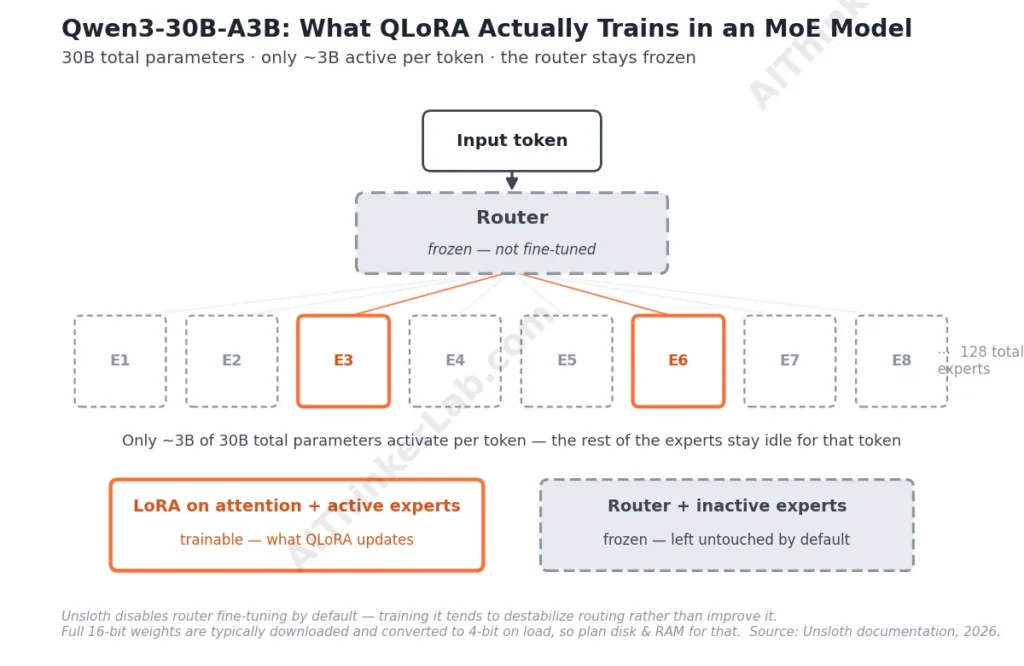
Yes, but Qwen3-30B-A3B is a different animal from the dense models, and this is the section most guides quietly skip. It’s a Mixture-of-Experts model with 30 billion total parameters and roughly 3 billion active at any given time — and Unsloth’s documentation reports it fits in about 17.5GB of VRAM for QLoRA fine-tuning, which sounds accessible right up until you hit the fine print.
Two caveats matter. First, Unsloth explicitly disables fine-tuning the router layer by default, because training the component that decides which experts activate tends to destabilize the model rather than improve it — leave it frozen unless you have a specific reason not to. Second, MoE models currently have import limitations with 4-bit bitsandbytes quantization, meaning you may need to download the full 16-bit checkpoint and let it convert to 4-bit on the fly during loading, rather than pulling a pre-quantized version directly. That means your disk space and system RAM budget need to account for the full-precision download even though your VRAM footprint stays manageable. If you’re on a metered connection or a machine with 16GB of system RAM, this is the step that quietly wrecks an otherwise well-planned run.
Common Failure Modes and How to Fix Them
Out-of-memory errors are the most common wall people hit, and they’re almost always fixable without buying new hardware. Drop your sequence length before you drop your batch size — a shorter context window saves more VRAM per step than most people expect. If you’re still OOMing, enable gradient checkpointing if you haven’t already, and confirm you’re loading a genuinely 4-bit-quantized checkpoint rather than converting a full-precision one on the fly (unless, as above, you’re working with an MoE model that requires it).
Overfitting on a small custom dataset shows up as a model that reproduces your training examples verbatim but generalizes poorly to anything slightly different. Fewer epochs, a smaller rank, or adding dropout usually helps more than adding more data of the same narrow type.
Then there’s the one that trips up almost everyone at least once: chat template mismatch. Qwen3 ships with a specific template, including handling for its hybrid thinking mode — the /think and /no_think switches that toggle reasoning behavior mid-conversation. If your training data doesn’t respect that template, or you fine-tune on non-thinking examples while the base model defaults to thinking mode, your outputs can come out garbled or oddly truncated after merging. Apply the tokenizer’s built-in chat template function rather than reconstructing the format by hand — it’s a five-minute step that prevents a multi-hour re-training loop.
Evaluating Your Fine-Tuned Model Before You Deploy It
Loss going down doesn’t mean your model got better at the thing you actually care about — it means it got better at predicting your training data, which isn’t quite the same claim. Hold out a small slice of your dataset the model never trains on, and run it through both the base model and your fine-tuned adapter side by side. Look for concrete behavior changes tied to your actual goal — tone, format adherence, domain accuracy — rather than a single aggregate score.
For anything going into production, run a handful of adversarial or edge-case prompts your training data didn’t cover. A model that performs well on in-distribution examples and falls apart on anything slightly novel usually needs either more diverse training data or a lower rank to reduce overfitting.
Merging, Exporting, and Running It Locally
Once you’re satisfied with the adapter, you have two paths: keep it separate and load it dynamically alongside the base model, or merge it into a standalone checkpoint. For local deployment through Ollama or LM Studio, merging and exporting to GGUF is the more practical route — it gives you a single file that runs through llama.cpp-based tools without needing PEFT loaded at inference time. Harden that Ollama server before exposing it.
Unsloth includes built-in export utilities for converting a merged Qwen3 checkpoint to GGUF at your quantization level of choice. Pick a quant that matches your inference-time hardware, not your training hardware — they’re different budgets, as covered above, and a card that struggled to train an 8B model with QLoRA will run that same model’s GGUF inference comfortably. Once exported, create an Ollama Modelfile pointing at your GGUF, and you’ve got a fine-tuned Qwen3 running entirely offline, on hardware you already own. A fully local RAG pipeline.
The Bottom Line
The honest state of local Qwen3 fine-tuning in August 2026 is this: the technique is mature, the tooling has gotten genuinely easier since Qwen3 launched, and the hardest part of the job isn’t running the training loop — it’s picking the right model size for your actual GPU and getting your dataset formatted correctly before you start. QLoRA didn’t just make fine-tuning cheaper; it moved the real bottleneck from compute to preparation. Get the chat template right, pick a rank in the 16–32 range as your starting point, and stop assuming an inference benchmark tells you anything about whether training will fit. Whether you land on Qwen3 or step up to Qwen3.5 depends entirely on whether your project needs what the newer family adds — for a huge share of local text fine-tuning work, it still doesn’t.
Sources
- willitrunai.com, “Qwen 3 8B VRAM Requirements” hardware database (2026) — https://willitrunai.com/models/qwen-3-8b
- Alibaba Cloud, “Alibaba Introduces Qwen3, Setting New Benchmark in Open-Source AI with Hybrid Reasoning” (2025) — https://www.alibabacloud.com/blog/alibaba-introduces-qwen3-setting-new-benchmark-in-open-source-ai-with-hybrid-reasoning_602192
- QwenLM, official Qwen3 GitHub repository and release log — https://github.com/QwenLM/qwen3
- Unsloth Documentation, “Qwen3 — How to Run & Fine-tune” (2026) — https://unsloth.ai/docs/models/tutorials/qwen3-how-to-run-and-fine-tune
- Unsloth Documentation, “Qwen3.5 Fine-tuning Guide” (2026) — https://unsloth.ai/docs/models/qwen3.5/fine-tune
- Dettmers, T. et al., “QLoRA: Efficient Finetuning of Quantized LLMs,” arXiv:2305.14314 (2023)
- Hu, E. et al., “LoRA: Low-Rank Adaptation of Large Language Models,” arXiv:2106.09685 (2021)
- Presenc AI, “Alibaba Qwen Model Lineage & Roadmap 2026” (2026) — https://presenc.ai/research/alibaba-qwen-model-lineage-and-roadmap-2026