TL;DR — Key Takeaways
- Chrome Lighthouse 13.3.0 made its “Agentic Browsing” audit category default around May 5–7, 2026, and it now checks every site for an llms.txt file automatically.
- A missing llms.txt file is scored Not Applicable, not a failure. Only a broken or malformed file trips a warning.
- Google’s own Search Central guidance, updated June 15, 2026, states plainly that llms.txt has zero effect — positive or negative — on Search rankings or AI Overviews.
- Most real-world llms.txt failures aren’t missing files. They’re formatting bugs — plain-text links instead of Markdown
[text](url)syntax is the single most common cause. - Across a June 2026 audit of the Tranco top 1,000 sites, only 64 of 636 scorable pages had a valid llms.txt file, even though 186 had attempted one.
- Fixing a genuine Lighthouse llms.txt error usually takes ten minutes: add an H1, write more than 50 characters of summary, and format your links as Markdown links.
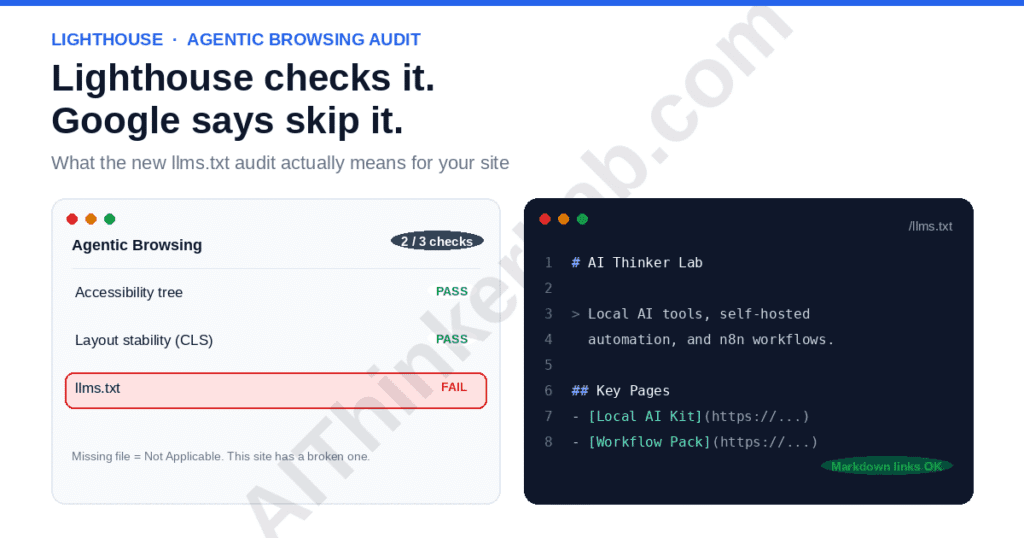
Sometime in the first week of May 2026, a new category quietly showed up in Lighthouse reports: Agentic Browsing. Buried inside it was a check nobody had asked for — llms.txt, does it exist, is it well formed. Developers who’d never heard of the file, and plenty who had and had dismissed it, started asking the same question in Slack threads and GitHub issues. Is this suddenly a ranking factor? It isn’t. But the reason Chrome checks for it anyway turns out to be more interesting than the warning itself.
What Is the Lighthouse llms.txt Audit, Exactly?
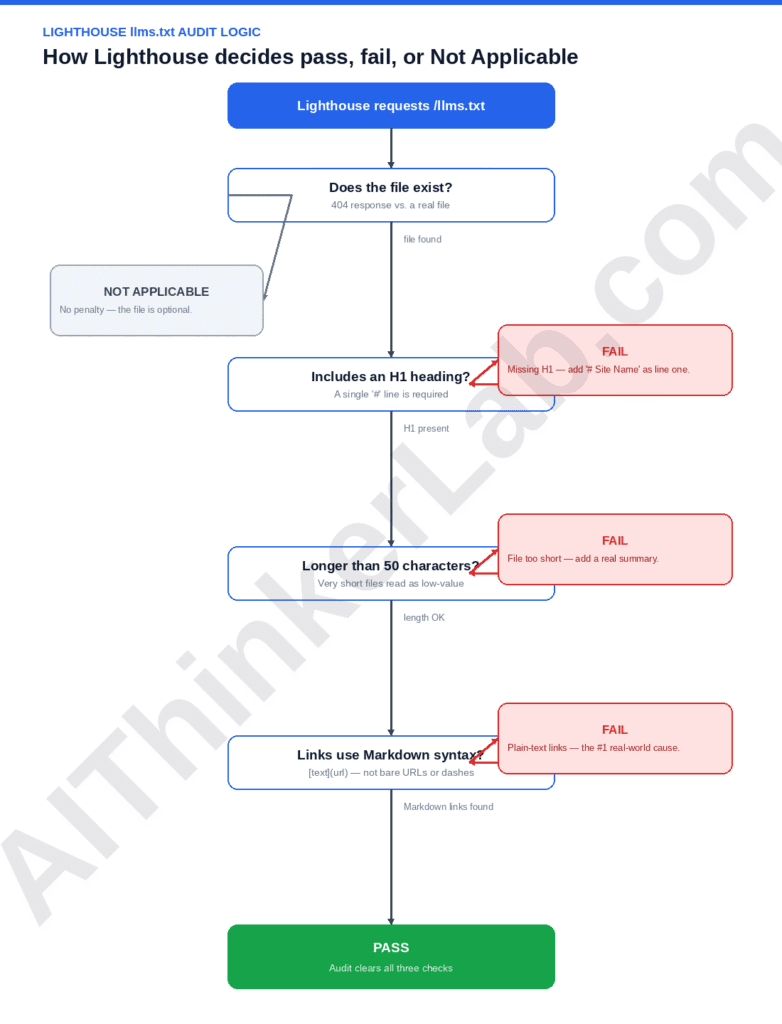
The Lighthouse llms.txt audit checks whether your site serves a file at /llms.txt and, if it does, whether that file follows a small set of formatting rules. According to Chrome’s own developer documentation, a missing file returns a Not Applicable result rather than a failure, because providing the file is still optional. A broken file — one that returns a server error, or one that exists but doesn’t meet the spec — is what actually trips the warning you’re probably here about.
This is worth sitting with for a second. A missing file is fine. A badly built one isn’t. That’s backwards from how most SEO audits behave, where absence is usually the failure state.
Why Does Chrome Check a File Google Search Says You Don’t Need?
Here’s the part most coverage skips past too quickly to get to the “is it worth it” debate. Two separate Google teams are answering two separate questions, and neither one is contradicting the other.
Google Search Central published its first official guide to generative AI search optimization on May 15, 2026, titled “Optimizing your website for generative AI features on Google Search.” Its mythbusting section names llms.txt directly, alongside content chunking and AI-specific rewriting, as tactics site owners don’t need. A month later, on June 15, 2026, Google added a dedicated “Clarifying guidance on llms.txt files” subsection after — in Google’s own framing — community confusion made it clear the message hadn’t landed. The updated guidance says the file has no effect, positive or negative, on Search rankings or AI Overviews, because Search doesn’t reference it.
Meanwhile, Lighthouse’s Agentic Browsing category isn’t measuring Search visibility at all. It’s measuring something adjacent: how easily an autonomous browser agent — the kind that fills out forms, compares prices, or books things on a user’s behalf — can orient itself on your page without a human watching. llms.txt sits in that category next to WebMCP, a proposed standard first shown in Chrome Canary in February 2026 and featured at Google I/O the same year, which went into a public origin trial in Chrome 149 after being confirmed on May 19, 2026. WebMCP lets a site declare structured, callable tool functions directly in HTML attributes or JavaScript, so an agent can act on a live session — add to cart, submit a form, fetch a price — instead of screenshotting its way through your UI and guessing which pixel to click. Google Chrome Labs runs a small set of demo sites (a flight search, a hotel booking flow, a restaurant reservation form) built specifically so developers can point Lighthouse at something and watch the WebMCP checks actually light up.
llms.txt is a static map an agent reads once to orient itself. WebMCP is a live interface an agent calls to get something done. One describes a site; the other lets an agent operate it — and if the agentic web develops the way Chrome’s roadmap suggests, the second one is where the real weight sits, with llms.txt as one modest, mostly-symbolic item alongside it.
Put simply: Search ranks pages for people typing queries. Agentic Browsing scores pages for software acting on someone’s behalf. llms.txt happens to sit exactly on the seam between those two systems, which is why the guidance from each team sounds like it’s arguing with the other one when it isn’t.
Does a Failing Lighthouse llms.txt Audit Hurt Your SEO?
No. As of June 2026, Google’s own Search Central documentation states directly that llms.txt has no bearing on Search rankings or AI Overviews, because Google Search doesn’t fetch or parse the file at all. A red mark in Lighthouse’s Agentic Browsing category is not a Core Web Vitals-style signal — it lives in a different scoring system entirely, one that doesn’t even produce a traditional 0–100 number.
That’s the sentence to bookmark if you take nothing else from this article. Treat the llms.txt line item the way you’d treat an RSS feed warning — worth fixing if it’s cheap, not worth panicking over.
The Real Reason Most Lighthouse llms.txt Failures Happen
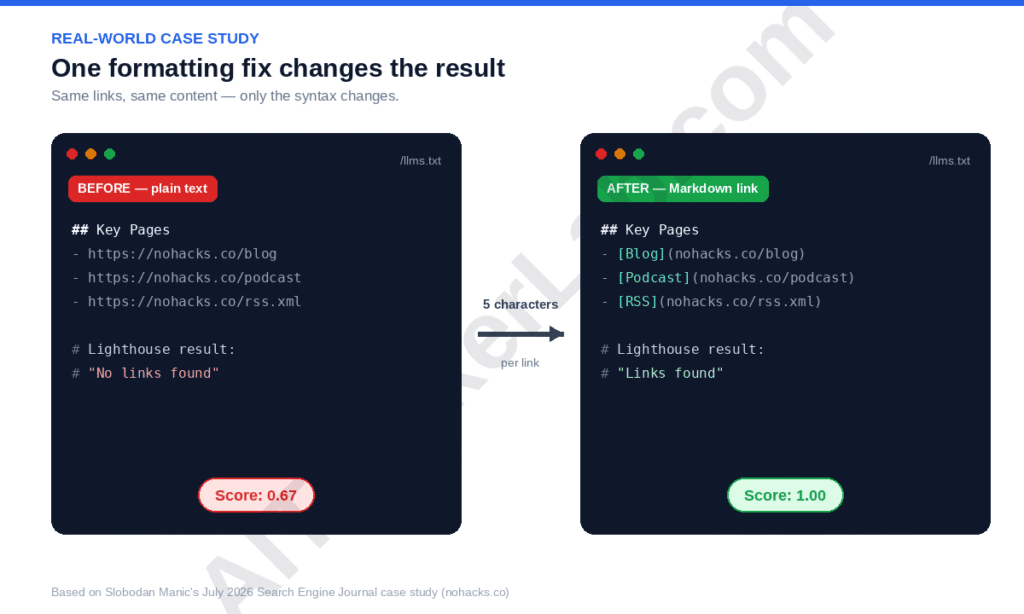
If you’ve got a genuine failure rather than a Not Applicable result, the cause is almost never “we don’t have a file.” According to DebugBear’s technical breakdown of the audit, Lighthouse runs three checks on an existing llms.txt file: it needs an H1 heading, it needs to be longer than roughly 50 characters, and — this is the one that trips people — its links must use Markdown syntax, [link text](url), not bare URLs or plain-text dashes.
SEO consultant Slobodan Manic ran into exactly this on his own site, nohacks.co, and wrote it up for Search Engine Journal on July 3, 2026. His llms.txt had working navigation and RSS links, all written as plain-text dashes. Lighthouse’s Agentic Browsing score came back at 0.67, with the audit failing on the verbatim message that the file didn’t appear to contain any links — despite every URL resolving fine in a browser. He changed roughly five characters per link, wrapping each one in Markdown syntax, and the score jumped to a perfect 1.0. Nothing else about the file changed.
That single case generalizes further than it looks. A June 2026 audit of the Tranco top 1,000 domains, run by the agency Locomotive, found that of 636 sites with a real scorable page, 186 served an llms.txt file — but only 64 of those passed validation. The other 122 had a file and still failed, almost certainly for the same reason Manic’s did: the content was there, the formatting wasn’t. That’s the actual state of things in mid-2026. It’s less “nobody has llms.txt” and more “most of the people who tried got the Markdown wrong.”
What Is llms.txt Actually For?
Jeremy Howard, co-founder of Answer.AI and fast.ai, published the original llms.txt proposal on September 3, 2024. The problem he was solving had nothing to do with search rankings. Language models have limited context windows, and a raw HTML page — full of navigation chrome, ad scripts, and JavaScript — burns through that budget before a model gets to anything useful. Howard’s fix was a curated Markdown file at the site root: an H1 with the project name (the only strictly required element), an optional blockquote summary, and a set of H2-delimited link lists an agent could read in seconds instead of crawling the whole site.
His own project, FastHTML, was the reference implementation, and the intended audience was narrower than most GEO advice implies — developers working inside tools like Cursor or Claude Code, pulling API documentation into an AI coding session. It was never pitched as a ranking lever. That distinction gets lost constantly in how the file is sold.
The same principle applies to retrieval systems running locally. Instead of searching the entire web, local retrieval pipelines use curated knowledge sources to improve response quality and reduce hallucinations. Our guide on building Local RAG with Ollama demonstrates this approach in practice.
Developers running local AI environments often maintain documentation and APIs locally. If you’re building an offline AI setup, the AI Thinker Lab Local AI Kit includes preconfigured local model environments and deployment guides.
robots.txt and llms.txt Solve Different Problems
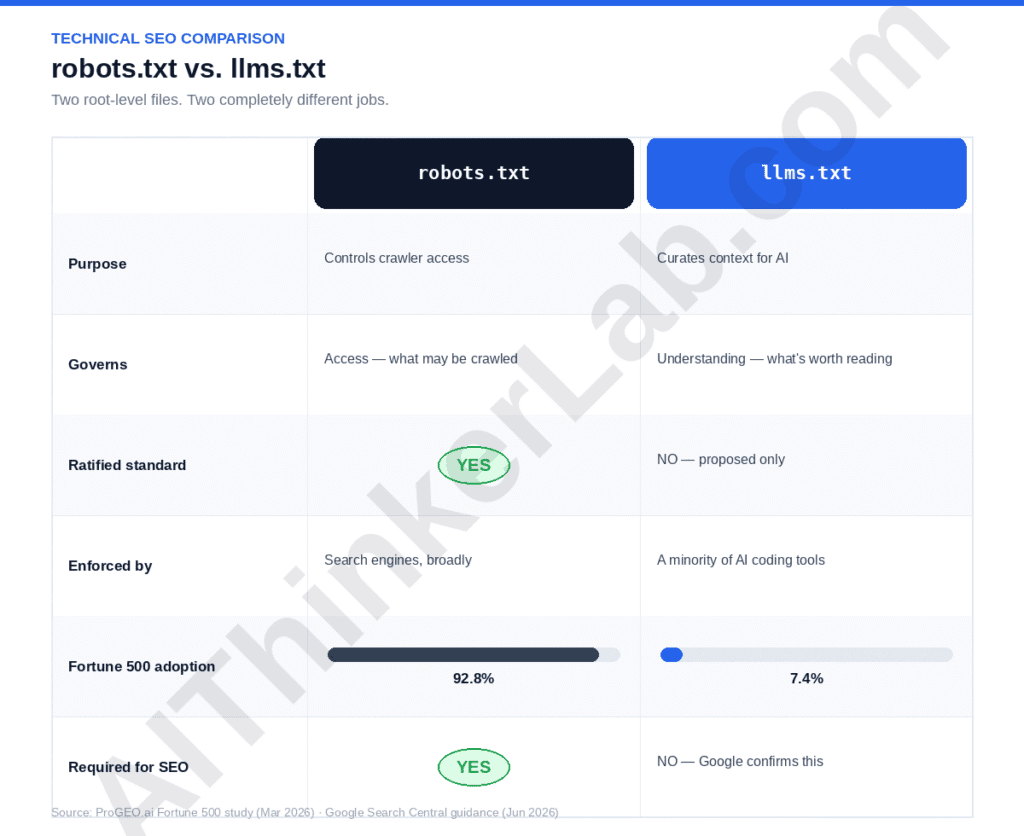
The comparison to robots.txt comes up in nearly every conversation about this file, and it’s worth settling cleanly.
| robots.txt | llms.txt | |
|---|---|---|
| Purpose | Controls what crawlers may access | Curates what matters, for context |
| Governs | Access — blocks or allows | Understanding — summarizes and links |
| Ratified standard | Yes, decades old | No — a proposed convention, not IETF/W3C ratified |
| Enforced by | Search engines, broadly | A minority of AI coding tools and agents |
| Adoption (Fortune 500, March 2026) | 92.8% | 7.4% |
| Required for SEO | Yes | No — Google confirms this explicitly |
robots.txt says what a machine may touch. llms.txt says what’s worth reading first, assuming the machine bothers to look at all — and right now, most don’t.
What Else Does the Agentic Browsing Category Check?
llms.txt is the part of this category everyone talks about, mostly because it’s the one with a snappy name and a clear fix. It’s also, arguably, the least important check in the category.
The same audit pulls in a slice of Lighthouse’s accessibility checks — programmatic labels on interactive elements, whether the accessibility tree is structurally valid, whether content is hidden from assistive tech — because that tree is, according to Chrome’s own documentation, the primary data model an agent uses to understand a page. It also scores layout stability through Cumulative Layout Shift, since an agent clicking a button that just moved is functionally the same failure as a human misclicking. And it checks for WebMCP, the structured-tool-contract standard mentioned above, though that check returns Not Applicable on almost every site right now, since almost nobody has implemented it yet.
The Tranco-1000 audit puts real numbers on where sites actually struggle. Of 636 sites with a scorable page, 412 — about two in three — failed the agent-accessibility check outright, including sites that score well into the 90s on Lighthouse’s regular Accessibility category. WebMCP registration showed up on exactly three of them: forter.com, netgear.com, and optimizely.com, a 0.3% adoption rate. Against that backdrop, an llms.txt formatting slip is a rounding error. If you’re triaging Agentic Browsing warnings by actual impact, accessibility-tree fixes come first, layout stability second, and llms.txt somewhere well after that.
Is Anyone Actually Reading Your llms.txt?
This is the uncomfortable section, and it deserves a direct answer rather than a hedge.
Analysis reported through PPC Land in mid-2025 found that no major AI search crawler — not GPTBot, not ClaudeBot, not PerplexityBot — was confirmed to be requesting llms.txt in a retrieval or citation context. That finding hasn’t meaningfully reversed since. A widely cited counterexample is Mintlify, the documentation-hosting platform that rolled out llms.txt across all its hosted docs sites in late 2024; it later reported a few hundred AI-crawler visits attributable to the file, most from ChatGPT. That’s a real signal, but it’s also a small one, and it comes from a platform whose entire audience is developers pulling API references — not a general content site hoping for citation traffic.
Where llms.txt does have real, confirmed users is a narrower lane: AI coding assistants and agent frameworks. Anthropic recommends the file in its guidance for building agent-facing sites, and its own documentation has listed llms.txt and llms-full.txt since November 2024. OpenAI’s Agents SDK and Agentic Commerce Protocol make use of it too. Companies like Stripe, Vercel, Cloudflare, Coinbase, Pinecone, and Cursor maintain one specifically so tools like Cursor or Claude Code can pull accurate API context instead of guessing at an endpoint that doesn’t exist.
So the honest framing isn’t “nobody reads it.” It’s “the readers are developer tools, not search engines,” and conflating the two is how the file got oversold in the first place.
Lighthouse Agentic Browsing Audit: AI Thinker Lab Case Study
Recent Lighthouse performance scans for AI Thinker Lab reveal an incredibly healthy foundation, boasting a 97 in Performance, 100 in Best Practices, 92 in SEO, and an 89 in Accessibility. However, the newly introduced Agentic Browsing category—which measures how easily AI agents can read, navigate, and complete tasks on a website—returned a partial pass ratio of 2/3.
For a platform focused on AI tools and insights, optimizing this specific metric is highly relevant to the target audience. The Agentic Browsing audit evaluates machine-readability by checking the site’s accessibility tree, layout stability (CLS), and the presence of an llms.txt file at the domain root. An llms.txt file acts as an immediate technical roadmap for autonomous agents. It provides a clean Markdown summary so agents do not waste computing resources trying to render heavy interactive scripts.
A 2/3 score indicates that one of these core readiness checks failed. While the site’s high Performance and Best Practices scores suggest layout stability is already strong, partial scores in this category frequently point to either an error-returning llms.txt file or gaps in the accessibility tree, such as interactive elements lacking programmatic names.
Should You Build an llms.txt in 2026?
For most content sites — including a WordPress blog like this one — the honest answer is: build it because it’s cheap, not because it moves any needle you can currently measure.
For publishers and independent creators, the bigger opportunity isn’t the file itself but creating content that AI systems actually want to reference. If you’re building authority in this space, our guide on how to start an AI blog covers content strategy, topic selection, and AI-era SEO fundamentals.
| Site type | Build llms.txt? | Why |
|---|---|---|
| Developer docs / API products | Yes, prioritize it | Confirmed use by Cursor, Claude Code, OpenAI Agents SDK |
| Content site / blog (WordPress, Yoast/Rank Math) | Yes, low priority | Near-zero cost, plugins auto-generate it, no measurable downside |
| Large ecommerce / enterprise (10,000+ pages) | Optional, skip if stretched | Keeping it accurate at scale costs more than the unproven upside |
| Anything chasing Google AI Overviews specifically | No | Google confirms zero effect on Search or AI Overviews |
Yoast and Rank Math both ship llms.txt generation by default now, which changes the calculus for a WordPress operator: the marginal cost of having a valid file is close to zero, so “build it, forget it” is a reasonable default even without strong evidence it does anything for you specifically.
Where I’d push back a little on the “just build it, it’s free” advice going around: free only holds if you actually let the plugin generate it and never touch it again. The moment someone decides to hand-curate the file, write custom descriptions, or keep it in sync with a fast-changing product catalog, the cost stops being zero. That’s the trap in the Fortune 500 data too — 37 companies built one, but nothing in that number says how many are still accurate six months later. A stale llms.txt pointing an agent toward a discontinued product page is arguably worse than no file at all, since it actively feeds bad context instead of just declining to help.
How to Fix Lighthouse llms.txt Errors
The good news buried in all of this: fixing a genuine failure is one of the cheapest technical SEO tasks you’ll do all year, precisely because the spec is so small. There’s no crawl budget to manage, no canonical tag logic to reason through, no risk of breaking something else on the page. It’s a single static text file, three checks, and a five-minute edit once you know which check is failing.
A minimal file that clears all three of Lighthouse’s checks looks like this:
# AI Thinker Lab

> AI Thinker Lab covers local and offline AI tools, self-hosted automation,
> and practical AI workflows for creators and builders.

## Key Pages

- [Local AI Kit](https://aithinkerlab.com/local-ai-kit): Self-hosted AI setup guides for Ollama and local LLMs
- [AI Workflow Pack](https://aithinkerlab.com/ai-workflow-pack): n8n workflows for content and research automation
- [Blog](https://aithinkerlab.com/blog): Guides on local AI, SEO, and automation
Common failure modes, in order of how often they actually show up:
- Plain-text links instead of Markdown links.
- https://example.com/docsfails.- [Docs](https://example.com/docs)passes. This is the Manic case, and it’s the most common single cause of a false failure. - No H1. The file needs to open with a
#heading naming the site or project — this is the only element the original spec calls strictly required. - File too short. Anything under roughly 50 characters reads to Lighthouse as too thin to be useful, and the audit fails it on length alone.
- Server errors on fetch. A 500, a timeout, or a WAF rule silently blocking Chrome’s fetcher will fail the audit even if the file is perfect — worth testing directly with
curl -Iagainst/llms.txtfrom a clean environment.
One more thing worth knowing before you assume your fix worked: as of a GitHub issue opened in mid-June 2026 (googlechrome/lighthouse#17082), at least one site owner has documented a spec-compliant, third-party-validated llms.txt still failing PageSpeed Insights’ fetch check, despite CDN logs proving Google’s own PSI runner successfully retrieved the file twice. The audit tooling is roughly two months old at the time of writing. It has rough edges. If your file validates cleanly against the llms.txt spec elsewhere and Lighthouse still flags it, that’s a real possibility, not necessarily something you did wrong.
The AI Readiness Pyramid
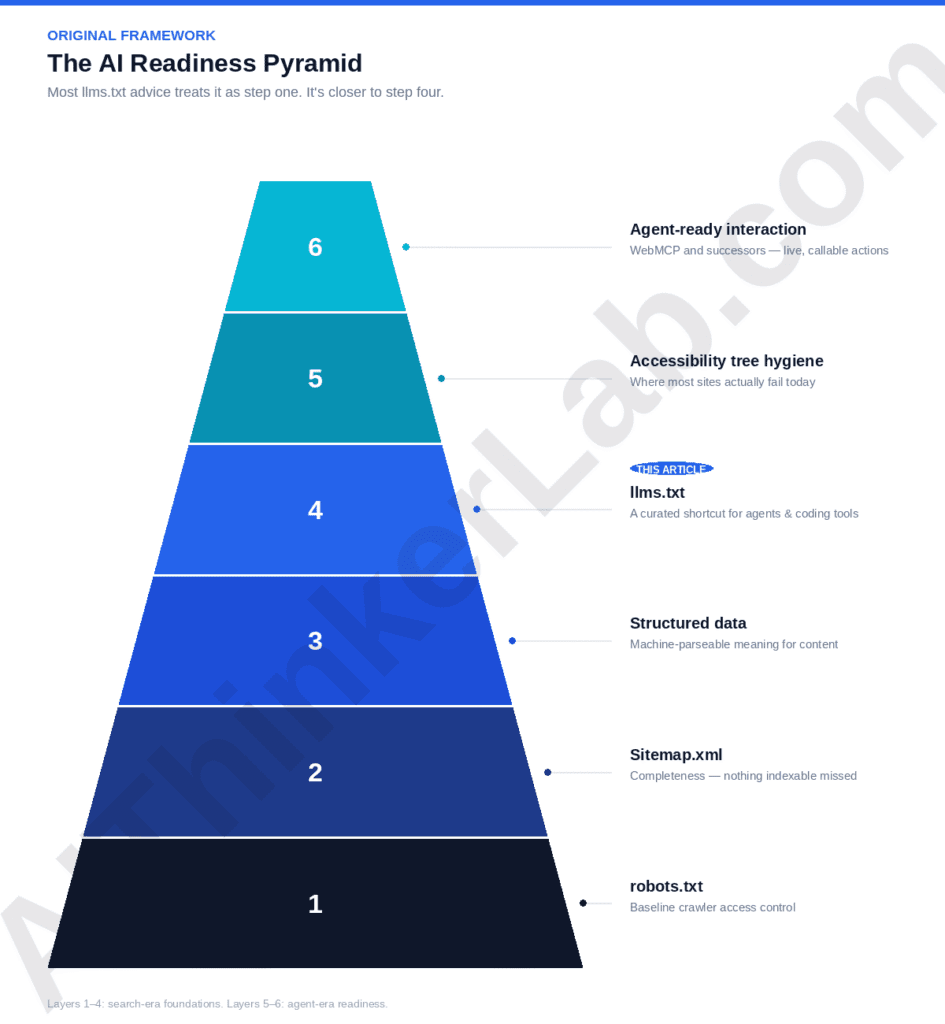
Most llms.txt advice treats it as step one. It’s closer to step four.
- robots.txt — baseline crawler access control
- Sitemap.xml — completeness, so nothing indexable is missed
- Structured data — machine-parseable meaning for what’s already crawled
- llms.txt — a curated shortcut, mostly useful to agent and coding tools
- Accessibility tree hygiene — the layer Lighthouse’s Agentic Browsing category weighs most heavily, and where most sites actually fail
- Agent-ready interaction (WebMCP and successors) — structured, callable actions instead of screenshot-driven automation
The Tranco-1000 audit found two out of every three popular sites failed the accessibility-tree portion of the Agentic Browsing check — a much larger, much less discussed problem than llms.txt formatting. Jumping straight to layer four while layers one through three are shaky, or while your accessibility tree is a mess, is polishing one drawer in a kitchen that still doesn’t have running water.
For a solo WordPress operator, this reordering matters more than it sounds like it should. It’s tempting to treat “add llms.txt” as a satisfying, easily-checked-off task — and it is one, which is exactly the trap. An hour spent tightening ARIA labels or fixing form-field names on your checkout or contact page does more for both human accessibility and agent readiness than the same hour spent hand-writing llms.txt link descriptions. The pyramid isn’t saying skip layer four. It’s saying don’t let it jump the queue just because it’s the layer with the most blog posts written about it.
Sources
- ProGEO.ai Fortune 500 adoption study, via PPC Land, March/April 2026
- Chrome for Developers — llms.txt | Lighthouse (updated May 5, 2026)
- DebugBear — Lighthouse: llms.txt does not follow recommendations (May 29, 2026)
- PPC Land — Google adds llms.txt to Lighthouse as agentic web standards heat up (May 30, 2026)
- Digital Applied — Google Says llms.txt Does Nothing for SEO Rankings (June 2026)
- Let’s Data Science — Lighthouse Flags llms.txt When Links Lack Markdown, reporting on Slobodan Manic’s July 3, 2026 Search Engine Journal case study
- Locomotive — Lighthouse Agentic Browsing Audit: What It Checks and Why It Matters (June 2026 Tranco-1000 audit)
- Answer.AI — /llms.txt — a proposal to provide information to help LLMs use websites, Jeremy Howard, September 3, 2024
- GitHub — googlechrome/lighthouse issue #17082