
Disclosure: this guide contains affiliate links for Hostinger and GetGenie AI. If you buy through them, aithinkerlab.com may earn a commission at no extra cost to you. We only recommend tools we’d set up on our own sites — and we’ll tell you exactly where each one is worth it and where it isn’t.
TL;DR — Key Takeaways
- You can start an AI blog for under ₹2,000 (about $25–35) in year one if you pair budget hosting with a free or entry AI tool — full cost breakdown in rupees and dollars is in the table below.
- The launch order that survives 2026: Platform → Authority → Substance → Surface (the PASS sequence). Most guides do these in the wrong order and pay for it at AdSense review.
- WordPress still runs roughly 43% of all websites as of 2026 (W3Techs), which is why nearly every practical AI-blogging workflow assumes it.
- Publishing 50 AI articles fast is the trap, not the strategy — it’s now the quickest way to trigger AdSense’s “Low value content” rejection and get skipped by AI search.
- AdSense approval with AI content is possible — Google judges the page, not the byline — but only if a human adds analysis, structure, and accuracy on top of the draft.
- Getting cited by ChatGPT, Perplexity and Google AI Mode needs three concrete things: self-contained answer blocks, attributed stats, and a quarterly refresh (AI citations decay sharply after ~3 months).
Introduction

In June 2026, starting a blog is simultaneously the cheapest it has ever been and the easiest to get wrong. The tooling is nearly free. The bar for quality — set jointly by Google AdSense and a new layer of AI answer engines — has quietly gone up. So if you want to start an AI blog that earns and survives, the old “buy hosting, install WordPress, publish daily” checklist isn’t enough anymore.
Quick clarification before anything else, because the phrase trips people up. An “AI blog” can mean two things: a blog about artificial intelligence, or a blog written with AI assistance. This guide covers both, because in practice most people starting now do both at once — they write about AI topics, using AI tools, on a WordPress site. The setup is the same. What changes is how carefully you handle the writing part. That’s where almost everyone slips.
Here’s the part nobody puts on the checklist: the way you sequence your launch decides whether you get monetized or rejected.
What is an AI blog (and what it isn’t)?
An AI blog is a regular website — usually built on WordPress — where the content is either about AI or produced with AI help, then published for human readers and search engines. An AI blog is not a feed of raw, unedited machine output. That distinction matters because Google AdSense and AI answer engines both reward human-added value and penalize bulk generation, according to AdSense’s published content policies (2026).
The platform choice is nearly settled for beginners. WordPress powers about 43% of all websites on the internet as of 2026, per W3Techs data, and the entire ecosystem of cheap hosting, SEO plugins, and AI writing tools is built around it. You can start an AI blog on Ghost, Webflow, or a static site. For a first blog on a tight budget, though, WordPress gives you the most help for the least money — and it’s the assumption behind every tool in this guide.
So the real question isn’t which platform. It’s what order you do things in.
How do you start an AI blog in 2026?
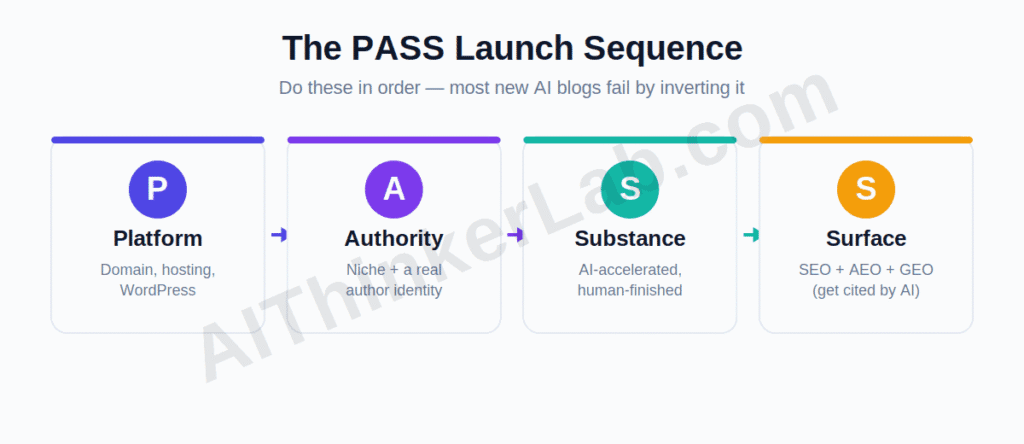
To start an AI blog in 2026, set up a domain and WordPress hosting, choose a focused niche with a real author identity, write genuinely useful posts using AI as a research-and-draft accelerator rather than a replacement, then optimize each post for both Google and AI search. The order matters: get the foundation and trust signals right before you scale content.
I use a four-stage sequence for this — call it PASS:
- P — Platform: domain, hosting, WordPress install.
- A — Authority: a tight niche and a visible, real author.
- S — Substance: human-grade content, AI-accelerated, not AI-dumped.
- S — Surface: SEO + AEO + GEO so people and AI engines can actually find and cite you.
Most beginner guides quietly invert this. They rush Substance (publish lots, fast) and treat Authority and Surface as afterthoughts. In 2026 that order gets you rejected by AdSense and ignored by AI search. The next four sections walk PASS in order.
Step 1 — Platform: domain, hosting, and WordPress
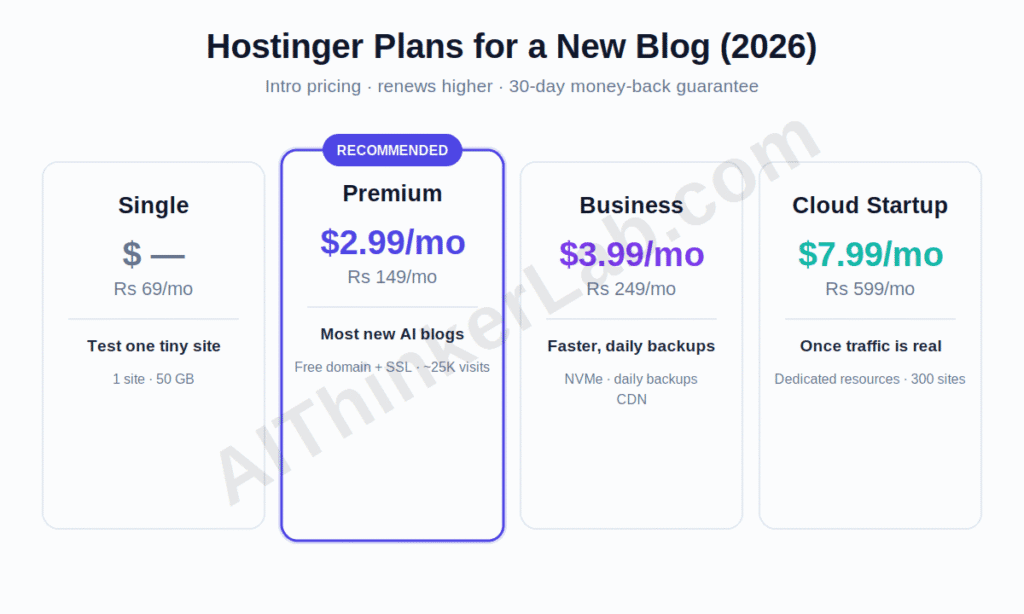
Your platform is a domain name plus a hosting plan plus WordPress installed on top. For a new AI blog, you want hosting that’s cheap to start, beginner-friendly, and — if your readers are in India — served from a nearby data center so pages load fast.
Hostinger is the default budget recommendation here, and the reason is specific rather than hand-wavy. Hostinger runs a data center in Mumbai, accepts payment in rupees via UPI and Indian cards, and starts its Single plan around ₹69/month, according to its India pricing pages (2026). Outside India, the entry point is the Premium shared plan at about $2.99/month on a longer term (roughly $3.99/month on the annual plan), per Hostinger’s global pricing (2026). For an AI blog you’ll want that Premium tier either way — it adds a free domain, free SSL, 100 GB storage, and capacity for roughly 25,000 monthly visitors, per Hostinger’s plan listings (2026).
One honest caveat most affiliate guides bury: the renewal price jumps hard. Premium renews at around ₹449/month in India and about $10.99/month globally after the intro term, per Hostinger’s listings (2026) — that’s roughly a 450% increase on the cheapest US rate. So buy the longest term you can comfortably afford up front — that’s where the real discount lives — and diarize the renewal date now. The cheap first year is real; the cheap second year is not automatic.
| Hostinger plan | India intro (2026) | Global intro (USD) | Best for | Key limits |
|---|---|---|---|---|
| Single | ~₹69/mo | — (India-only entry) | Testing one tiny site | 1 site, ~50 GB, no free domain |
| Premium | ~₹149/mo | ~$2.99/mo (~$3.99 annual) | Most new AI blogs | 100 sites, free domain + SSL, ~25K visits/mo |
| Business | ~₹249/mo | ~$3.99/mo | Faster, with daily backups | NVMe storage, daily backups, free CDN |
| Cloud Startup | ~₹599/mo | ~$7.99/mo | Once traffic is real | Dedicated resources, 300 sites |
Pricing from Hostinger (2026); intro rates require a longer commitment and renew higher (Premium renews ~₹449/mo / ~$10.99/mo). 30-day money-back guarantee.
Once hosting is active, install WordPress (Hostinger does this in about two clicks from its hPanel), pick a lightweight theme, and add an SEO plugin — Rank Math or Yoast SEO. You can set up Hostinger and WordPress here. That’s the whole Platform stage. Don’t over-engineer it; a fast, plain site beats a slow, beautiful one every time at this stage.
Step 2 — Authority: a niche and a real author
Authority is the trust layer, and it’s the stage beginners skip hardest. Before you write a single post, you need a narrow niche and a visible human author behind the site. Both are now direct ranking and monetization signals, not nice-to-haves. I’ve broken down all seven approaches — with real fee math and a 90-day plan — in my guide to AI content monetization strategies that actually work in 2026.
Pick a niche tight enough that you can plausibly become a known source in it. “AI” is not a niche. “Local and offline AI tools for solo creators” is — and notice it’s the kind of focus that lets you say something competitors can’t. A narrow niche is also easier to get AI-cited in, because answer engines reward topical consistency across a site.
Then put a real person on the site. An About page with a genuine name, photo, and credentials, plus an author byline on every post, feeds Google’s E-E-A-T expectations — experience, expertise, authoritativeness, trust — which AdSense reviewers and AI engines both lean on. Faceless, author-less AI blogs are exactly the profile that gets flagged as low-trust. This is cheap insurance. Do it before, not after.
What should your first posts be about?
Your first posts should answer the specific, low-competition questions your niche’s readers are already asking — not broad terms every big site already owns. For a new AI blog, that means going narrow and useful before going big and ambitious. A post titled “Best AI tools” will lose to sites with thousands of backlinks. A post titled “Best free local AI tools for a 16GB laptop” can win, because almost nobody has answered it well.
Here’s a simple way to find those questions for free. Type your niche into Google and read the “People also ask” box. Skim the relevant subreddit and note how people phrase their actual problems. Check Google autocomplete. Each of those is a real query with real intent, and clustering five or six of them gives you a topical map — a set of related posts that signals depth to both Google and AI engines. Topical depth, not raw volume, is what builds authority in 2026.
Aim for 15–25 posts before applying to AdSense, but make each one the genuinely best answer to its question. One outstanding 1,500-word post beats five shallow 400-word ones — for readers, for AdSense review, and for AI citation. Quality compounds. Thinness gets flagged.
Step 3 — Substance: writing with AI without getting penalized
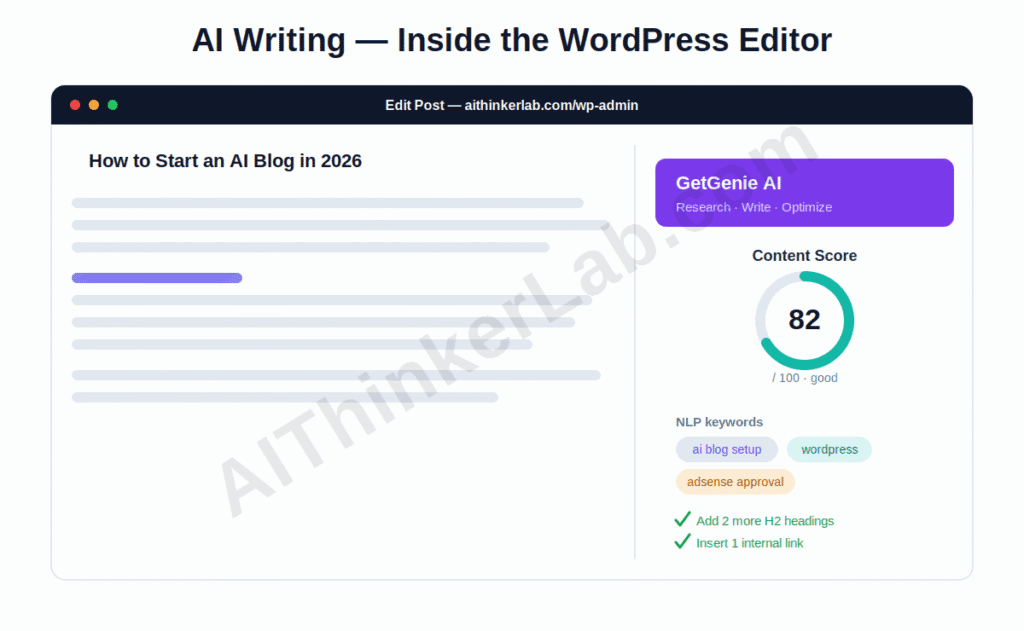
Publish 50 AI-generated articles in your first month and you will almost certainly get rejected. That’s not a scare line — it’s the most common “Low value content” pattern AdSense catches, and in 2026 it now doubles as the fastest way to get ignored by AI search too. Volume is the trap. Here’s the part nobody really tells you: the tools aren’t the problem, the workflow is.
Used correctly, an AI writing tool is a research-and-draft accelerator, not a content replacement. The winning loop looks like this: AI does keyword research and a structured first draft, then you add the analysis, the real example, the opinion, the correction — the things a model can’t fabricate honestly. That human layer is precisely what AdSense rewards and what makes a post quotable by AI engines.
For a WordPress AI blog, GetGenie AI is the tool I’d reach for first, because it lives inside the WordPress editor instead of forcing you into yet another dashboard. GetGenie has 80,000+ active installs and a 4.9 rating on its own listings (2026), and its free plan gives you 2,500 AI words per month — enough to test the whole workflow before paying anything, per GetGenie’s pricing page (2026). Paid plans start at about $6/month (Starter, billed annually) and the 60K-word Writer plan runs roughly $11.40/month annually. Notably for 2026, GetGenie added an AI Overview Answer Builder and AI FAQ Generator — features built specifically to structure content for AI search, which is exactly the Surface work in Step 4.
What does the accelerator loop look like in practice? Say you’re writing about running a language model locally. The AI drafts the structure and the generic explanation of system requirements in seconds. Then you do the part it can’t: you actually run the model on your own machine, screenshot the result, note that it used 11.2 GB of RAM not the “16 GB recommended,” and write that down. That single real number — the thing you observed and the draft couldn’t — is what turns a generic post into a citable one. Readers trust it. AdSense rewards it. AI engines quote it. The draft saved you an hour; the real detail earned you the ranking.
Here’s our actual loop at aithinkerlab.com, end to end. An n8n agent handles the topic research — finding the question that’s genuinely worth answering. The first draft is written by AI, but from a tightly structured prompt, not a lazy “write me a post about X.” Then comes the part that earns the ranking: a manual edit pass where we fact-check every claim, cut the filler a model pads with, and add the specifics it couldn’t know. Image generated, uploaded with proper alt text and meta, published. Start to finish, roughly 30 minutes a post.
But the 30 minutes isn’t the point — the edit pass is. Skip it and you’ve shipped the same thin draft everyone else did, the kind AdSense flags and AI engines ignore. The automation buys you speed on the parts that don’t need judgment so you can spend your judgment where it counts.
Step 4 — Surface: SEO, AEO, and getting cited by AI
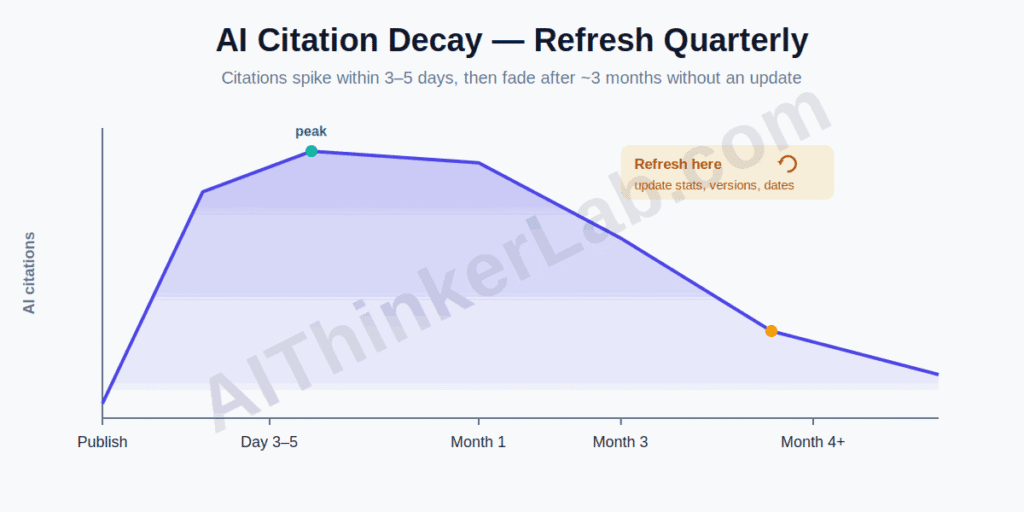
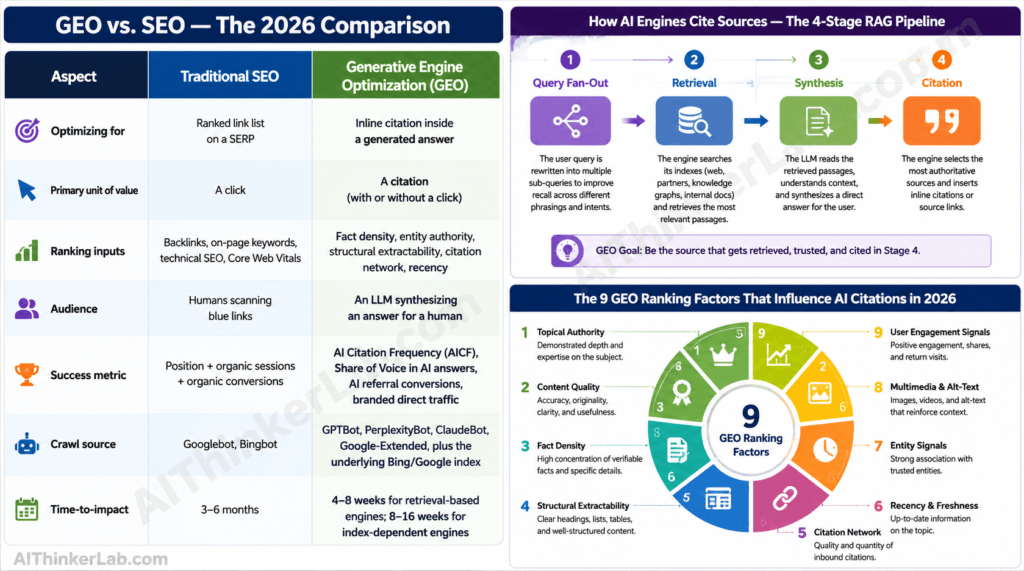
Surface is making sure humans and machines can find and quote you. In 2026 that means three audiences, not one: classic Google search, voice/answer boxes, and AI engines like ChatGPT, Perplexity, Gemini, and Google AI Mode. The last group is the fastest-growing and the most-ignored.
The stakes are concrete. AI Overviews now appear in up to roughly 60% of searches, and Gartner projects traditional search traffic will fall about 25% by 2026 as people shift to conversational AI, according to figures cited across GEO research (2026). If your posts aren’t structured to be extracted, that shift leaves you invisible.
Three moves do most of the work, and they’re free. First, write a self-contained 40–60 word answer right under each question-style heading — AI engines lift these wholesale. Second, attribute your stats inline (“according to [source] [year]”), because engines preferentially cite passages that already carry sourced data. Third — the one almost everyone misses — refresh important posts quarterly. AI citations to a page drop off sharply once it passes about three months old without an update, while fresh content enters citation pools within 3–5 business days, per AI-search tracking data (2026). Done together, these GEO tactics can lift AI visibility by up to ~40% versus unoptimized pages, per the Princeton GEO study replicated through 2026.
How much does it cost to start an AI blog?
You can start an AI blog for under ₹2,000 (about $25–35) in the first year. Hosting is the only unavoidable cost; a domain is usually bundled free on Hostinger’s Premium plan, and you can run the AI writing on a free tier until the blog earns. Here’s a realistic first-year breakdown using current pricing, in both rupees and dollars.
| Item | Free/cheap path | Comfortable path |
|---|---|---|
| Hosting (Hostinger, 1 yr) | Premium ~₹149/mo ≈ ₹1,788 / ~$36–48 | Business ~₹249/mo ≈ ₹2,988 / ~$48 |
| Domain | Free with Premium | Free with plan |
| WordPress + theme | Free | Free |
| SEO plugin (Rank Math) | Free | Free / Pro optional |
| AI writing tool (GetGenie) | Free plan (2,500 words/mo) | Writer ~$11.40/mo (~₹950) ≈ $137/yr |
| First-year total | ~₹1,788 / ~$36–48 | ~₹15,000 / ~$185 |
Hosting from Hostinger (2026); GetGenie from GetGenie.ai/pricing (2026). USD↔INR approximate; GetGenie bills in USD, so dollar figures are exact there.
The takeaway: money is not the barrier to starting an AI blog in 2026. Patience is. The free path is genuinely enough to launch and reach AdSense approval — you only need to spend on AI tooling once volume justifies it.
Can you get AdSense approved with AI content?
Yes — you can get AdSense approved with AI-assisted content, because Google evaluates the quality and originality of the page, not whether a machine helped write it, per AdSense’s content policies (2026). What gets rejected is thin, unedited, duplicative output that adds nothing a reader couldn’t get from a snippet.
This is the synthesis worth internalizing: AdSense’s “Low value content” filter and 2026’s AI-citation signals now reward the same behavior. Both favor depth, accuracy, structure, a clear author, and freshness. Both punish bulk and thinness. So you don’t optimize for AdSense and AI search separately — fixing one largely fixes the other. Build for a human who’ll find the page worth their time, add the analysis only you can, keep it current, and you clear both bars at once.
A note on where we stand: aithinkerlab.com is going through AdSense approval as we publish this guide, applying the exact PASS workflow above. We’ll update this section with our real numbers — post count at application and time to approval — the moment it clears, rather than borrow someone else’s. (Last updated: June 2026.)
The mistakes that sink most new AI blogs
The failure modes are predictable, which means they’re avoidable. Knowing them up front is half the battle.
The biggest is front-loading volume — mass-publishing AI drafts before the site has authority or a single deeply useful post. The second is the faceless site: no author, no About page, no reason for Google or a reader to trust it. The third is publish-and-forget: treating content as one-and-done when both AdSense quality signals and AI citations reward updates. The fourth is chasing every niche at once, which kills the topical consistency AI engines use to decide who’s an authority. And the fifth is ignoring AI search entirely — writing only for blue links in a year when a growing share of discovery happens inside AI answers.
None of these cost money to avoid. They cost attention. Which is the whole game now.
Where to go from here
The mechanics of starting an AI blog in 2026 are genuinely simple — an afternoon of setup and a tool or two. The hard part, and the part that decides whether you earn, is discipline: a real niche, a real author, human-grade substance on top of AI drafts, and content you keep fresh. Get hosting live this week, publish your first deeply useful post, and put your name on it.
Then build slowly. The blogs that win the next few years won’t be the ones that published fastest — they’ll be the ones a human and an AI engine both find worth quoting. Start one post at a time, and make each one the best answer on the internet to a question you actually understand.
Sources
- GEO 40% visibility lift (Princeton, replicated 2026) — Frase: https://www.frase.io/blog/what-is-generative-engine-optimization-geo
- WordPress market share (~43%, 2026) — Barn2 / W3Techs: https://barn2.com/blog/wordpress-market-share/
- WordPress statistics, June 2026 — WPZoom: https://www.wpzoom.com/blog/wordpress-statistics/
- Hostinger India pricing & Mumbai data center (2026) — Hostinger: https://www.hostinger.com/in/tutorials/how-much-does-website-hosting-cost
- Hostinger India plan details (2026) — Best Hosting India: https://besthostingindia.vercel.app/hosting/hostinger
- GetGenie AI features & installs (2026) — GetGenie: https://getgenie.ai/
- GetGenie AI pricing & free plan (2026) — GetGenie: https://getgenie.ai/pricing/
- GEO / AI-citation best practices & decay (2026) — LLMrefs: https://llmrefs.com/generative-engine-optimization
Excellent insights on how AI is transforming business operations. We’re seeing more organizations use AI not just for automation, but also for improving decision-making and customer experience.
Excellent guide! I appreciate how you broke down the process of starting an Great article! I really enjoyed reading about how AI is transforming the way businesses collect and analyze customer feedback. The explanation of using AI to uncover customer sentiment, identify recurring issues, and generate actionable insights highlights the true value of AI beyond simple automation. Combining AI-powered feedback analysis with human decision-making can help organizations improve customer experience, enhance service quality, and make more informed business decisions. Thanks for sharing such an insightful and practical guide! blog into practical, actionable steps rather than focusing only on AI writing tools. Your emphasis on choosing a focused niche, building credibility with original insights, and using AI to enhance—not replace—human expertise is especially valuable. The advice on creating high-quality, reader-first content while following SEO and AI search best practices makes this article a great resource for beginners and experienced bloggers alike. Thanks for sharing such a comprehensive guide!